dsh-sidebar-menu
给 DeepSeek Harness(DSH)桌面版左侧栏加一个开关面板:勾选哪些「全局面板」项显示、哪些隐藏。
侧栏底部多一个滑块图标;点开就是一份清单,关掉哪一项,左侧菜单立刻少一行,选择记在本机,重开还在。
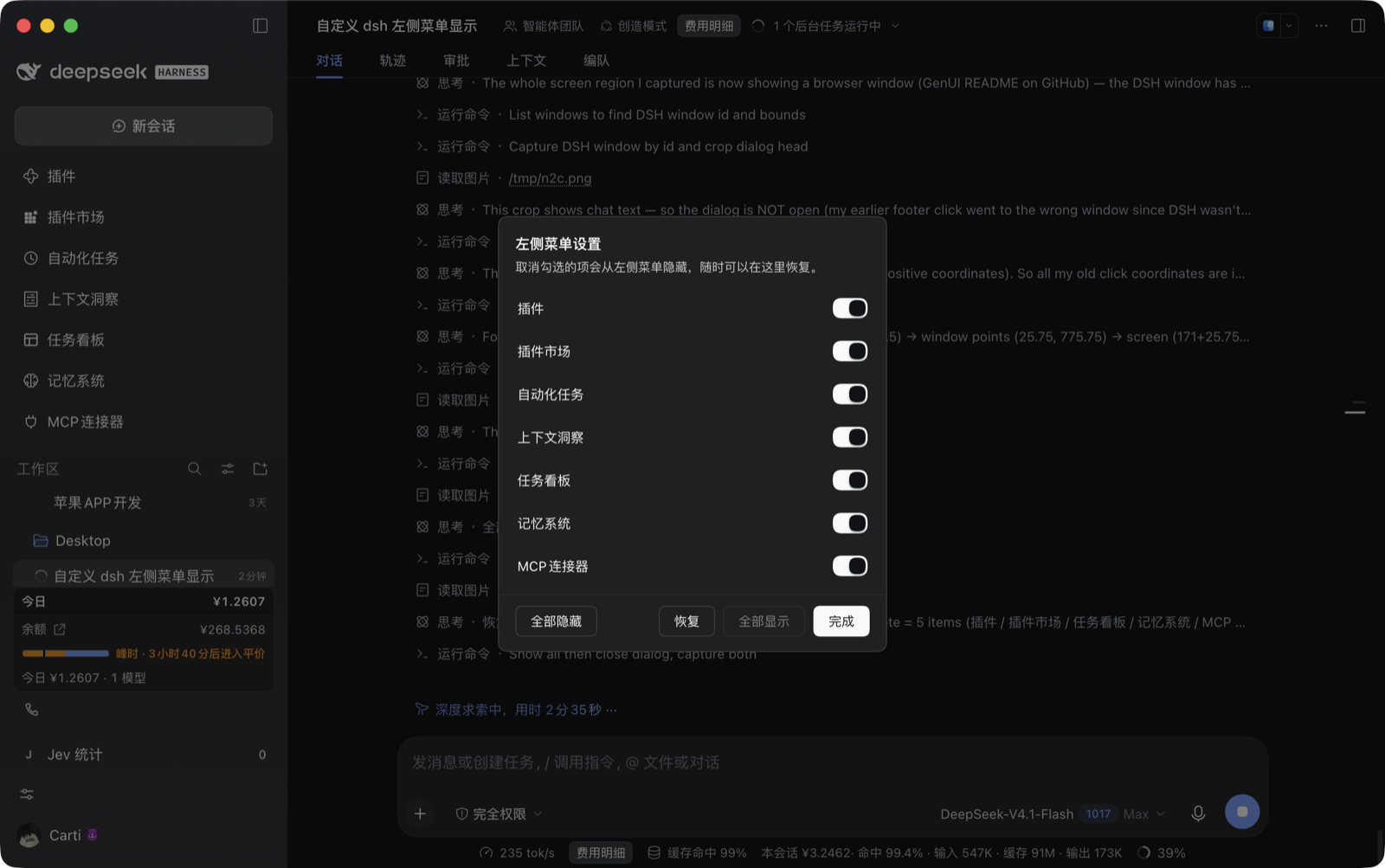
截图:7 项全部显示时的面板;右侧对话区是宿主内容,插件不参与。
功能
| 功能 | 说明 |
|---|---|
| 逐项勾选 | 面板每一行对应左侧菜单的一项,点一下即隐藏/恢复,菜单实时更新 |
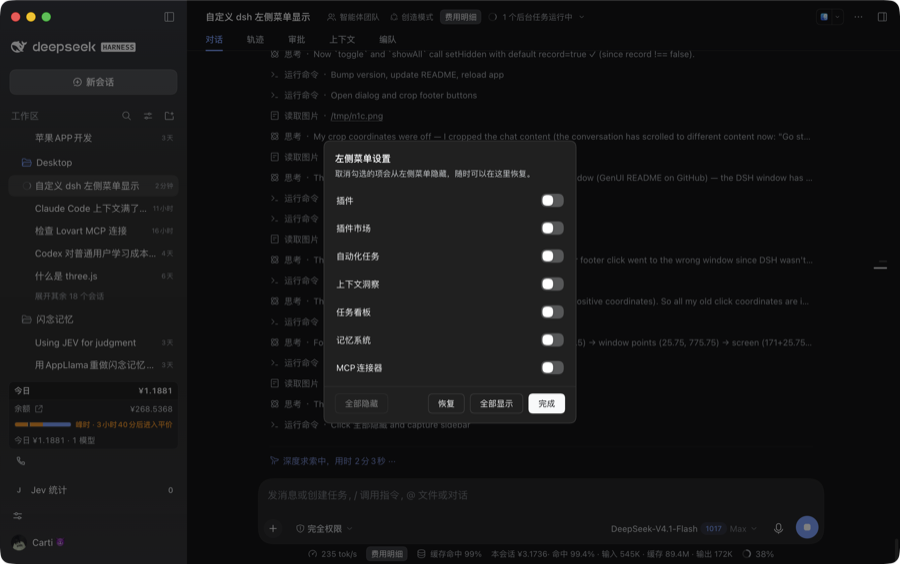
| 全部隐藏 | 清空整列菜单(只留「新会话」与工作区),一键把侧栏收到最简 |
| 恢复 | 撤销上一步,最多连撤 20 步;「全部隐藏」点错了可以一步退回原来的选择 |
| 全部显示 | 一键恢复全部项 |
| 持久化 | 选择存在浏览器 localStorage,重开应用照旧 |
| 键盘与无障碍 | Esc 关闭;每行是 role="switch" + aria-checked;入口按钮带 aria-label |
禁用逻辑:没有可隐藏项时「全部隐藏」变灰,没有隐藏项时「全部显示」变灰,撤销栈空时「恢复」变灰。
安装
这是一个 DSH 本地 bundle(@local/… 是官方模板沿用的本地包命名,不发布到 npm)。
方式一:把目录交给 DSH(推荐)
git clone https://github.com/Winjazw/dsh-sidebar-menu.git
然后在 DSH 会话里让它把这个目录装成 bundle,等价于调用插件管理工具:
{ "action": "install_bundle", "target": "/绝对路径/dsh-sidebar-menu" }
装完会热加载,侧栏底部出现滑块图标;没出现就 ⌘R 重载一次。
方式二:手动放进 profile
# 1) 放进 profile 的 node_modules
ln -s "$PWD" ~/.dsh/profiles/<你的profile>/node_modules/@local/sidebar-menu

# 2) 在该 profile 的 package.json 里登记:
#    "dependencies": { "@local/sidebar-menu": "link:/绝对路径/dsh-sidebar-menu" }
#    "dsh": { "profile": { "bundles": [ … , "@local/sidebar-menu" ] } }
手动改完重启 DSH。
使用
- 左侧栏最底部(「Jev 统计」与头像之间)多了个滑块图标,点它;
- 弹出「左侧菜单设置」,逐项开关;
- 需要批量处理就用底部四个按钮;
完成或Esc关闭。此时左侧菜单已是最新状态。
侧栏折叠成窄图标栏时入口仍在,面板依旧居中弹出。
工作原理
DSH 目前没有「隐藏某个侧栏菜单项」的公开 API:sidebar.panellist 只接受 id / order / label,
layout 服务也只有 selectPanel / toggleSidebar / openRightbar / closeRightbar。
所以本插件走数据层过滤,一共三处:
| 环节 | 做法 |
|---|---|
| 菜单来源 | 包住 ctx.slots.entriesOfSlot('sidebar.panellist'),只对这一个 key 过滤掉被隐藏的 id,其余原样透传;ctx.effect 在卸载时还原原实现 |
| 触发重算 | 侧栏靠 subscribe('sidebar.panellist') 重算清单。插件每次改动注册一个 order: 1e9 的哨兵条目来触发刷新,哨兵本身永远被过滤,不会出现在菜单里 |
| 入口与面板 | 入口注册在 sidebar.footer.action,面板注册在 shell.overlay(该层本身 click-through,面板根节点自己开 pointer-events:auto) |
| 样式 | 注入一个 <style data-plugin-css>,颜色/圆角/焦点环全部取 --dsw-alias-*、--dsw-radius-* 等主题 token,跟随明暗主题 |
Host 侧(index.js)是空的:所有逻辑都在渲染进程,不改宿主任何文件。
兼容性
能保证:不兼容时被 DSH 安全拒绝,而不是装成一个半坏的插件。 不能保证:所有 DSH 版本都能用——它依赖上表那三处内部面,而这些会随版本演化。
| 依赖 | 缺失/变更时 |
|---|---|
engines.dsh + DSH 的 compatibility preflight |
不满足就 disabling profile plugin …,插件不加载并打印原因 |
sidebar.footer.action / shell.overlay |
缺哪个跳过哪个(contribute() 内 try/catch),其余照旧 |
entriesOfSlot 可被包住 |
包不住 → 面板显示「当前版本不支持」,不隐藏、不报错、不影响侧栏 |
- 声明:
engines.dsh: ">=0.2.0-rc.2"(不封上限,新版本仍会尝试加载,靠能力探测降级) - 实测:
0.2.1-rc.2(macOS 桌面版) 0.1.x:会被拒绝加载(不是坏掉)。需要的话先做隔离环境实测,再把下限放宽
升级 DSH 后复查三步:底部图标还在吗 → 面板能列出项吗(列出 = entriesOfSlot 还能用)→ 关一项菜单真的少了吗。
若被拒绝加载,可在 profile 目录的 compatibility.json 里给这个包登记显式豁免(informed grant)——这属于用户决策,插件不代劳。
已知限制
- 只影响「全局面板」那一列菜单;不影响工作区里的会话列表与底部状态条。
- 「恢复」是撤销上一步,不是「恢复默认」;撤销历史在内存里,重开应用后清空(持久化的只有当前清单)。
- 若 DSH 换了左侧菜单的数据来源,最坏表现是「面板能打开、但隐藏不生效」——侧栏本身不会坏。
目录结构
dsh-sidebar-menu/
├─ package.json        # bundle 清单:dsh.bundle.patch / dsh.client / engines
├─ cordis.patch.yml    # 插入一行插件 entry
├─ index.js            # Host 半边(有意为空)
├─ client.js           # 全部功能:过滤 + 哨兵 + 底部按钮 + 面板 + 样式
├─ locale/{zh,en}.json # 插件页里的标题与说明
├─ icon.svg
├─ docs/               # README 截图
└─ LICENSE (MIT)
开发与自检
node --check index.js
node --check client.js
node -e "JSON.parse(require('fs').readFileSync('package.json','utf8'))"
改完热重载:DSH 里 ⌘R。想直接看持久化真相:
strings ~/Library/Application\ Support/@deepseek-ai/dsh-desktop/Local\ Storage/leveldb/*.log \
  | grep -A1 'dsh-sidebar-menu.hidden.v1'
English
A sidebar-menu organizer for DeepSeek Harness desktop: choose which global panels stay in the left rail.
- Click the sliders icon at the sidebar foot → toggle any panel off; the rail updates instantly.
- Bulk actions: Hide all / Undo (up to 20 steps) / Show all.
- Choices persist in
localStorage;Esccloses the panel.
DSH exposes no public "hide a panel" API, so the plugin filters
ctx.slots.entriesOfSlot('sidebar.panellist'), pokes the sidebar with a throwaway sentinel entry to force a
recompute, and renders its UI from sidebar.footer.action + shell.overlay using theme tokens only.
The host half is a no-op.
Requires DSH >= 0.2.0-rc.2. On a host without those surfaces it degrades to "panel opens, nothing hidden"
instead of breaking the sidebar.
Install: clone the repo, then install_bundle the folder in DSH (or symlink it into your profile's
node_modules and list it under dsh.profile.bundles).
License
MIT © 2026 Winjazw
No comments yet. Be the first to write one.