dsh-codegraph-search


中文 · English
中文
简介
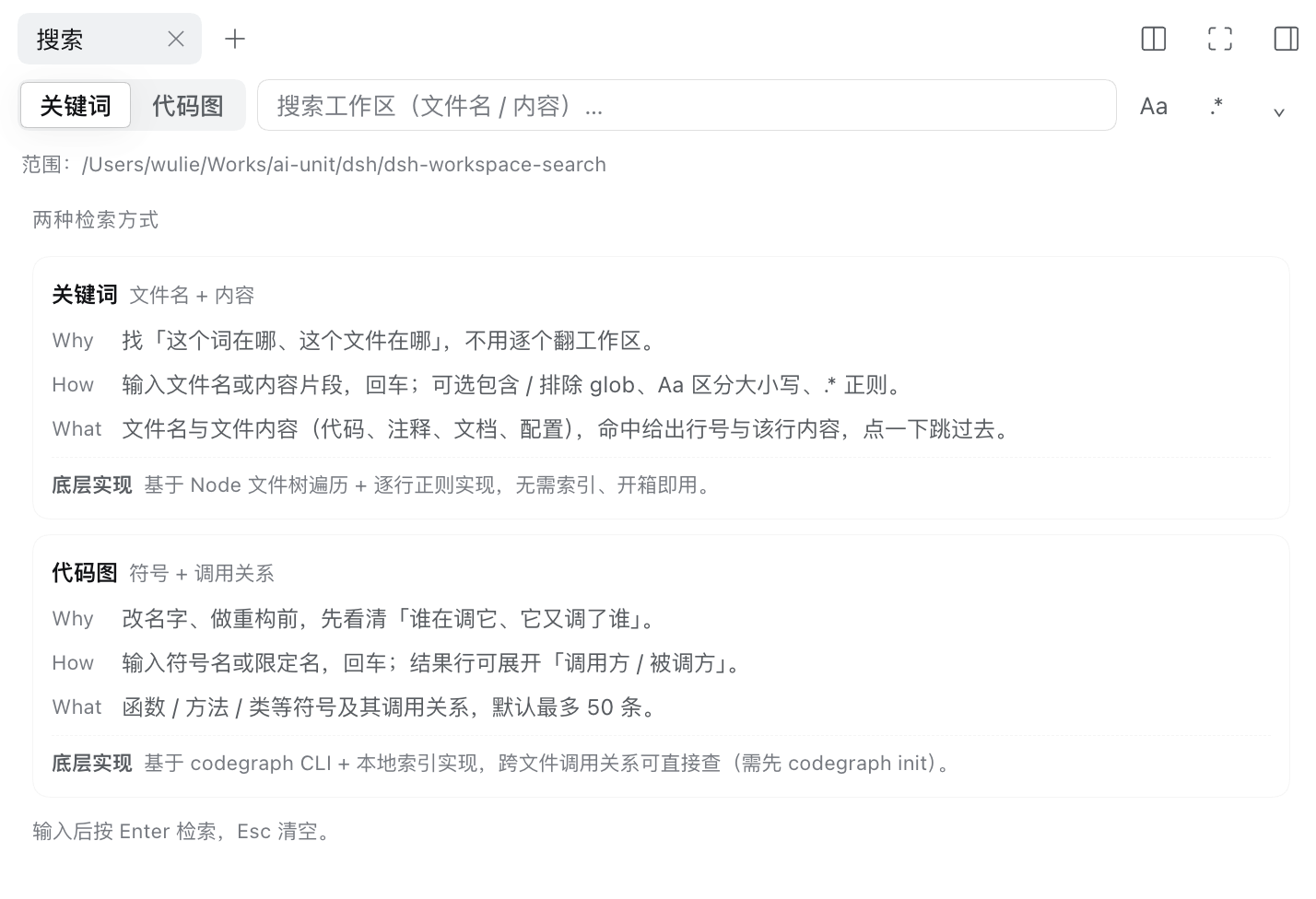
为 DeepSeek Harness(dsh)Web GUI 的内置右侧栏提供搜索标签页——无需 dsh-better-sidebar。一个面板,两种模式:
- 关键词——在当前会话的工作区中搜索文件名和内容,结果按文件分组并显示行号。
- 代码图谱——按符号名或限定名查询符号,并展开其调用方与被调用方。
点击任一结果会在内置文本预览中打开文件,并跳转到对应行。
模式
关键词
- 文件名与内容行;按文件分组显示匹配数,可折叠。
- 渐进式结果:主机一旦发现文件就通过 NDJSON 流式推送该文件分组(
POST /workspace-search/search,stream: true),因此遍历仍在进行时结果就已出现,状态栏实时累加计数。渲染做了节流:首批结果立即显示,之后列表最多每 250 ms 更新一次,所以快速遍历不会逐个文件重渲染,最终列表的排序与缓冲式响应完全一致。代码图谱查询仍为单次缓冲响应。 - 匹配文本会高亮:文件名中的查询、匹配到的行,以及代码图谱的符号名/签名,使用与搜索本身相同的匹配规则(字面量大小写折叠,或正则与
Aa状态)。 - VS Code 风格过滤:包含文件 / 排除文件(逗号分隔的 glob,支持
**、*、?、{a,b})、Aa大小写开关、.*正则开关。 - 类型过滤:常用扩展名快捷按钮(
.ts .tsx .js .py .json .md),外加自由填写的扩展名字段。 - 跳过隐藏文件和目录、
.git、node_modules、.hg、.svn、dist、build、.next、target、符号链接、二进制文件,以及超过 1 MiB 的文件。
代码图谱
- 需要服务器上装有
codegraphCLI,且工作区已执行过codegraph init(索引位于.codegraph/)。 - 符号结果会显示类型、签名和位置;每行可懒加载展开调用方/被调用方。CLI 缺失、索引缺失、超时和解析失败都会给出各自的提示和可复制的修复命令。
使用
- 面板会自动定位到当前会话的工作区。
Enter执行搜索;过滤器或模式变更后约 250 ms 也会自动刷新结果。Esc清空查询。- 切换标签页不再重跑搜索:结果、滚动位置和展开状态都会保留。
环境要求
- dsh web(内置右侧栏,
@deepseek-ai/dsh-client-ui-sidebar-right) - Node.js >= 22
codegraphCLI——仅代码图谱模式需要
安装
已发布到 npm:dsh-codegraph-search:
dsh plugin --profile web add dsh-codegraph-search
如果从本地检出安装——profile 会以 link: 依赖的方式保留它,因此你的修改在下次重启后生效:
git clone https://github.com/Wilyte/dsh-codegraph-search.git
dsh plugin --profile web add ./dsh-codegraph-search
无论哪种方式,插件都会加入 web profile 的 bundle 列表,所以需要重启 dsh web 才能加载。不需要额外的侧边栏插件:该标签页直接注册到 dsh 内置右侧栏,侧边栏的引导页会显示「Code search」条目。
配置
所有字段均可选(profile patch 层,id: code-search):
- id: code-search
  config:
    maxFiles: 5000          # 每次搜索最多扫描的文件数
    maxMatches: 300         # 内容匹配总数的上限
    maxLineLength: 300      # 单行输出的字符上限
    maxFileBytes: 1048576   # 超过此大小的文件跳过内容扫描
    codegraphBin: codegraph # 代码图谱模式使用的 CLI
    codegraphTimeoutMs: 15000
    codegraphMaxResults: 50
每一项上限都会在状态栏如实报告("file scan truncated" / "matches truncated"),而不是静默丢弃结果。
实现原理
双面 bundle。
- 主机侧(
lib/index.js)在 dsh 的webServer上注册 HTTP 路由(ctx.webServer.register,前缀/workspace-search)——POST /workspace-search/search和POST /workspace-search/graph。它刻意不注入connection:web 主机 profile 中不存在该服务。 - 客户端侧(
lib/client.js)在ctx.sidebarRightTabs上注册标签页类型(kindsearch),把内容渲染到带 key 的sidebar.right.pane.tab座位,并贡献一条引导页条目。文案通过 Client locale 服务路由(zh/en),样式表通过ctx.effect挂载,并使用 GUI 自己的设计令牌。
致谢
本插件源自 AmmiWang 的 dsh-workspace-search——dsh 上最初的 VS Code 风格关键词搜索标签页,随后被集成进 dsh-better-sidebar。代码图谱模式、流式结果和内置右侧栏都是在其之上新增的。感谢原作者的工作。
许可证
MIT
English
Introduction
A Search tab for the DeepSeek Harness (dsh) web GUI's built-in right sidebar —
no dsh-better-sidebar required. One panel, two modes:
- Keyword — search file names and contents in the current session's workspace, grouped per file with line numbers.
- Code graph — query symbols by name / qualified name and expand their callers and callees.
Clicking a hit opens the file in the built-in text preview, jumping to the line.
Modes
Keyword
- File names and content lines; per-file groups with match counts, collapsible.
- Progressive results: the host streams each file group over NDJSON the
moment it is found (
POST /workspace-search/searchwithstream: true), so hits appear while the walk is still running and the status line counts up live. Rendering is throttled — the first rows show immediately, then the list is updated at most once per 250 ms — so a fast walk never re-renders per file, and the final list is sorted exactly like the buffered response. Code-graph queries stay a single buffered response. - Matched text is highlighted: the query inside file names, matched lines, and
code-graph symbol names / signatures, using the same matching rules the search
itself used (literal case folding, or the regex and
Aastate). - VS Code-style filters: files to include / files to exclude (comma-separated
globs, supports
**,*,?,{a,b}),Aacase toggle,.*regex toggle. - Type filter: quick extension chips (
.ts .tsx .js .py .json .md) plus a free-form extension field. - Skips hidden files/dirs,
.git,node_modules,.hg,.svn,dist,build,.next,target, symlinks, binary files, and files over 1 MiB.
Code graph
- Needs the
codegraphCLI on the server and acodegraph init-ed workspace (the index lives in.codegraph/). - Symbol results show kind, signature and location; each row lazily expands callers / callees. Missing CLI, missing index, timeout and parse failures are reported with their own message and a copyable fix command.
Usage
- The panel scopes to the current session's workspace automatically.
Entersearches; results also refresh ~250 ms after a filter or mode change.Escclears the query.- Switching tabs no longer re-runs the search: results, scroll position and expansion state are preserved.
Requirements
- dsh web (the built-in right sidebar,
@deepseek-ai/dsh-client-ui-sidebar-right) - Node.js >= 22
codegraphCLI — only for the code graph mode
Install
Published on npm as dsh-codegraph-search:
dsh plugin --profile web add dsh-codegraph-search
From a local checkout instead — the profile then keeps it as a link:
dependency, so your edits take effect on the next restart:
git clone https://github.com/Wilyte/dsh-codegraph-search.git
dsh plugin --profile web add ./dsh-codegraph-search
Either way the plugin is added to the web profile's bundle list, so restart
dsh web to load it. No extra sidebar plugin is needed: the tab registers
directly with dsh's built-in right sidebar, and the sidebar's guide page shows a
"Code search" entry.
Configuration
All fields optional (profile patch layer, id: code-search):
- id: code-search
  config:
    maxFiles: 5000          # hard cap on files scanned per search
    maxMatches: 300         # hard cap on total content matches
    maxLineLength: 300      # hard cap on one reported line
    maxFileBytes: 1048576   # files above this skip the content scan
    codegraphBin: codegraph # CLI used by the code graph mode
    codegraphTimeoutMs: 15000
    codegraphMaxResults: 50
Every cap is reported honestly in the status line ("file scan truncated" / "matches truncated") instead of silently dropping results.
How it works
Dual-face bundle.
- Host half (
lib/index.js) registers an HTTP route on dsh'swebServer(ctx.webServer.register, prefix/workspace-search) —POST /workspace-search/searchandPOST /workspace-search/graph. It deliberately does not injectconnection: that service does not exist in the web host profile. - Client half (
lib/client.js) registers a tab type onctx.sidebarRightTabs(kindsearch), renders its body into the keyedsidebar.right.pane.tabseat, and contributes a guide-page entry. Copy is routed through the Client locale service (zh/en) and the stylesheet is mounted throughctx.effect, using the GUI's own design tokens.
Credits
This plugin started from dsh-workspace-search by AmmiWang — the original VS Code-style keyword search tab for dsh, then docked in dsh-better-sidebar. The code graph mode, streamed results and the built-in right sidebar were added on top of it. Thanks for the original work.
License
MIT
No comments yet. Be the first to write one.