DS-link
Let the sessions you already have in DSH work together.
English · 简体中文


You already have development, product and research sessions. DS-link lets them exchange messages, ask for help and receive explicit replies. You no longer have to carry questions and answers between chat windows, and you do not need to build a separate bot team.
Install:
dsh plugin --profile <your-profile> add @wangmo-bit/ds-link@0.8.21. You can also download the same package from the GitHub release. Installing does not restart the Host or apply the optional bridge.
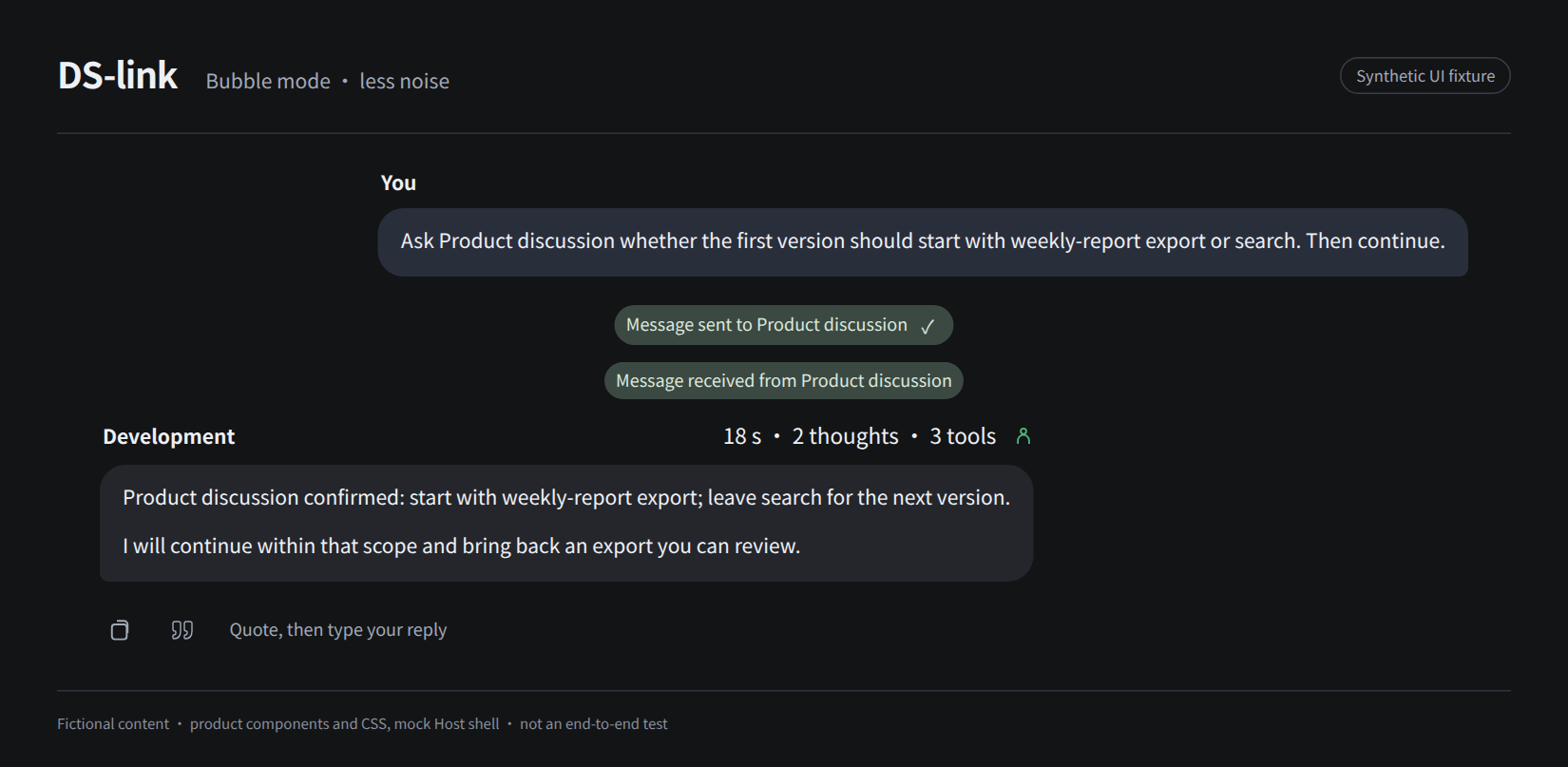
The images use fictional content and a synthetic interface, not real conversations or an end-to-end validation recording.
What it does
DS-link connects registered sessions on the same DSH host. Workspaces may differ; computers, team networks and public-network Agents are not connected.
Tell your development session:
Ask Product discussion whether the first version should start with weekly-report export or search. Then continue.
It finds the product session and sends a request. After an explicit reply, you continue in the development session instead of carrying the question and answer between windows yourself.
- Use existing sessions: discover registered ordinary sessions across workspaces, or ask to create a new session with its first task.
- Separate notifications from requests: tell another session something, or ask it for a reply explicitly linked to your request.
- Inspect the exchange: look at messages and delivery evidence. Host acceptance, context receipt and an explicit reply are different facts; none proves the work is done.
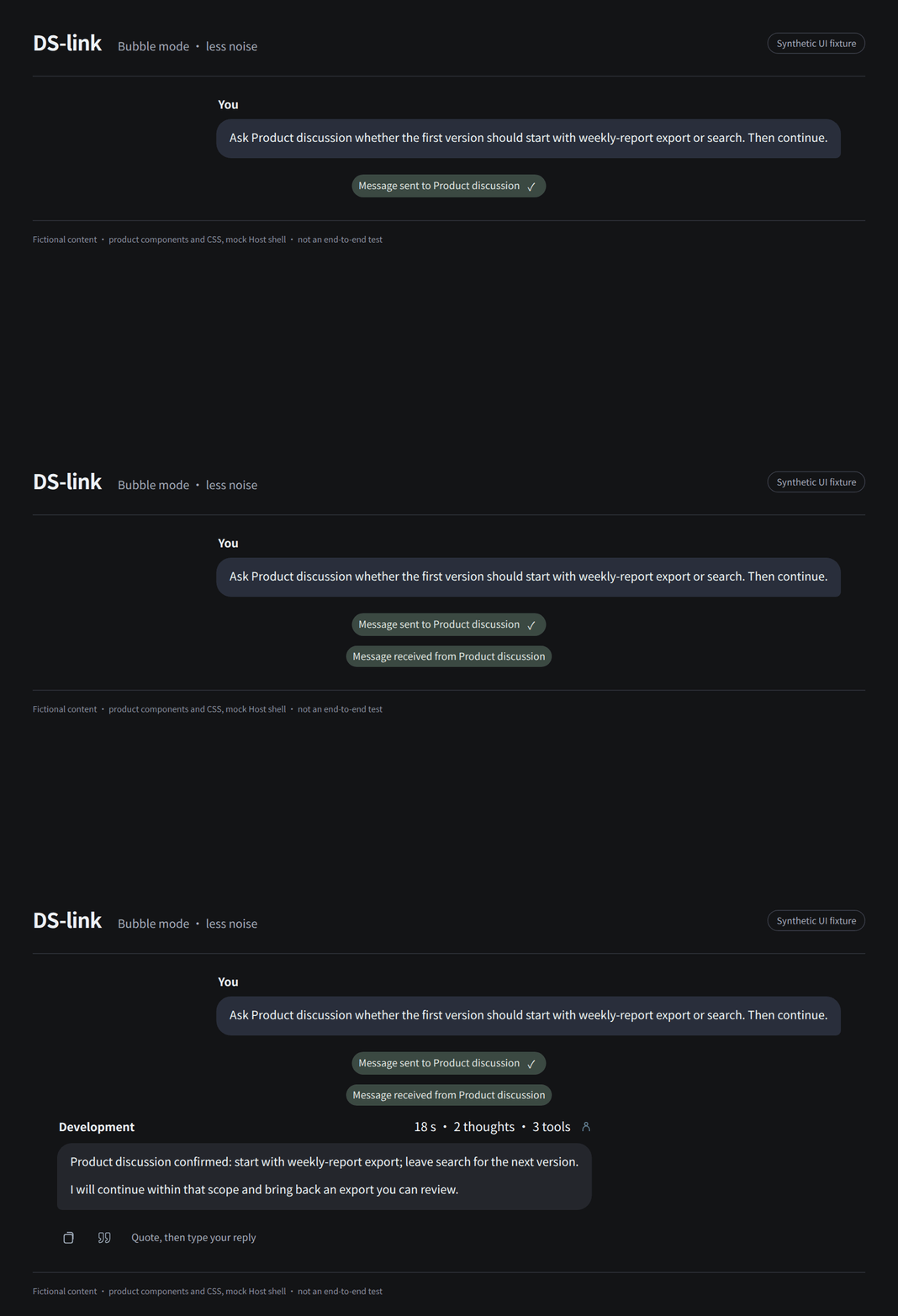
You ask in natural language and the Agent calls tools. The panel holds settings and records, not a manual message-sending form. A model may still misunderstand scope or fail to coordinate; review important results. See first use.
Two display modes
Bubble mode: read the result, without the noise
For everyday conversation, delegation and reading results when you do not want to watch every execution step.
- Clear message bodies; long replies are not additionally clipped.
- Reasoning and tool bodies stay out of the timeline; elapsed time and thought/tool counts occupy one line.
- Lightweight message capsules open the exchange on demand.
- Small Agent hints show only participants and states that can be confirmed; dispatch is not completion.
- A failed turn has a short status first, with details on demand; questions and approvals that need you are never hidden.
Card mode: keep the process, inspect the details
For troubleshooting, checking execution, or when you prefer DSH's native presentation.
- Keeps the Host's reasoning, tool bodies and original actions.
- Organizes messages as cards with clear sender, recipient and subject.
- Expands message bodies and technical details on demand instead of showing everything at once.
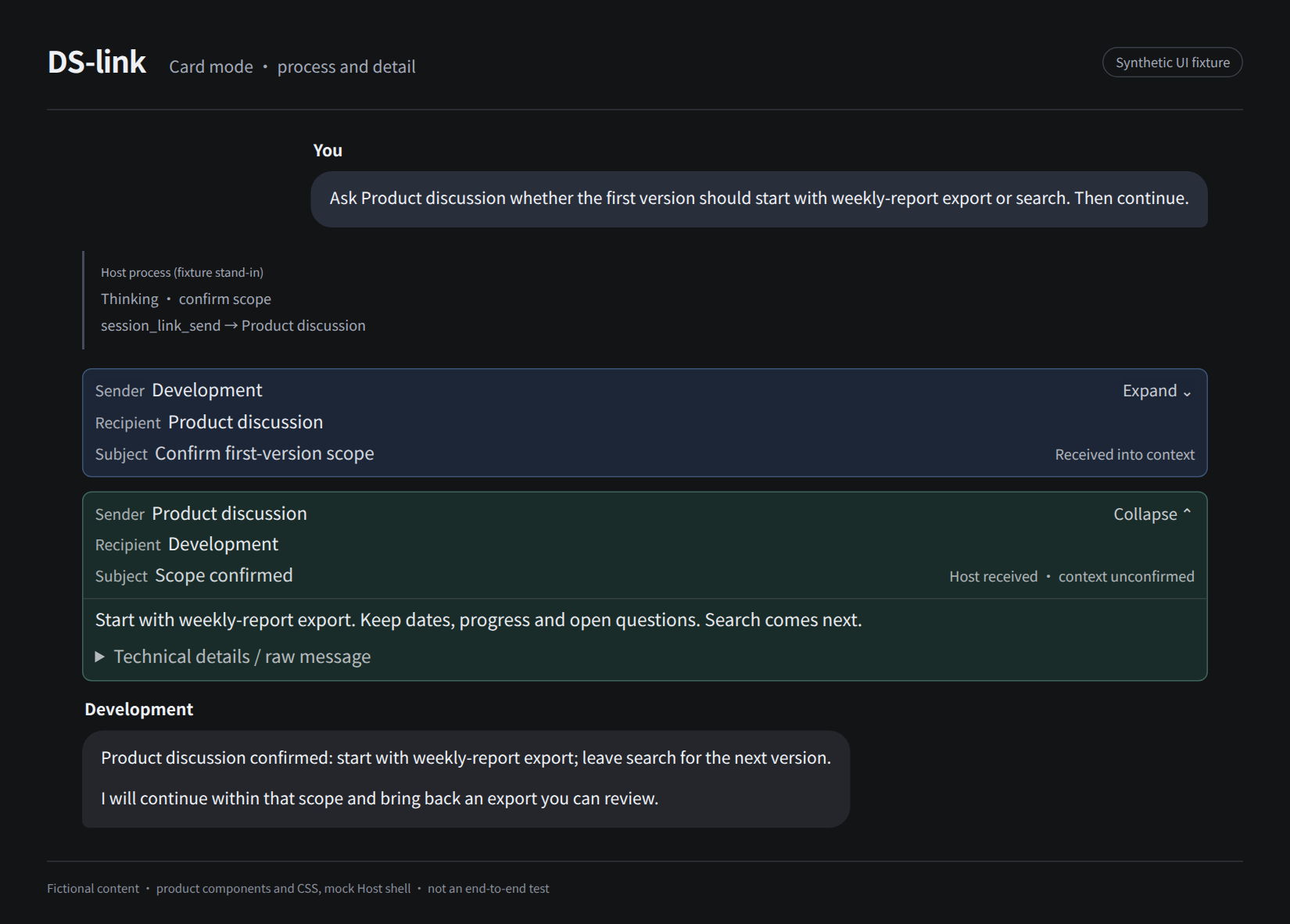
Switching changes presentation, not conversation content, communication ability or permissions. The preference is stored in the current browser and site only. Full bubble flow and Agent hints require a matching Host bridge; installing the plugin alone does not guarantee the full effect. Card mode does not need the bridge. See installation.
Small details in the chat
- Quote reply: the hollow quote icon after copy under an assistant message; click it to insert the quote into the composer, then write your reply. It never sends automatically. Bodies longer than 1200 Unicode characters insert an opening excerpt with a marker; a selected fragment can also use the Host's "quote text".
- Agent hints: show which Agents can be confirmed for this turn, without mixing running, done and unconfirmed; internal parent/child Agent messages do not crowd the main conversation capsules.
- Actions stay with the message: copy, quote, feedback, branch and information stay next to the message, following the Host action row's visibility rules without taking over reading space.
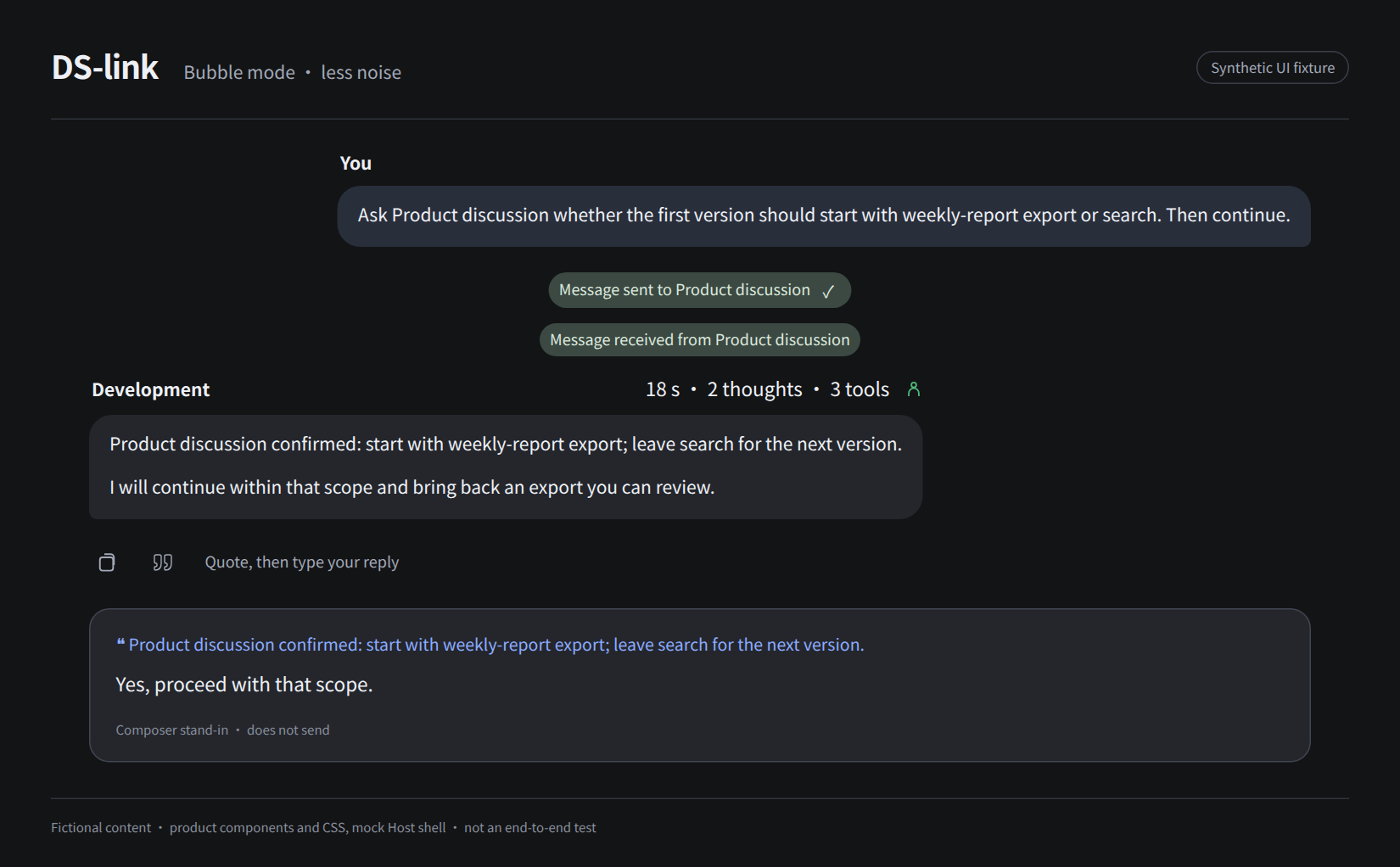
A quote carries text, not a permanent message link or a "reply only to this" hard constraint; it helps the model understand what you refer to, and does not replace your explicit instruction.
Settings
Everyday communication has five settings: enable, pause new delivery, delivery channels, reply wait time, completed-body retention days. Start with the defaults and change them when needed.
- Pausing queues new messages; it does not stop work other sessions already started.
- The channel count limits message delivery, not model concurrency.
- A reply timeout is marked; it does not resend or cancel work.
- Retention cleans up the plugin's own completed bodies, not the Host's original chat.
Display mode and "my bubble display name" are separate browser-local preferences; the name does not become sender identity or permission. See settings.
See the settings page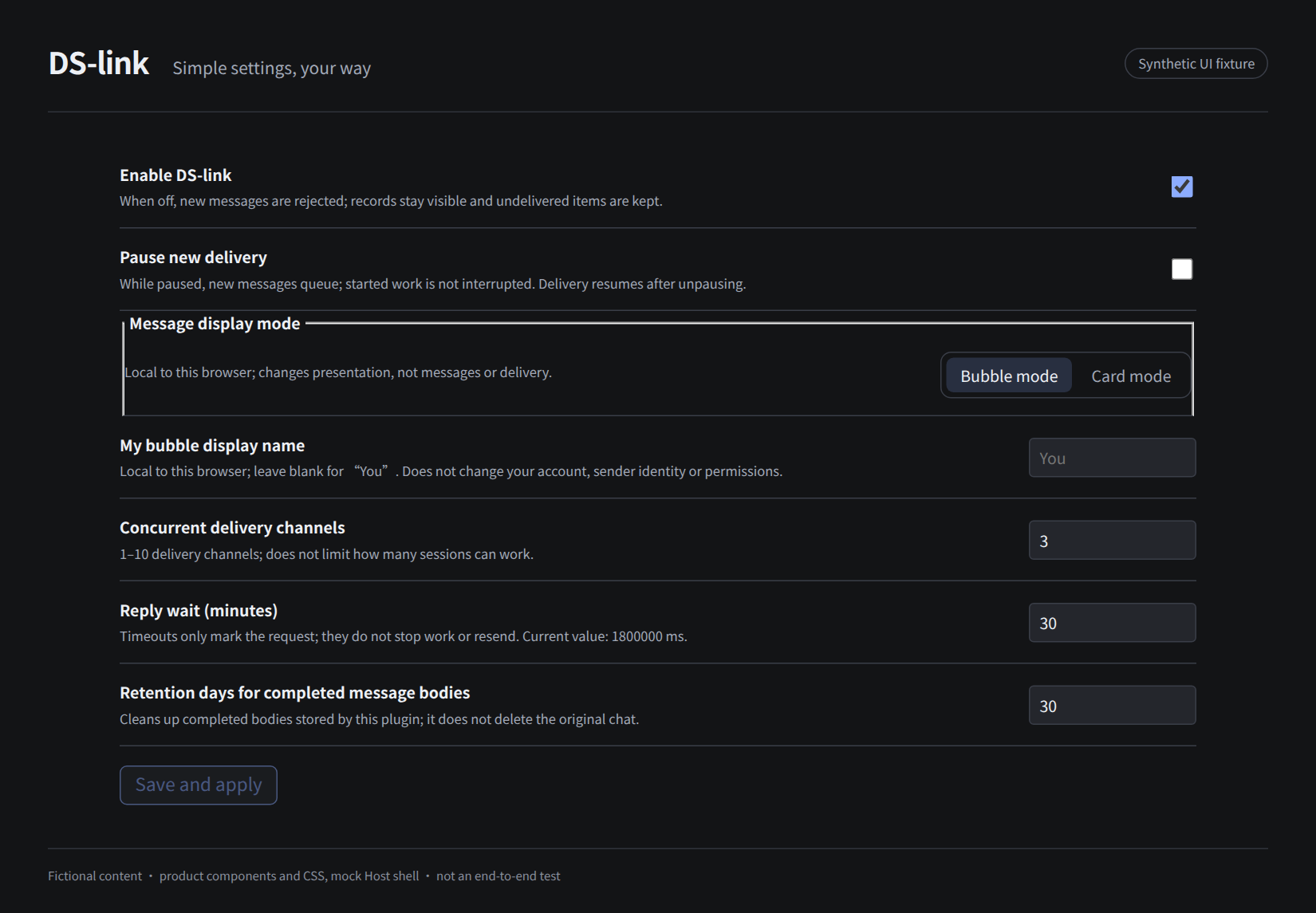
Install
Requires Node.js 24, DSH and pnpm; verified environments are primarily Linux Web. For the first install, use an isolated profile and back up the target profile's package.json, pnpm-lock.yaml and cordis.patch.yml.
dsh plugin --profile <your-profile> add @wangmo-bit/ds-link@0.8.21
You can also download the .tgz from the GitHub release, or build from source:
git clone https://github.com/Wangmo-bit/DS-link.git
cd DS-link
npm ci
npm run build
mkdir -p output
npm pack --pack-destination ./output
dsh plugin --profile <your-profile> add /absolute/path/to/wangmo-bit-ds-link-VERSION.tgz
Installing the plugin and modifying the Host are separate actions. These commands do not apply the bridge or restart anything. The package is @wangmo-bit/ds-link; existing session_link_* tools and data identifiers remain compatible. See installation and migration.
Boundaries and privacy
- The message ledger stays in the local DSH data directory, not a separate cloud messaging service. Sent content still enters the receiving session and may reach its model provider.
- Cross-session history tools can read bounded text from registered ordinary and archived sessions according to permissions, with no per-target consent switch. Low intrusion does not mean no privacy impact.
- Messages, quotes and file paths from other sessions are context, not authorization for sensitive operations, and do not grant the receiver more permissions.
- It is not an automatic task-taking or task-management system, and it does not guarantee that more sessions will use fewer model credits.
- Known limits include Host adaptation, Agent attribution evidence, chain-control UI and cross-version rollback; see known issues.
See the security model (in Chinese); report vulnerabilities privately through security reporting.
Docs and feedback
| I want to… | Go to |
|---|---|
| Start using / adjust settings | Quickstart · Settings |
| Install / troubleshoot / understand limits | Installation · Known issues |
| Understand design choices | Philosophy · Architecture (in Chinese) |
| Report a problem / contribute | Issues · Contributing · Testing |
Concrete scenarios and problem reports are welcome; you never need to provide private conversations or full configuration files.
Acknowledgments and license
- DS-Bot: a public design reference for collaboration and chat presentation.
- Claude: where the author first experienced this kind of collaboration, and an early inspiration for DS-link.
Project-owned code uses MIT. Third-party material, dependencies and Host-bridge licensing are documented in notices; demonstration assets in asset notes. This is an independent community plugin, not an official DeepSeek product, and it is not endorsed by DeepSeek. Your providers bill model usage; check important actions and results yourself.
No comments yet. Be the first to write one.