DSH Native Effort Slider
A compact, model-aware effort control for DeepSeek Harness




Why this plugin
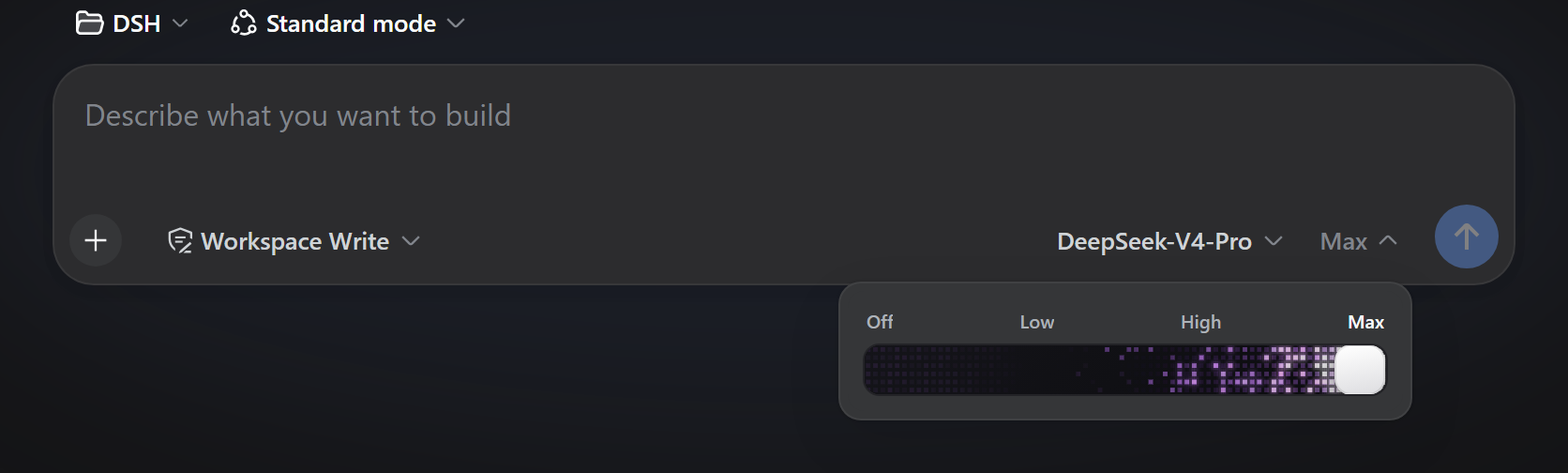
DSH models can advertise different reasoning-effort levels. This plugin keeps the composer to two small pills—model and effort—and opens the exact advertised levels in a compact slider only when you need it. It does not invent unsupported capabilities or change provider routing.
- Model-aware: uses only the levels reported by the selected model.
- Efficient: dragging is local preview; DSH receives one selection on release.
- Native: separates model selection from a 28 px effort pill and follows DSH tokens and contracts.
- Personal: one light/dark palette for every model, or a separate palette for each model.
- Deliberate: keyboard input works; Native stays still, while choosing Energy explicitly enables motion.
- Private: no credentials, account access, telemetry, or plugin-owned network calls.
Three modes, one plugin
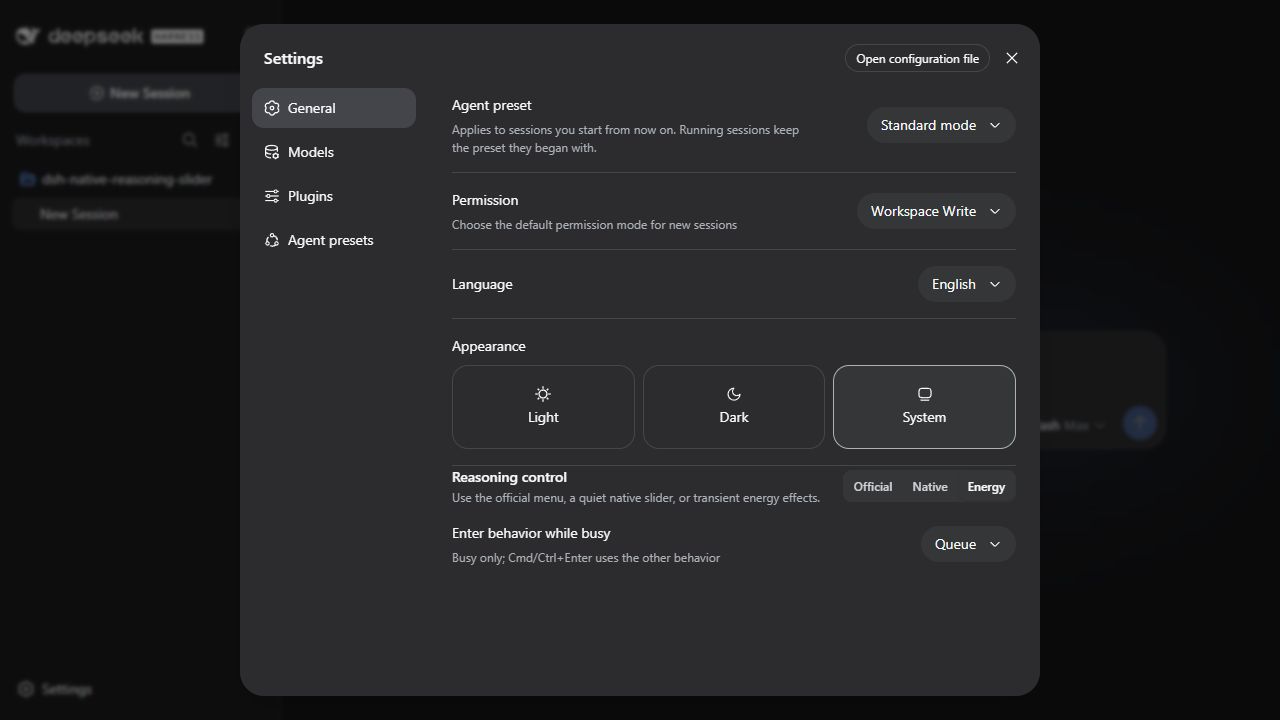
Choose the presentation in Settings -> General -> Reasoning control:
| Mode | Behavior |
|---|---|
| Official | Restores DSH's unmodified model selector |
| Native | Adds a quiet effort pill with a compact popover slider |
| Energy | Adds a brief, independently implemented WebGL cell-and-bloom effect while dragging and settling |
The plugin market remains the place to install, update, disable, or remove the plugin. The setting changes presentation without installing duplicate plugins.
Energy mode offers three renderers: Continuous animates every advertised effort level and is the default; Reference reproduces the published Max-only timing and cell-spread behavior through an independent implementation; Compact (Beta) is the lower-motion alternative. It starts with restrained blue in light appearance and violet in dark appearance. Both colors are editable from DSH Settings. Choose All models for one palette, or Per model and select each model's light and dark colors in the settings page. The composer popover stays focused on effort control. The motion is Claude-inspired, but the implementation and model contract are provider-neutral.

Try the same production renderer on the interactive experience page. It supports dragging, keyboard input, light/dark appearance, and live color adjustment without connecting to an account.
Install
Beginner-friendly PowerShell helper (it still installs through DSH's official plugin command):
irm 'https://github.com/WSL043/dsh-native-reasoning-slider/releases/latest/download/install.ps1' | iex
Or use the official DSH command directly:
dsh plugin --profile web add dsh-native-reasoning-slider
Then restart DSH. The same official command works with DSH distributions that
provide dsh. This plugin is tested against the latest DSH release shown in
the package metadata.
Update or uninstall:
dsh plugin --profile web update dsh-native-reasoning-slider
dsh plugin --profile web remove dsh-native-reasoning-slider
Behavior and limits
- The selected effort applies through DSH's normal model-selection contract.
- Models with fewer than two advertised effort levels keep the standard model selector and show no artificial slider choices.
- Energy rendering runs only while its compact popover is open. Continuous and Compact respond above Off; Reference deliberately animates only at Max. Closing the popover unloads it; choose Native for a still control.
- This plugin does not show DeepSeek balance or quota. Account-specific balance access belongs in a separate plugin with explicit permissions and failure UI.
This community project is not affiliated with or endorsed by DeepSeek.
Report a bug · Security · MIT
No comments yet. Be the first to write one.