dsh-plugin-toolkit




English · 中文
Everything a DeepSeek Harness plugin needs between init and a version the market index accepts: scaffolding, a test harness for the client bundle, a way to see a change without restarting the app, and a release that does not depend on remembering fourteen steps.
npx dsh-plugin-toolkit@latest init ./my-panel --name my-panel   # a plugin that already passes the checks
npx dsh-plugin-toolkit@latest verify .                          # pack it, install the tarball, mount the panel
npx dsh-plugin-toolkit@latest release --pr --merge              # tag, wait for npm, update the index, open and merge the PR
The panel
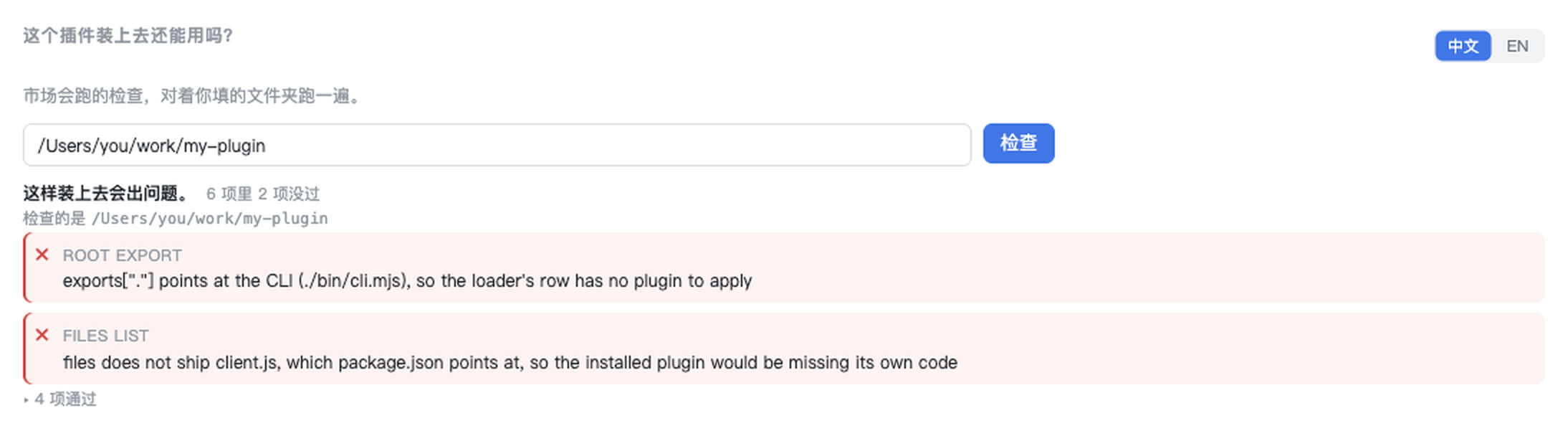
The same checks, in the right sidebar: type a folder, an owner/repo, or a GitHub link, and it says which one would fail and why. Nothing is installed and nothing is written.
Three paths
| You are… | Start with | Then |
|---|---|---|
| writing your first plugin | init |
doctor, fix, verify |
| changing a panel that is already installed | dev |
mount, the testkit, audit |
| shipping a version | verify |
release, index |
It also installs as a plugin. dsh plugin add dsh-plugin-toolkit puts a
插件体检 / Plugin doctor panel under the conversation and a tab in the right
sidebar. Give it a folder that holds a plugin's package.json, or just
owner/repo — or a repository name, which it searches GitHub for and lists the
candidates to pick from. It then runs the same checks verify runs and says
which one would break the install, with the reason on the line — the same
answers as the CLI, without leaving the app.
$ dsh plugin add dsh-plugin-toolkit
1. Write a plugin
init writes the files whose absence shows up as a failed first publish — engines.dsh, the patch file, a files list that ships the code, a client bundle, a test for it, and the CI that runs both. doctor then checks the same things without writing anything, and verify checks the tarball instead of the working copy.
If a plugin already exists, doctor --fix turns the failing checks into a
repair plan. It names the file and the edit for every problem, writes nothing
until you add --write, and then runs the checks again. fix --engines is
still there when the host range is the only thing you need to change.
npx dsh-plugin-toolkit@latest init ./my-panel --name my-panel
cd my-panel && npm install && npm test && npx dsh-plugin-toolkit@latest doctor .
2. Develop a panel
A plugin's client code is one file that calls window.__ModuleLoader__.load({factory}) — there is no module to import, so the usual React test setup does not apply. testkit supplies the missing half, and dev pushes a rebuilt bundle into the running app.
npx dsh-plugin-toolkit@latest mount ./client.js     # what a user would see, without the app
npx dsh-plugin-toolkit@latest dev . --host http://127.0.0.1:54133
3. Ship a version
verify first (it is the only check that reads the tarball), then release, which tags, waits for the registry, writes the index entry with the publish time the registry reports, and — with --pr --merge — opens and merges the pull request.
npx dsh-plugin-toolkit@latest verify .
npx dsh-plugin-toolkit@latest release . --pr --merge
What verify actually does
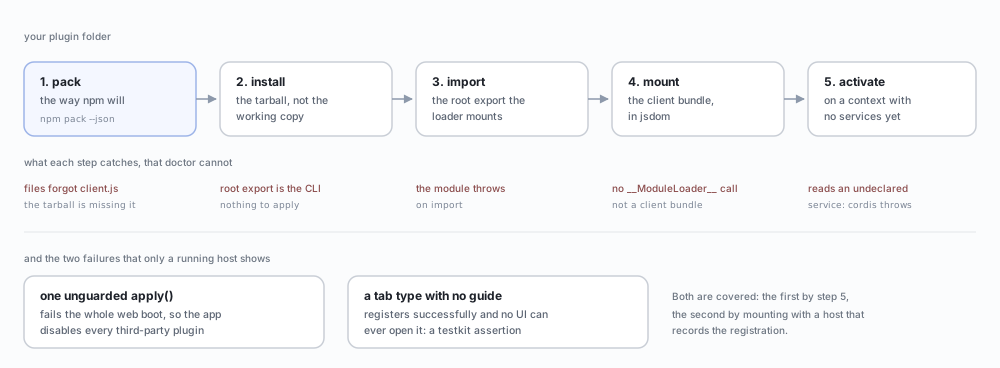
The order matters. Packing first means the check reads the file list npm will publish, not the folder you have. Installing the tarball means the root export is imported the way the loader imports it. Mounting means the client bundle is actually executed, in jsdom, with a host that records what it registered.
Each step exists because a plugin once got past the step before it and still installed into nothing.
Why this exists
Releasing one plugin fifteen times taught me three things the ecosystem's tooling does not cover:
- A version is not shipped when npm accepts it. Registry propagation took two to eight minutes every time.
npm viewanswered from a stale local cache, so I repeatedly believed a release had failed when it had not — and once believed it had succeeded when the market still could not see it. - The market index is a second release, done by hand. Each version needs an entry carrying
publishTimestampfrom the registry andengines.dshfrom the manifest. Forget the range and the index validator rejects the PR withEngines mismatch— after the tag is already public. - Reading a manifest is not the same as checking it. A plugin can have a valid
package.jsonand still be uninstallable:filesthat omit the entry the manifest points at, a bundle patch that does not exist, a README that never states the host range it declares.
The five failures behind these checks — a red dot with no panel, a row the host drops, an app that disables every plugin after one unguarded apply(), a tab nothing can open, and a checker that was wrong — are written up with their exact error text and how to reproduce each one: Five plugins that installed and did nothing.
Four ways a plugin installs and still does nothing
Each of these shipped in a real version of this toolkit before the check below existed. A manifest check passes on all four.
| What you see | What it was | Caught by |
|---|---|---|
| The tab is a red dot and the panel never opens | exports["."] pointed at the CLI, so the loader's row had no plugin to apply |
root export |
| The plugin is installed, the app never serves it | dsh.client declared, exports["./client"] missing — the host drops the row |
client declaration |
| The app says the third-party plugin is unsupported and disables all of them | apply() read ctx.webServer without declaring it; cordis throws instead of returning undefined |
verify (calls apply on a context that has no services) |
| The tab registers, and nothing in the UI opens it | sidebarRightTabs.register() registers a type; the sidebar lists what tabs.guide() returns |
a testkit test, not doctor |
The first three are static: doctor and verify catch them without the app running. The fourth is a UI contract, so it needs the panel mounted and the registration inspected — that is what testkit is for.
Requirements
- Node.js 18 or newer (the registry is read with
fetch; no runtime dependencies) - Git and
ghonPATHfor the steps that touch GitHub - DeepSeek Harness
>=0.2.0— the version whose market index carriesengines.dsh, which is what makes the range check meaningful - For
testkit:jsdom,reactandreact-domas dev dependencies (npm install --save-dev jsdom react react-dom)
Start from a plugin that already passes
$ npx dsh-plugin-toolkit@latest init ./my-panel --name my-panel --title "My panel"
created 8 file(s) in /Users/you/my-panel
  .github/workflows/ci.yml
  .gitignore
  README.md
  client.js
  cordis.patch.yml
  index.js
  package.json
  test/panel.test.mjs

next: npm install && npm test && npm run doctor
What you get is not a snippet: it is a plugin whose doctor already passes (engines.dsh, the patch file, the files list), with a client bundle that registers a sidebar tab, a testkit test for it, and a CI workflow that runs both. init refuses a directory that is not empty unless you pass --force, and refuses a name npm would refuse — those are the two mistakes that cost the most time later.
Where it lives
The checker is docked under the conversation, above the input bar: a single row, collapsed by default. Open it and it carries the whole guide — who it is for, how to use it, what each check means, and what it cannot tell you — plus the folder field and the results. The same panel is also a Plugin doctor tab in the right sidebar, for when the conversation is busy.
The panel speaks both languages and opens in Chinese; the 中文 / EN switch sits in the dock's header row (and in the sidebar tab) and the choice is remembered.
Look at it without the app:
node scripts/preview.mjs /tmp/panel.html # collapsed, open, with a result, and the tab
Test a panel without a browser
A plugin's client code is one file that calls window.__ModuleLoader__.load({factory}) — there is no module to import, so the usual React test setup does not apply. testkit supplies the missing half: a DOM, the real React, and a host context that records what the panel registers.
npm install --save-dev jsdom react react-dom
import { mountClient, createFetch } from 'dsh-plugin-toolkit/testkit';

const panel = await mountClient({
  file: 'client.js',
  copy: { 'my-plugin': { title: 'My panel' } },
  fetch: createFetch({
    '/my-plugin/report': { body: { score: 71, noise: 3 } },
    '/my-plugin/apply': () => ({ status: 201, body: { score: 92 } }),
  }),
});

await panel.click('[data-testid="optimize"]');
console.assert(panel.text().includes('92'), 'the score on screen did not move');
console.assert(panel.must('[role="status"]').textContent.includes('92'));
await panel.unmount();
unmount() is async: it lets React finish the work its own unmount schedules before the DOM goes away. Skipping the await surfaces as ReferenceError: window is not defined after the test has already passed, which is a confusing way to learn it.
What you get back: text(), html(), query(selector), must(selector) (throws with the rendered HTML when it misses), click(selector), type(selector, value), press(selector, key), focus, attributes(selector), snapshot(dir, name) for a normalised DOM baseline, and host for assertions about what the bundle registered.
Keep a visual baseline
The DOM is the baseline: normalising class order and whitespace gives a file that fails for the reasons a screenshot would — a lost label, a control that stopped rendering — and can be reviewed in a diff instead of by eye.
import { expectSnapshot } from 'dsh-plugin-toolkit/testkit';

const panel = await mountClient({ file: 'client.js' });
expectSnapshot(panel.html(), '__snapshots__', 'panel');   // throws with the element that moved
await panel.unmount();
First run writes nothing: it tells you to re-run with UPDATE_SNAPSHOTS=1, so a baseline is always a decision, never a side effect. That rerun writes the normalised HTML and returns { status: 'written' }; later runs return same or fail with the element that moved.
Check what assistive tech sees
panel.expectAria('[role="tab"][aria-selected="true"]', { label: 'Protection', selected: 'true' });
assert.match(panel.must('[role="status"]').textContent, /Score moved 71 → 77/);
expectAria() compares the attributes a screen reader actually reads — role,
label, live, selected, expanded, checked, pressed, disabled — and
names the one that differs:
[aria-live="polite"]: expected aria text to be "9", but it is "0"
A missing attribute is reported as nothing, not as an empty string, because
those are different bugs. panel.aria(selector) returns the same object when you
want to assert on it yourself.
must() throws with the rendered markup when the selector misses, which is the difference between "the assertion failed" and "here is what the user actually got".
Every example below is a file in this repository, run by CI, and the output shown is the output it prints:
| Example | What it shows |
|---|---|
node examples/mount-a-bundle.mjs |
mount a real bundle, read the text, click, read it again |
node examples/route-stubs.mjs |
answer the routes a panel asks for, and assert on the requests |
node examples/baseline.mjs |
a DOM baseline compared on every run |
node examples/aria.mjs |
what assistive tech sees |
$ node examples/mount-a-bundle.mjs
Demo panel Count 0 0
Demo panel Count 1 1
$ node examples/route-stubs.mjs
Score 71
asked for: 1 route(s), undeclared route answers 404
To look at a bundle by hand:
npx dsh-plugin mount ./client.js            # print the text a user would see
npx dsh-plugin mount ./client.js --html     # print the markup
That is how the AIignore panel was checked before release: the real bundle, mounted in Node, against a stubbed /aiignore/*:
$ npx dsh-plugin mount ../ai-context-doctor/plugin/client.js
AIignore No workspace yet Could not read the report …
Put the badge on a plugin that passes
If verify passes on your plugin, this badge says so and links back here:
[](https://github.com/WJDdidi-1/dsh-plugin-toolkit)
It is a claim, not a decoration: add it only when dsh-plugin verify . exits 0.
Start from the example
dsh-plugin-example is a ~70-line plugin: one sidebar tab, two languages, one behaviour test, CI that runs verify through the composite action. It is the shape this toolkit expects, so it is also the fastest way to see whether the toolkit fits your plugin. It is a GitHub template too: Use this template starts you on a plugin whose first publish already passes.
dsh plugin add dsh-plugin-example
See what is installed, and what the app loaded
doctor checks one folder you name. The question that actually gets asked is
"why is my plugin not in the sidebar?", and the answer needs three things at once:
what is installed, whether each installed copy is valid, and which of them the
running app actually loaded.
$ dsh-plugin audit --host http://127.0.0.1:54133
dsh-aiignore           0.37.1    loaded       ok
demo-panel             0.3.0     not loaded   ok  — dsh.profile.bundles in /Users/me/.dsh/profiles/desktop/package.json does not list it, and the loader mounts only listed bundles
                                            fix: add "demo-panel" to dsh.profile.bundles in /Users/me/.dsh/profiles/desktop/package.json (or run `dsh plugin add demo-panel`), then restart the app

1 installed plugin(s) are not in the running app:
"Not loaded" has three different causes, and audit names the one that applies
instead of offering a blanket restart:
- Not in
dsh.profile.bundles.pnpm add(ornpm install) installs the package but does not tell the loader to mount it. Add the package name todsh.profile.bundlesin~/.dsh/profiles/<profile>/package.json, or rundsh plugin add <name>, then restart the app. - No
dsh.bundle. The package declaresdshbut no patch file to mount. Adddsh.bundle.patchto itspackage.jsonand ship the patch file, then reinstall. - Listed, but the app predates the install. The profile is already correct; restart the app once to read the new list.
Advisories (engines.dsh, README Requirements) are counted apart from problems:
the market index needs them, the loader does not, so they should not bury a plugin
that is actually broken.
audit exits 1 when an installed plugin has a hard failure or when the
running app did not load at least one installed plugin, so CI can gate on a
profile where the app silently skipped a plugin. It exits 0 when every
installed plugin is loaded and valid. If no graph was read (--host omitted),
the loaded column is ? and only hard failures change the exit code.
Without --host the loaded column is ?, because guessing would be worse than
saying nothing. Only packages that declare a dsh field are audited — the rest of
node_modules is ordinary dependencies, and auditing those is noise.
An installed package whose package.json cannot be read is the exception: the
dsh field that would mark it as a plugin is in the file that failed to parse.
If its name is still in dsh.profile.bundles, audit reports a manifest
failure naming the unreadable package.json and exits 1 instead of treating
the folder as an ordinary dependency. A truncated manifest from an interrupted
install therefore cannot make the plugin disappear from the report, and a valid
sibling plugin is still listed on the same run. The exception stays narrow: a
damaged package.json in a package that is neither in dsh.profile.bundles nor
readable enough to expose a dsh field is still an ordinary dependency and is
skipped, so one broken transitive install does not fail every audit.
Edit a plugin that is already installed
The host already swaps a rebuilt bundle without a page reload: it watches each plugin's entry artifact and reports a rebuilt frame on /plugins/events. dev puts the new file where the host is looking, then proves the frame arrived instead of asking you to check by eye.
npx dsh-plugin dev . --host http://127.0.0.1:54133
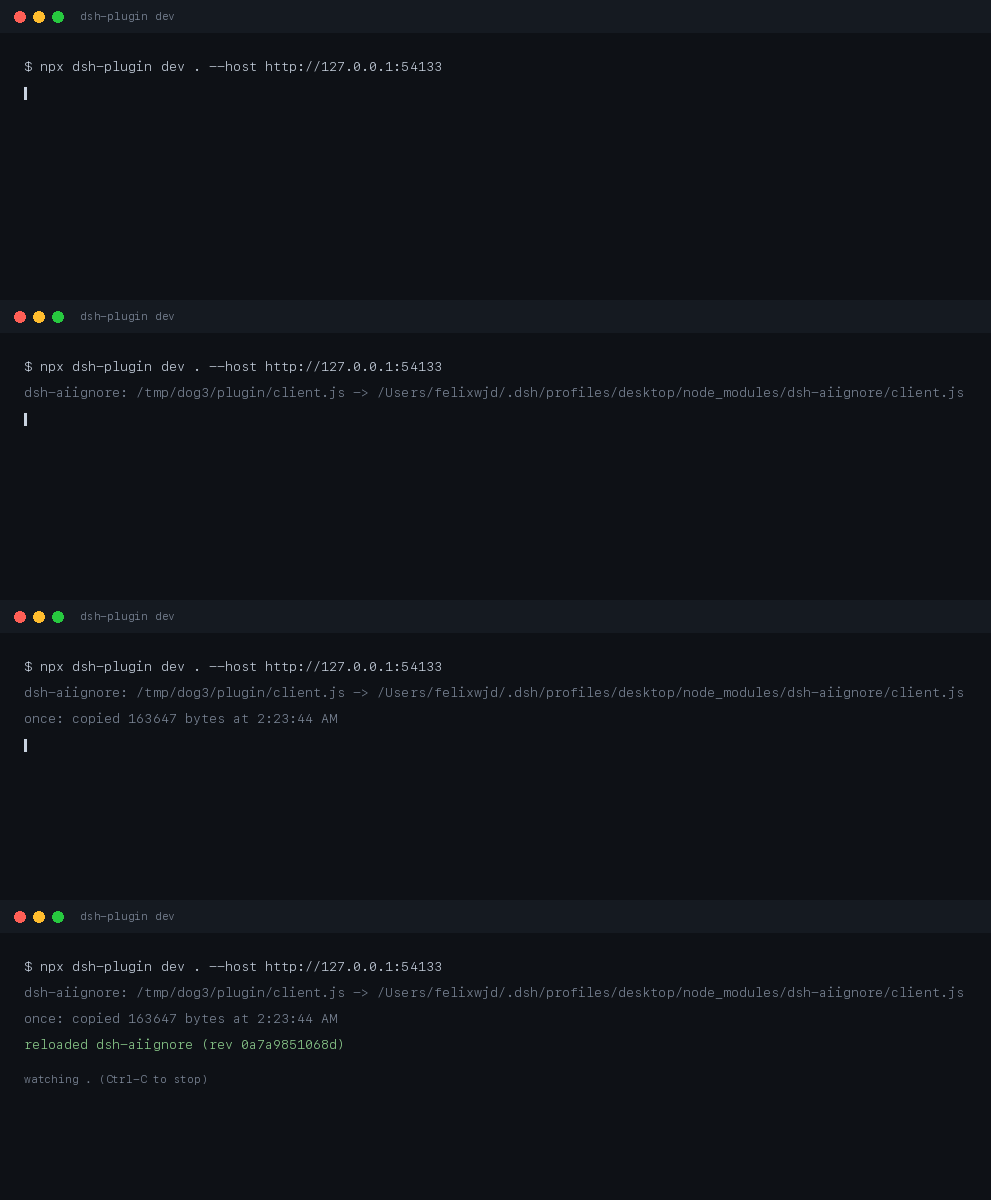
Recorded from a real run against the running app: the last line is the revision the app sent back on /plugins/events, not a message the tool printed on faith.
demo-aiignore: /work/plugin/client.js -> ~/.dsh/profiles/desktop/node_modules/dsh-aiignore/client.js
initial: copied 163647 bytes at 1:18:43 AM
reloaded dsh-aiignore (rev e0c0230c4fc9)
watching /work/plugin
That last line is the whole point: the revision came back from the app's own event stream, so "it reloaded" is a fact, not a hope.
A plugin the running app never loaded cannot be reloaded, and the app says so by leaving it out of the graph it sends first. dev reads that graph, so a freshly installed plugin gets the sentence that fixes it instead of a timeout:
copied, but not confirmed: the running app has not loaded demo-panel, so it will not report a reload; restart the app once after installing it
| Flag | Meaning |
|---|---|
--dest <dir> |
write into this installed copy instead of searching ~/.dsh/profiles/*/node_modules/<name> |
--entry <file> |
copy this file instead of dsh.client.entry, client.js, lib/client.js |
--build <command> |
run this before each copy (a failed build copies nothing) |
--host <url> |
confirm the reload against the app at this URL; without it the copy still happens and the tool says it is unconfirmed |
--once |
copy once and exit, for scripts |
Two things it does not do, because the host does not: React state inside the reloaded plugin is lost, and a failed swap does not roll back to the previous bundle.
Use it in CI
The same checks run as a GitHub Action, so a tag cannot go out on a plugin that would not install:
- uses: actions/checkout@v4
- uses: WJDdidi-1/dsh-plugin-toolkit@v1
  with:
    dir: plugin        # the folder holding the plugin's package.json
    command: verify    # pack it, install the tarball, mount the panel
verify is the default because it is the only check that reads what a user
actually installs: doctor reads the working copy, so a files list that
forgets client.js passes it and fails only after npm i.
command: doctor stops at the manifest checks (fast, no install), and
command: index audits market/index.json instead, failing on any version whose
engines.dsh is missing or is not a semver range (a malformed value such as
>=banana, or a single pinned version such as 0.2.0, both fail). Pin
version: if you would rather not track the latest release.
Check a plugin you have not cloned
The panel takes three kinds of input: a folder, owner/repo, or a GitHub URL.
A bare name is a search, not a guess — it asks GitHub, lists the matches with
their stars, and checks the one you pick. A repository is downloaded once as a
tarball into a temp folder, so nothing is cloned into your workspace and
nothing is installed.
The CLI reads a repository straight from the GitHub API:
dsh-plugin doctor --remote V1ki/dsh-plugin-subscriptions
dsh-plugin doctor: 1 problem(s) in V1ki/dsh-plugin-subscriptions
  ⨯ engines.dsh: engines.dsh is missing, so a host that enforces the range rejects the install as "incompatible with dsh"; declare the range you support, e.g. "engines": { "dsh": ">=0.2.0" }
That is the whole reason this mode exists: the plugin hub files failed installs
back into plugin repositories, and the report is a sentence — plugin install failed, plugin does not support the DSH version in use — that never names a
file. Reading package.json over the API is enough to name it.
What it can see, and what it cannot:
- Manifest checks (
engines.dsh,dsh field,files,dsh.client,exports) run on the realpackage.json. - README checks (
readme) run on the text GitHub serves: the README must have aRequirementsheading and must state the host rangepackage.jsondeclares. A repository whose checkout failsreadmefails the remote check too, with the same sentence. - File checks (does
exports["./client"]point at a file that exists, does the root exportapply) need the tree. A package that runsprepack,prepublishOnly,prepareorbuildpublishes files it does not commit, so those checks are skipped with a note instead of calling a working plugin broken. - Public repositories work anonymously, but GitHub allows 60 requests an hour.
Export
GH_TOKEN(orGITHUB_TOKEN) to audit more than one or two.
To check a whole list in one pass, put one owner/repo per line in a file and
pass it with --from (- reads standard input):
$ dsh-plugin audit --remote --from repos.txt
Repositories are read four at a time by default. --jobs N changes that width;
values above 8 are capped at 8, and --jobs 1 walks the list one repository
at a time, the timing the command had before batching. The output — and the
--json array — still follows the input list, and every verdict is the one the
sequential run produced, so a diff between two runs compares repositories rather
than scheduling.
When GitHub answers 403 or 429, the shared quota is gone, so the batch stops
starting new repositories and marks every entry it could not read as
rate-limited instead of clean or unreadable. If the response carries
x-ratelimit-reset (or retry-after), the reset time is printed with the
verdict, and the remaining entries are reported without another request.
Will this plugin install on my DSH?
The seven compatibility reports all end with the same question. Add --host <version> to a remote audit and it answers that question for one repository.
This is a real run against L3n3L/dsh-resume, a plugin whose declared range
stops before DSH 0.2.0, checked against the 0.2.2-alpha.3 canary from the
reports:
$ dsh-plugin audit --remote L3n3L/dsh-resume --host 0.2.2-alpha.3
incompatible  L3n3L/dsh-resume  0.1.3 (host >=0.1.0-rc.6 <0.2.0-0) [incompatible with dsh 0.2.2-alpha.3; declares ">=0.1.0-rc.6 <0.2.0-0"]

summary: 1 repository — 0 clean, 1 failing (1 problem), 0 unreadable, 0 rate-limited
The verdict comes first: incompatible means the range in package.json does
not accept the host, so the installer rejects the plugin before it unpacks it.
This run exits 1. The same answer is reproducible without a GitHub request —
the manifest is checked in under examples/compatibility-sample/, and this
command feeds it through the real CLI path:
$ node scripts/compatibility-sample.mjs
(npm run compatibility runs the same script.) The test suite runs that
command and compares its output with the block above, so the sample cannot
drift from the formatter or from the README.
The line carries the range package.json declares and one of compatible,
incompatible, or unknown against that host version. unknown is the honest
answer for a missing or malformed range — there is nothing to compare — while a
range that excludes the host is incompatible, counted as failing, and exits
1. npm's pre-release rule is part of the answer: >=0.2.0 does not accept
0.2.2-alpha.3, because a range only opts into a pre-release when it names one
of the same major.minor.patch. A canary host can therefore be incompatible
with a range that will accept the final release. The same flag works in the
batch mode, so one --from run answers the whole list:
$ dsh-plugin audit --remote --from repos.txt --host 0.2.2-alpha.3
The compatibility flags are --remote <owner/repo> for one repository,
--from <file> for a list (- reads standard input), --host <version> for
the DSH version to compare against, and --json for the machine-readable
finding. --jobs <n> sets the batch width, and --patch-dir <dir> writes the
host-targeted repair for each repository that needs one. The help text lists
the same flags; a test fails if this section names a flag the CLI does not have.
--host still names the running app URL for a local audit; on --remote it
is the DSH version to compare against. With --json, each finding gains
host and compatibility beside hostRange.
Each repository gets one line with its verdict — clean, failing,
unreadable, or rate-limited — and the run ends with a counted summary:
clean         demo/plugin  1.2.3 (host >=0.2.0)
failing       demo/broken  — engines.dsh: engines.dsh is missing, so a host that enforces the range rejects the install as "incompatible with dsh"
rate-limited  demo/blocked — GitHub rate-limited this request (403) for package.json; set GH_TOKEN or GITHUB_TOKEN to raise the limit; the limit resets at 2026-11-04T20:00:00.000Z
rate-limited  demo/next    — GitHub rate-limited the batch before this repository was read, so it was not requested; the limit resets at 2026-11-04T20:00:00.000Z

summary: 4 repositories — 1 clean, 1 failing (1 problem), 0 unreadable, 2 rate-limited
The parenthesised count is the number of failed checks, not the number of failing
repositories: one repository that fails both engines.dsh and its client
declaration prints 1 failing (2 problems). A repository whose package.json
has an empty dsh field and no dsh.bundle.patch is failing here too: the
batch runs the same dsh field check as doctor, and the --json finding
carries that failure even though no patch path was declared to check. A README
with no Requirements heading is treated the same way: the batch asks the same
readme question as a checkout, so the row is failing, the --json finding
names readme, and the run exits 1 instead of reporting the repository clean.
The command exits 1 when any repository is failing, unreadable, or
rate-limited, and 0 only when every repository in the list is clean. --from
also accepts the JSON evidence shape (an array, or an object with rows) that
the old shell loop printed, so an existing audit file can be replayed without
rewriting it.
Measured throughput
The measurement uses the first eight repositories from the 3 November
install-failure list — 610la/dsh-notification-center,
Anionex/dsh-vision-toolkit, ChongCyrus/Vibe-Mathematics,
CrazyShout/dsh-ssh-remote, Ebony-Vinyl/dsh-our-free-model,
FSMargoo/dsh-at-file, FylarOpen/dsh-fylar-office-editor and
GraySilver/dsh-evolve-modes — served from memory with a fixed 500 ms delay on
every API request. That makes the number reproducible on any host: it measures
the batch's scheduling, not GitHub's mood. Reproduce it with:
$ npm run benchmark
(node scripts/benchmark-audit.mjs runs the same harness without npm's banner.)
The tarball ships both that script and the list it reads, so the command runs in
a checkout and in an installed copy. The test suite packs the package, installs
the tarball into a temp directory and runs the documented command there;
docs/benchmark-tarball.md
records the packaging gap this closes.
It runs the same list twice: --jobs 1, which is the loop the command used
before batching, and the default --jobs 4. Measured on this host:
| run | wall clock | seconds per repository |
|---|---|---|
before (--jobs 1) |
8.03 s | 1.003 s |
after (default --jobs 4) |
2.01 s | 0.251 s |
The after run keeps four reads in flight, so eight repositories finish in two
waves and the per-repository cost falls from about 1.00 s to about 0.25 s. The
test suite reads this table and fails if the after number no longer matches the
default --jobs value, so changing the default cannot leave the claim behind.
For a CI job or a repair sweep, add --json:
$ dsh-plugin audit --remote --from repos.txt --json
[ { "target": "V1ki/dsh-plugin-subscriptions", "version": "0.3.0", "hostRange": ">=0.2.0", "failures": [], "notes": [] }, { "target": "demo/plugin", "version": "1.2.3", "hostRange": null, "failures": [ { "check": "engines.dsh", "message": "engines.dsh is missing, so a host that enforces the range rejects the install as "incompatible with dsh"; declare the range you support, e.g. "engines": { "dsh": ">=0.2.0" }" } ], "notes": [] } ]
Every repository produces one object with `target`, `version`, `hostRange`,
`failures` (`{ check, message }`) and `notes`, and the command exits `1` when any
repository has a problem. With `--host <version>` each object also carries
`host` and `compatibility`. A rate-limited repository adds `rateLimited: true`
and a `rateLimit` object with the HTTP `status` and, when GitHub sent one,
`resetAt`; it is not marked `unreadable`. A network error is printed in `notes`
and still exits `1`: a repository the tool could not read is never reported as
clean. Packages that build before they pack
keep their file-level checks in `notes` as before.

When the list is a repair queue rather than a report, add `--patch-dir`:

```sh
$ dsh-plugin audit --remote --from repos.txt --patch-dir repairs/
It creates the directory and writes one owner__repo.patch for every
repository whose engines.dsh check fails, with the same diff fix --remote --patch produces. With --host <version>, the repair is aimed at that host, so
a repository whose valid range merely excludes the host is repaired too; a
repository that already accepts the host is skipped even when it is in the same
batch. Repositories that are clean, unreadable, or need a repair the tool cannot
make automatically are skipped. The repository itself is still only read, and
--force replaces a patch that is already there.
The 3 November list
The install-failure audit that started this tool covers 67 repositories. Its
list is checked in as
docs/ecosystem-audit-2026-11-03.txt,
one owner/repo per line. One command audits all of it and leaves the repairs
in /tmp/repairs:
$ dsh-plugin audit --remote --from docs/ecosystem-audit-2026-11-03.txt --patch-dir /tmp/repairs
A real run. The rows in the middle are elided; the summary is exactly what the command printed:
failing     610la/dsh-notification-center  — engines.dsh: engines.dsh is missing, so a host that enforces the range rejects the install as "incompatible with dsh"; declare the range you support, e.g. "engines": { "dsh": ">=0.2.0" }
failing     Anionex/dsh-vision-toolkit  — engines.dsh: engines.dsh is missing, so a host that enforces the range rejects the install as "incompatible with dsh"; declare the range you support, e.g. "engines": { "dsh": ">=0.2.0" }
...
clean       HERO476/dsh-sidecard-ask  2.1.11 (host >=0.1.2-rc.1 <0.3.0)
...
summary: 67 repositories — 7 clean, 60 failing (60 problems), 0 unreadable
58 patches written to /tmp/repairs
The exit code is 1 because 60 of the 67 still need an edit. The evidence file
the list came from was written on 3 November with 6 clean and 59 missing
engines.dsh; one repository has since added the field, which is why this run
shows 7 clean and 58 missing. Two repositories no longer have a root
package.json, so the tool reports that instead of guessing at a repair.
Each patch file is named after the repository, so the one for
PrismLean/dsh-run-guard is
/tmp/repairs/PrismLean__dsh-run-guard.patch. To apply it, clone the
repository and apply the file in the checkout:
$ git clone https://github.com/PrismLean/dsh-run-guard /tmp/dsh-run-guard
$ cd /tmp/dsh-run-guard
$ git apply --check /tmp/repairs/PrismLean__dsh-run-guard.patch
$ git apply /tmp/repairs/PrismLean__dsh-run-guard.patch
$ npx dsh-plugin-toolkit@latest doctor .
git apply --check is the dry run; it changes nothing and exits non-zero before
writing if package.json moved since the audit. If that happens, run fix <owner>/<repo> --remote --patch to regenerate the diff from the current
default branch. Repair a repository you have not
cloned below shows the same loop with
the diff in the terminal.
What doctor checks
| Check | Why it matters |
|---|---|
name |
npm publishes and installs by this field; a missing, empty or non-npm name would otherwise pass doctor and fail later at publish or npm pack |
version |
The tag is built from it; a malformed version produces a tag nobody can install |
engines.dsh |
The market index copies this into every version entry. Missing it, or a value that is not a semver range (including a pinned version such as 0.2.0), fails the index PR |
readme |
A Requirements section that states the declared range, so an install failure is predictable |
dsh field |
dsh.bundle.patch must exist for the host to load the plugin |
patch file |
The path declared above must be a real file |
client entry |
If dsh.client is declared, the bundle has to be there |
files list |
Every path package.json points at (exports, patch, client) must be covered by files |
root export |
The loader imports the bare package name; if that module is the CLI (or exports no apply), the row mounts nothing while the install reports success |
Exit code is 0 when the plugin can be installed and 1 when it cannot, so it drops into CI unchanged. doctor --remote and audit --remote run the same manifest and README checks (name, version, engines.dsh, dsh field, files list, readme) against the package.json and README GitHub serves, then check the files the manifest points at, so a bad package name or a README with no Requirements heading is reported before a clone or install. The name check is pinned at the process boundary: npm test expects the shipped CLI to reject a missing, empty and malformed name (accepted=0/3) and to accept a valid plain or scoped control.
Repair what doctor finds
doctor --fix reads the same checks and prints one line per failed check: the
file, and the edit it would make. It is a preview by default and writes nothing
until you pass --write:
$ npx dsh-plugin-toolkit@latest doctor --fix ./my-panel
dsh-plugin doctor --fix: 1 failed check(s) in /Users/you/my-panel
  ✗ engines.dsh: package.json — would write engines.dsh ">=0.2.0" (was missing)
nothing written; pass --write to apply
dsh-plugin doctor --fix: 1 problem(s) remain in /Users/you/my-panel
  ✗ engines.dsh: engines.dsh is missing, so the market index cannot state the host requirement

$ npx dsh-plugin-toolkit@latest doctor --fix ./my-panel --write
dsh-plugin doctor --fix: 1 failed check(s) in /Users/you/my-panel
  ✗ engines.dsh: package.json — would write engines.dsh ">=0.2.0" (was missing)
dsh-plugin doctor --fix: wrote engines.dsh ">=0.2.0" in package.json
ok  my-panel@1.0.0 (host >=0.2.0)
The write is limited to the edits in the plan: a missing or non-range
engines.dsh becomes >=0.2.0, the other engines entries are left in place,
and a range that already passes is not touched. --range <range> chooses the
value used when engines.dsh needs repair, and --dry-run wins if it is passed
alongside --write.
Checks that cannot be repaired without guessing — a missing patch file, a root
export that points at the CLI, a README with no Requirements section — still
appear in the plan with manual:, so the command never invents file contents.
After writing, doctor runs again: the exit code is 0 only when no problem
remains, and the remaining failures are printed with their usual messages. Run
it per repository; a checkout is the only thing it edits, never a published
package or the market index.
Fix a missing host range
doctor on its own names a missing engines.dsh but never edits the manifest.
fix --engines prints the range it would write, and writes it only when you
also pass --write:
$ npx dsh-plugin-toolkit@latest fix ./my-panel --engines
dsh-plugin fix: would write engines.dsh ">=0.2.0" (was missing)
    /Users/you/my-panel/package.json
    nothing written; pass --write to apply

$ npx dsh-plugin-toolkit@latest fix ./my-panel --engines --write
dsh-plugin fix: wrote engines.dsh ">=0.2.0" (was missing)
    /Users/you/my-panel/package.json
A missing value, or one doctor calls "not a semver range", becomes >=0.2.0 — the
same range init writes. A range that already passes the check is left alone,
because >=0.3.0 can be a deliberate statement about the host APIs the plugin
uses; --range <range> asks for a different one explicitly. fix changes only
engines.dsh and leaves the other engines entries in place. doctor on its
own still runs read-only, and its checks are unchanged; fix and doctor --fix
change the manifest only when you pass --write.
When the failed install names the host version, --host aims the range at that
host instead of using the default. The written range accepts the host and stops
before the next major, and the command prints that reasoning:
$ npx dsh-plugin-toolkit@latest fix ./my-panel --engines --host 0.3.0 --write
dsh-plugin fix: wrote engines.dsh ">=0.3.0 <1.0.0" (was missing)
    host 0.3.0 is inside ">=0.3.0 <1.0.0"; 1.0.0 is excluded, so the range includes the host you run and stops before the next major
    /Users/you/my-panel/package.json
A host version that is not complete semver is refused, and --range still wins
when it is passed beside --host.
For a repository you have not cloned, see
Repair a repository you have not cloned:
fix <owner>/<repo> --remote fetches package.json through the GitHub API and
prints the same engines.dsh diff, and --patch <file> saves it for a
checkout.
Repair a repository you have not cloned
Start from the repository name in the hub issue: PrismLean/dsh-run-guard, one
of the repositories in the 3 November install-failure audit. You do not need a
checkout to learn what is wrong. doctor --remote reads package.json, the
README and the files the manifest points at through the GitHub API and prints
the same verdict it would give a folder:
$ npx dsh-plugin-toolkit@latest doctor --remote PrismLean/dsh-run-guard
dsh-plugin doctor: 1 problem(s) in PrismLean/dsh-run-guard
  ✗ engines.dsh: engines.dsh is missing, so a host that enforces the range rejects the install as "incompatible with dsh"; declare the range you support, e.g. "engines": { "dsh": ">=0.2.0" }
That is still only a verdict. fix <owner>/<repo> --remote reads the same
manifest and prints the edit as a unified diff against package.json; it sends
only a GET to GitHub and writes nothing. Add --host <version> to aim the
proposed range at the DSH that rejected the install; the plan prints the range
and why it includes that host and excludes the next major:
$ npx dsh-plugin-toolkit@latest fix PrismLean/dsh-run-guard --remote
dsh-plugin fix: would write engines.dsh ">=0.2.0" (was missing) in PrismLean/dsh-run-guard
--- a/package.json
+++ b/package.json
@@ -53,5 +53,8 @@
     "@deepseek-ai/schemastery": "~3.18.4",
     "react": "^18.3.1",
     "react-dom": "^18.3.1"
+  },
+  "engines": {
+    "dsh": ">=0.2.0"
   }
 }
    remote repositories are read-only; nothing written; apply this diff in your checkout
When package.json already declares a range that clears the check, there is
nothing to apply: the command prints ok engines.dsh is already "<range>"; nothing to apply and exits 0, the same no-op as fix --engines on a
checkout. No diff and no patch file is written.
To apply it, clone the repository, save that diff with --patch, and apply it
in the checkout:
$ git clone https://github.com/PrismLean/dsh-run-guard
$ cd dsh-run-guard
$ npx dsh-plugin-toolkit@latest fix PrismLean/dsh-run-guard --remote --patch /tmp/dsh-run-guard-engines.patch
$ git apply --check /tmp/dsh-run-guard-engines.patch
$ git apply /tmp/dsh-run-guard-engines.patch
--patch creates parent directories and refuses to replace an existing file
unless you pass --force; its output names the file, and the repository it read
is still untouched. The same host-aware plan works with --patch, and
audit --remote --host <version> --patch-dir <dir> writes host-targeted repairs
for a whole list. git apply --check is the dry run: it fails before changing
anything if the manifest moved since the diff was printed. Commit the applied
change as you would any other edit.
Then run npx dsh-plugin-toolkit@latest doctor . in the checkout. Both the
remote and checkout commands now read the README text, so a readme line names
the same follow-up in either place — for PrismLean/dsh-run-guard, the README
still has no Requirements section. Repair a failed
install
has the smallest edit for each remaining line. Once the branch with that README
edit is pushed, doctor --remote PrismLean/dsh-run-guard no longer reports
engines.dsh or readme. If the diff does not apply because the file changed,
run the remote fixer again — it always starts from the current package.json.
When an install fails
A plugin hub files failed installs back into the plugin's repository, and the
report always opens with the same sentence — plugin install failed,
plugin distribution incomplete, plugin does not support the DSH version in use, failed to apply loader entry. None of them names a file, so the author
is left reading a symptom. Repair a failed install has one
section per doctor check, with the exact line it prints and the smallest edit
that clears it; doctor --fix . --write applies the engines.dsh edit for you
and re-runs the checks. Paste the sentence and get the cause:
$ npx dsh-plugin-toolkit explain "dsh: installation rejected: Plugin my-panel@1.0.0 is incompatible with dsh 0.2.1-rc.5"
dsh-plugin explain: 1 known cause(s)
  cause: engines.dsh is missing, or the range it declares excludes the host doing the install
  symptom: the installer rejects the plugin before unpacking it
  check: engines.dsh
  fix: declare the range you actually support: "engines": { "dsh": ">=0.2.0" }
Once you know the missing range is the problem, dsh-plugin fix <dir> --engines --write writes it for you. Without --write the same command only prints the
range it would add.
When the report gives you a log path such as logs: ~/.dsh/logs/… instead of
a sentence, point --log at the file. It reads the log and explains the last
line that matches a known cause, so the installer's generic first line does not
hide the specific one underneath it:
$ npx dsh-plugin-toolkit explain --log ~/.dsh/logs/install.log
dsh-plugin explain: 1 known cause(s)
  cause: two plugins register the same id or slot, so the second one cannot apply
  symptom: the plugin is installed but the loader refuses its entry
  check: patch file
  fix: give the row in cordis.patch.yml a unique id, and do not re-register a slot another plugin owns
Add the checkout and it also tells you whether that check actually fails there:
$ npx dsh-plugin-toolkit explain "plugin install failed" ./my-panel
...
  in ./my-panel: ✗ engines.dsh: engines.dsh is missing, so the market index cannot state the host requirement
The same checkout argument works after the log:
dsh-plugin explain --log ~/.dsh/logs/install.log ./my-panel.
On Windows, cmd and PowerShell leave the tilde alone:
--log ~\.dsh\logs\install.log expands exactly like
--log ~/.dsh/logs/install.log. A log that cannot be read exits 2 and names
the resolved absolute path it tried, never a directory literally named ~.
Text it does not recognise exits 2 instead of guessing: a wrong diagnosis
sends you editing the wrong file. A log with no known cause also exits 2 and
lists the causes it looked for.
Prove the tarball works, not just the repository
doctor reads your working copy. Users install the tarball, and a files list can ship everything except the panel — doctor will not notice.
$ npx dsh-plugin-toolkit verify .
ok  packed 5 file(s), installed the tarball, mounted the panel
    My panel This panel came from dsh-plugin init. Clicks: 0
It packs, installs that tarball into a throwaway directory, then mounts the bundle from the installed copy. A bundle that only inserts a subpath patch needs no root module; in that case there is nothing to import, and the success line says it skipped the host import instead of claiming one ran. When the files list drops the panel:
$ npx dsh-plugin-toolkit verify .
dsh-plugin verify: stopped at pack
  ✗ pack: the tarball does not contain client.js, so the installed plugin has no panel
When the panel does not appear
The first question is whether the host ever served your bundle. A package that
ships client.js but declares no dsh.client loads its host half and shows no
panel — doctor now fails that, because the host serves client bundles only for
packages that declare one:
The install reports success and nothing shows up. In this order:
- Did the host restart? Client bundles are read at startup.
dsh plugin addwrites the profile; the running window still has the old bundle. - Is the root export the plugin?
node -e "import('my-plugin').then((m) => console.log(typeof m.apply))"functionis what the loader needs.undefinedmeansexports["."]points at the CLI —0.8.0of this tool shipped exactly that. A root written as a conditions object ({ "import": "./index.js" }) is resolved before the check, andmainis only the fallback when no root export exists. - Does the tarball ship the panel?
dsh-plugin verify .installs what users get and mounts it.doctorcannot see this. - Is the patch row shaped right?
cordis.patch.ymlneeds one- insert:entry withidandname:- insert: - id: 'my-plugin' name: 'my-plugin' config: {} - Did the client bundle throw? The host logs the loader error with the plugin id; a bundle that throws at factory time looks identical to one that never loaded.
What release does
release runs the sequence in the order that fails cheapest first:
- Preflight (
doctor) — stop before tagging anything. - Refuse to run on a dirty tree. If the tag already exists and points at the current commit, reuse it and resume; if it points somewhere else, stop with the tag's commit and HEAD, and print the
git tag -d/git push --deleterecovery. - Create and push the tag, which starts the plugin's release workflow.
- Poll the registry until it actually serves that version, reporting each wait.
- Write the index entry with the publish time the registry reports, not the local clock. It waits for
time[version]specifically: the abbreviated registry document has notimefield, and an entry with a null timestamp is rejected by the market checker. - With
--pr: commit that entry onmarket/<version>, push it, and open the pull request. With--mergeas well: wait forgh pr checksto settle, then squash-merge.
npx dsh-plugin release . --pr --merge
tagged plugin-v0.4.0, npm served my-plugin@0.4.0 after 82s
updated market/index.json on market/0.4.0
opened https://github.com/me/my-plugin/pull/3
checks settled after 1s (1 look(s))
merged
Without --pr it prints the git add / gh pr create commands instead of running them; --dry-run prints the whole sequence before anything happens. A re-run after a failure is safe: when the tag already points at HEAD it is reused rather than recreated, the release continues with the registry wait, and the same version with the same publish time is a no-op.
If that tag points at another commit, the release does not move it. It exits 1
and names the tag, the commit it points at, HEAD, and the recovery:
dsh-plugin release stopped at tag
  ✗ tag: plugin-v0.4.0 already exists and does not point at HEAD: tag plugin-v0.4.0 is at <tag-sha>, HEAD is <head-sha>. Delete the stale tag with `git tag -d plugin-v0.4.0` and `git push --delete origin plugin-v0.4.0`, then re-run release.
Run those two commands when the old tag really was a mistake, then release
again. A tag at HEAD needs no separate --resume: it takes the resume path
automatically.
When nothing publishes for you
release assumes a tag starts a workflow that publishes. Repositories without
one use --publish, which runs npm publish in the same step:
$ dsh-plugin release . --publish
When the index lives in someone else's repository
Most plugins are listed in a central market repository, not their own. Point
--market at a checkout of that repository and the entry — and the pull
request — land there:
$ dsh-plugin release . --market ../market-repo --pr --merge
tagged plugin-v0.4.0, npm served my-plugin@0.4.0 after 92s
updated /Users/me/market-repo/market/index.json on market/0.4.0
merged
Exit codes
| Code | Meaning |
|---|---|
| 0 | Done, or nothing to complain about — including fix --remote when engines.dsh is already a valid range |
| 1 | A check failed, an installed plugin was not loaded by the running app, or the release stopped (the failing stage is named) |
| 2 | Unknown command, invalid usage, or a remote request that could not be completed |
fix <owner>/<repo> --remote exits 0 both when it prints a diff for a missing
engines.dsh and when the manifest already declares a range that clears the
check; the second case prints ok ... nothing to apply and writes no diff.
What is not here yet
Honest list, so nobody plans around a feature that does not exist:
- No
npm publish.releasepushes the tag and waits for the registry, so publishing stays in the workflow where your token and provenance live. It never holds your npm credentials. - No check against a running app.
verifymounts the installed bundle in Node with a stubbed host. It cannot prove the panel appears in a real sidebar — only that the code the tarball ships renders. dev --hostis not covered by CI. The unit tests use a synthetic event stream; the live path is exercised by hand against a running app, on macOS only.- No Windows testing of the
devfile watcher. The Windows CI job runs the whole suite, but the watcher is only asserted against a temp directory, not a real profile.
FAQ
Do I need the app running to check a plugin?
No. doctor reads a folder and writes nothing, mount renders a client bundle
in Node, and verify packs the plugin and installs that tarball into a
temporary directory. None of them needs the running app.
npx dsh-plugin-toolkit@latest verify .
Will doctor --fix rewrite my package.json?
Only with --write. Without it the command prints the plan and stops; with it,
it applies the edits in the plan and runs the checks again.
doctor passes, but the panel still does not appear. What next?
doctor checks the manifest and source without executing the plugin. verify
packs the plugin, installs the tarball and mounts the bundle, so it catches a
root module or client bundle that throws when the loader loads it. If verify
passes too, work through When the panel does not
appear.
Can I check a plugin before cloning it?
Yes. doctor --remote owner/repo reads the repository's package.json, README
and the files it declares over the GitHub API, and writes nothing:
npx dsh-plugin-toolkit@latest doctor --remote V1ki/dsh-plugin-subscriptions
Will a plugin install on the DSH version I run?
Add --host <version> to a remote audit. It prints compatible,
incompatible or unknown against that host, and an incompatible result is
counted as failing and exits 1:
npx dsh-plugin-toolkit@latest audit --remote L3n3L/dsh-resume --host 0.2.2-alpha.3
What should CI run?
The composite action's default command is verify, the only check that reads
the tarball. Use command: doctor for a fast manifest-only gate, or
command: index to audit the market index:
- uses: WJDdidi-1/dsh-plugin-toolkit@v1
  with:
    dir: plugin
Changelog
CHANGELOG.md lists what changed in each release, including
the 0.20.10 fix: expectSnapshot() and panel.snapshot() honor the
documented UPDATE_SNAPSHOTS=1 rerun by writing the normalised HTML and
returning { status: "written" }, while an ordinary run still fails a missing
or changed baseline rather than writing one as a side effect. The 0.20.9 fix
is recorded too: explain --log expands the Windows spelling
~\.dsh\logs\install.log exactly like ~/.dsh/logs/install.log, so the
documented command works in PowerShell and cmd, and a log that cannot be read
exits 2 naming the resolved absolute path it tried instead of a directory
literally named ~. The 0.20.8 fixes are recorded too: release resumes when
plugin-v<version> already points at
HEAD — reusing the tag and continuing to the registry wait instead of failing —
and refuses a tag at another commit, printing the tag, the commit it points at,
HEAD and the exact git tag -d / git push --delete recovery commands. A
resume does not recreate the tag, so an index entry left by the aborted run does
not block it. The 0.20.7 fix is recorded too: release --budget rejects a
value that is not a positive number of seconds — 8m, 0, -1 or a missing
value — with exit 2 before
any local or remote tag is created, instead of pushing the tag and then waiting.
The 0.20.6 fixes are recorded too: doctor reads a files glob the way
npm pack does, so a "files": ["*.js"] entry no longer hides a nested
exports["./client"], and
doctor --remote/audit --remote apply the same files-list check instead of
printing clean. The 0.20.5 fixes are recorded too: doctor reads a
package.json saved with a UTF-8 BOM instead of failing with a bare
Unexpected token, and init --title escapes a / in the generated
test/panel.test.mjs, so a title like Input/Output panel leaves a scaffold
that parses and passes its own npm test. The 0.20.4 fix
is recorded too: verify deletes its scratch install directory in a
finally, so a passing run and one that stops at install or mount no longer
leave a dsh-plugin-verify-* tree under TMPDIR. The 0.20.3 host-range
check is recorded too: doctor now uses the package's own semver
parser, so an engines.dsh value such as >=banana or a complete pin such as
0.2.0 fails with a clear "not a semver range" message while partial, wildcard
and multi-comparator ranges still pass; index, fix --engines and
audit --remote apply the same rule, so a bad range is caught before the tag.
The 0.20.2 packaging fixes are recorded too: init quotes the package name
in cordis.patch.yml, so a scoped name like @me/my-panel parses instead of
failing on id: @me/my-panel, and verify recognizes the patch whether it is
written with or without a leading ./, so a tarball that omits it stops at
pack and names cordis.patch.yml before installing a plugin that cannot
load. The 0.20.1 scaffold fix is there too: init --title escapes the title
in every generated JavaScript file, so an apostrophe or regular-expression
character no longer leaves a scaffold that fails node --check or its own
npm test. The 0.20.0 compatibility answer is also recorded:
audit --remote --host says whether a plugin installs on the DSH you run,
fix --host aims the repair at that host, and npm run benchmark works from
the published tarball as well as from a checkout.
License
Apache-2.0. See LICENSE.
No comments yet. Be the first to write one.