dsh-plugin-toolkit

Everything a DeepSeek Harness plugin needs between init and a version the market index accepts: scaffolding, a test harness for the client bundle, a way to see a change without restarting the app, and a release that does not depend on remembering fourteen steps.
npx dsh-plugin-toolkit@0.7.0 init ./my-panel --name my-panel   # a plugin that already passes the checks
npx dsh-plugin-toolkit@0.7.0 verify .                          # pack it, install the tarball, mount the panel
npx dsh-plugin-toolkit@0.7.0 release --pr --merge              # tag, wait for npm, update the index, open and merge the PR
Three paths
| You are… | Start with | Then |
|---|---|---|
| writing your first plugin | init |
doctor, verify |
| changing a panel that is already installed | dev |
mount, the testkit |
| shipping a version | verify |
release, index |
It also installs as a plugin. dsh plugin add dsh-plugin-toolkit adds a
Plugin doctor tab to the right sidebar: name the folder that holds a
plugin's package.json, and it runs the same checks verify runs and lists
what would fail — the same answers as the CLI, without leaving the app.
$ dsh plugin add dsh-plugin-toolkit
1. Write a plugin
init writes the files whose absence shows up as a failed first publish — engines.dsh, the patch file, a files list that ships the code, a client bundle, a test for it, and the CI that runs both. doctor then checks the same things without writing anything, and verify checks the tarball instead of the working copy.
npx dsh-plugin-toolkit@0.7.0 init ./my-panel --name my-panel
cd my-panel && npm install && npm test && npx dsh-plugin-toolkit@0.7.0 doctor .
2. Develop a panel
A plugin's client code is one file that calls window.__ModuleLoader__.load({factory}) — there is no module to import, so the usual React test setup does not apply. testkit supplies the missing half, and dev pushes a rebuilt bundle into the running app.
npx dsh-plugin-toolkit@0.7.0 mount ./client.js     # what a user would see, without the app
npx dsh-plugin-toolkit@0.7.0 dev . --host http://127.0.0.1:54133
3. Ship a version
verify first (it is the only check that reads the tarball), then release, which tags, waits for the registry, writes the index entry with the publish time the registry reports, and — with --pr --merge — opens and merges the pull request.
npx dsh-plugin-toolkit@0.7.0 verify .
npx dsh-plugin-toolkit@0.7.0 release . --pr --merge
Why this exists
Releasing one plugin fifteen times taught me three things the ecosystem's tooling does not cover:
- A version is not shipped when npm accepts it. Registry propagation took two to eight minutes every time.
npm viewanswered from a stale local cache, so I repeatedly believed a release had failed when it had not — and once believed it had succeeded when the market still could not see it. - The market index is a second release, done by hand. Each version needs an entry carrying
publishTimestampfrom the registry andengines.dshfrom the manifest. Forget the range and the index validator rejects the PR withEngines mismatch— after the tag is already public. - Reading a manifest is not the same as checking it. A plugin can have a valid
package.jsonand still be uninstallable:filesthat omit the entry the manifest points at, a bundle patch that does not exist, a README that never states the host range it declares.
Requirements
- Node.js 18 or newer (the registry is read with
fetch; no runtime dependencies) - Git and
ghonPATHfor the steps that touch GitHub - DeepSeek Harness
>=0.2.0— the version whose market index carriesengines.dsh, which is what makes the range check meaningful - For
testkit:jsdom,reactandreact-domas dev dependencies (npm install --save-dev jsdom react react-dom)
Start from a plugin that already passes
$ npx dsh-plugin-toolkit@0.7.0 init ./my-panel --name my-panel --title "My panel"
created 8 file(s) in /Users/you/my-panel
  .github/workflows/ci.yml
  .gitignore
  README.md
  client.js
  cordis.patch.yml
  index.js
  package.json
  test/panel.test.mjs

next: npm install && npm test && npm run doctor
What you get is not a snippet: it is a plugin whose doctor already passes (engines.dsh, the patch file, the files list), with a client bundle that registers a sidebar tab, a testkit test for it, and a CI workflow that runs both. init refuses a directory that is not empty unless you pass --force, and refuses a name npm would refuse — those are the two mistakes that cost the most time later.
Test a panel without a browser
A plugin's client code is one file that calls window.__ModuleLoader__.load({factory}) — there is no module to import, so the usual React test setup does not apply. testkit supplies the missing half: a DOM, the real React, and a host context that records what the panel registers.
npm install --save-dev jsdom react react-dom
import { mountClient, createFetch } from 'dsh-plugin-toolkit/testkit';

const panel = await mountClient({
  file: 'client.js',
  copy: { 'my-plugin': { title: 'My panel' } },
  fetch: createFetch({
    '/my-plugin/report': { body: { score: 71, noise: 3 } },
    '/my-plugin/apply': () => ({ status: 201, body: { score: 92 } }),
  }),
});

await panel.click('[data-testid="optimize"]');
console.assert(panel.text().includes('92'), 'the score on screen did not move');
console.assert(panel.must('[role="status"]').textContent.includes('92'));
await panel.unmount();
unmount() is async: it lets React finish the work its own unmount schedules before the DOM goes away. Skipping the await surfaces as ReferenceError: window is not defined after the test has already passed, which is a confusing way to learn it.
What you get back: text(), html(), query(selector), must(selector) (throws with the rendered HTML when it misses), click(selector), type(selector, value), press(selector, key), focus, attributes(selector), snapshot(dir, name) for a normalised DOM baseline, and host for assertions about what the bundle registered.
Keep a visual baseline
The DOM is the baseline: normalising class order and whitespace gives a file that fails for the reasons a screenshot would — a lost label, a control that stopped rendering — and can be reviewed in a diff instead of by eye.
import { expectSnapshot } from 'dsh-plugin-toolkit/testkit';

const panel = await mountClient({ file: 'client.js' });
expectSnapshot(panel.html(), '__snapshots__', 'panel');   // throws with the element that moved
await panel.unmount();
First run writes nothing: it tells you to re-run with UPDATE_SNAPSHOTS=1, so a baseline is always a decision, never a side effect.
Check what assistive tech sees
assert.equal(panel.attributes('[role="tab"][aria-selected="true"]').id, 'tab-protection');
assert.match(panel.must('[role="status"]').textContent, /Score moved 71 → 77/);
must() throws with the rendered markup when the selector misses, which is the difference between "the assertion failed" and "here is what the user actually got".
Every example below is a file in this repository, run by CI, and the output shown is the output it prints:
| Example | What it shows |
|---|---|
node examples/mount-a-bundle.mjs |
mount a real bundle, read the text, click, read it again |
node examples/route-stubs.mjs |
answer the routes a panel asks for, and assert on the requests |
node examples/baseline.mjs |
a DOM baseline compared on every run |
node examples/aria.mjs |
what assistive tech sees |
$ node examples/mount-a-bundle.mjs
Demo panel Count 0 0
Demo panel Count 1 1
$ node examples/route-stubs.mjs
Score 71
asked for: 1 route(s), undeclared route answers 404
To look at a bundle by hand:
npx dsh-plugin mount ./client.js            # print the text a user would see
npx dsh-plugin mount ./client.js --html     # print the markup
That is how the AIignore panel was checked before release: the real bundle, mounted in Node, against a stubbed /aiignore/*:
$ npx dsh-plugin mount ../ai-context-doctor/plugin/client.js
AIignore No workspace yet Could not read the report …
Start from the example
dsh-plugin-example is a ~70-line plugin: one sidebar tab, two languages, one behaviour test, CI that runs verify through the composite action. It is the shape this toolkit expects, so it is also the fastest way to see whether the toolkit fits your plugin. It is a GitHub template too: Use this template starts you on a plugin whose first publish already passes.
dsh plugin add dsh-plugin-example
Edit a plugin that is already installed
The host already swaps a rebuilt bundle without a page reload: it watches each plugin's entry artifact and reports a rebuilt frame on /plugins/events. dev puts the new file where the host is looking, then proves the frame arrived instead of asking you to check by eye.
npx dsh-plugin dev . --host http://127.0.0.1:54133
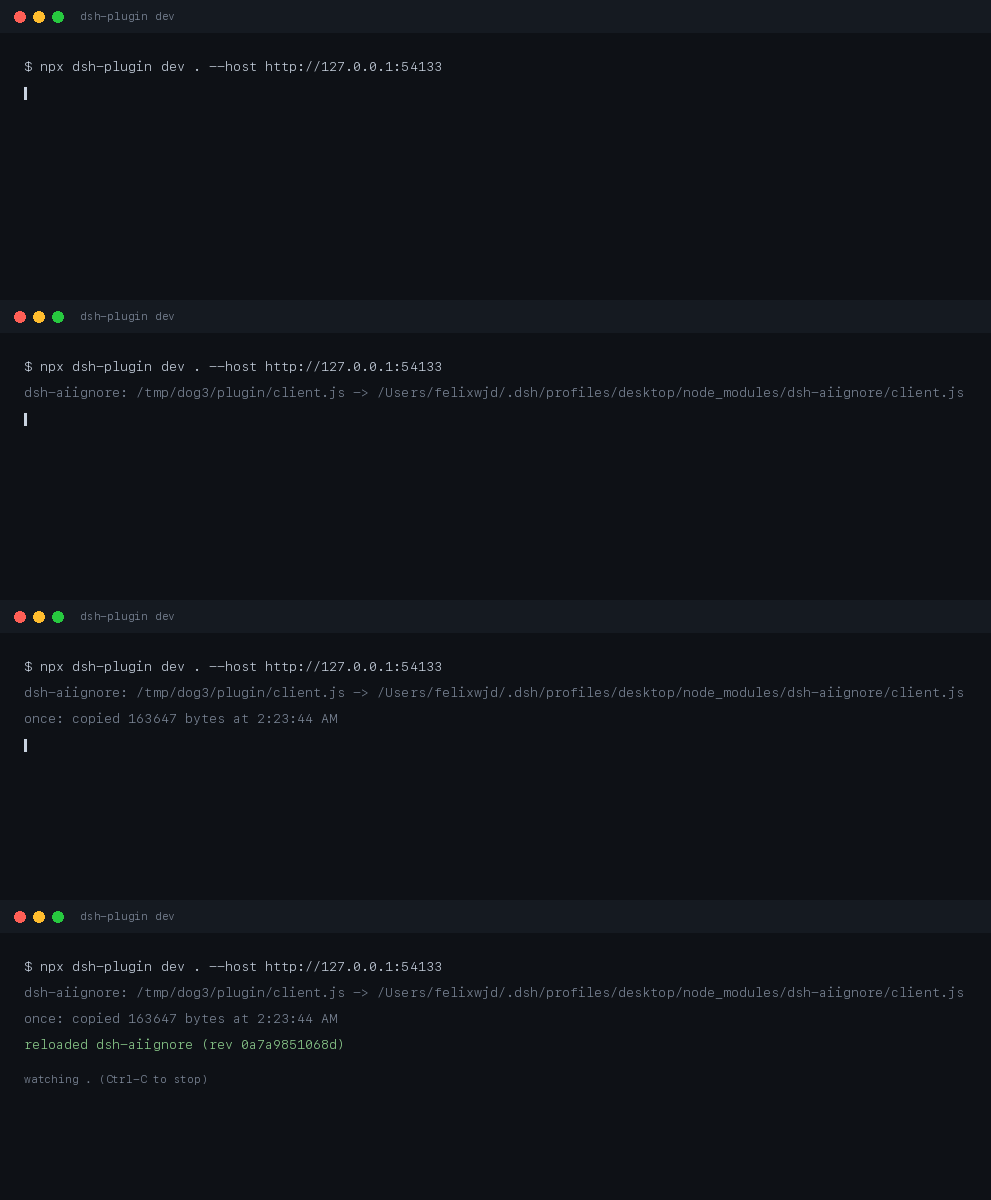
Recorded from a real run against the running app: the last line is the revision the app sent back on /plugins/events, not a message the tool printed on faith.
demo-aiignore: /work/plugin/client.js -> ~/.dsh/profiles/desktop/node_modules/dsh-aiignore/client.js
initial: copied 163647 bytes at 1:18:43 AM
reloaded dsh-aiignore (rev e0c0230c4fc9)
watching /work/plugin
That last line is the whole point: the revision came back from the app's own event stream, so "it reloaded" is a fact, not a hope.
| Flag | Meaning |
|---|---|
--dest <dir> |
write into this installed copy instead of searching ~/.dsh/profiles/*/node_modules/<name> |
--entry <file> |
copy this file instead of dsh.client.entry, client.js, lib/client.js |
--build <command> |
run this before each copy (a failed build copies nothing) |
--host <url> |
confirm the reload against the app at this URL; without it the copy still happens and the tool says it is unconfirmed |
--once |
copy once and exit, for scripts |
Two things it does not do, because the host does not: React state inside the reloaded plugin is lost, and a failed swap does not roll back to the previous bundle.
Use it in CI
The same checks run as a GitHub Action, so a tag cannot go out on a plugin that would not install:
- uses: actions/checkout@v4
- uses: WJDdidi-1/dsh-plugin-toolkit@v1
  with:
    dir: plugin        # the folder holding the plugin's package.json
    command: verify    # pack it, install the tarball, mount the panel
verify is the default because it is the only check that reads what a user
actually installs: doctor reads the working copy, so a files list that
forgets client.js passes it and fails only after npm i.
command: doctor stops at the manifest checks (fast, no install), and
command: index audits market/index.json instead, failing on any version that
cannot state a host range. Pin version: if you would rather not track the
latest release.
What doctor checks
| Check | Why it matters |
|---|---|
version |
The tag is built from it; a malformed version produces a tag nobody can install |
engines.dsh |
The market index copies this into every version entry. Missing it fails the index PR |
readme |
A Requirements section that states the declared range, so an install failure is predictable |
dsh field |
dsh.bundle.patch must exist for the host to load the plugin |
patch file |
The path declared above must be a real file |
client entry |
If dsh.client is declared, the bundle has to be there |
files list |
Every path package.json points at (exports, patch, client) must be covered by files |
root export |
The loader imports the bare package name; if that module is the CLI (or exports no apply), the row mounts nothing while the install reports success |
Exit code is 0 when the plugin can be installed and 1 when it cannot, so it drops into CI unchanged.
Prove the tarball works, not just the repository
doctor reads your working copy. Users install the tarball, and a files list can ship everything except the panel — doctor will not notice.
$ npx dsh-plugin-toolkit verify .
ok  packed 5 file(s), installed the tarball, mounted the panel
    My panel This panel came from dsh-plugin init. Clicks: 0
It packs, installs that tarball into a throwaway directory, then mounts the bundle from the installed copy. When the files list drops the panel:
$ npx dsh-plugin-toolkit verify .
dsh-plugin verify: stopped at pack
  ✗ pack: the tarball does not contain client.js, so the installed plugin has no panel
When the panel does not appear
The install reports success and nothing shows up. In this order:
- Did the host restart? Client bundles are read at startup.
dsh plugin addwrites the profile; the running window still has the old bundle. - Is the root export the plugin?
node -e "import('my-plugin').then((m) => console.log(typeof m.apply))"functionis what the loader needs.undefinedmeansexports["."]points at the CLI —0.8.0of this tool shipped exactly that. - Does the tarball ship the panel?
dsh-plugin verify .installs what users get and mounts it.doctorcannot see this. - Is the patch row shaped right?
cordis.patch.ymlneeds one- insert:entry withidandname:- insert: - id: my-plugin name: my-plugin config: {} - Did the client bundle throw? The host logs the loader error with the plugin id; a bundle that throws at factory time looks identical to one that never loaded.
What release does
release runs the sequence in the order that fails cheapest first:
- Preflight (
doctor) — stop before tagging anything. - Refuse to run on a dirty tree, or if the tag already exists.
- Create and push the tag, which starts the plugin's release workflow.
- Poll the registry until it actually serves that version, reporting each wait.
- Write the index entry with the publish time the registry reports, not the local clock. It waits for
time[version]specifically: the abbreviated registry document has notimefield, and an entry with a null timestamp is rejected by the market checker. - With
--pr: commit that entry onmarket/<version>, push it, and open the pull request. With--mergeas well: wait forgh pr checksto settle, then squash-merge.
npx dsh-plugin release . --pr --merge
tagged plugin-v0.4.0, npm served my-plugin@0.4.0 after 82s
updated market/index.json on market/0.4.0
opened https://github.com/me/my-plugin/pull/3
checks settled after 1s (1 look(s))
merged
Without --pr it prints the git add / gh pr create commands instead of running them; --dry-run prints the whole sequence before anything happens. A re-run after a failure is safe: the same version with the same publish time is a no-op.
When nothing publishes for you
release assumes a tag starts a workflow that publishes. Repositories without
one use --publish, which runs npm publish in the same step:
$ dsh-plugin release . --publish
When the index lives in someone else's repository
Most plugins are listed in a central market repository, not their own. Point
--market at a checkout of that repository and the entry — and the pull
request — land there:
$ dsh-plugin release . --market ../market-repo --pr --merge
tagged plugin-v0.4.0, npm served my-plugin@0.4.0 after 92s
updated /Users/me/market-repo/market/index.json on market/0.4.0
merged
Exit codes
| Code | Meaning |
|---|---|
| 0 | Done, or nothing to complain about |
| 1 | A check failed, or the release stopped (the failing stage is named) |
| 2 | Unknown command |
What is not here yet
Honest list, so nobody plans around a feature that does not exist:
- No
npm publish.releasepushes the tag and waits for the registry, so publishing stays in the workflow where your token and provenance live. It never holds your npm credentials. - No check against a running app.
verifymounts the installed bundle in Node with a stubbed host. It cannot prove the panel appears in a real sidebar — only that the code the tarball ships renders. dev --hostis not covered by CI. The unit tests use a synthetic event stream; the live path is exercised by hand against a running app, on macOS only.- No Windows testing of the
devfile watcher. The Windows CI job runs the whole suite, but the watcher is only asserted against a temp directory, not a real profile.
License
Apache-2.0. See LICENSE.
No comments yet. Be the first to write one.