dsh-local-radiance-server-controller
A DeepSeek Harness (DSH) plugin: remote-control an AMD inference server on your local LAN over SSH — the local Radiance inference server controller.
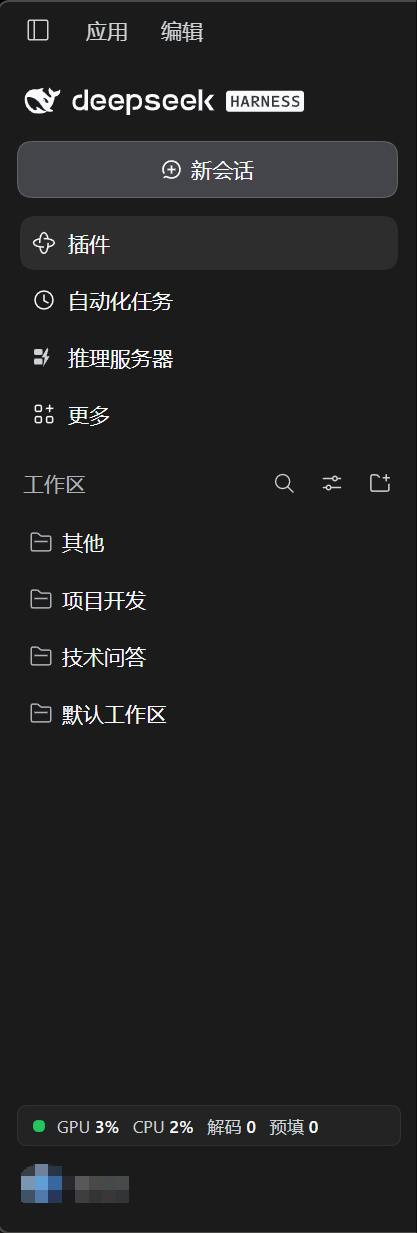
Adds a "推理服务器 / Inference Server" panel to the DSH sidebar plus an always-visible live-metrics widget in the sidebar footer, so day-to-day operations need no terminal.
Chinese documentation: README.zh-CN.md
Sidebar entry and the always-live metrics widget (bottom of the sidebar):
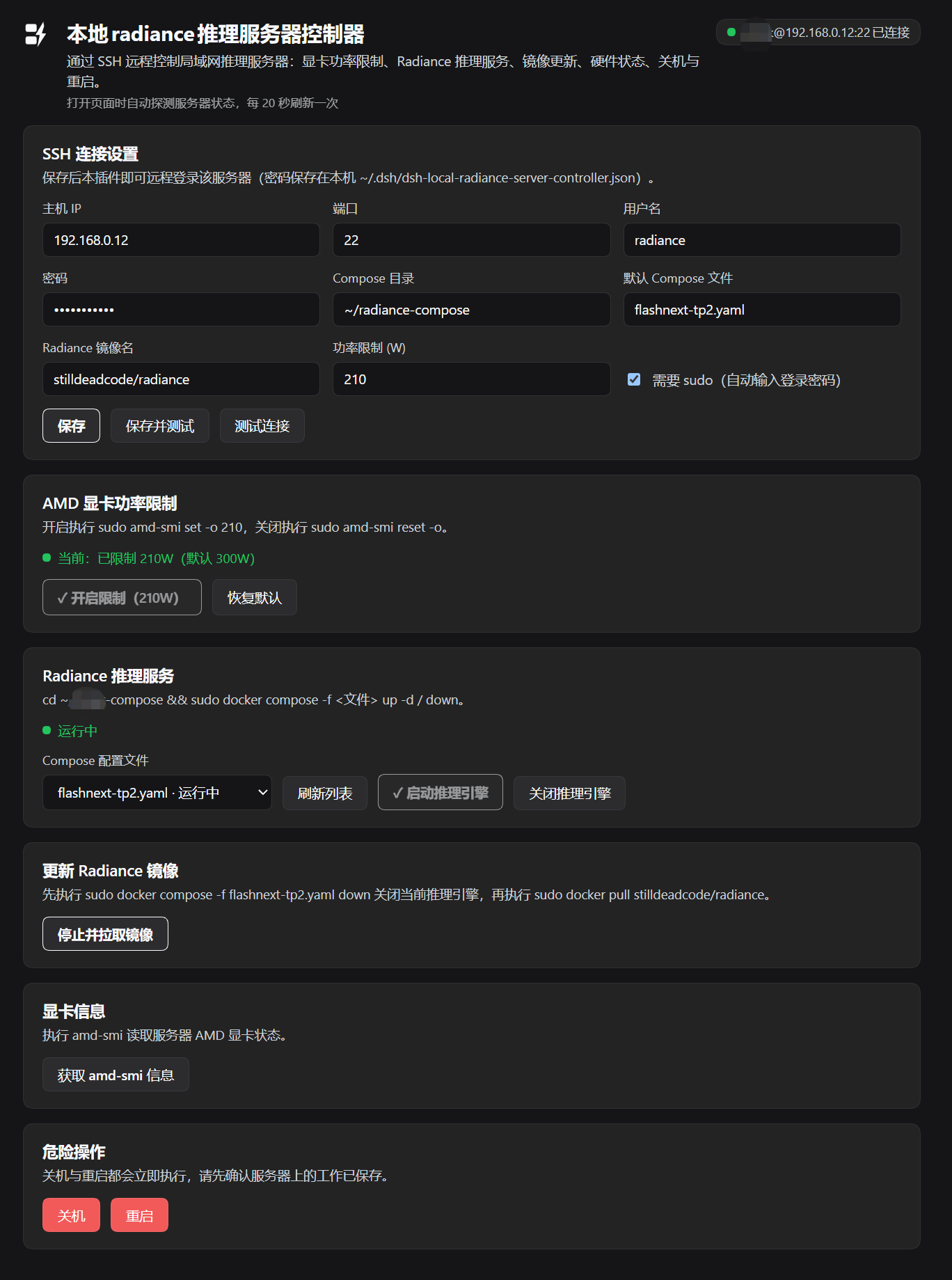
Features
| Card | What it does | Remote command |
|---|---|---|
| SSH settings | Host / port / username / password / compose directory / default service file / image name / power limit / sudo toggle | — (saved locally to ~/.dsh/dsh-local-radiance-server-controller.json) |
| AMD GPU power limit | Enable limit / reset to default; shows current limit state; buttons get a ✓ and disable when the state already matches | sudo amd-smi set -o <W> / sudo amd-smi reset -o |
| Radiance inference service | Dropdown of yaml files in the compose directory (common.yaml hidden), start / stop / update image (down first, then pull) |
cd <dir> && sudo docker compose -f <file> up -d / down; sudo docker pull <image> |
| Server diagnostics | Fetch full amd-smi output | amd-smi |
| Danger zone | Shutdown / Reboot — each with its own two-click confirmation (auto-disarms after 4 s) | sudo shutdown -h now / sudo reboot |
| Sidebar widget | One persistent row: status dot + GPU % CPU % decode/prefill t/s (shrinks to a status dot when the sidebar is collapsed) |
see Live metrics below |
Opening the panel probes the server immediately (running services, power-limit state), then refreshes every 20 s; every action also triggers an immediate refresh.
Live metrics & connection architecture
The whole plugin keeps exactly one long-lived SSH connection to the server (15 s keepalive, self-healing reconnect with backoff). All traffic multiplexes over it through ssh2 exec channels:
| Traffic | Cadence | Remote command |
|---|---|---|
| Engine decode/prefill | 0.5 s | curl localhost:<PORT>/stats (radiance Web API; PORT and API key are read on the fly from <compose dir>/.env — the key never leaves the server) |
| CPU / GPU utilization | 5 s | /proc/stat double-sample delta; GFX_ACTIVITY from amd-smi metric -u |
| Service / power state | 20 s | docker compose ls --format json; amd-smi static -l (SOCKET vs MAX power to detect an active limit) |
| User actions | on demand | see Features table |
No short-lived connections: the server's journalctl typically shows only one or two SSH logins per day.
The sudo password is piped in via base64 (base64 -d | sudo -S); plaintext never appears in remote process arguments.
Installation
Prerequisites
- This machine: DeepSeek Harness desktop
- Server: sshd with password login, sudo available (Radiance deployed via docker compose; AMD GPU with
amd-smi; radiance engine exposing the/statsendpoint)
Steps (first install on any machine)
Copy the plugin directory anywhere on the target machine (do not copy
node_modules; reinstall dependencies per machine): You only needindex.js,client.js,package.json,cordis.patch.yml,icon.svg,locale/(assets/is the README screenshot, optional).Install dependencies inside the plugin directory (installing a local directory does not install its dependencies; skipping this fails with
Cannot find package 'node-ssh'):cd <plugin dir> npm install --omit=devInstall the bundle into DSH: tell the Harness agent
use plugin_manager to install
<absolute plugin dir>as a bundleor run
dsh plugin install <absolute plugin dir>.Restart the DSH app (Host-side code loads at app start).
Open the sidebar panel, fill in the SSH details, save.
To sync between machines, copy the files listed in step 1 and repeat steps 2–3.
Configuration
| Field | Notes | Default |
|---|---|---|
| Host / port / username / password | SSH login (the password is also used for sudo) | 22 |
| Compose directory | Directory containing the service yaml files (~ allowed) |
~/radiance-compose |
| Default compose file | Preselected service file in the panel | flashnext-tp2.yaml |
| Radiance image | Image pulled by the Update-image action | stilldeadcode/radiance |
| Power limit (W) | Target watts for the Enable-limit action | 210 |
| Use sudo | When off, commands run without sudo (the remote user needs direct docker/AMD permissions) | on |
⚠️ Security: the SSH password is stored in plaintext on this machine at
~/.dsh/dsh-local-radiance-server-controller.json. Don't use this on shared/managed machines, and keep the account's permissions minimal.
Troubleshooting
| Symptom | Fix |
|---|---|
| Errors or stale behavior after code edits | Restart the DSH app (Host module cache) |
sudo: a password is required |
Re-save the password in the panel (sudo uses the login password) |
Widget shows - although the service is fine |
Normal during the reconnect cooldown after a server reboot/disconnect; recovers within ~30 s |
| A yaml file missing from the dropdown | Only plain .yaml/.yml file names without .. are listed; common.yaml is hidden on purpose |
| Decode reads 0/tiny while idle | Radiance reports a windowed engine-side average; idle is near zero by design |
File structure
dsh-local-radiance-server-controller/
├── index.js          # Host half: HTTP endpoints + SSH connection pool + all remote actions
├── client.js         # Client half: panel UI + sidebar icon + live metrics widget
├── cordis.patch.yml  # Loader patch (injects the plugin entry)
├── icon.svg          # App icon
├── assets/           # README screenshots (screenshot.png, sidebar.png)
├── locale/{zh,en}.json
└── package.json      # dsh.bundle / dsh.client manifest; depends on node-ssh
Host endpoints (prefix route on the local DSH web server, protected by DSH login):
GET state, GET job?id, GET fast, POST settings, POST action {action,file?}
under /dsh-local-radiance-server-controller.
License
MIT — see LICENSE.
No comments yet. Be the first to write one.