READMESource: main@1b8ebb69
dsh-wsl-windows-folder-picker
English | 中文
Use the Windows folder dialog when using dsh under WSL.
Once installed, "Add workspace" opens the Windows folder dialog, and it can be toggled anytime in Settings.
Install
Requires dsh >=0.1.5-rc.2.
dsh plugin --profile web add github:VoidPrim/dsh-wsl-windows-folder-picker
Restart dsh after installing, then refresh the page:
dsh web
Uninstall:
dsh plugin --profile web remove dsh-wsl-windows-folder-picker
Settings
Settings gains a "Windows folder picker" page:
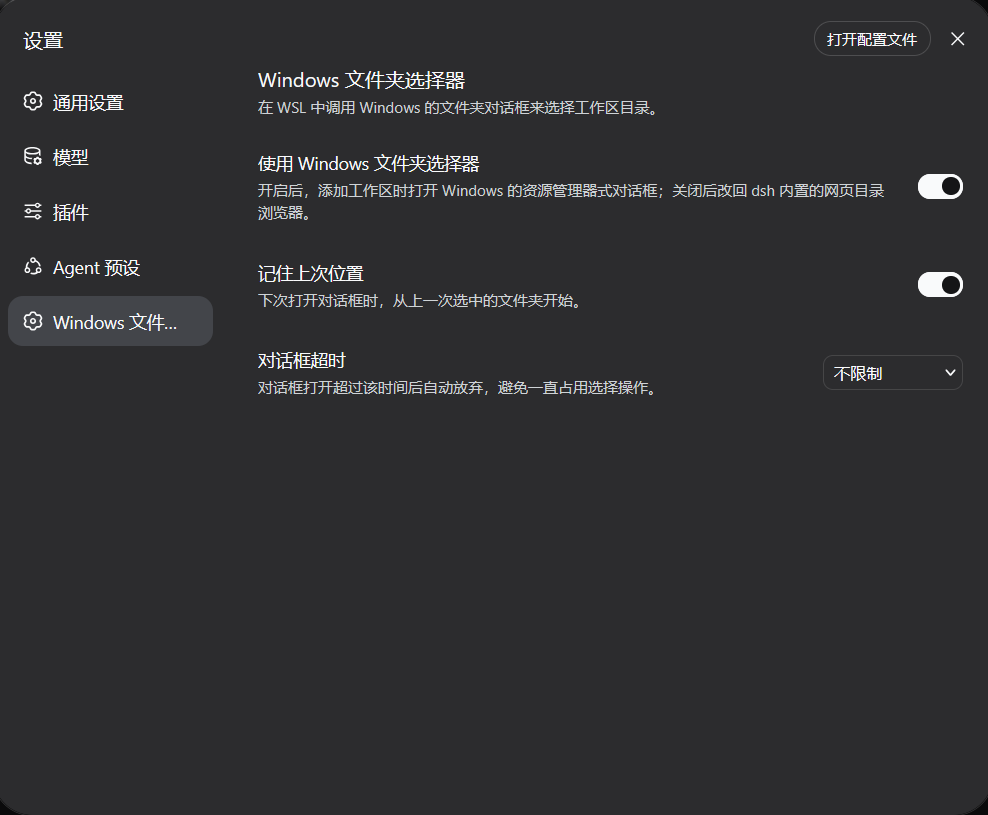
| Option | Default | Description |
|---|---|---|
| Use the Windows folder picker | On | Turn off to return to the default |
| Remember last location | On | Start from the last chosen folder next time |
| Dialog timeout | 5 minutes | Close the dialog automatically on timeout, or set to no limit |
License
MIT
No comments yet. Be the first to write one.