dsh-restart
在 DeepSeek Harness 的插件页标题右侧加一个「重启」小按钮:点一下重启 DSH,插件改动立刻生效,不用退出再手动打开。
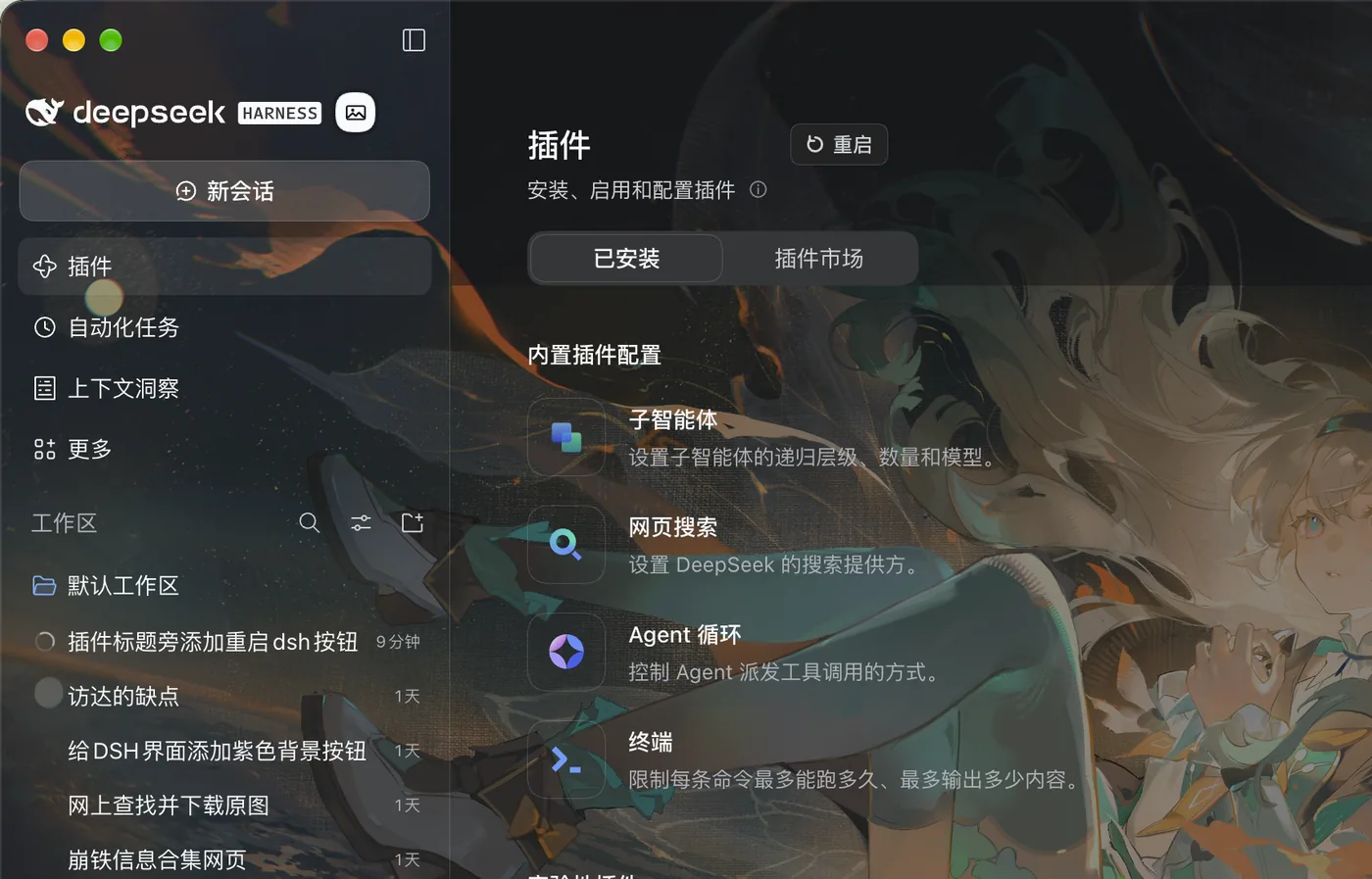
功能
- 标题右侧的小按钮:注册在
shell.overlay槽位,按插件页标题实测定位,紧贴「插件」右侧——不占用、不替换任何内置控件;离开插件页自动隐藏,标题滚进紧凑头部时一起收起 - 一键重启:桌面版会关闭当前应用、等旧进程全部退出、重新启动,并确认应用真的回到前台
- 终端也能用:在终端跑
dsh web时,用完全相同的命令和参数重启 Host - 跟随主题与语言:只引用
--dsw-alias-*主题变量,界面文案跟随 DSH 中英文 - 纯 JavaScript:没有构建步骤,也没有运行时依赖
安装
打开 DSH → 插件 → 添加插件
填入本仓库地址:
https://github.com/VictorGol/dsh-restart确认安装。按钮出现在「插件」页标题右侧;如果没出现,重开一次 DSH
需要 DSH 0.2.x 桌面版。
使用
点「重启」:窗口会关闭,几秒后自动重新打开并回到前台。正在运行的任务会被中断——这一点和菜单里的退出重启一致。
实现
- 按钮定位:插件页没有标题旁的槽位,所以按钮注册在
shell.overlay,读取页面标题[data-plugin-header-part="title"]的位置贴在它右侧,用MutationObserver+resize重新测量;标题不存在时按钮不渲染 - Host 路由:
POST /dsh-restart/restart,只接受 loopback 请求;自定义请求头跨域会触发预检,而该路径不响应预检,别的网页发不出这个请求;同一时间只允许一次重启(第二次 409) - detached helper:点击后 Host 启动一个脱离进程组的 helper,自己随即退出,所以后续步骤不会被正在重启的进程带走。helper 依次:
- 等旧应用的所有进程(主进程、渲染进程、Host)退出,再等 1.2 秒让单实例锁释放;
- 从环境里剥掉
ELECTRON_RUN_AS_NODE、DSH_SESSION_ID、DSH_WEB_URL等只属于 Host 的变量——open会把这些变量原样传给被启动的 App,而ELECTRON_RUN_AS_NODE=1会让 Electron 以 Node 模式启动:没有窗口、约 0.1 秒退出; open -a启动,3.5 秒后确认应用进程真的存在;没起来就重试(最多 5 次,第 4 次直接执行应用可执行文件);- 再发一次
open -a触发应用的activate,把窗口带到前台。
- 日志:每一步都写进
$TMPDIR/dsh-restart.log,重启失败时先看这里。
兼容性
- macOS 桌面版 DSH 0.2.x:实测通过(点按钮后窗口关闭,约 4 秒后重新打开)
- Windows 桌面版 DSH 0.2.x:实测通过(直接执行应用可执行文件;该平台没有
ps校验,所以只有一次启动尝试,起来后应用自己恢复窗口) - 终端
dsh web:按原命令重启 Host(未在真机单独验证)
卸载
在插件页卸载即可;不需要清理其他状态。
License
MIT · 详见 LICENSE
English
A small Restart button beside the Plugins page title in DeepSeek Harness. One click relaunches the app so plugin changes take effect without quitting and reopening it by hand.
- The button is registered in the
shell.overlayslot and anchored to the page title, so it sits next to the heading without replacing any built-in control. It disappears when you leave the Plugins page or the header collapses on scroll. - Desktop: stops the running app, waits for every one of its processes to exit, starts it again, confirms it is really running and activates its window.
- Terminal
dsh web: replays the same command and arguments once the old Host released its port. - Plain JavaScript, no build step, no runtime dependencies.
Install
- Open DSH → Plugins → Add plugin
- Paste
https://github.com/VictorGol/dsh-restart - Confirm. The button appears right of the Plugins title; if it does not, reopen DSH once.
Requires DSH 0.2.x desktop.
How it works
The click sends POST /dsh-restart/restart (loopback only, custom-header fenced). The Host then spawns a detached helper and exits; the helper waits for the old application's processes to disappear, strips Host-only environment variables — open forwards the caller's environment, and ELECTRON_RUN_AS_NODE=1 would start the app as Node with no window — launches it, verifies the process exists (retrying up to five times), and finally activates the window. Every step is logged to $TMPDIR/dsh-restart.log.
Compatibility
Verified on the macOS and Windows desktop apps (DSH 0.2.x). On Windows the helper launches the executable directly and cannot verify the result, so it makes a single launch attempt; the application restores its own window.
License
MIT
No comments yet. Be the first to write one.