dsh-side-chat
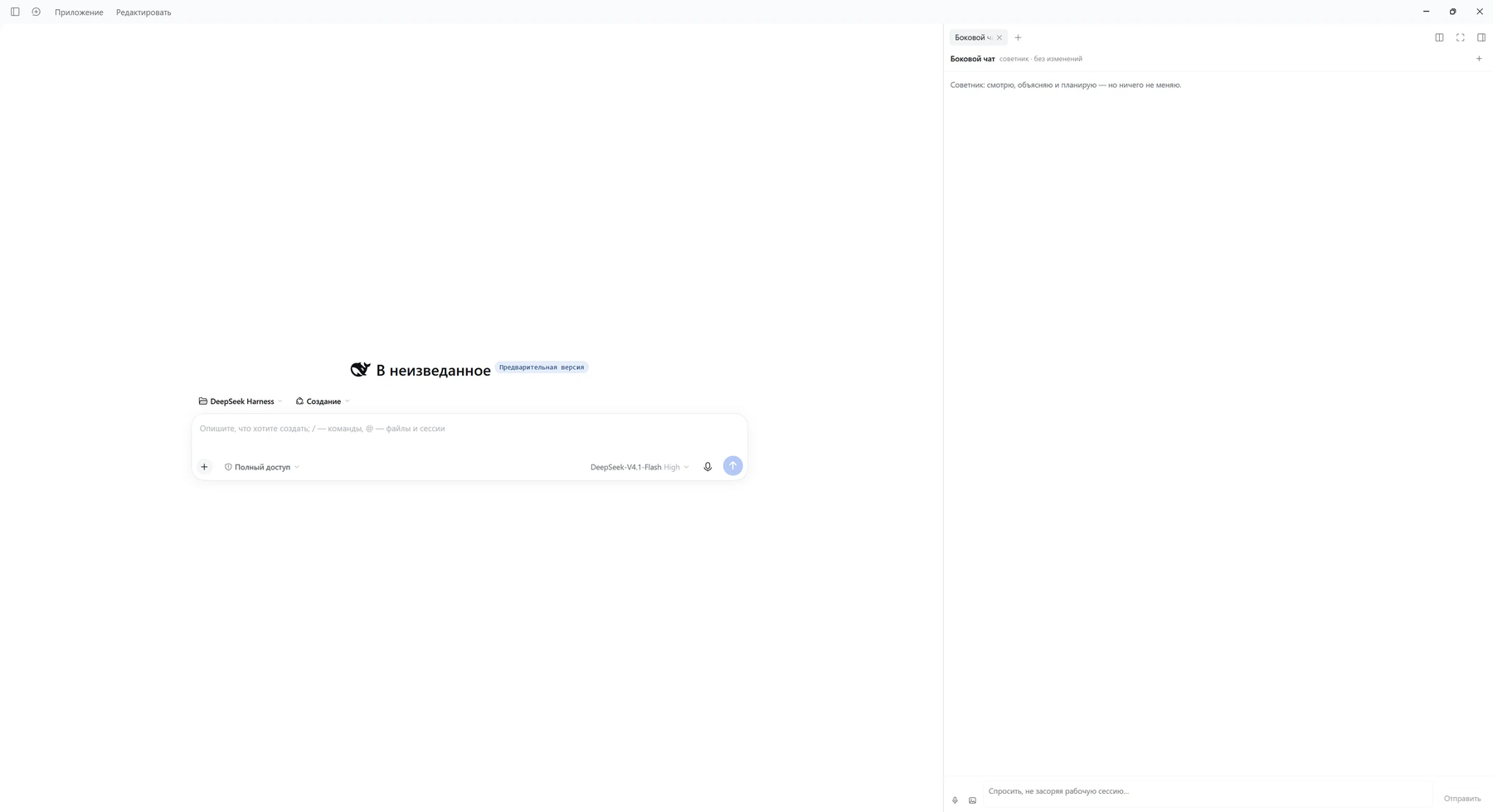
A chat tab in the DeepSeek Harness right sidebar: a separate conversation that sits next to your working session, can read and search, and cannot change anything.
Think of it as the AI chat you keep open in a browser tab — except it lives inside DSH, already knows which project you are in, and never touches your files.
Why it exists
A DSH session is a chat, so why another one? Because the working session is a poor place to ask "help me think". Its transcript fills with tool calls, its context is spent on the task, and every question costs a turn in the middle of the work.
This plugin gives you a second thread that:
- runs its own session, so the two conversations never contaminate each other;
- inherits the working directory, so it can actually look at the project you are in;
- is restricted to reading, so "just check this file" never becomes "oops, edited it".
Features
| Separate thread | Its own agent session, persisted across reloads and restarts |
| Right-panel tab | Opens next to your session, not instead of it |
| Read-only | read, glob, grep, read_image, web_search, web_fetch — no write, no edit, no shell |
| Streaming | Answers appear token by token, with a Stop button |
| Reasoning level | off / low / high / max, chosen in Settings, applied per thread |
| Voice input | Records the microphone, transcribes through the host speech provider |
| Images | Attach screenshots; they are sent as prompt content parts |
| Clean transcript | Shows what was said, not the agent's internal monologue |
Requirements
- DeepSeek Harness 0.2.x with the Web UI (
@deepseek-ai/dsh-web-app). - A configured model provider (any provider the host can route; the plugin uses your default).
- For voice: any speech provider registered in the host. Tested with a local GigaAM provider; if no provider is configured, the display simply reports that nothing is available.
Install
git clone https://github.com/Uzumaku13/DSH-side-chat-advisor.git
Then, from a DSH session, install the directory as a bundle (the tool performs package installation and bundle selection itself):
plugin_manager
  action: install_bundle
  target: /absolute/path/to/dsh-side-chat
From the CLI the equivalent is:
dsh plugin --profile <profile> add /absolute/path/to/dsh-side-chat
One bundle installs two rows: the plugin and the agent preset it runs on (see Why a preset ships with it). There is no second step.
Then:
- restart DSH, or toggle the plugin off and on in Settings → Plugins;
- refresh the page (
F5) — the client half is a browser module.
To remove everything:
plugin_manager
  action: remove_bundle
  target: dsh-side-chat
Use
Open the panel with the speech-bubble button in the conversation header, on the right next to the session utilities. The tab also appears in the right sidebar's tab guide.
Inside the panel:
- Type and press Enter. Shift+Enter adds a line.
- 🎤 / mic — record, press again to stop. The transcript is appended to the draft, so you can fix a word before sending.
- Picture — attach images (several at once).
- + in the panel header — start a fresh thread. The old one keeps its log on disk; it is simply no longer shown.
- Stop replaces Send while the model is answering.
Settings
Settings → Plugins → Side chat (and the plugin's own card in the plugins list).
Reasoning level
How much the model thinks before answering: Off, Low, High, Max. The list comes
from the model catalog, so it follows whichever model you run.
Default is Off: for a chat, reasoning tokens are the main cost and the main latency.
Switch to Low or High if planning starts to feel shallow.
A note on the implementation: DSH's selectModel installs the choice on the session and
saves it as the deployment default in the background. The plugin restores the previous
default immediately after, so your coding sessions keep their own level. The plugin reads
the value back from GET /x-side-chat/models.json — if default.reasoningEffort ever
changes, that restore step failed.
Hide the Claude Migration button
Optional and off by default. dsh-claude-move injects a floating launcher as raw DOM,
not through a slot, so there is no registration to remove. The toggle adds one CSS rule
that hides it; the plugin itself and its tools keep working. The preference lives in this
browser's localStorage.
How it works
Threads
The panel asks the host for a thread (POST /x-side-chat/thread). The host creates the
session itself, which means it knows the id before the panel does and can apply the tool
mask in the same breath.
The thread id is kept in the browser (localStorage: dsh.side-chat.thread.v2) and mirrored
in $DSH_HOME/side-chat/threads.json. The registry exists so the mask can be re-applied on
agent/created — a thread resumed after a restart is narrowed before its first turn.
Read-only by construction, and by mask
The preset ships only reading tools. On top of that the host applies tools.restrict
with an explicit allow-list whenever the agent is created. Either alone would do; both
together mean a future edit to the preset cannot quietly hand the chat a shell.
Why a preset ships with it
Agent presets decide what reaches the model. Created on a coding preset, the thread would
inherit the workspace AGENTS.md, the project rules and the entire skill catalog: it would
answer with reports, task lists and tool talk, and cost several times more per turn.
The bundled sidechat preset mounts a persona, reading tools, web access and compaction —
and not agent-instructions, tool-skill or any MCP server.
HTTP surface
Everything the panel needs is a plain JSON route on the host, so the same actions can be driven without a browser:
| Route | Purpose |
|---|---|
POST /x-side-chat/thread |
Create a thread (preset, tool mask, model) |
POST /x-side-chat/adviser |
Re-apply the mask (idempotent, called on every mount) |
POST /x-side-chat/model |
Re-apply the configured reasoning level to one thread |
POST /x-side-chat/say |
Send text into a thread (handy for testing) |
POST /x-side-chat/voice |
Transcribe a canonical 16 kHz mono WAV (base64) |
GET /x-side-chat/voice.json |
Speech providers, selection, warm-up |
GET /x-side-chat/settings.json |
Current reasoning level, allowed values, model |
POST /x-side-chat/settings |
Save the level and apply it to every known thread |
GET /x-side-chat/models.json |
Raw model catalog |
GET /x-side-chat/tools.json |
Tool names the thread can see (debugging the mask) |
GET /x-side-chat/status.json |
Known threads |
Files it writes
| Path | Contents |
|---|---|
$DSH_HOME/side-chat/threads.json |
Thread ids (for re-applying the mask) |
$DSH_HOME/side-chat/settings.json |
Reasoning level |
localStorage: dsh.side-chat.thread.v2 |
The thread the panel shows |
localStorage: dsh.side-chat.hide-claude-launcher |
The launcher toggle |
Transcripts themselves are ordinary DSH session logs — nothing is stored twice.
Troubleshooting
The tab shows an error, or the plugin's routes return 404.
The host half registered its HTTP surface before the web server existed. This is handled by
waiting for the service (ctx.inject(['webServer'])); if you still see 404 after a restart,
check the host log for [side-chat].
The thread does not appear — the panel sits on "Creating thread…".
Creation is a page-level singleton on purpose: the right column remounts the tab body, and a
per-component flag would abandon the request and mint a new session each remount. If it
hangs, call POST /x-side-chat/thread directly — the error it returns names the cause.
Voice does nothing.
Two hard requirements from the transcriber: a canonical WAV (44-byte header, PCM16) and
language: auto for providers that declare only auto. Both are handled; if you swap the
provider, keep them in mind. Check GET /x-side-chat/voice.json for the provider's phase.
Answers read like a work report.
The thread is running on a coding preset — the preset-sidechat row is missing or was
overridden. Confirm the row is active in Settings → Plugins.
Reasoning level does not stick.
The session may have been resumed before the change. Call POST /x-side-chat/model with
its id, or open a new thread.
Limitations
- A thread is a real DSH session: it appears in no workspace, but it does exist on disk and
is never garbage-collected. Delete
$DSH_HOME/sessions/<id>(or use your usual quarantine) to drop one. - The persona text is Russian. Edit the preset in
cordis.patch.ymlif you want another language; the UI itself follows the DSH locale. - Tool steps are not shown as rows — a chat shows what was said, not what ran.
- The runtime-context block (
Current working directory…) is still sent to the model by a host plugin; it is filtered out of the transcript but still costs tokens. - Voice needs microphone permission, and the first press may wait for the model to load.
Development
Plain JavaScript, no build step.
- Host half:
index.js(routes, thread creation, mask, model, voice). - Client half:
client.js(slot registrations, panel, settings card, microphone capture). - Reload after editing
index.js: toggle the plugin off/on (or restart DSH). - After editing
client.js: toggle and refresh the page.
Before publishing a fork, set author in package.json and add a repository field.
Contributing
Bug reports, ideas and patches are welcome — see CONTRIBUTING.md for how the two halves fit together, how to reload them, and what a useful report contains.
License
MIT — see LICENSE.
No comments yet. Be the first to write one.