dsh-translator
Enhanced fork of
nicearrack/dsh-translator, based on upstreamv0.4.3. Adds a standalone input panel (translate typed/pasted text, no selection needed), Google Translate as the first keyless provider, and a dictionary layer (POS groups, pinyin/IPA, bilingual examples) rendered under the translation. Everything else is upstream's — see CHANGELOG.md for the exact diff and NOTICE.md for provenance, verification and how to sync with upstream.
Youdao-style word-selection translation for DeepSeek Harness (DSH).
Select any text — a message, the sidebar, an input field — and a floating translate button appears at the selection. Click it for a translation card.
Two engines, switchable in the plugin's settings:
- Free API (default) — public translation endpoints. No account, no key, nothing to configure.
- Model — the harness's own LLM. Your text stays inside the model pipeline you already configured.
| English | 中文 README |
|---|
Install
On the DSH Plugins page, click Add plugin and give either the npm package name or the GitHub address:
@tuweizhi/dsh-translator
https://github.com/TuWeiZhi/dsh-translator
To remove it later, uninstall it from that same page.
To update, uninstall it and add it again — the npm package name and the GitHub address both resolve to the latest release. The new version takes effect once DSH restarts.
Usage
Select text → click the floating translate button → the translation card appears. Drag the card by its header, or pin it so it can't be dismissed by accident. Click the translation (or the source text, or an error message) to copy it.
Features
- Select text anywhere; the button follows the selection and adapts to light/dark. A touch or pen selection raises it too, and a selection that wraps lines anchors the button at the point it ended rather than at the whole block
- Direction is automatic: text in your primary language becomes English, anything else becomes your primary language. Primary language: 简体中文 / 繁體中文 / 日本語 / 한국어 / Русский
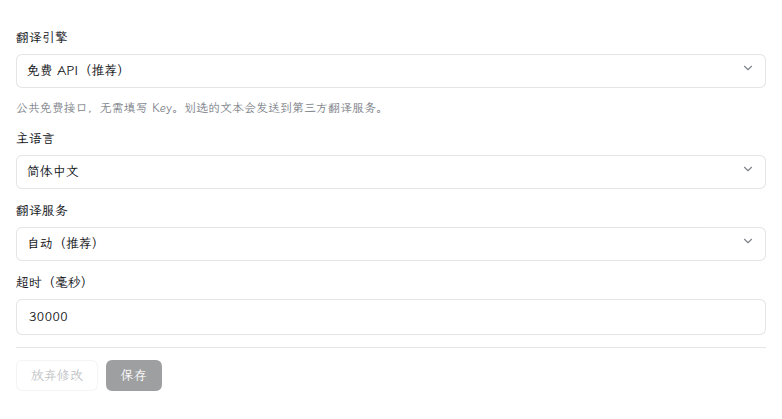
- Settings sit on the plugin's own page. Picking the Free API engine shows just the primary language, the service and the timeout; picking Model swaps in the model controls. Changes apply to the next translation, with no restart
- The card's footer names what answered — the endpoint for Free API, the model for Model — and marks a reused answer
- Copy, drag and pin. One card at a time — but a card you pin stays where you put it, still finishing if it was mid-translation, while you translate something else
- Asking for the same passage again is answered from a short-lived cache, so it costs one request, not two. Retry deliberately ignores the cache and asks again
- A translation that came back unchanged is labelled as untranslated instead of being passed off as a translation
The free API engine
Public endpoints run by Tencent, Microsoft, Volcengine and MyMemory. None of them needs registration, an API key or a token. Requests go out from the DSH host process rather than the browser, so there is no CORS negotiation and no cookie is sent. Automatic mode walks the chain and benches a failing provider with a backoff that starts at 30 seconds and caps at five minutes; any one page may make 60 requests a minute, after which the card asks you to wait a moment.
Two things worth knowing:
- These are undocumented web endpoints, not official APIs. They carry no SLA and can change without notice — which is why the chain exists. If every one of them is down, the card says so and points at the Model engine.
- Your selected text leaves the machine and goes to whichever provider answers. The first free-engine translation a browser performs says so in the card, once; after that it is not shown again. If that is not acceptable, use the Model engine.
Screenshots
Select text → the floating translate button appears at the selection:

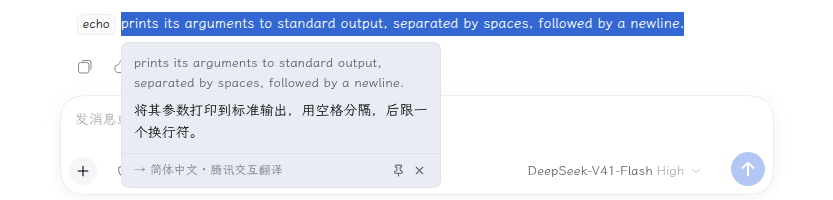
Click it → the translation card (English → Chinese):
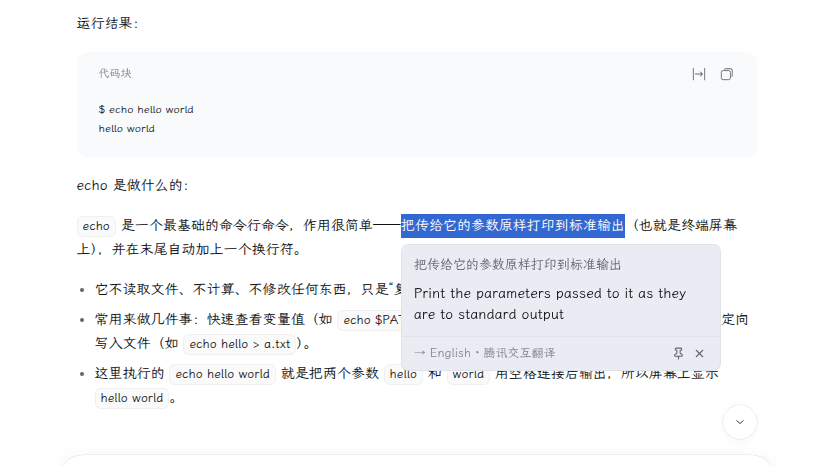
The Chinese → English direction is automatic:
Settings, on the plugin's own page:
No comments yet. Be the first to write one.