DeepSeek Harness Temporary Workspaces



DeepSeek Harness Temporary Workspaces (dsh-tmp-wks)
English | 中文
Why you need it
You just want to ask a quick question, but you have to leave DSH, create a folder, come back and point at that directory, then delete it by hand afterwards. Forget to clean one up, and several sessions start contaminating each other.
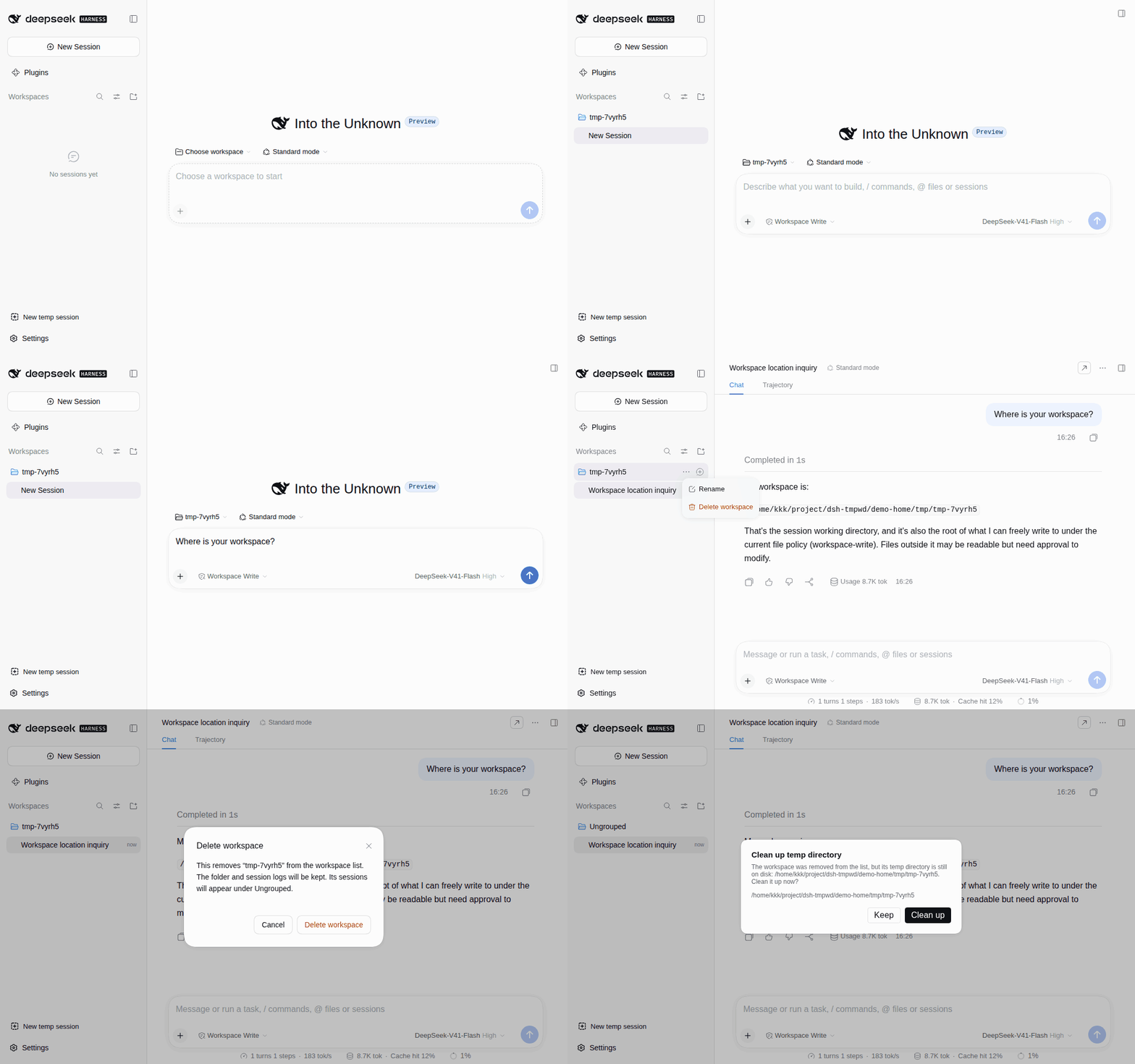
Temp workspaces collapse all of that into a single click:
- One-click setup: click once and a throwaway workspace is created on the spot, with a session already started in it.
- Deletion under control: deleting a workspace asks whether to delete its temp directory on disk too, and keeps the files by default.
- Works on both clients: available in DSH Web and the DSH desktop client, from a single install.
Install
dsh plugin --profile web add @cliven/dsh-tmp-wks
A "New temp session" button then appears at the bottom of the sidebar; click it to create a temp workspace and start a session. Right-click the button to open the management panel, where you can view and delete the temp workspaces this plugin created.
Storage location
Temp workspaces live in tmp/ under the DSH home directory, each named tmp- plus 6 random characters.
The home directory defaults to ~/.dsh and can be overridden with the $DSH_HOME environment variable, so a default path looks like:
~/.dsh/tmp/tmp-k7mq2z
No comments yet. Be the first to write one.