Find in Chat (DeepSeek Harness plugin)
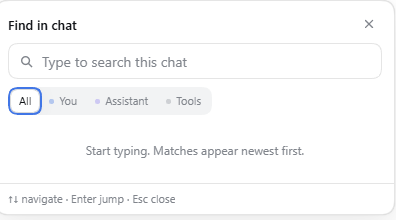
A search control in the conversation header. It searches the whole open session, not just the part of the transcript Chat has already loaded, and lists every match from the newest to the oldest. Picking a result pages the history to that Turn, scrolls to the message, and marks the exact text.
Features
- One magnifier button in the conversation header, next to the Session utilities.
- Literal, case-insensitive search; whitespace in the query matches any whitespace run, so
lu boxfindslu\nbox. - Results are one row per occurrence, newest first, with the message kind, Turn, time, and a two-line preview around the match.
- A four-way selector — All, You, Assistant, Tools — chooses what stays in the results; All is the default. Assistant covers answers and reasoning, Tools covers tool calls and their output. The Host applies the choice before the 500-hit cap, so narrowing it never hides the remaining matches.
- A Hidden result comes from compacted history; clicking it opens the full message from the Session log in a reader with the match highlighted and a copy button.
↑/↓move through the list,Enteropens the active match, a click opens any row.- The Chat is asked to load the missing history window before the jump, so matches in old Turns work too.
- The matched text is highlighted with the CSS Custom Highlight API, and a short-lived ring marks the exact spot (it stays visible even inside inline code, where a highlight would sit under the code background).
- Closing with
Esc, the close button, or a click outside. The panel follows the header when the window is resized. - English, Russian, and Simplified Chinese copy, following the page language.
- No global keyboard shortcut: the control is the way in, so it never competes with the built-in Session search shortcut.
What is searched
Search covers the visible text of the whole open Session:
- human
user/messageentries (You); assistant/messageanswers (Assistant);- assistant reasoning blocks (Thought, grouped under Assistant);
tool/callnames and arguments plustool/resultoutput and errors (Tools).
Injected context, system prompts, and compaction checkpoints are not searched. A match inside a collapsed step still appears in the list; opening it scrolls to that step and the panel explains that the step must be expanded to see the highlight. Compacted messages stay searchable too: the result list marks them Hidden, and clicking one opens its full text from the log in a reader.
The Host reads the complete live log through ctx.sessionQuery.readSession() and asks listEvents() which records were removed by a positional replacement. Removed records stay searchable and are marked Hidden; the others, including log-only records embedded in a step, can be opened in Chat. One parsed document list is cached per Session and rebuilt when the live log grows.
Install
The plugin is a normal DeepSeek Harness bundle with a Host half and a browser half.
- Put this directory into the profile's package tree, for example
~/.dsh/profiles/desktop/node_modules/@local/find-in-chat/. - Add
"@local/find-in-chat": "1.0.0"to the profilepackage.jsondependencies. - Add
"@local/find-in-chat"todsh.profile.bundlesin the same file. - Restart DSH. The bundle's
cordis.patch.ymlinserts thefind-in-chatrow; nothing else needs enabling.
With the plugin manager available, install this folder as a bundle instead of steps 1–3.
How it works
| File | Role |
|---|---|
index.js |
Host plugin: registers GET /find-in-chat/search and GET /find-in-chat/status, projects the Session surface into searchable documents, and caches them. |
lib/search.js |
Pure extraction and match logic, shared by the Host route and the tests. |
client.js |
Browser plugin: the header control, the result panel, history loading, scroll, highlighting, and copy. |
cordis.patch.yml |
Inserts the bundle row. |
locale/*.json |
Plugin Manager title, description, and the icon metadata. |
The browser calls the Host route with the current Session id. The Host returns hits with their seq, Turn, and step. The browser asks the Session controller for loadThrough(seq), finds the rendered row by its conversation key (input-message + message id, or assistant-step + <turn>:<step>), and falls back to a Turn and text lookup if the key shape changes.
Limits
- Search is literal; tool output and reasoning are included, so a broad query can reach the 500-occurrence cap.
- A match inside a collapsed tool or reasoning step is scrolled to, but its highlight becomes visible only after that step is expanded.
- A Hidden result comes from compacted history: it is found and previewed, and opening it shows the full message in a reader because Chat no longer renders that row.
- The history jump can take a moment when the match is far outside the loaded window; the panel shows “Opening message…” while it pages.
- The Host re-reads the Session log when it grows, so a very large Session makes each new keystroke spend more time on the Host.
- Matching is literal; regular expressions are not interpreted.
Privacy
Everything stays local. The browser talks only to the DSH Host on the same origin, and the Host reads only the Sessions the DSH profile already owns. There is no telemetry, no external request, and no network dependency.
License
MIT
Русский
Кнопка поиска в шапке чата. Ищет по всей открытой сессии, а не только по той части переписки, которая уже загружена в Chat, и показывает все совпадения от новых к старым. По нажатию на результат чат догружает нужный участок истории, прокручивается к сообщению и подсвечивает точное место.
Возможности
- Кнопка с лупой в шапке чата, рядом с остальными действиями сессии.
- Поиск буквальный, без учёта регистра; пробелы в запросе совпадают с любым набором пробельных символов, поэтому
lu boxнаходитlu\nbox. - Каждая строка списка — одно совпадение, сначала самые новые; видны тип сообщения, ход, время и две строки контекста вокруг найденного текста.
- Переключатель на четыре положения — Все, Вы, Ассистент, Инструменты — выбирает, что оставить в результатах; по умолчанию Все. Ассистент включает ответы и рассуждения, Инструменты — вызовы и вывод инструментов. Host применяет выбор до лимита в 500 совпадений, поэтому сужение не прячет оставшиеся совпадения.
- Результат Скрыто пришёл из сжатой истории; по клику открывается полный текст сообщения из журнала с подсветкой и кнопкой копирования.
↑/↓листают список,Enterоткрывает выбранное совпадение, клик открывает любую строку.- Перед переходом Chat догружает недостающую часть истории, поэтому работают и совпадения в старых ходах.
- Найденный текст подсвечивается через CSS Custom Highlight, а точное место на короткое время обводится рамкой — её видно даже внутри inline-кода, где обычная подсветка уходит под фон плашки.
- Закрытие по
Esc, кнопке закрытия или клику вне панели. Панель следует за шапкой при изменении размера окна. - Тексты на английском, русском и китайском в соответствии с языком страницы.
- Глобальной горячей клавиши нет: вход только через кнопку, поэтому плагин не спорит со встроенным поиском по сессиям.
Что ищется
Поиск идёт по видимому тексту всей открытой сессии:
- сообщения пользователя (
user/message, Вы); - ответы ассистента (
assistant/message, Ассистент); - блоки рассуждений ассистента (Рассуждение, входят в «Ассистента»);
- имена и аргументы вызовов (
tool/call), вывод и ошибки инструментов (tool/result) — Инструменты.
Внедрённый контекст, системные промпты и точки компакции не ищутся. Совпадение внутри свёрнутого шага всё равно попадает в список; при открытии чат прокручивается к шагу, а панель поясняет, что шаг нужно раскрыть для подсветки. Сжатые сообщения тоже ищутся: они помечаются как Скрыто, и по клику открывается полный текст из журнала.
Host читает полный живой журнал через ctx.sessionQuery.readSession() и запрашивает у listEvents(), какие записи были удалены позиционной заменой. Удалённые записи остаются в поиске и помечаются как скрытые; остальные, включая log-only записи внутри шага, можно открыть в чате. Разобранный список документов кэшируется на сессию и перестраивается, когда журнал растёт.
Установка
Плагин — обычный бандл DeepSeek Harness с Host- и браузерной половинами.
- Положите эту папку в дерево пакетов профиля, например
~/.dsh/profiles/desktop/node_modules/@local/find-in-chat/. - Добавьте
"@local/find-in-chat": "1.0.0"вdependenciesфайлаpackage.jsonпрофиля. - Добавьте
"@local/find-in-chat"вdsh.profile.bundlesтам же. - Перезапустите DSH.
cordis.patch.ymlбандла вставит строкуfind-in-chat; больше ничего включать не нужно.
Если доступен plugin manager, установите эту папку как бандл вместо шагов 1–3.
Как устроено
| Файл | Назначение |
|---|---|
index.js |
Host-плагин: маршруты GET /find-in-chat/search и GET /find-in-chat/status, разбор поверхности сессии и кэш. |
lib/search.js |
Чистая логика извлечения текста и поиска; используется маршрутом и тестами. |
client.js |
Браузерный плагин: кнопка, панель, догрузка истории, прокрутка, подсветка, тексты. |
cordis.patch.yml |
Вставляет строку бандла. |
locale/*.json |
Название и описание в Plugin Manager, метаданные иконки. |
Браузер передаёт Host-маршруту id текущей сессии. Host возвращает совпадения с seq, номером хода и шага. Браузер просит Session controller выполнить loadThrough(seq), находит отрисованную строку по ключу разговора (input-message + id сообщения либо assistant-step + <ход>:<шаг>) и откатывается к поиску по ходу и тексту, если формат ключа изменится.
Ограничения
- Поиск буквальный; вывод инструментов и рассуждения включены, поэтому широкий запрос может упереться в лимит 500 совпадений.
- Совпадение внутри свёрнутого шага с инструментом или рассуждением прокручивается к шагу, но подсветка появляется только после раскрытия шага.
- Результат Скрыто пришёл из сжатой истории: он находится и показывается в сниппете, а по клику открывается полный текст в читалке, потому что чат эту строку больше не отображает.
- Догрузка истории может занять мгновение, если совпадение далеко за пределами загруженного окна; панель показывает «Открываю сообщение…».
- Host перечитывает журнал сессии при его росте, поэтому в очень большой сессии каждое новое нажатие клавиши тратит больше времени на Host.
- Совпадения буквальные; регулярные выражения не поддерживаются.
Приватность
Всё остаётся локально. Браузер обращается только к DSH Host на том же origin, а Host читает только те сессии, которыми уже владеет профиль DSH. Никакой телеметрии, внешних запросов и сетевых зависимостей.
Лицензия
MIT
中文
聊天标题栏中的搜索按钮。它搜索整个打开的会话,而不只是 Chat 已经加载的那一段,并按从新到旧列出所有匹配项。点击结果后,Chat 会加载缺失的历史、滚动到该消息并标出准确位置。
功能
- 会话标题栏中的一个放大镜按钮,位于会话操作区。
- 字面匹配、不区分大小写;查询中的空白可匹配任意空白,因此
lu box能找到lu\nbox。 - 列表每一行是一个匹配项,最新的在前,显示消息类型、轮次、时间和匹配处周围的两行预览。
- 四档选择器 全部 / 你 / 助手 / 工具,决定结果中保留什么;默认 全部。助手 包含回答和推理,工具 包含工具调用与输出。Host 在 500 条上限之前应用筛选,因此缩小范围不会隐藏其余匹配。
- 已隐藏 的结果来自已压缩的历史;点击会打开日志中的完整消息,带高亮和复制按钮。
↑/↓在列表中移动,Enter打开当前匹配项,点击任意行也可以打开。- 跳转前会让 Chat 加载缺失的历史窗口,因此旧轮次中的匹配也能打开。
- 匹配文本用 CSS Custom Highlight 标出,并用一个短暂的圆角框圈出准确位置——即使匹配位于行内代码中,高亮会被代码底色盖住,圆角框仍然可见。
- 支持
Esc、关闭按钮和点击面板外关闭。窗口尺寸变化时面板跟随标题栏。 - 提供英文、俄文和简体中文文案,跟随页面语言。
- 不注册全局快捷键:入口只有按钮,因此不会和内置的会话搜索快捷键冲突。
搜索范围
搜索覆盖整个打开会话中可见的文本:
- 用户的
user/message消息(你); - 助手的
assistant/message回答(助手); - 助手的推理块(思考,归入“助手”);
tool/call的名称与参数,以及tool/result的输出和错误(工具)。
注入的上下文、系统提示和压缩检查点不参与搜索。位于折叠步骤中的匹配仍会出现在列表里;打开时会滚动到该步骤,面板会提示需要展开步骤才能看到高亮。已压缩的消息同样可以搜索:列表会将它们标记为 已隐藏,点击即可在阅读器中打开日志里的完整文本。
Host 通过 ctx.sessionQuery.readSession() 读取完整的实时日志,并用 listEvents() 确认哪些记录被位置替换删除。被删除的记录仍可搜索并标记为已隐藏;其余记录(包括步骤内的 log-only 记录)可以在聊天中打开。每个会话缓存一份解析后的文档列表,日志增长时重建。
安装
插件是普通的 DeepSeek Harness bundle,包含 Host 和浏览器两部分。
- 把本目录放到配置文件的包目录中,例如
~/.dsh/profiles/desktop/node_modules/@local/find-in-chat/。 - 在配置文件的
package.json的dependencies中加入"@local/find-in-chat": "1.0.0"。 - 在同一个文件的
dsh.profile.bundles中加入"@local/find-in-chat"。 - 重启 DSH。bundle 的
cordis.patch.yml会插入find-in-chat行,不需要再启用其他内容。
如果可以使用 plugin manager,请直接把该目录作为 bundle 安装,跳过第 1–3 步。
实现
| 文件 | 作用 |
|---|---|
index.js |
Host 插件:注册 GET /find-in-chat/search 和 GET /find-in-chat/status,把会话表面投影为可搜索文档并缓存。 |
lib/search.js |
纯文本提取与匹配逻辑,供 Host 路由和测试共用。 |
client.js |
浏览器插件:标题栏按钮、结果面板、历史加载、滚动、高亮和文案。 |
cordis.patch.yml |
插入 bundle 行。 |
locale/*.json |
Plugin Manager 中的标题、描述和图标元数据。 |
浏览器把当前会话 id 传给 Host 路由。Host 返回带有 seq、轮次和步骤的匹配项。浏览器通过 Session controller 调用 loadThrough(seq),按对话键(input-message + 消息 id,或 assistant-step + <轮次>:<步骤>)找到已渲染的行;如果键格式变化,则回退到按轮次和文本查找。
限制
- 搜索是字面匹配;工具输出和推理也包含在内,因此宽泛的查询可能达到 500 条上限。
- 位于折叠的工具或推理步骤中的匹配会滚动到该步骤,但展开步骤后才能看到高亮。
- 已隐藏 的结果来自已压缩的历史:可以找到并预览,打开时会显示完整消息,因为聊天不再渲染该行。
- 当匹配项远在已加载窗口之外时,加载历史可能需要一点时间;面板会显示“正在打开消息…”。
- 日志增长时 Host 会重新读取会话日志,因此超大会话中每次按键在 Host 上的耗时都会增加。
- 匹配是字面匹配,不支持正则表达式。
隐私
所有内容都留在本地。浏览器只访问同源的 DSH Host,Host 只读取 DSH 配置文件已经拥有的会话。没有遥测、外部请求或网络依赖。
许可证
MIT
No comments yet. Be the first to write one.