dsh-rapidocr


Local, offline OCR for DeepSeek Harness.
A text-only model cannot look at an image. When a user attaches a screenshot to a
conversation, the agent is told the file path but never sees the pixels.
dsh-rapidocr closes that gap on this machine: the host reads the image
bytes, hands them to a bundled CPU OCR engine and returns plain text.
- Private — images never leave the computer. No network call at all.
- Cheap — no vision-model tokens, no API bill.
- Offline — the 13 MB of ONNX weights ship inside the plugin.
- Fast — a 1280×720 screen capture is recognised in roughly half a second on an ordinary 8-core desktop CPU.
agent ──▶ ocr_image(file_path) ──▶ DSH Host (index.js)
                                    │  path authorised by ctx.fs, bytes read there
                                    ▼
                                  sidecar worker (worker/ocr-worker.js)
                                    │  one warm ONNX engine, JSON Lines protocol
                                    ▼
                                  RapidOCR pipeline (src/) ──▶ ONNX Runtime (CPU)
The engine lives in a separate Node process, so a one-second inference never blocks the Electron UI. It is started lazily on the first call and stays warm, so the ~410 ms model load is paid once rather than per image.
Install
Option A — Open Plugin Market (recommended). The plugin is listed and
reviewed in the dsh-plugin-index
market: add https://dshopen.org/index.json as an index source (Plugins →
Experimental Plugins → Custom plugin markets → Discover → Add index source),
then paste the name dsh-rapidocr in Discover to install it.
Option B — from a clone of this repository. Add the package to your DSH profile and enable the bundle:
# 1. clone
git clone https://github.com/Timqt/dsh-rapidocr.git

# 2. point your profile at it, in
#    %USERPROFILE%\.dsh\profiles\<profile>\package.json
{
  "dependencies": {
    "@local/dsh-rapidocr": "link:D:/path/to/dsh-rapidocr/packages/dsh-rapidocr"
  },
  "dsh": { "profile": { "bundles": [ ..., "@local/dsh-rapidocr" ] } }
}
Restart DSH (or let the profile watcher pick the change up). The plugin then appears under Settings → Plugins with an editable configuration row.
Use
The agent calls the tool for you; you can also drive it directly:
// ocr_image takes a file path, exactly like the built-in read_image tool
{ "file_path": "C:\\Users\\me\\Desktop\\screenshot.png" }
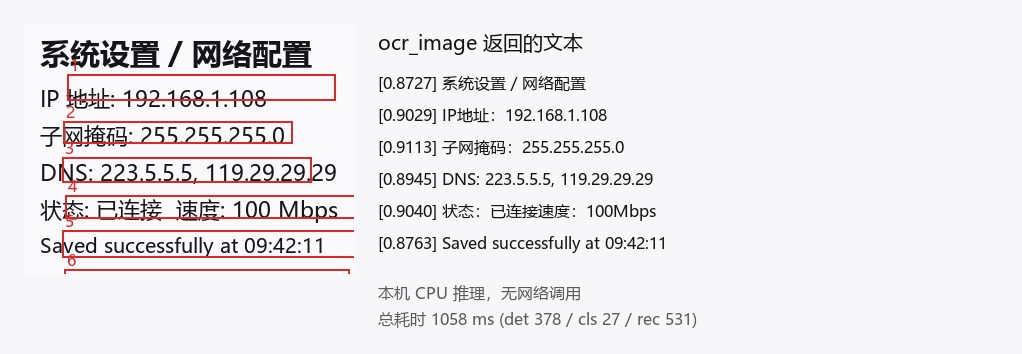
系统设置/网络配置
IP地址:192.168.1.108
子网掩码:255.255.255.0
DNS: 223.5.5.5, 119.29.29.29
状态:已连接 速度:100Mbps
Platform support
Windows x64 only in this release. The bundled ONNX Runtime ships as a
prebuilt onnxruntime.dll for win32/x64; the OpenCV.js part is WASM and is
platform-neutral, but the inference backend is not. On other platforms the
plugin installs but the engine fails to load — add the matching
onnxruntime-node binary for your platform to vendor/node_modules/ (or
publish a per-platform build) to run it there.
What it recognises
| Input | Result |
|---|---|
| PNG (all colour types, incl. palette / RGBA), JPEG (baseline + progressive) | up to 52 MB and 40 megapixels per image |
| Chinese, English, digits, common punctuation | 6623-character dictionary |
| 180°-rotated text | corrected automatically |
| Printed text | yes |
| Handwriting, photos of text at a strong angle | no |
| Image content (what is in the picture, tables, charts) | no — this is OCR, not a vision model |
Performance
Measured on an Intel i7-10700F (8 cores / 16 threads, no GPU):
| Image | Warm latency | det / cls / rec |
|---|---|---|
| 1280×720 screenshot | 495 ms | 134 / 4 / 275 ms |
| 800×600 mixed text | 568 ms | 118 / 16 / 413 ms |
| 1920×1080 dense text | 1068 ms | 375 / 7 / 563 ms |
| A4 300 dpi scan (68 lines) | 9.3 s | 3058 / 52 / 10507 ms |
Cost scales with the number of text lines — roughly 120–210 ms per line, and it is 15–25 % faster than the Python reference implementation of RapidOCR on the same machine.
Repository layout
packages/dsh-rapidocr/   the publishable plugin bundle
  index.js               Host plugin: tool registration, sidecar lifecycle
  worker/ocr-worker.js   Sidecar: JSON Lines protocol over stdin/stdout
  worker/selftest.js     Sidecar smoke test (real child process, real protocol)
  src/                   The RapidOCR pipeline port (det / cls / rec / geometry)
  models/                PP-OCRv3 ONNX weights (13.07 MB)
  vendor/                Vendored runtime dependencies (no npm install needed)
  locale/, icon.svg      Display metadata
bench/                   Benchmark harness, reference images and baselines
docs/                    Evaluation, implementation record and DSH API evidence
.github/workflows/       CI: sidecar selftest, vendored-layout and tarball checks
CHANGELOG.md             Release notes
SECURITY.md              Security policy and private reporting
The bundle has zero npm dependencies, zero build scripts and zero install
approvals: every runtime dependency is vendored under vendor/, and the
plugin manager can therefore install it without a package manager ever running
a postinstall hook.
Documentation
| Document | Contents |
|---|---|
| docs/evaluation.md | Why this plugin, the measured numbers, the architecture comparison and the capability boundaries |
| docs/implementation.md | What was actually built, the sidecar protocol, the pitfalls hit on the way, and the remaining known gaps |
| docs/dsh-integration.md | Evidence for the DSH plugin API (file and line references into the host) |
| packages/dsh-rapidocr/README.md | The plugin's own manual: configuration, testing, layout |
| docs/publishing.md | How the npm release is produced (2FA, trusted publishing, release workflow) |
| CHANGELOG.md | What changed in each release |
| SECURITY.md | What the plugin can and cannot access, and how to report a vulnerability |
Credits
The OCR pipeline in src/ is a port of
RapidOCR (PP-OCRv3: DBNet detection,
direction classification, CRNN recognition with CTC decoding), and the ONNX
weights are the Apache-2.0 PP-OCRv3 models. See
NOTICE for the full third-party attribution.
License
Apache-2.0 — see LICENSE.

No comments yet. Be the first to write one.