English | 简体中文
dsh-session-deck
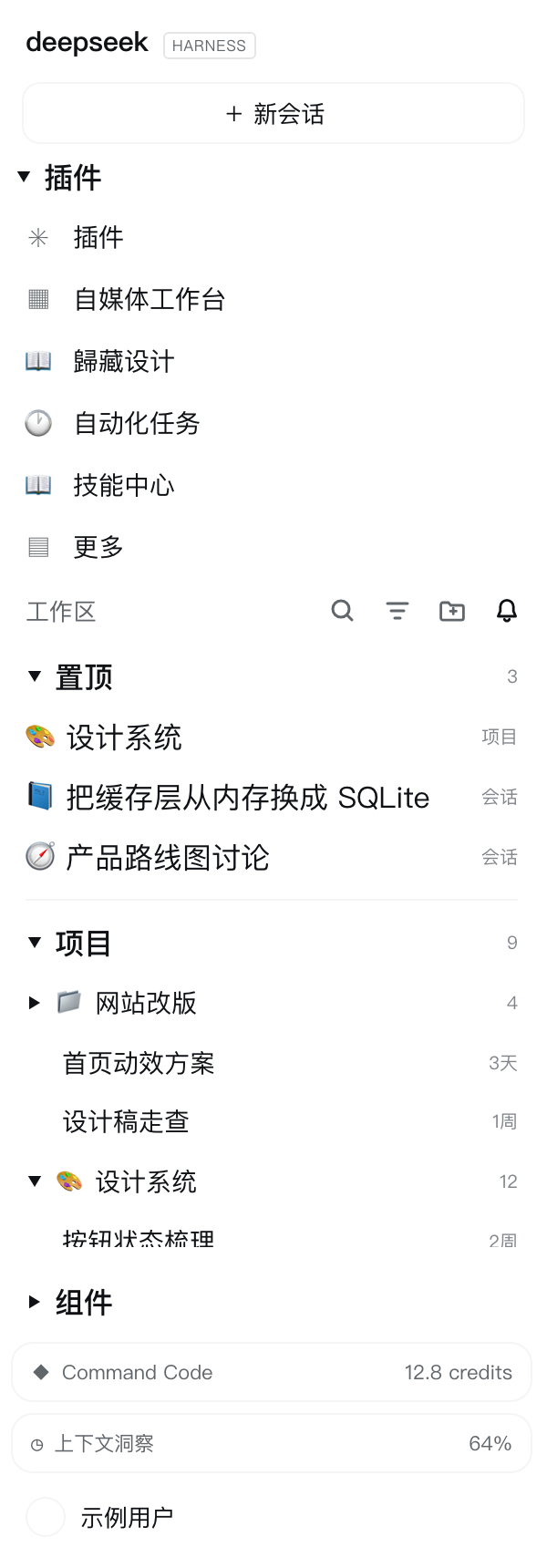
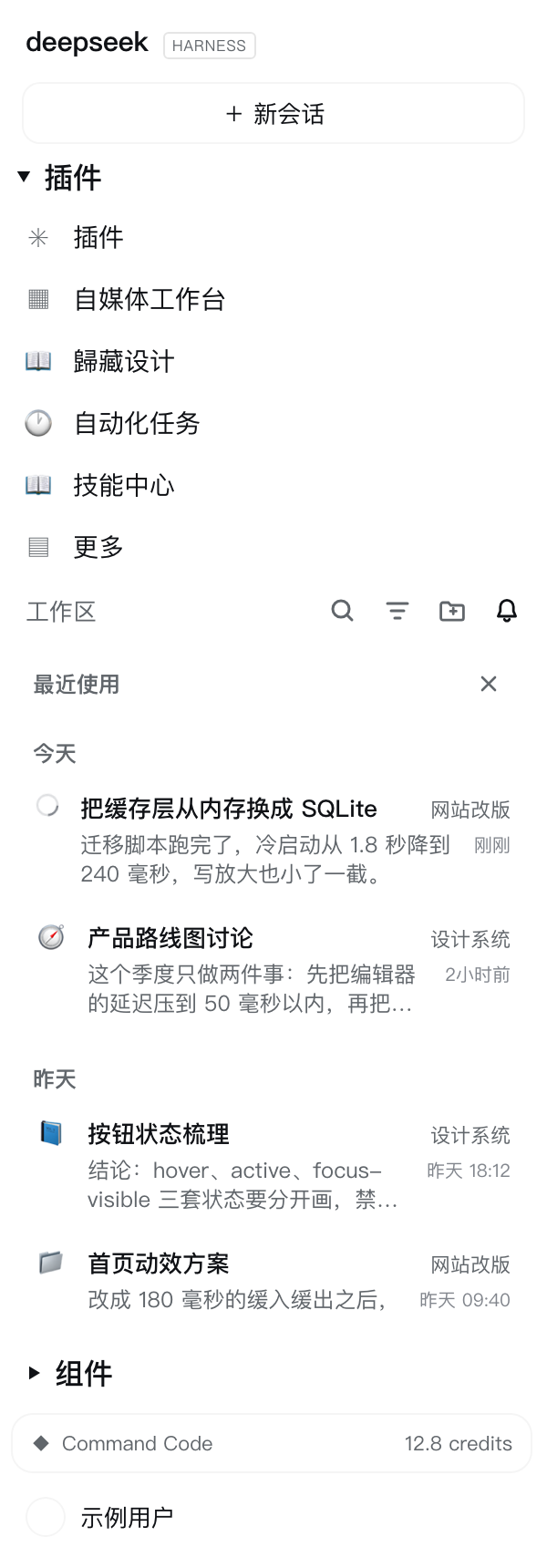
Manage your whole workspace, not just one conversation. A Codex-style sidebar for DeepSeek Harness: pin projects and conversations to one band, switch the sidebar to a "recently used" activity view, give every project its own icon, and collapse the sections you are not using.


Screenshots
| Sidebar — pinned band, 项目 section, 组件 section | Activity view — the bell |
|---|---|
 |
 |
(Rendered from the plugin's own stylesheet on the app's real theme tokens, with sample data — no personal titles or paths appear in these images.)
Why
DSH's sidebar is organized per project, and that is fine until you work across several of them:
- the built-in pin only reorders a conversation inside its own project — there is no place for "these are the threads I am actually working on right now";
- the projects you use most sit wherever they happened to be created, and every project looks the same (one folder glyph);
- finding "what did I touch yesterday" means scrolling a tree;
- the bottom of the column fills up with widgets you cannot get out of the way.
This plugin adds the four things you reach for: a pinned band, a recent view, an icon per project, and collapsible sections.
What you get
Pinned band (置顶) |
Pin a conversation or a whole project into one band above every project. A pinned project unfolds in place and lists its own conversations — like the project row below, but reachable without scrolling. Click to open, ✕ to unpin, the header collapses. |
Activity view (🔔) |
The last icon of the workspace row switches the sidebar to recently used: day groups (today / yesterday / weekday / date), two lines per conversation (title + project, then the beginning of the last answer), a running indicator, and click-through that keeps the view open so you can walk through several threads in a row. |
| Project icons | Replace a project's folder icon with any emoji — on the sidebar's project rows and in the directory picker. A Codex-style picker: recently used, category tabs, an icon grid, and reset. |
| One state everywhere | Rename a conversation, finish a turn or change a project icon and every view follows: the pinned band and the activity view resolve each row against the live stores, and a working conversation shows the shell's own running ring. |
| Collapsible sections | 插件 (the panel nav rows), 置顶, 项目 (the shipped project list) and 组件 (the sidebar's bottom widgets) each collapse from their own header and remember their state. |
Sidebar anatomy
┌ 工作区                        🔍  ⌘  📁+  🔔   ← the bell opens the activity view
│ ▾ 置顶                                  3       ← pinned band (conversations + projects)
│   ▸ 🎨 设计系统                         项目
│     📘 把缓存层从内存换成 SQLite         会话
│     🌈 我没发现现在有什么这个左侧…      会话
│   ────────────────────────────────────
│ ▾ 项目                                  9       ← the shipped project list, collapsible
│   📁 pdf
│   🚀 前沿方向研究
│       首页动效方案                      3天
└
  ⋯ widgets ⋯
  ▸ 组件                                          ← the bottom widgets, collapsible
Usage
- Pin — hover a conversation row and press
☆in its action strip, or hover a project row and press the☆left of the pencil. The pinned band appears on top; its header collapses it and✕removes a single pin. - Recent — press the bell at the end of the workspace row. Pick a conversation; the view stays
open, so you can pick several. Press the bell again (or
✕) to return to the project list. - Icons — hover a project row and press the pencil (or right-click the row) to open the picker. Pick an emoji, paste one from the system emoji panel (⌃⌘Space), or reset to the folder glyph. The same picker works on the folder rows inside the directory picker.
- Collapse — click any section header (
置顶/项目/组件). States are remembered per DSH home.
Install
# from npm — also available in the in-app "add plugin" dialog by name
dsh plugin --profile desktop add dsh-session-deck

# or straight from this repository (no npm)
dsh plugin --profile desktop add github:Timebro9999/dsh-session-deck
Restart the desktop app (or reload the window) once; after that the plugin loads with the profile.
The same spec works in the in-app plugin pages (they accept a GitHub target), and #v0.1.1 pins a
release instead of tracking main:
dsh plugin --profile desktop add github:Timebro9999/dsh-session-deck#v0.1.1
Listing in the DSH plugin market comes from the curated index
awesome-dsh-plugin (the market reads its
plugins.json). The submission is one file — data/plugins/Timebro9999__dsh-session-deck.yml, kept in
this repo under marketplace/ — and
scripts/open-marketplace-pr.sh opens the PR.
Host requirements
| DSH host | 0.2.0-rc.1 (verified live) or 0.1.7-rc.2; the same bundle runs in the desktop app and in the web client |
| Profile | any profile — the examples use desktop |
| Host Node | ^22.19.0 or >=24 (whatever DSH ships; the plugin needs nothing beyond it) |
| Runtime dependencies | none — lib/client.js is plain CommonJS over the DOM, loaded as-is, no build step |
| Client services | none required (inject: []). sessions, workspaces, uiWorkspace and locale are used when they exist; without them the plugin still paints, just with less data |
| Browser APIs | localStorage, MutationObserver, requestAnimationFrame, Intl.Segmenter |
| Platform | macOS, Windows, Linux — browser-side only, no native code (the icon picker's hint prints the emoji-panel shortcut for the OS it runs on) |
| Network | none at runtime (no telemetry, no remote calls) |
| What it binds to | the shipped sidebar's DOM: [data-row-key^="workspace:"] / [data-row-key^="session:"] rows, the section header, the list scroller and the foot area. A future shell redesign can move these anchors — that is the one thing an upgrade can break |
| Storage | browser localStorage only (dsh-session-deck:v1, dsh-session-deck:previews:v3) |
The interface follows DSH's own language (the locale service first, then the rendered UI, then the browser), so its copy is Chinese or English like the rest of the app.
How it works
The plugin registers no slot and requires no client service (inject: []). It mounts a DOM
overlay: it finds the shipped rows ([data-row-key^="workspace:"], session:), the section header, the
list scroller and the sidebar foot area; adds controls styled from the row's own buttons; and paints the
states the shell does not offer. Anything it needs beyond the DOM comes from client services it reads on
demand (ctx.get('sessions' | 'workspaces' | 'uiWorkspace' | 'locale')).
Every node it inserts is marked data-dsh-session-deck, so a later mount reclaims its predecessor's
leftovers — the shell does not unload an old client instance when it reloads a bundle. The working
notebook of that exploration (anchors, mirrored CSS, traps, and the remote probe that reports page state
through a slot id) lives in docs/implementation.md (Chinese).
Storage
Everything is browser localStorage, per DSH home:
| Key | Contents |
|---|---|
dsh-session-deck:v1 |
{ emoji, recent, pinnedSessions, pinnedProjects, expandedProjects, pinnedCollapsed, workspaceCollapsed, widgetsCollapsed } |
dsh-session-deck:previews:v3 |
The answer preview of each conversation, keyed by its updatedAt stamp |
Project icons are stored under two keys on purpose — the workspace id when a surface knows it, and
name:<basename> when only the folder name exists — and either resolves everywhere.
Development
npm test # 148 + 7 assertions, no dependencies
The suite boots the real lib/client.js under a fake module loader with a fake DOM, a fake client
context and fake session records, then drives every surface: registrations, painted icons, triggers, the
picker, the pinned band, the sections, the activity view (including which part of a message becomes the
preview), locale handling, and unload/reload safety. CI runs it on Node 22 and 24.
Uninstall
dsh plugin --profile desktop remove dsh-session-deck
There is no host-side state: remove it, reload, and the shell is exactly as it was.
License
MIT
No comments yet. Be the first to write one.