READMESource: main@90237e42
一键插件更新(DSH 插件)
在 DeepSeek Harness 的 【设置 → 插件】 里新增一个 「一键更新」 标签页: 一次检查所有已装插件有没有新版本,一键全部升级。
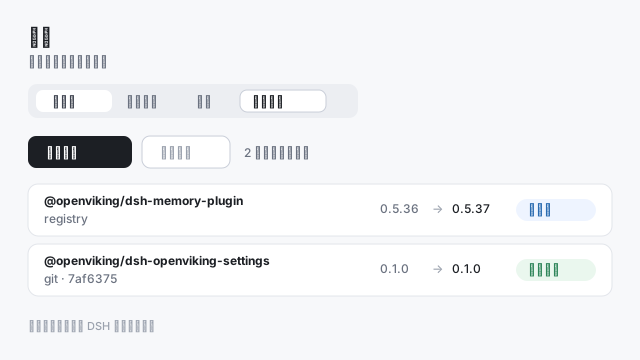
它解决什么
DSH 自带的插件页面能逐个插件检查和更新,但:
- 没有批量——插件一多就得一个个点;
- 市场没收录的插件查不到——更新入口依赖插件出现在插件市场索引里;
- Git 钉在提交上的插件要手填 40 位 commit。
本插件把这三件事一次解决:
| 能力 | 做法 |
|---|---|
| 批量检查与更新 | 对宿主判定为「可更新」的 profile 依赖逐个查询,再按顺序全部升级 |
| 不依赖市场索引 | 版本直接问包 registry(pluginManager.listVersions),市场收录与否不影响 |
| Git 源自动跟进 | 解析 profile 里的 Git 来源,取上游 HEAD 提交与该提交上的版本,自动生成钉住完整 commit 的 spec |
| 状态如实呈现 | 每个插件显示已装版本、最新版本与结论(可更新 / 已是最新 / 不能更新 / 无法检查) |
用法
- 打开 设置 → 插件 → 一键更新;
- 点 检查更新(首次打开会自动检查一次);
- 点 全部更新。
更新过程逐条显示宿主报告的阶段(checking / removing / installing / restoring)与结果。 部分更新需要重启 DSH 后才会生效。
它不做什么
- 不直接改 profile 的
package.json,不自己跑 pnpm:安装、兼容性判断、版本豁免、 失败回滚全部交给官方pluginManager服务; - 不动 DSH 自带插件(那些随应用升级);
- 不绕过宿主的兼容性检查——被判定为与当前 DSH 不兼容的版本不会被选中。
实现要点
插件只有浏览器半(exports["./client"])。宿主半什么都不做,它只是让这个 bundle
在 profile 里有一行。
| 官方 API | 用途 |
|---|---|
ctx.remote.pluginManager.listBundles() |
列出已装且被判为可更新的 bundle(update: 'registry' | 'git') |
ctx.remote.pluginManager.listVersions(name, {}) |
问 registry 有哪些更新版本;宿主已做兼容性检查与豁免读取 |
ctx.remote.pluginManager.updateBundle(name, version, { spec, requestId }) |
执行更新 |
ctx.remote.$on('plugin-manager/update-state', …) |
更新进度 |
Git 源的 bundle 由 listVersions 明确拒绝("installed from Git, which lists no versions"),
所以这一类插件自己解析来源:读 https://api.github.com/repos/<owner>/<repo>/commits 取 HEAD,
读该提交上的 package.json 取版本,再比较语义化版本。
界面通过 plugins.tab 插槽挂到内置插件页面上(与「发现」标签页同一机制)。
安装
# 从本目录安装(开发)
dsh plugin --profile desktop add "F:/path/to/dsh-plugin-update-all"

# 或从插件市场安装(发布后)
dsh plugin --profile desktop add @dsh-community/dsh-plugin-update-all
也可以在 插件 → 添加插件 里选本地目录。
开发
cd tools
pnpm install
node build-client.mjs     # src/client.tsx -> client.js
node test-store.mjs       # 纯逻辑自测(Git 来源解析、版本比较)
许可
MIT
No comments yet. Be the first to write one.