dsh-screenshot
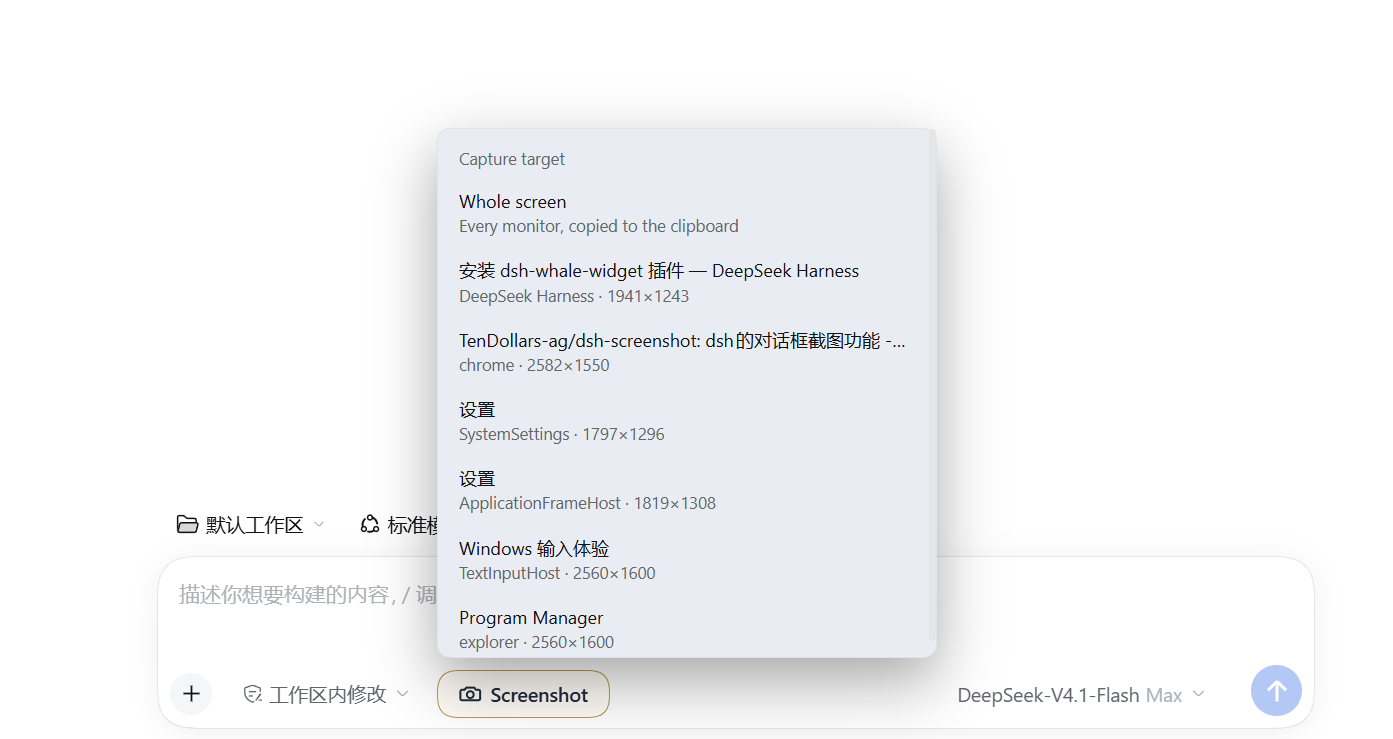
A screenshot button for the DeepSeek Harness composer: capture the whole screen or one chosen window, save it as a PNG, and copy it to the clipboard so it can be pasted into the message box.
输入框旁的截图按钮:截取整个屏幕或指定窗口,存成 PNG 并复制到剪贴板,按 Ctrl+V 直接粘贴成附件。
Features
- Target picker — one menu lists the whole screen plus every open window (title, process, size).
- Window capture via
PrintWindow— a window still captures its own content while covered by another window. - DPI aware — declares per-monitor DPI awareness before measuring, so a 150%-scaled 2560×1600 panel yields a full 2560×1600 capture instead of the top-left crop a DPI-unaware helper produces.
- Warm window list — cached with stale-while-revalidate and prefetched after page load, so the menu opens instantly instead of waiting on a PowerShell start-up.
- No build step, no dependencies — a Host route plus a Client button; nothing to compile.
Install
Windows only: capture runs a PowerShell helper using System.Drawing and user32.dll.
Installing from source takes one command — either mirror works:
# GitHub
dsh plugin --profile desktop add "github:TenDollars-ag/dsh-screenshot#v0.26.1"

# Gitee (mainland China)
dsh plugin --profile desktop add "https://gitee.com/Adachisakura1019/dsh-screenshot.git#v0.26.1"
Or copy the folder to a fixed local location and link it. Do not install from a removable drive: link: installs reference the source path, and unplugging the drive breaks the plugin.
dsh plugin --profile desktop add "link:D:\Plugins\dsh-screenshot"
Settings → Plugins → Add plugin → local directory does the same thing without a terminal.
Either way, restart DSH once (the Host route registers at boot), then refresh the page (the Client button loads with the page).
Usage
- Click the camera button left of the composer.
- Pick Whole screen or one window from the list.
- The button reports success; press
Ctrl+Vin the message box to attach the image.
Captures are also written to ~/.dsh/screenshots/ as shot-screen-<timestamp>.png or shot-win-<hwnd>-<timestamp>.png.
Routes
Both routes require the header x-dsh-screenshot: 1 and reject cross-origin callers, so an arbitrary page cannot trigger a capture through localhost.
GET  /dsh-screenshot/windows   visible top-level windows, front-most first
POST /dsh-screenshot/capture   { "mode": "screen" | "window", "hwnd": number }
Limitations
- Windows only.
- A few windows refuse
PrintWindow(hardware-protected video, some UWP/store apps); the button reports the failure and suggests whole-screen capture. - Minimized windows are not listed — they have no drawable frame.
- Windows smaller than 120×90 or with an empty title are filtered out.
- The button palette is tuned for a light cream surface; on a dark theme the fixed
#4a5568label is low contrast.
Layout
| Path | Role |
|---|---|
index.js |
Host half: routes, PowerShell capture, window-list cache |
client.js |
Client half: button, target menu, status text |
cordis.patch.yml |
Bundle patch that inserts the plugin row |
locale/ |
Plugin title and description for Plugin Manager |
docs/DETAIL.md |
Detail page shown in Plugin Manager |
assets/ |
Cropped bitmap pill artwork, currently unused |
Mirrors
Both mirrors carry the same history and tags:
- GitHub — https://github.com/TenDollars-ag/dsh-screenshot
- Gitee(国内更快)— https://gitee.com/Adachisakura1019/dsh-screenshot
License
MIT — see LICENSE. Copyright (c) 2026 Adachi.
No comments yet. Be the first to write one.