Trajectory Graph for DeepSeek Harness
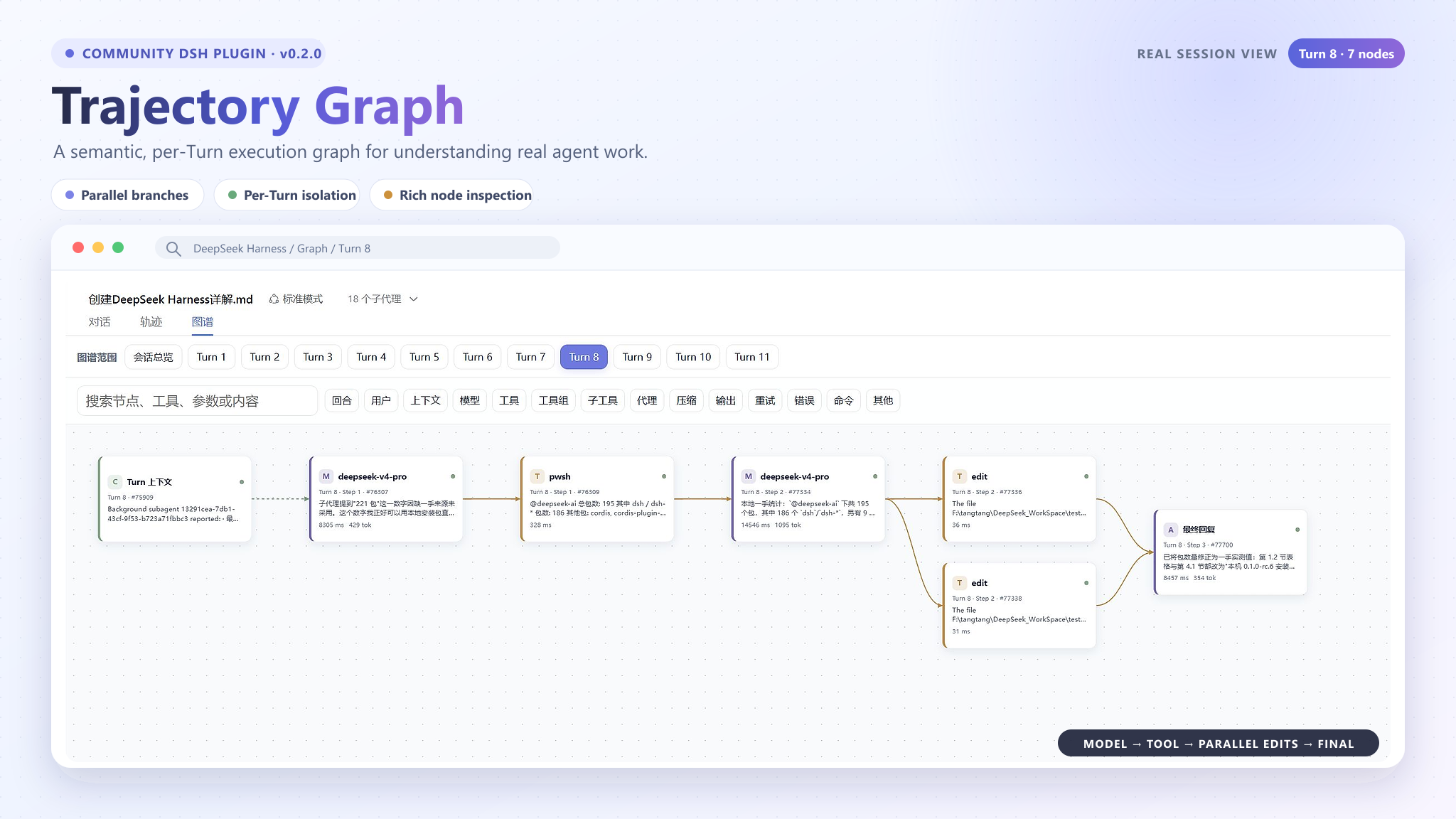
dsh-plugin-trajectory-graph adds a Graph / 图谱 tab beside DeepSeek Harness' built-in Chat / 对话 and Trajectory / 轨迹 views. It projects the structured trajectory snapshot into an interactive, left-to-right execution graph without changing the task, session, or model execution.
Highlights
- Session overview plus independently selectable graphs for every Turn; the latest Turn is selected by default.
- Semantic User, Context, Model, Tool, Tool Group, Sub-tool, Agent, Compaction, Final, Retry, and Error nodes.
- Parallel tool calls branch vertically and converge into the next Model or Final node.
- Search, node-type filters, collapse/expand, zoom, fit-to-view, and load-older support.
- Drag the blank canvas with the primary mouse button to pan in any direction, and use the mouse wheel to zoom around the pointer; native scrollbars remain available.
- Search, filters, collapse state, selection, and zoom are isolated per Turn.
- Type-specific details. Tool nodes expose Payload, Result, Schema, Timing, Raw data, and source references when the snapshot provides them.
- Live updates during a running session, with stable layout reuse for streaming text changes.
- Conservative semantics: the plugin does not invent delegation or causal edges when Harness does not provide durable evidence.
- Local-only visualization. It does not upload trajectory data or mutate sessions.
Requirements
| Component | Requirement | Why it is needed |
|---|---|---|
| Node.js | 20 or newer | Required by the plugin build and the supported DeepSeek Harness runtimes. |
| DeepSeek Harness | 0.1.0-rc.6 or 0.1.0-rc.7 | Version 0.3.0 is validated against both trajectory contract versions; the examples below use rc.7. |
| pnpm | 10 or newer | The DSH plugin command delegates package installation to pnpm, so it must be available on PATH. |
| Browser | Current Chromium-based browser | Required by the DeepSeek Harness Web UI. |
Check the local environment:
node --version
npx --yes @deepseek-ai/dsh@0.1.0-rc.7 --version
pnpm --version
If pnpm is missing:
npm install --global pnpm@10
Install
- Download dsh-plugin-trajectory-graph-0.3.0.tgz from the repository's GitHub Releases page.
- Keep the TGZ file in a stable local directory. Do not extract it.
- Install it into the default web profile, replacing the example path with the actual download location:
npx --yes @deepseek-ai/dsh@0.1.0-rc.7 plugin --profile web add "C:\path\to\dsh-plugin-trajectory-graph-0.3.0.tgz"
A successful installation reports dsh-plugin-trajectory-graph under dependencies and finishes with Done.
Optionally verify that the composed Harness configuration contains the plugin:
npx --yes @deepseek-ai/dsh@0.1.0-rc.7 web --dump-config | Select-String "trajectory-graph"
Start and use
Start the default Web profile on port 3080:
npx --yes @deepseek-ai/dsh@0.1.0-rc.7 web --port 3080
Open http://127.0.0.1:3080, select a session that contains trajectory data, and choose:
Chat / 对话 | Trajectory / 轨迹 | Graph / 图谱
Use the Turn navigator to isolate a user request, or choose Session Overview to inspect the whole session. Select any node to open its structured details. Drag an empty area of the canvas with the primary mouse button to pan horizontally or vertically, and roll the mouse wheel to zoom around the pointer. The native scrollbars and toolbar zoom/fit controls remain available. Use the rest of the toolbar to search content, enable or disable node types, or collapse nested groups.
The plugin is installed once per profile. Normal Harness restarts do not require another installation.
Update or uninstall
Remove the installed version:
npx --yes @deepseek-ai/dsh@0.1.0-rc.7 plugin --profile web remove dsh-plugin-trajectory-graph
To update, remove the old version, download the new TGZ, install it with the same plugin command, and restart Harness.
Compatibility
Version 0.3.0 supports and has been validated with DeepSeek Harness 0.1.0-rc.6 and 0.1.0-rc.7. Installation and start examples use rc.7. The plugin consumes the built-in trajectory view snapshot structurally. Another Harness release may change those contracts, so rebuild and run the full verification suite before claiming compatibility with it.
Development stack
| Area | Components |
|---|---|
| Host integration | @deepseek-ai/cordis and cordis.patch.yml |
| Harness client contracts | Locale, runtime, slots, conversation, and trajectory packages compatible with DeepSeek Harness rc.6 and rc.7; development dependencies use rc.7 |
| UI | React 18 and React DOM 18 |
| Projection and layout | TypeScript semantic projector, deterministic ranked DAG layout, filtering, and per-Turn state |
| Build | TypeScript 5.9 and esbuild |
| Test | Vitest, Testing Library, user-event, and jsdom |
| Package management | pnpm 10+ |
Install development dependencies and verify the project:
npx pnpm@10 install
npm test
npm run typecheck
npm run build
Build the distributable plugin archive:
npm run pack:plugin
The generated archive is written to:
dist/dsh-plugin-trajectory-graph-0.3.0.tgz
Project structure
src/client.tsx                          Registers the Graph conversation view
src/components/TrajectoryGraphView.tsx Coordinates Turn state, filtering, layout, and details
src/components/TurnNavigator.tsx       Session overview and per-Turn navigation
src/components/GraphNodeCard.tsx       Semantic node cards and node actions
src/components/GraphDetailsPanel.tsx   Type-specific inspection tabs
src/graph/snapshot.ts                  Validates the Harness trajectory snapshot
src/graph/turns.ts                     Partitions data into coherent Turns
src/graph/projector.ts                 Projects events and requests into semantic DAGs
src/graph/layout.ts                    Computes deterministic ranked branch geometry
src/graph/filter.ts                    Search, type filtering, and collapse visibility
scripts/build.mjs                      Produces the Harness browser bundle
tests/                                 Projection, layout, UI, contract, and performance tests
cordis.patch.yml inserts the package after the built-in Web bundles. The host entry is intentionally minimal; src/client.tsx registers the localized trajectory-graph conversation view and reads the existing trajectory snapshot from the active session.
Current limits
- This is an execution viewer, not an editable workflow designer.
- Harness rc.6 and rc.7 do not expose durable Agent identity for every execution path, so the plugin does not infer Agent branches from tool names or model text.
- Very large histories can remain horizontally wide; use per-Turn navigation, search, filters, collapse, and fit-to-view.
- Sessions without a structured trajectory snapshot cannot produce graph nodes.
Privacy and safety
The plugin runs inside the local DeepSeek Harness Web UI. It reads the session's existing trajectory snapshot for presentation only. It does not upload data, call an external analytics service, modify prompts, change tool calls, or mutate session history.
License
MIT © 2026 TangRj-Git
还没有评论,来写第一条。