furina-dsh-theme · 芙宁娜 / Fontaine theme for DeepSeek Harness
A complete web-theme plugin for the DeepSeek Harness Web GUI: three Furina / 芙宁娜
skins, a wallpaper layer you can switch on its own, translucent glass surfaces, a
芙宁娜主题 section inside DSH's own Settings dialog, a themed startup splash and
readable file cards — no rebuild, no patched markup, no !important arms race.
Repository: https://github.com/TanPass/furina-dsh-theme ·
Install: dsh plugin --profile web add github:TanPass/furina-dsh-theme ·
Issues: https://github.com/TanPass/furina-dsh-theme/issues
| Skin | Preview |
|---|---|
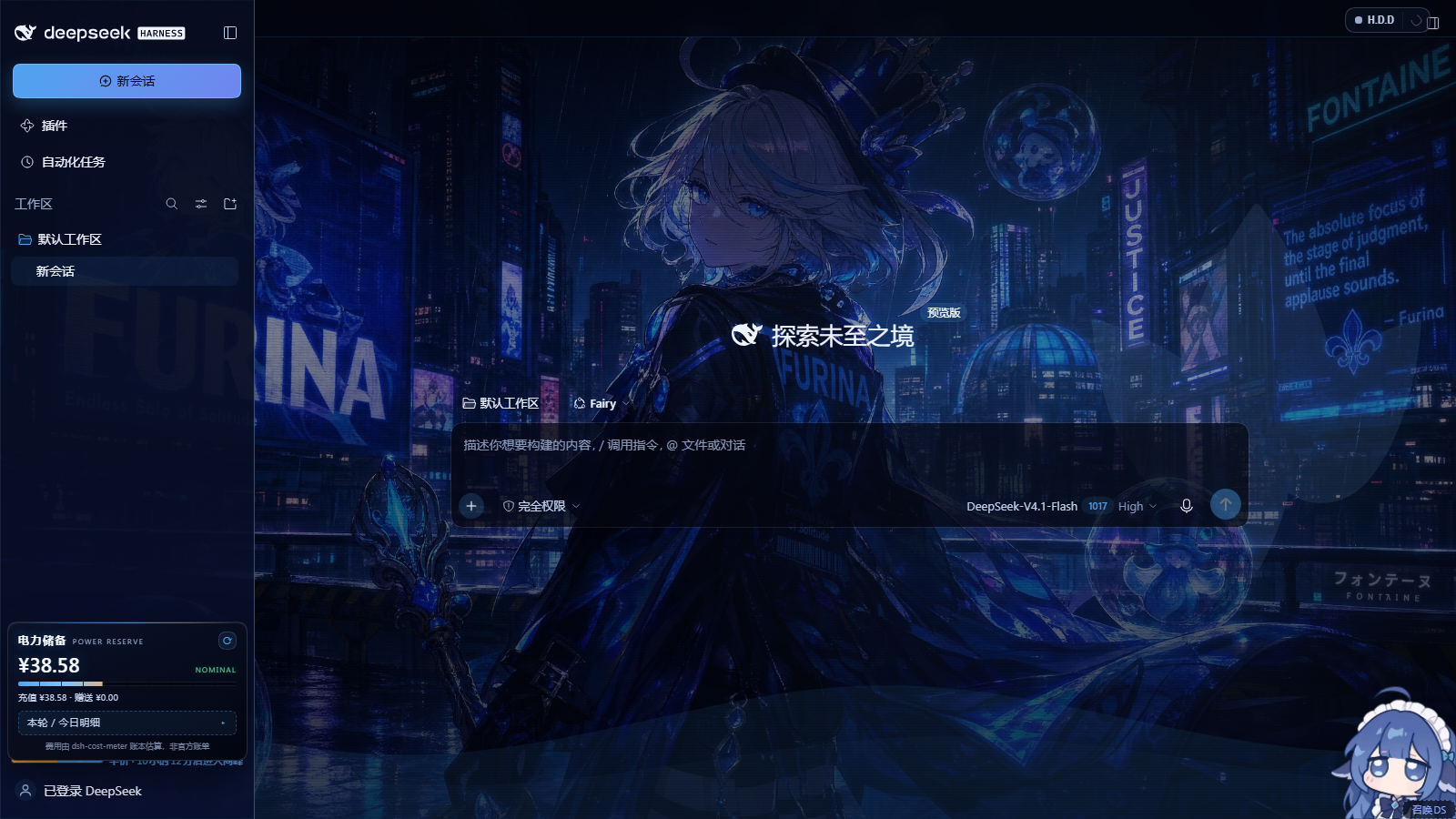
fontaine-nocturne 雨夜枫丹 |
 |
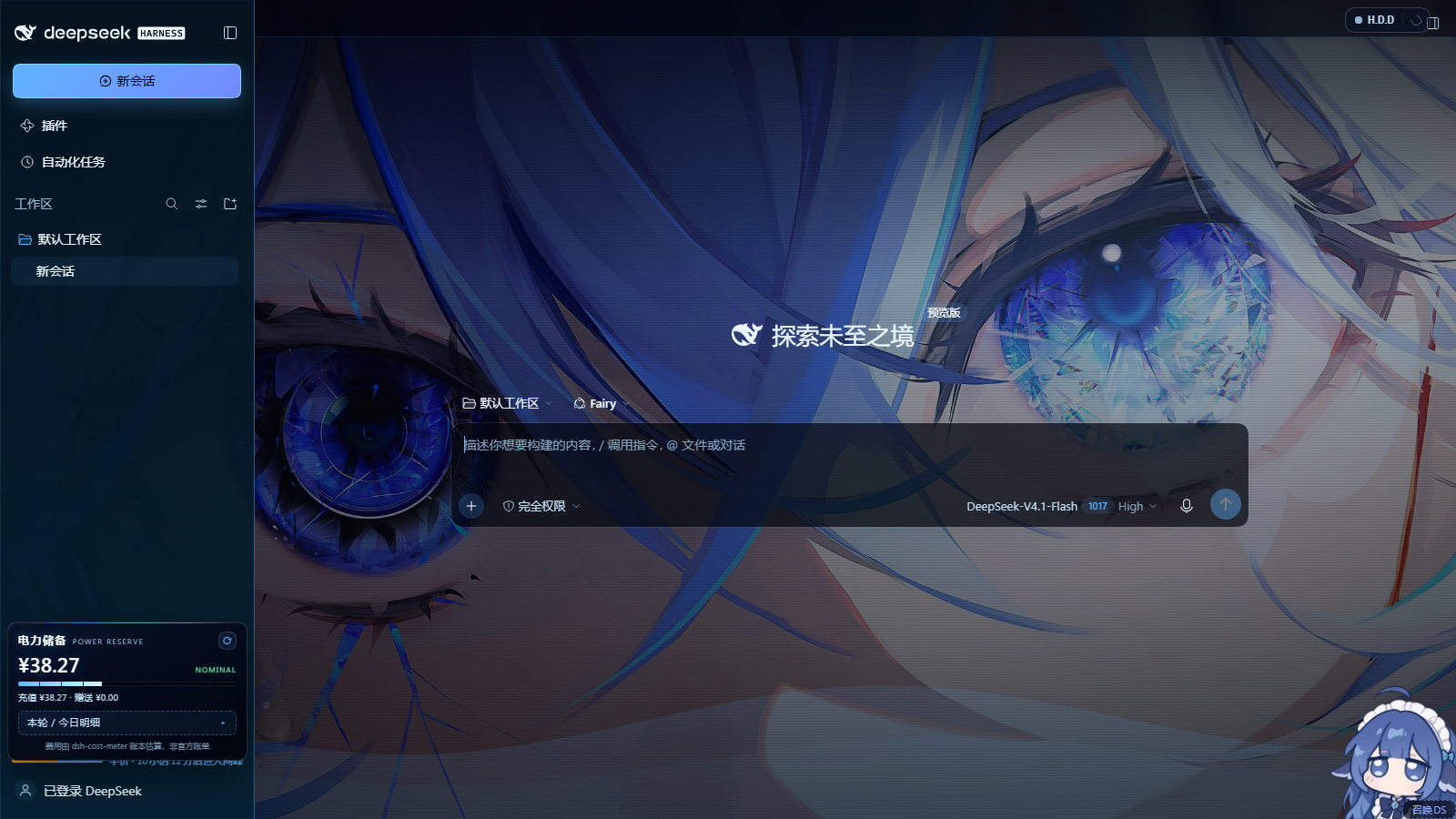
hydro-iris 水镜鸢尾 |
 |
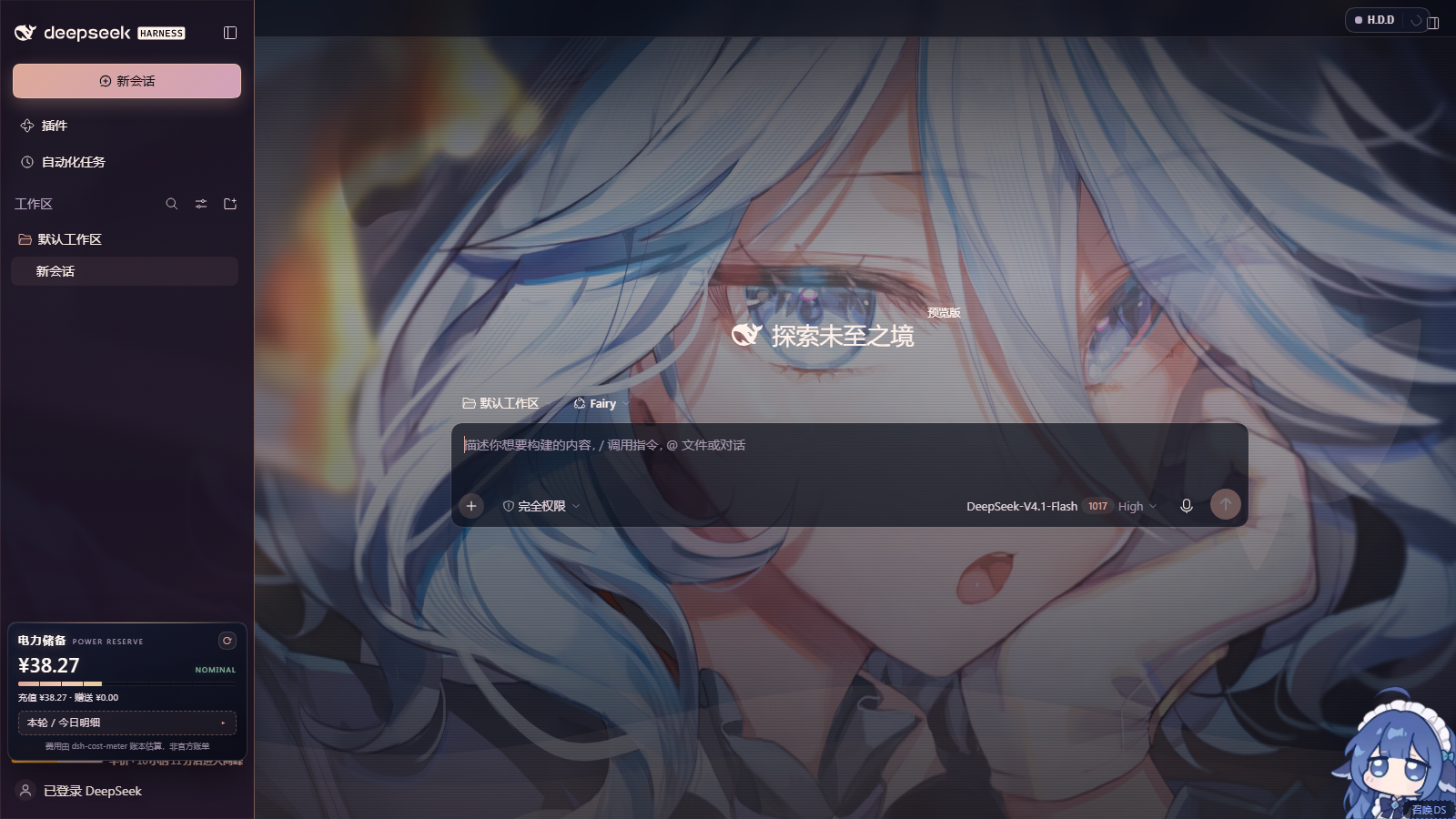
salon-solitude 沙龙独处 |
 |
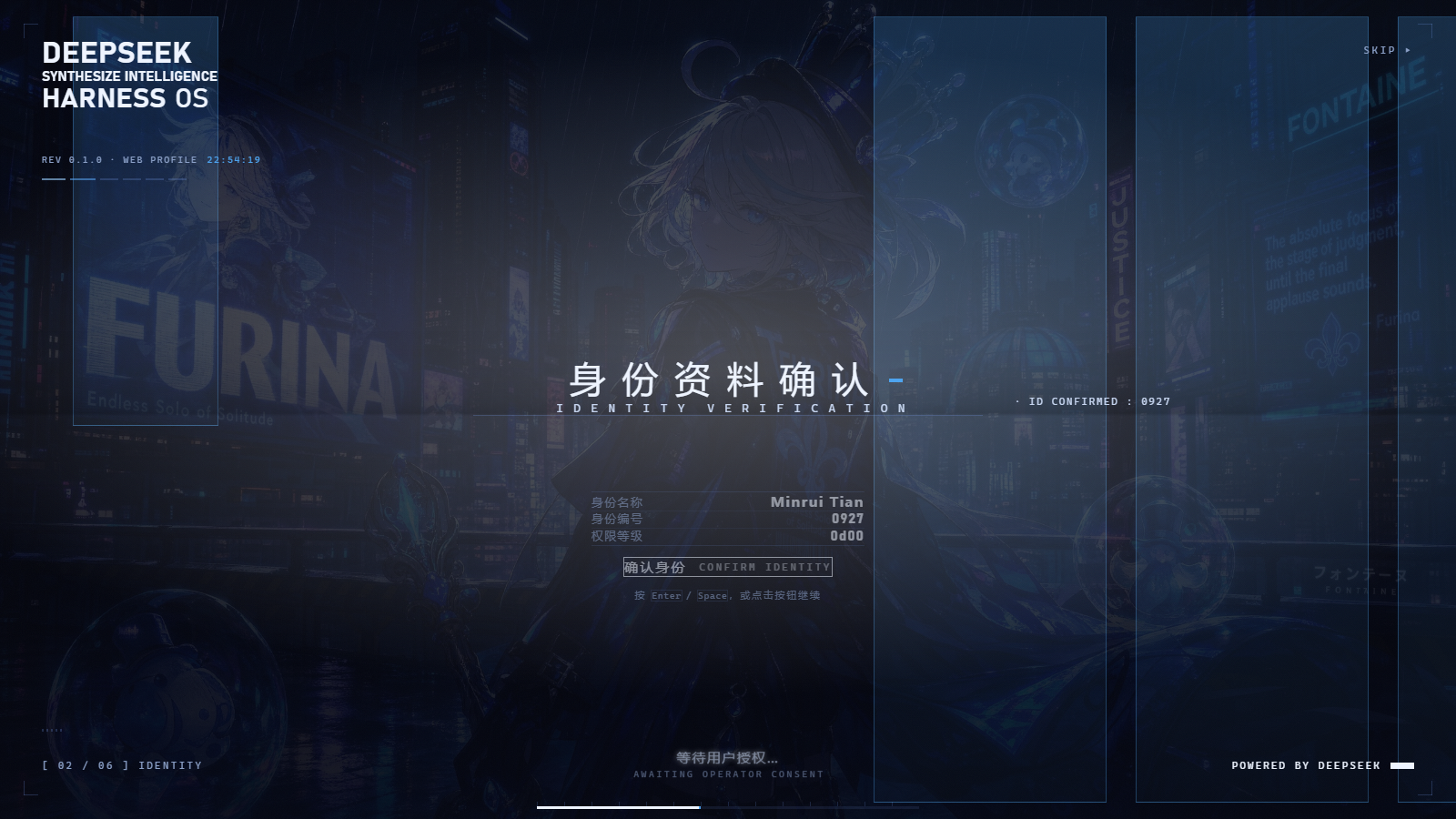
| Settings page | Startup splash | File & deliverable cards |
|---|---|---|
 |
 |
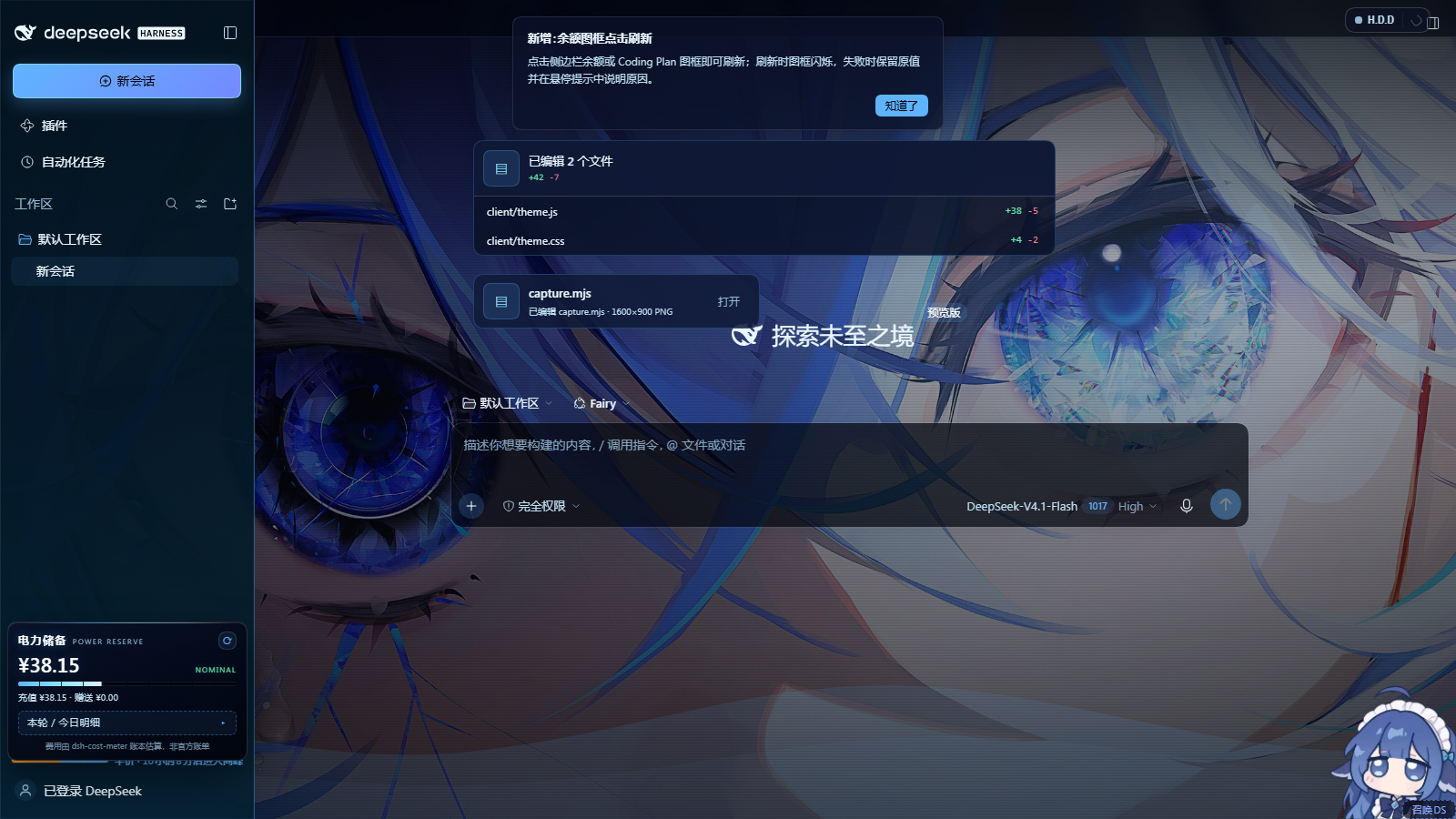 |
All six images are real 1600×900 captures of throwaway DSH instances (isolated
DSH_HOME, ports 3083/3084) — see Verification. The five round-1
captures under docs/ (screenshot-switcher-open.png etc.) are kept as history:
they show the old floating switcher that round 2 replaced.
What you get
Three skins, each a full palette (background, surfaces, text hierarchy, four accents, semantic colours) mapped onto DSH's own
--dsh-*design tokens, so every stock component — sidebar, composer, message bubbles, code blocks, menus — re-skins without touching application markup.id 中文 feel accent fontaine-nocturne雨夜枫丹 rain-slick neon, indigo night #4ea4efhydro-iris水镜鸢尾 crystal water, near-black ice glass #5fb4ffsalon-solitude沙龙独处 rose-gold afternoon, lavender #dea998A wallpaper layer behind the whole application. Three shipped wallpapers plus
跟随皮肤(auto — each skin's own art) and无壁纸(painted ground). Wallpaper and skin are independent: pick the night-city art with the rose-gold palette if you want. Any image you drop into$DSH_HOME/furina-wallpapers/shows up in the switcher as an extra tile — free wallpaper switching is not limited to the shipped set.Translucent glass UI in three strengths —
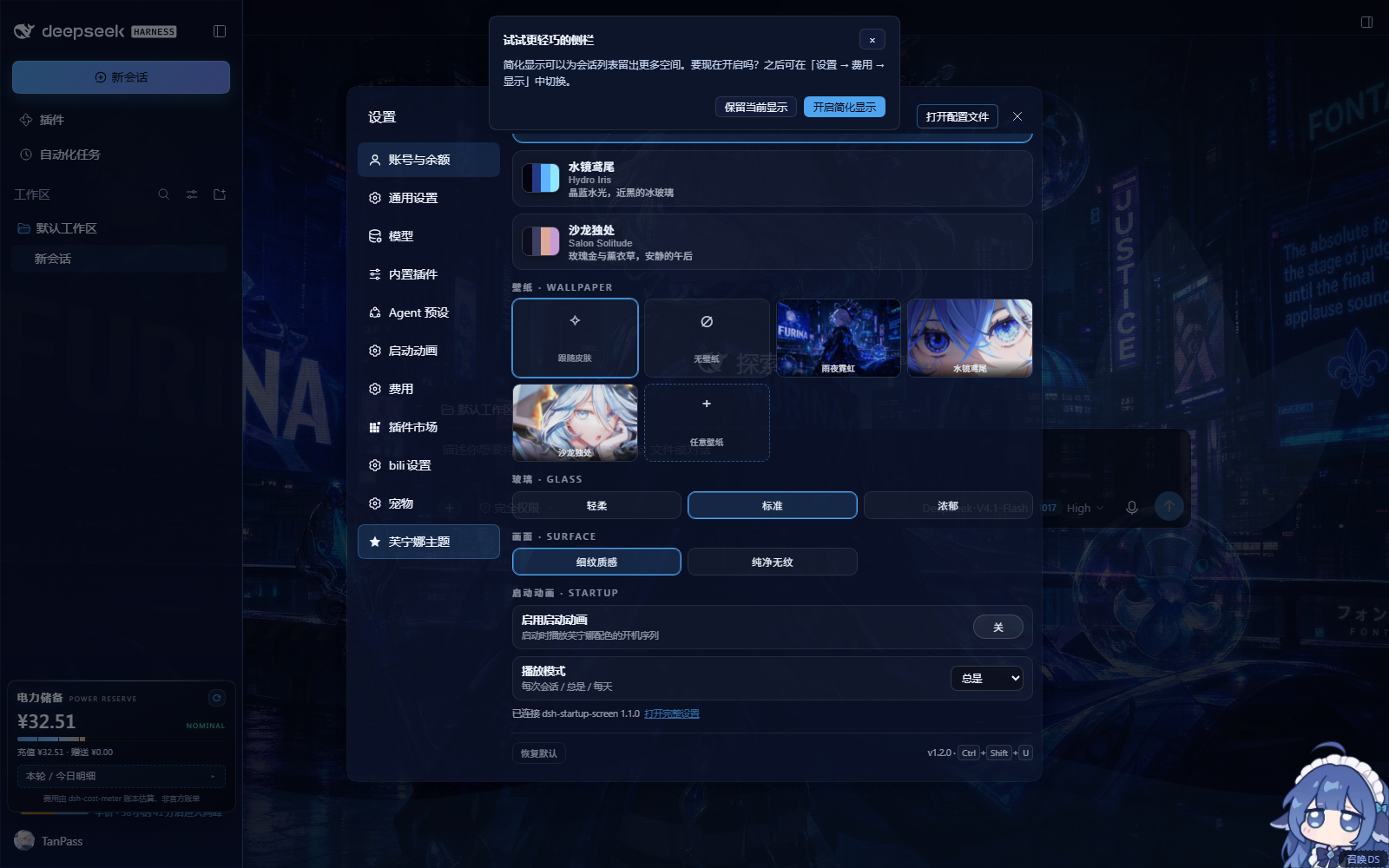
轻柔/标准/浓郁— applied to the sidebar, composer, popovers and the settings card itself. A separate 画面 · Surface switch removes the faint scanline film for users who prefer a perfectly clean wallpaper.A settings page inside DSH Settings — a 芙宁娜主题 / Furina theme section in the app's own Preferences dialog (an extra nav row rendered in a Shadow DOM pane): skin cards with live swatches, a wallpaper tile grid — including
任意壁纸to pick any local image — glass modes and reset.Ctrl + Shift + Ustill opens the same card from anywhere, and if the Settings dialog never appears a small emblem pill in the bottom-right corner remains as the fallback launcher.A themed startup splash — the installed
dsh-startup-screenboot sequence is re-coloured per skin through its own--dsu-*custom properties, with the active wallpaper laid under the veil, so the first paint is Fontaine night instead of the stock white plate. The startup package is not modified.Readable file & deliverable cards — the "已编辑 …" changed-file card and the presented-file row are repainted from the skin palette instead of the stock white surface. See File cards.
Per-skin sidebar — left rail, workspace tree, account chip and footer take their tint from the active skin (
--fr-side-*variables), with body text kept above the 4.5:1 contrast target. See Sidebar and text contrast.Persistence in
localStorageunderfurina-theme.settings.v1. Settings survive reloads; deleting the key (or the plugin) returns the GUI to stock.No residue when disabled: every rule is scoped to
html[data-furina-skin…], the backdrop, settings pane, splash style and fallback launcher are plain DOM nodes the plugin removes on dispose, and the app never sees a monkey-patched React tree.
Round 2 — settings page, startup splash, file cards, per-skin sidebar
Round 2 moved the controls out of the floating panel and fixed the two surfaces that were still stock white: the first paint and the agent's file cards.
Settings page
The app has no plugin slot for settings sections, so the theme mounts one the same way the bundled plugins do:
- nav row appended to the settings dialog's own list — the dialog is
div[role="dialog"][data-shortcut-modal="settings"], the list is thenav's[class*="navList"]; the row is a clone of a shippedbutton.VOzbGW_navCellwithdata-furina-settings-nav, labelled 芙宁娜主题. Third-party plugins (HDD / Fairy, bili, pets) add rows the same way, so the list is not React-private. - content pane
#furina-settings-pane([data-furina-settings-pane]) is absolutely positioned over the dialog's options area; it holds a second Shadow DOM with the shared card markup (controlsMarkup()/wireControls()are shared with the fallback launcher, so the two can never drift apart). - clicking another nav row restores the React options pane; a
MutationObserverre-mounts the nav row and pane if React re-renders the dialog, and the boot flow keeps the old floating switcher code path dormant (#furina-switcherwithdata-furina-fallback="1"); it is only revealed when[data-slot="settings.launcher"]never appears, so the old UI remains an honest fallback rather than the primary surface.
Below 玻璃 the same pane carries the 画面 · Surface card (细纹质感 / 纯净无纹,
the latter hides the decorative scanline layer) and the 启动动画 · Startup block, so
the companion startup-animation plugin is operated from the same screen as the skin it
is coloured from: an enable switch, a 每次会话 / 总是 / 每天 play-mode select and a
打开完整设置 link that jumps to the plugin's own section for its 30+ options. The
block talks to the plugin's own JSON endpoint (GET/POST /dsh-startup/config, patch
semantics owned by that plugin). When dsh-startup-screen is not installed the block
offers 一键安装: the host copies the vendored companion into the active profile
(lib/startup-install.js) and adds the bundle entry, then asks for one DSH restart —
no network access and no command line. The theme itself never hard-depends on it.
Startup splash
client/theme.js appends one <style id="furina-startup-skin"> to <head>. The splash
root (#dsh-startup-root) already exists at the start of <body> by then, and the
overrides are pure custom-property declarations scoped by the active skin:
html[data-furina-skin='<skin>'] #dsh-startup-root {
  --dsu-bg / --dsu-bg-2 / --dsu-ink / --dsu-ink-soft / --dsu-muted
  --dsu-hair / --dsu-hair-soft / --dsu-box-bg / --dsu-box-ink / --dsu-sub-glow
  --dsu-accent / --dsu-glitch-a / --dsu-glitch-b   (the last four need !important
                                                    because splash.js writes them
                                                    inline on the same element)
}
plus paint-layer overrides for the hard-coded light parts of splash.css:
.dsu-plate (skin wallpaper + veil gradient), .dsu-wm (archive panels — the white
slabs), .dsu-wash, .dsu-black, .dsu-flash, .dsu-bloom. While the sequence owns
the screen (html.dsu-lock), every sibling of the splash root — app shell, composer,
transcript, toasts, footer status and the theme's own panels — is kept out of the frame.
The · ID CONFIRMED : xxxx annotation is pinned to the right archive column (6vw from
the edge) instead of crossing the headline, and the mode restores itself when
splash.js releases the lock. The black opening act with the DeepSeek wordmark is
intentionally left dark; everything after it is Fontaine night. Proof is a capture of a
real boot from an isolated instance that keeps dsh-startup-screen in its bundle
list (the shared verify instance removes it because its GRANT ACCESS gate blocks
automation) — docs/screenshots/splash-boot.png.
File cards
The deliverables plugin only darkens its surfaces under body[data-ds-dark-theme], and
this app runs its light token branch (html[data-ds-theme-source="system",
color-scheme: light, no dark body attribute). Round 2 therefore:
- forces the dark branch from
theme.js:assertDarkMode()setshtml.style.colorScheme="dark",html[data-ds-theme-source="dark"]andbody[data-ds-dark-theme], and a guardedMutationObserverre-asserts them if the app flips back; - tints the plugin's own custom properties per skin, using selectors verified against
the installed package (class names
hz8-rW_*,nyYjTG_*):[data-changed-files](--changes-fill,--changes-hover),_header/_row/_path/_tile/_counts,[data-changes-hover-preview](diff hover card),[data-presented-files-row](--deliverable-fill,--deliverable-hover),[data-presented-file],_fileIcon,_fileName,_description.
Before: #fafafa fill with near-white text. After: --fr-surface-2 fill, --fr-text
labels, accent-tinted icon tile, accent border — see docs/screenshots/file-card.png.
Sidebar and text contrast
The left rail used to be a fixed navy gradient. Round 2 adds per-skin rail variables in the palette blocks and paints the rail from them:
| variable | Fontaine Nocturne | Hydro Iris | Salon Solitude |
|---|---|---|---|
--fr-side-top |
#070c1f |
#03141f |
#191122 |
--fr-side-bottom |
#0b1438 |
#072a3f |
#291b2f |
--fr-side-line |
rgba(78,164,239,.30) |
rgba(143,232,255,.28) |
rgba(222,169,152,.32) |
--fr-side-active |
rgba(78,164,239,.22) |
rgba(95,180,255,.24) |
rgba(199,155,214,.24) |
html[data-furina-skin] body [data-slot='sidebar'] > div {
  background: linear-gradient(180deg, color-mix(in srgb, var(--fr-side-top) var(--fr-g-soft), transparent),
                                      color-mix(in srgb, var(--fr-side-bottom) var(--fr-g-soft), transparent)),
              linear-gradient(180deg, color-mix(in srgb, var(--fr-accent) 7%, transparent), transparent 55%);
  border-right: 1px solid var(--fr-side-line);
}
Text colours were raised per skin and measured with the WCAG contrast formula against
every opaque token ground (worst case is usually --fr-surface-2, the lightest):
| skin | --fr-text (on --fr-bg-deep → --fr-surface-2) |
--fr-text-2 |
--fr-text-3 |
--fr-muted |
|---|---|---|---|---|
| Fontaine Nocturne | #eef4ff 18.44 → 15.06 |
#c3d2ec 13.33 → 10.89 |
#9aabcc 8.80 → 7.18 |
#7488ae 5.70 → 4.65 |
| Hydro Iris | #eaf7ff 18.89 → 15.69 |
#c0dff2 14.80 → 12.29 |
#93b6d0 9.66 → 8.02 |
#6f92ad 6.27 → 5.21 |
| Salon Solitude | #fff2ea 17.88 → 13.85 |
#e4d3dc 13.69 → 10.60 |
#b9a8c2 8.82 → 6.83 |
#94879f 5.82 → 4.51 |
Every text step is above 4.5:1 in every skin and ground, including the muted/decorative step. The glass panels on the main canvas keep their own translucent layers, so the tint does not flatten them.
Requirements
- DSH with the Web GUI (
dsh web), profileweb. - Node 22+ (only for the plugin process; the browser half is plain ES5-era JS).
- No other full-page theme enabled. Themes that repaint the entire shell — notably
dsh-theme-endfield/dsh-endfield-theme— override the same--dsh-*tokens and paint their own opaque layer over the app. They are not broken, but they will win: enable one theme at a time. See Coexistence.
Install
The plugin is a normal DSH cordis plugin, installed into a profile with dsh plugin:
# canonical install — straight from GitHub
dsh plugin --profile web add https://github.com/TanPass/furina-dsh-theme
# same package, short GitHub spec
dsh plugin --profile web add github:TanPass/furina-dsh-theme

# or, without `dsh` on PATH, through the DSH checkout's CLI entrypoint
node "<dsh-checkout>\lib\bin.js" plugin --profile web add https://github.com/TanPass/furina-dsh-theme
A published version can be pinned the same way, e.g.
dsh plugin --profile web add furina-dsh-theme@1.1.0.
Bundle: theme + startup animation in one install
The latest release
ships furina-dsh-pack-<version>.zip containing both plugins plus a Windows
installer, because the themed startup animation is a separate plugin
(dsh-startup-screen). To install both halves by hand instead:
dsh plugin --profile web add https://github.com/TanPass/furina-dsh-theme
dsh plugin --profile web add github:6shenhonghong9/dsh-startup-screen
The bundle's install.cmd does exactly these two commands and then tells you to
restart DSH. The startup plugin is optional — without it the theme still works and the
in-panel 启动动画 block disables itself. Its source is also vendored under
companion/dsh-startup-screen/ for reference and credit.
Local development — install the working tree as a link, so edits are live after a page refresh:
dsh plugin --profile web add file:"<path-to-this-checkout>"
The profile's package.json should then contain the artifact spec under
dependencies, with the package in dsh.profile.bundles:
{
  "dependencies": { "furina-dsh-theme": "github:TanPass/furina-dsh-theme" },
  "dsh": { "profile": { "bundles": [ /* …, */ "furina-dsh-theme" ] } }
}
Restart the DSH server once if the profile bundle list changed; after that, refresh
the page. cordis.patch.yml ships with the package and inserts its own furina-theme
plugin row; dsh --dump-config shows the resolved row (see Verification).
To uninstall: dsh plugin --profile web remove furina-dsh-theme (or remove the bundle
entry and the dependency), then restart the server. The browser half also disposes
cleanly if the plugin row is removed while a page is open.
Coexistence with other themes
Two full-page themes cannot both own the surface. The measured behaviour with
dsh-theme-endfield + dsh-endfield-theme also installed:
- their rules win on
--dsh-*tokens and paint an opaque page layer, so this theme's wallpaper and palette are mounted but invisible; - nothing errors — the plugin simply renders underneath.
So enable exactly one theme. If the Furina theme does not appear:
- Open the profile
package.json(C:\Users\<you>\.dsh\profiles\web\package.json). - Remove
dsh-theme-endfieldanddsh-endfield-themefromdsh.profile.bundles. - Also remove the
- id: theme-endfieldrow fromcordis.patch.ymlif present. - Restart the DSH web server and reload the page.
(Removing other themes touches a live profile — back it up first. In the isolated instance used for verification, the same two bundles were removed and the theme painted immediately; with them present the theme mounted but stayed hidden.)
Using it
Settings page — open DSH Settings (account chip → 设置, or
Ctrl + Alt + ,), then pick 芙宁娜主题: skin cards (accent swatches + one-line description), wallpaper tiles (跟随皮肤/无壁纸/ three art tiles /任意壁纸), glass strength and reset.Keyboard —
Ctrl + Shift + Uopens/closes the same card on top of the app,Esccloses it.Fallback launcher — if the page never renders the Settings launcher (
[data-slot="settings.launcher"]), the Furina emblem pill stays in the bottom-right corner and opens the same card as a modal.Custom wallpapers — two ways:
任意壁纸picks any local image (downscaled to max 1920 px and stored as a data URL in the settings key), or drop.jpg/.png/.webp/.aviffiles into%USERPROFILE%\.dsh\furina-wallpapers\(or$DSH_HOME/furina-wallpapers/) and reload; the browser half asks the host for that list viaGET /furina-theme/wallpapers.Scripting — the browser half exposes a small API for console use and tests:
window.__furinaTheme.skins        // ['fontaine-nocturne', 'hydro-iris', 'salon-solitude']
window.__furinaTheme.wallpapers   // ['city-noir', 'hydro-iris', 'salon-solitude']  (built-ins)
window.__furinaTheme.state        // { skin, wallpaper, glass }
window.__furinaTheme.mounted      // { sheet, backdrop, switcher, skin }
window.__furinaTheme.setSkin('hydro-iris')
window.__furinaTheme.setWallpaper('salon-solitude')  // 'auto' | 'none' | id | 'user:<file>'
window.__furinaTheme.setGlass('rich')                // 'soft' | 'standard' | 'rich'
window.__furinaTheme.openPanel(true)
window.__furinaTheme.reset()      // defaults: fontaine-nocturne / auto / standard
window.__furinaTheme.remount()    // re-inject after an SPA hard reset
How it works
Two halves, one package.
Host half — lib/index.js (Node, runs inside the DSH server):
- registers one prefix route
/furina-themeand serves the browser half:theme.css,theme.js,assets/emblem.svg,assets/wallpapers/*.jpg,assets/thumbs/*.jpg; - path traversal is resolved and rejected (
resolveRelative), requests are restricted to same-origin viaSec-Fetch-Site/Origin, and unknown files 404 instead of taking the route down; GET /furina-theme/wallpaperslists$DSH_HOME/furina-wallpapers(images only) andGET /furina-theme/user-wallpaper/<name>serves them;- injects two tiny rows into
index.html: a criticalhtml,body{background-color:…}style (prevents a stock-white flash before the theme CSS loads) and the theme<script>tag; a companion row setsdata-furina-booton<html>so the first stylesheet can fade its decoration in.theme.jsclears that attribute once the backdrop is mounted, with a 4-second timer as the fallback.
Browser half — client/theme.js + client/theme.css (no framework, no build):
theme.cssdefines a semantic--fr-*palette per skin and maps it onto the app's--dsh-*tokens plus targeted surface rules scoped tohtml[data-furina-skin…];theme.jsowns the wallpapers (a fixed backdrop layer atz-index:-1so nothing intercepts input), the glass strength, the settings-page integration, the themed startup splash style, the forced dark token branch, keyboard shortcuts andlocalStoragepersistence;- a
MutationObserverreconciles the injected nodes if the SPA (re)renders and drops them — backdrop, fallback launcher, settings nav row/pane — and re-asserts the dark theme attributes; - the boot attribute
data-furina-bootis removed on first paint so a failed load never leaves the page with a blank ground.
Settings shape (versioned, tolerant of unknown values):
{ "skin": "fontaine-nocturne", "wallpaper": "auto", "glass": "standard", "customSrc": null }
customSrc is the optional data URL written by 任意壁纸 (wallpaper: "custom"); it is
only honoured when it starts with data:image/, and the key is dropped by 恢复默认.
Verification
Two layers, both runnable from the repository.
1. Unit tests
npm test
# or, if npm's PowerShell shim is blocked by execution policy on this machine:
node --test test/host.test.mjs test/client.test.mjs
node --test test/*.test.mjs (or plain node --test) runs 36 tests across
test/host.test.mjs (route resolution and traversal rejection, content types,
same-origin gate, wallpaper listing/serving, injection rows, dispose),
test/client.test.mjs (skin/wallpaper tables, settings read/write tolerance,
wallpaper resolution, markup escaping, keyboard map) and test/billing.test.mjs
(billing document: balance merge incl. granted wallets, day buckets, endpoint shape).
2. Live instance
tools/verify.mjs boots a private Chromium (Edge) page against a running DSH web
server, drives the theme through window.__furinaTheme, asserts 14 checks and writes
the screenshots above.
The captures were taken against an isolated DSH_HOME on a spare port (the live GUI
was never touched). Reproduce them anywhere by pointing the same script at your own
instance:
$verifyHome = "<scratch-dir>\.dsh"        # throwaway home: a copy of profiles/web, with the
$env:DSH_HOME = $verifyHome               #   competitor full-page themes removed
node "<dsh-checkout>\lib\bin.js" web --port 3081 --no-open --host 127.0.0.1
#   → prints http://127.0.0.1:3081/?token=…   (single-use: every navigation spends it,
#     so a re-run needs a fresh token, i.e. a server restart)
node tools/verify.mjs --url "<printed url>" --outdir "<repo>\docs"
(tools/verify.mjs --url <url> is the only required argument; --outdir defaults to
docs/. It needs Edge or Chrome and no extra npm dependencies — it speaks CDP over
the standard WebSocket in Node 22+.)
Result — docs/verify-report.json:
PASS  browser half mounted (sheet + backdrop + switcher)
PASS  skin attribute present
PASS  theme tokens reach the app
PASS  wallpaper layer is on
PASS  backdrop sits behind the app
PASS  switcher is a shadow-root panel with every choice
PASS  body ground is transparent (wallpaper shows through)
PASS  skin fontaine-nocturne applied in place
PASS  skin hydro-iris applied in place
PASS  skin salon-solitude applied in place
PASS  switcher panel opens
PASS  wallpaper changes independently of the skin
PASS  no-wallpaper mode keeps a painted ground
PASS  no attributable page exceptions from the app
{"ok":true,"checks":14,"failed":0}
The cordis.patch.yml insert was also checked against the verify profile with
--dump-config; the resolved config shows the row the package's own patch adds:
# == furina-dsh-theme
- id: furina-dsh-theme
  name: furina-dsh-theme
(--dump-config also prints "patch: entry … not found" warnings for rows in the
copied verify profile that referenced bundles removed there — wallpaper-engine,
ui-theme-firefly, ui-skin-maid-atelier, theme-endfield. Those are leftovers of the
copy, not rows this package adds.)
Limitations of the evidence
- Screenshots are 1600×900 headless-Chromium captures of throwaway profiles; they prove mount + paint + switching, not every component state (dialogs, streaming transcripts) in every skin.
splash-boot.pngis a real boot capture (isolated instance with the installeddsh-startup-screenkept in the bundle list, splash forced tomode: always, captured at ~6.6 s). The port-3083/3084 instances are throwaway: the live GUI and the installed theme copy under~/.dsh/profiles/web/node_modules/furina-dsh-themewere never touched.file-card.pngrenders the changed-file and presented-file cards in a live page using the installed deliverables plugin's own class names (hz8-rW_*,nyYjTG_*, loaded from itsdata-plugin-cssmodules) and data attributes; there is no agent transcript in a throwaway profile, so the card content is seeded rather than produced by a real tool call.- The settings page is injected into the app's dialog (a cloned nav row + an absolutely positioned Shadow DOM pane). It follows the app's DOM contract, not a public plugin slot, so a future Settings redesign may need the selectors refreshed; the fallback launcher keeps the controls reachable in that case.
- The isolated instance runs with the two full-page competitor themes removed — that is the supported configuration, not a hidden workaround (see Coexistence).
- The theme is CSS-first: it re-skins DSH's design tokens and a bounded set of surfaces. It does not restyle third-party plugin UI that hard-codes its own colours.
Billing panel (电力储备 / POWER RESERVE)
The theme ships a compact sidebar panel, appended above the account row:
- Reserve gauge — the account balance as the full spendable reserve:
topped-up credit plus granted/bonus wallets (the reference implementation
this panel was ported from read
valueonly and droppedbonusWallets, so granted credit never reached the gauge). Caption switches betweenNOMINAL,OUTPUT LOW,DEPLETEDandNO SIGNAL. - Today — calls, cache-hit rate, estimated cost and the five token types of the current local day: input, output, cache read, cache write, reasoning.
- 本轮 (current turn) — the same breakdown for the newest turn of the selected conversation, read from that session's log.
- Collapsible detail ("本轮 / 今日明细"), a manual refresh button and a 60 s
poll. Costs are printed in CNY; the ledger stores USD, so the panel converts
with
costMeter's configuredexchangeRate(default 7.2) and always shows the estimate marker.
The panel is honest about missing data: available:false plus a reason is
rendered as — and a short Chinese explanation, never as 0. A real 0 (no
calls today) stays 0. The endpoint answers 503 {"ok":false, "error":"billing-unavailable"} when the host half is not installed, and the
panel then removes itself instead of showing an empty gauge.
Screenshots
1600×900, expanded table, real dsh-cost-meter data (本轮 ¥0.0041 / 今日
¥0.0043 at capture time):
| skin | panel |
|---|---|
| Fontaine Nocturne | 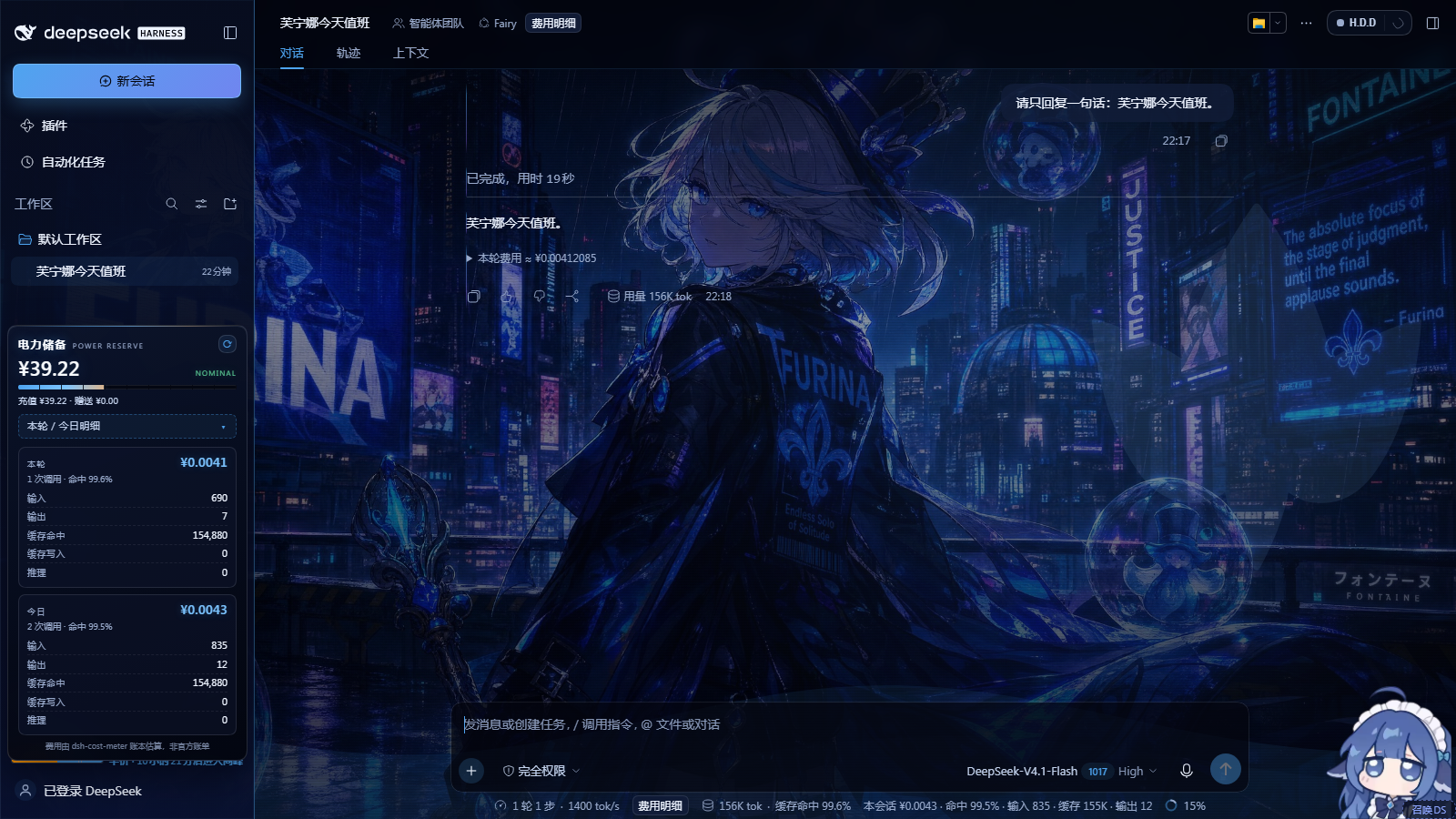 |
| Hydro Iris | 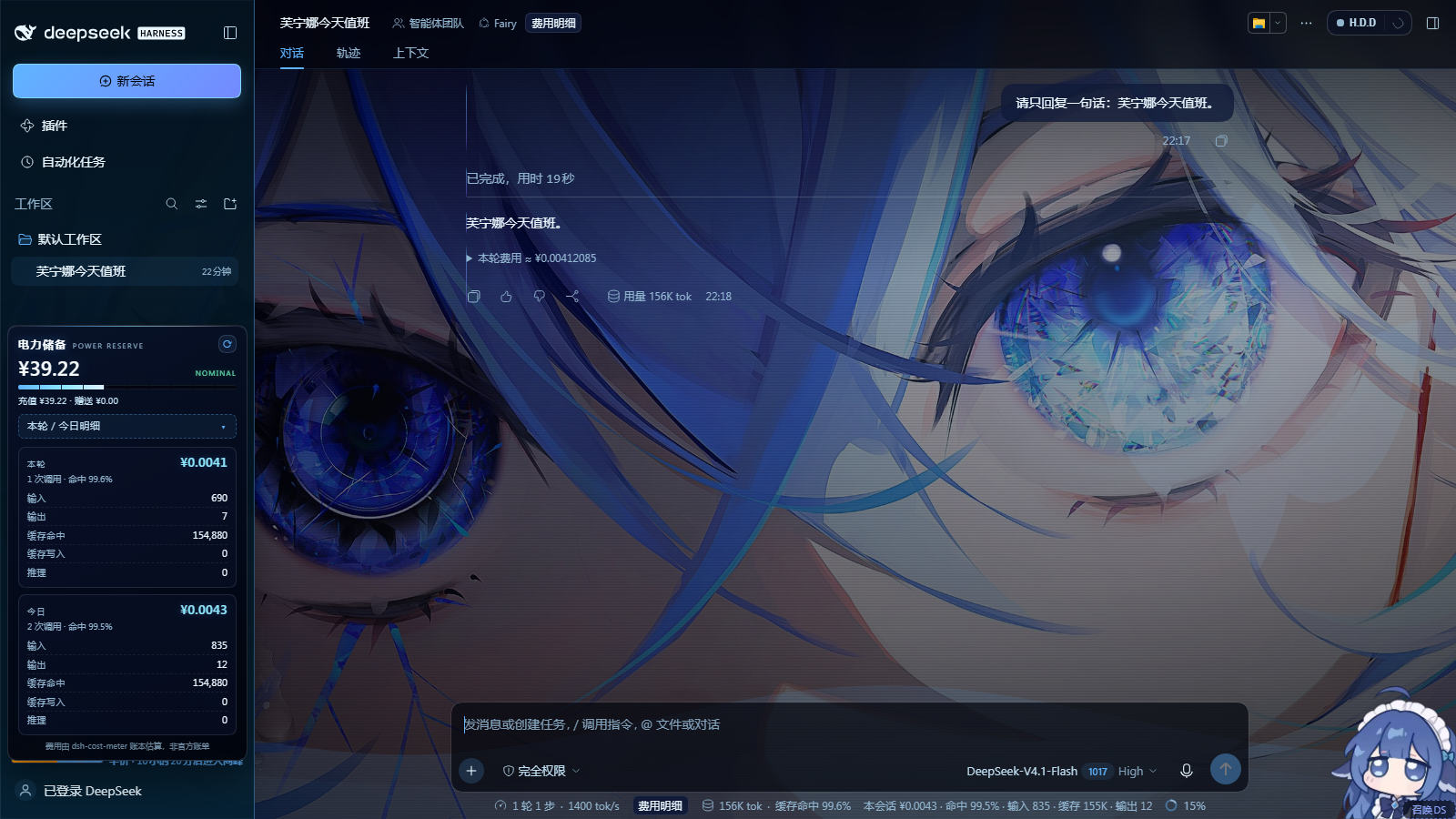 |
| Salon Solitude | 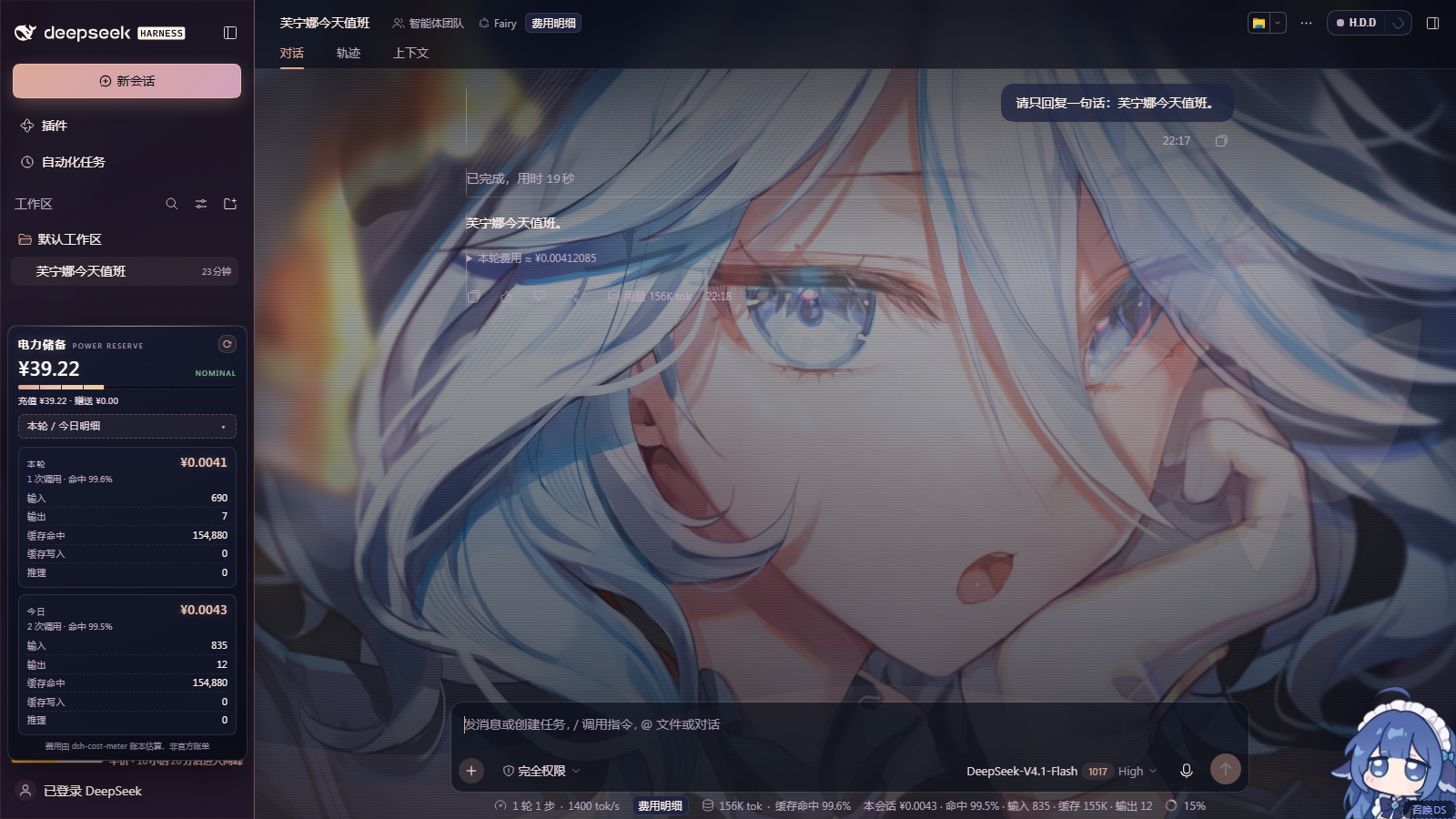 |
Legibility was checked in all three skins: the figure uses --fr-bill-text
(near-white) and the token labels --fr-bill-2 (Fontaine rgb(154,171,204),
Hydro rgb(147,182,208), Salon rgb(185,168,194)) over the translucent panel
surface, so every row stays above the 4.5:1 body-text contrast target. The
card's bottom edge is measured against the account-row footer, so the expanded
table clears the user chip at 900 px height and the detail area scrolls if the
viewport is shorter.
Data source
Everything comes from the injected dsh-cost-meter service; this package does
not read credentials and does not call the DeepSeek API itself:
| field | source |
|---|---|
| balance (incl. bonus) | costMeter.getState().balance (already reconciles bonus wallets) |
| today tokens / calls / cost | costMeter.getState().today |
| current turn | costMeter.getSessionBilling({sessionId}), newest non-empty turn |
| fallback balance | deepseekAccount.getBalance() — used only when cost-meter is absent, merging value + bonusWallets |
Because the service must be mounted, cordis.patch.yml inserts a second row:
# == furina-dsh-theme
- id: furina-dsh-theme
  name: furina-dsh-theme
- id: furina-cost-meter
  name: dsh-cost-meter
and dsh-cost-meter is a runtime dependency (>=1.8.24).
Endpoint
GET /furina-theme/api/billing?session=session-<uuid>[&fresh=1]
Same-origin only (the host route rejects cross-origin requests). Shape:
{
  "ok": true,
  "generatedAt": "2026-10-22T14:00:00.000Z",
  "currency": "CNY",
  "exchangeRate": 7.2,
  "balance": {
    "available": true, "reason": null, "currency": "CNY",
    "total": 42.24, "toppedUp": 17.22, "granted": 25.02,
    "updatedAt": "2026-10-22T13:59:00.000Z", "source": "cost-meter"
  },
  "today": {
    "available": true, "reason": null, "date": "2026-10-22",
    "calls": 18, "tokens": { "input": 12000, "output": 3400, "cacheRead": 88000, "cacheWrite": 1200, "reasoning": 900 },
    "cacheHitRate": 0.868, "cost": { "usd": 0.0123, "cny": 0.08856 },
    "apiCost": { "usd": 0.0123, "cny": 0.08856 }, "includesPlan": false
  },
  "turn": { "available": true, "reason": null, "sessionId": "session-…", "turn": 7, "calls": 3, "tokens": { "…": 0 }, "cacheHitRate": 0.8, "cost": { "usd": 0.001, "cny": 0.0072 }, "apiCost": { "usd": 0.001, "cny": 0.0072 }, "includesPlan": false },
  "meta": { "now": 1761132000000, "dayKey": "2026-10-22", "monthKey": "2026-10", "timezone": "Asia/Shanghai", "timezoneOffsetMinutes": 480, "host": "dsh" },
  "costMeter": { "available": true, "reason": null }
}
turn is returned only when a valid session is supplied; without one it is
{"available":false,"reason":"no-session"}. Values are illustrative of the shape
only — the live figure comes from the ledger.
Dependencies and privacy
- one new runtime dependency:
dsh-cost-meter(the service that owns the ledger); - the panel reuses the theme's palette variables (
--fr-*), so it stays legible in all three skins; - no credentials are read, logged or sent anywhere by this plugin — the panel only asks the local host process.
Files
package.json            dsh.bundle.patch → ./cordis.patch.yml, files: lib, client
cordis.patch.yml        inserts the `furina-theme` plugin row + the `dsh-cost-meter` service row
lib/index.js            host half: routes, injection rows, file serving, disposal
lib/billing.js          billing document: cost-meter adapter, balance merge (incl. bonus wallets)
client/theme.css        palettes + token mapping + glass/surface + sidebar/deliverable rules
client/theme.js         backdrop, settings page, themed splash, dark branch, persistence, keyboard
client/billing.css      "电力储备" card styling from the skin palette variables
client/billing.js       self-mounting reserve gauge + 本轮/今日 token & cost table
client/assets/          emblem.svg, 3 wallpapers, 3 thumbnails
test/                   node:test suites (host, client, billing)
tools/verify.mjs        live-instance CDP verification + screenshots
docs/                   round-1 screenshots + verify-report.json
docs/screenshots/       round-2 proof shots (three skins, settings page, splash boot, file cards)
companion/              reference/companion plugins, source-identical, for reading and credit
  dsh-startup-screen/     the startup animation this theme tints (MIT, © 沈宏宏)
install/                one-click bundle installer (release zip: theme + startup plugin + these scripts)
CREDITS.md              art sources, companion plugin authors and licence texts
LICENSE                 MIT License (code only)
NOTICE.md               asset provenance and character/IP notice
Credits
Fan-art wallpapers (full sources, licence notes and re-encode details in CREDITS.md):
| File | Creator / credit | Source |
|---|---|---|
furina-01-city-noir.jpg |
rotvirtue | Wallpaper Abyss #1409444 |
furina-02-hydro-iris.jpg |
58_(opal_00_58) | Danbooru 5837276 |
furina-03-salon-solitude.jpg |
artist not named on the page | Wallpaper Abyss #1353872 |
Companion plugin: dsh-startup-screen
1.1.0 by 沈宏宏 (MIT) — vendored unmodified in
companion/dsh-startup-screen/ with its original
licence; the theme re-colours its splash per skin and exposes its enable/mode controls
in the settings page. dsh-cost-meter 1.8.24 by Han-1413141 (MIT) powers the
电力储备 panel and is declared as an npm dependency, not copied.
License
The code in this repository is released under the MIT License — see LICENSE.
The character artwork is not MIT: the wallpapers, thumbnails and emblem are fan art
of Furina (《原神》 / Genshin Impact, © HoYoverse), included for personal, non-commercial
theming only. See NOTICE.md before redistributing or publishing this
repository — or replace the images in client/assets/ with art you may redistribute
(the theme works with any images).
The vendored startup plugin in companion/dsh-startup-screen/ keeps its own MIT
notice and copyright (© 沈宏宏); see that folder's LICENSE.
No comments yet. Be the first to write one.