dsh-archive-pro
English | 简体中文
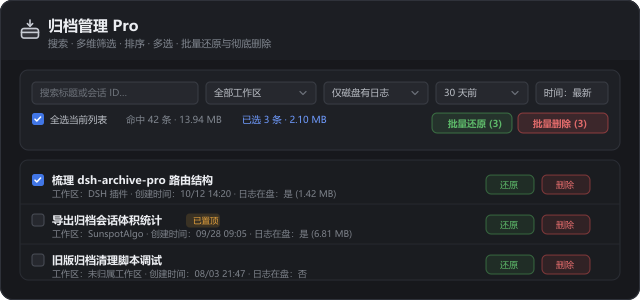
Bulk management for archived DeepSeek Harness sessions: search, filter, sort, multi-select, unarchive, and permanently delete — all from Settings → Archive manager pro.
The problem
DeepSeek Harness ships with an archive feature but nothing to maintain it. Archiving a few dozen sessions leaves you with a flat, unsorted list: no search, no filters, no multi-select, and no way to reclaim disk space except clicking sessions one at a time. Archives keep their logs on disk forever, so the cost of that gap grows quietly.
This plugin adds the maintenance layer the archive list is missing.
Features
| Capability | Detail |
|---|---|
| Keyword search | Matches session title and session ID |
| Workspace filter | One workspace, or sessions that never belonged to one |
| Log-state filter | Logs still on disk vs. leftover markers whose logs are gone |
| Age filter | Archived more than 7 / 30 / 90 days ago |
| Sorting | Created time, on-disk size, title — each in both directions |
| Multi-select | Checkbox per row, Shift-click to select a contiguous range |
| Select visible | Operates on the filtered set only, never sessions the filters hide |
| Batch unarchive | Return many sessions to their workspace sidebar at once |
| Batch delete | Permanent, with running tasks stopped and caches cleared |
| Purge visible | Clear the whole filtered list, skipping pinned sessions by default |
| Live stats | Matched count, combined size, selected count and selected size |
On-disk size is read from the real session log directory, so the heaviest archives are easy to target first.
Install
From the DSH app: Settings → Plugins → Install, then search for dsh-archive-pro.
Or from a terminal:
dsh plugin --profile web add dsh-archive-pro
The package is published on npm as dsh-archive-pro.
After installing, open Settings → Archive manager pro.
What permanent deletion does
Deleting an archived session is a controlled teardown, not just a directory removal:
- Stops any task still running inside that session.
- Closes the log writer and detaches the session from memory.
- Removes the session log directory, the archive marker, and the projection cache.
- Writes a deletion receipt so a late snapshot or cache write cannot resurrect the session.
Deletion cannot be undone. Unarchive remains available for as long as a session is only archived.
Safety
- Everything runs locally. No telemetry, no uploads, no network requests.
- Deletion receipts live in
~/.dsh/storages/archive-manager-deleted.jsonand contain session IDs only — never session content. - Every destructive action opens a confirmation dialog naming the count and combined size first.
Escdismisses any confirmation dialog.- Pinned sessions are skipped by Purge visible unless you turn that safeguard off.
Requirements
- DeepSeek Harness desktop app (
engines.dsh: >=0.2.1) - Node.js ≥ 22 (bundled with DSH)
- Zero runtime dependencies
How it fits into DSH
package.json declares both halves of a DSH bundle:
"dsh": {
  "bundle": { "patch": "./cordis.patch.yml" },
  "client": { "platform": "web", "inject": [ ... ] }
}
- Host half (
lib/index.js) injectswebServer,storageDomain,workspaceRegistry,sessionPersistence,sessions, andagents, then mounts five routes under/dsh-archive-pro/*. - Client half (
client/client.js) is a zero-build classic script loaded throughwindow.__ModuleLoader__.load, registering asettings.sectionplus an optional native context-menu item. - All session teardown is delegated to
lib/session-lifecycle.js, which cancels agents, awaits idle/dispose, closes persistence writers, and clears memoized entries.
Repository layout
lib/index.js               Host entry: mounts routes, wires deletion reconciliation
lib/routes.js              list, restore, delete, batch-delete, batch-restore
lib/session-lifecycle.js   Safe session / agent / writer teardown
client/client.js           Settings section + context menu (zero-build CJS module)
locale/zh.json             Chinese market metadata
locale/en.json             English market metadata
docs/DETAIL.md             English detail page (single feature image)
docs/DETAIL.zh.md          Chinese detail page (single feature image)
docs/preview.svg           Feature image, outlined to vector paths
icon.svg                   Plugin icon (36×36, self-contained)
cordis.patch.yml           Bundle patch inserting the plugin
Development
There is no build step. Edit the files, install the directory as a bundle, then reload the DSH window.
# syntax check
node --check lib/index.js
node --check lib/routes.js
node --check client/client.js
To install a local checkout while iterating:
dsh plugin --profile web add file:D:/path/to/dsh-archive-pro
Note that a locally linked directory bypasses the files whitelist, so
node_modules and scratch folders can still be picked up — keep the checkout clean.
License
MIT. See LICENSE.
The session teardown logic grows out of dsh-archive-manager-plus; this plugin adds filtering, sorting, multi-select, and batch operations on top of it.
No comments yet. Be the first to write one.