English · 简体中文

LogicMargin
Build with AI. Understand what it builds.
A local logic review tool: follow the flow, inspect the code, leave feedback, and verify each revision.



Why LogicMargin? · About · Preview · Quickstart · Documentation
Why LogicMargin?
AI is helping more people write more code, but understanding and reviewing that code has not become equally fast.
- For developers, faster output means more code to review. An agent can change many files and generate substantial code in one pass. Developers still need to understand call relationships, conditions, failure handling, and state changes. A line-by-line diff makes it difficult to reconstruct the full business flow and spot omissions or side effects.
- For people without a programming background, AI makes building possible while the code can remain a black box. Product managers, designers, and domain experts can describe a requirement and get a working feature, yet struggle to tell how it executes, what happens on failure, or whether it matches their intent. A working screen and the AI's explanation offer limited evidence of correctness.
“Can a failed operation still charge a fee?” “Could a repeated claim grant the reward twice?” “Does cancellation restore the previous state?” Answering these questions requires understanding the system's actual behavior and checking it again after a change.
About
LogicMargin brings flowcharts, related code, and review discussions into one local interface for people and coding agents. People without a programming background can start with flows and business rules; developers can open the corresponding source and diffs. Both can review the behavior of the same implementation.
An agent reads the actual code or documents and prepares a flowchart. You annotate specific nodes, edges, or groups of objects. After you submit a round, the agent changes the implementation, updates the diagram, and replies to the original feedback. You compare the revision with the fixed baseline and decide whether the issue is resolved. Feedback, replies, and versions stay together across rounds.
Agent-prepared diagrams still need to be checked against the source. LogicMargin provides tools for reading, discussing, and verifying the work; people make the final judgment.
Preview
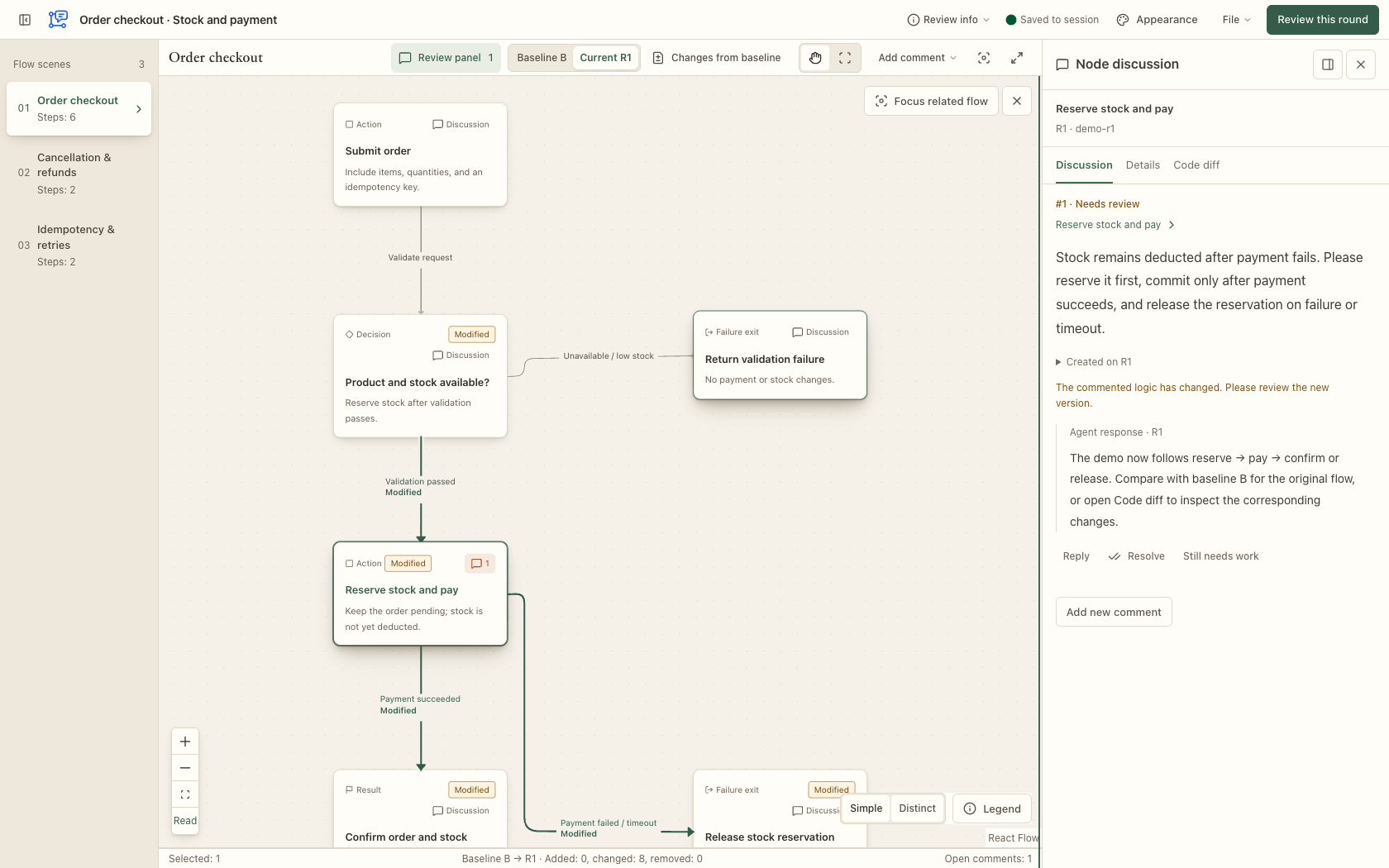
Fixed baseline · Changes on the diagram · Node discussions
Light theme ·
Dark theme ·
Download the English demo
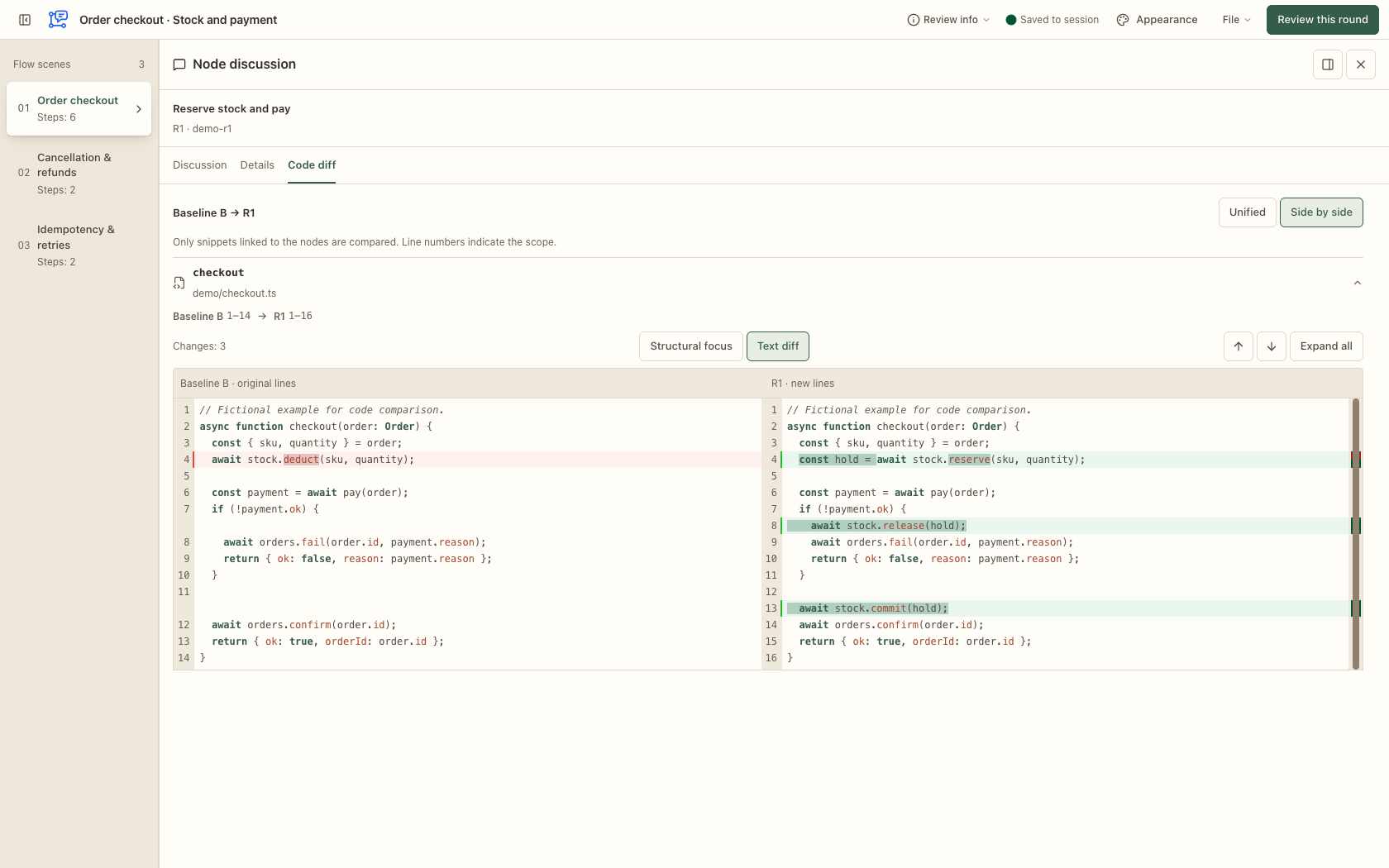
Discussion, Details, and Code diff · Resizable sidebar · Side-by-side source comparison
Light code view ·
Dark code view
Screenshots from the 0.9.0 Go build use fictional order data and sample code. The code view shows the earlier text/structural focus switch; the current interface automatically applies structural focus when available and otherwise keeps the text diff. The downloadable demo includes a fixed baseline and saved code snippets; it contains no real review sessions and does not demonstrate production source verification.
Features
| Capability | What you can do |
|---|---|
| Review directly on the diagram | Comment on nodes, edges, multiple objects, a whole scenario, or the entire review, with the relevant flow in view. |
| Read beside a node | Switch between Discussion, Details, and Code diff in one window to inspect discussion history, rules, inputs, outputs, and source evidence. Keep it beside the node or dock it in the right sidebar. |
| Inspect related code changes | Use unified or side-by-side diffs of saved node source snippets, with line numbers, syntax highlighting, change navigation, and unchanged-region folding. A single vertical scrollbar combines removal and addition markers with the reading position; click or drag it to navigate the current snippet. Buttons at the beginning and end of each visible block repeatedly reveal up to 20 more lines; you can also reveal one entire unchanged region or show the full snippet. |
| See changes across rounds | Compare the first review revision R1 and later rounds against the fixed original baseline B, see additions, removals, and modifications on the diagram, or inspect field changes against the previous round. Return to the original location of a removed target. |
| Plan changes on the original system | Annotate baseline B with redesign requirements, then review the agent's implementation in R1 alongside the original diagram and comments. |
| Work with a coding agent | Submit a round explicitly, let the agent wait, revise, reply, and publish a new diagram, then verify or approve the result yourself. |
| Separate review purposes | Associate multiple independent reviews with one agent conversation while keeping their comments, drafts, and rounds separate. |
| Control your data | Import and export JSON, download full backups, archive and restore reviews, or explicitly delete them. Optional automatic archival follows approval. |
Choose from three themes—paper, soft relief, and glass—with light, dark, or system appearance. Code comparison defaults to side by side; choose unified or side by side in the code view or Settings. The layout is saved in the browser and retained across nodes, scenarios, and reloads. The interface works on desktop and mobile. On desktop, drag either sidebar's boundary to resize it; the right sidebar can expand over the canvas for longer discussions and side-by-side code.
The interface supports English and Simplified Chinese. It initially follows the browser’s supported language; choose Settings → Interface → Interface language to save a different preference. Flows, source code, and comments stay in their original language, and switching languages keeps your current selection and drafts.
Settings opens in a centered window with Interface, Keyboard shortcuts, and Version and updates tabs. Common review actions have configurable shortcuts: record a replacement, disable a binding, or restore defaults. Typing and IME composition keep their normal behavior. See the default keys and customization guide.
Code diffs compare related source snippets saved in the review’s fixed baseline B and revision R when their correspondence can be established. If a historical snippet is missing or the pairing is ambiguous, the interface shows the available source and an explanation. It does not infer old code from the current workspace or provide a repository-wide diff. During local source verification, the Go CLI also captures version-verified full files in an optional backend analysis cache. Structural analysis uses that context and projects results back into the saved snippets; full files are not included in review JSON or sent to the browser. Missing or evicted context retains the existing snippet/text fallback.
Structural focus is applied automatically for supported Go and JavaScript/TypeScript syntax, including JSX/TSX, once a valid analysis is ready. It emphasizes changes beyond safe formatting differences and offers a local comparison with the original location for clearly paired moved blocks, including blocks modified during the move. Source text, alignment, and unified/side-by-side layouts are preserved. Unsupported syntax, uncertain pairing, or exhausted budgets automatically retain text highlighting with an explanation; no manual mode switch is needed. This is a syntax-based reading aid; it does not use the SemanticDiff engine or prove general semantic equivalence. See the structural diff contract and validation.
Quickstart
0.9.19 uses a Go executable with the web UI embedded. Codex and native ZIP users do not need Node.js, Go, Bun, or npm. Online Codex installation requires Git and internet access to download the matching native release on first launch. DSH uses its own supported Node.js environment and pnpm; source development and builds require Node.js and Go.
Use it with an agent
For DeepSeek Harness 0.2.2-rc.1, install the npm package into the profile you use:
dsh plugin --profile YOUR_PROFILE add dsh-plugin-logicmargin@latest --save-exact --registry=https://registry.npmjs.org
The command resolves latest at installation time and saves the resolved version; it does not enable background upgrades. To pin this version after it is available in npm, replace @latest with @0.9.19. GitHub and npm publication are separate steps.
Reload the plugin/profile, then verify the logic-margin skill and its MCP tools. The plugin connects the same native service through DSH's official MCP Client. The DSH guide covers updates and the GitHub tgz alternative. The commands below are specific to Codex.
Register the Git marketplace and install the plugin:
codex plugin marketplace add SunneeYang/LogicMargin --ref main --sparse .agents/plugins --sparse plugins/logic-margin
codex plugin add logic-margin@logic-margin-local
Codex checks out the plugin directories. On macOS/Linux, the bundled MCP entry runs the sh launcher, which downloads the native ZIP from the official GitHub Release, pinned to the plugin version, and verifies its SHA-256 before running it. For automatic MCP registration on Windows, use the platform ZIP below; the PowerShell launcher remains available for CLI use. Start a new agent session in the project you want to review:
$logic-margin:logic-margin
Start a logic review for the current feature. Focus on whether failures
can still deduct a fee, and wait for my feedback.
The plugin bundles its stdio MCP registration: .codex-plugin/plugin.json references root mcp.json, whose paths resolve from the installed plugin directory. Its tool_timeout_sec is 86400 (24 hours); no global executable-path registration is needed. Reload the plugin and verify a read-only tool call. The agent uses one shared background process for the review API, bundled web UI, and optional HTTP MCP. Initialization and tool discovery do not start the background process; each tool call checks it and starts it when safely stopped. If it exits, the next call can restore it without replaying an operation already sent. Closing the stdio connection leaves the shared background running. The agent then reads the sources, prepares the diagram, and gives you a review link. Your business project does not need LogicMargin's npm dependencies.
Before updating an existing installation, identify its managed service with server status, stop the verified old instance with server stop, and back up the actual session directory. Then ask your agent to run:
codex plugin marketplace upgrade logic-margin-local
codex plugin add logic-margin@logic-margin-local
Keep the same LOGIC_MARGIN_HOME / LOGIC_MARGIN_DATA_DIR, port, and session IDs. After updating, reload the plugin so Codex resolves the relative entry from its new installation directory, and restart the verified managed service when its version changes. For an older global mcp_servers.logic_margin registration, back up the config and remove or disable only the entry confirmed to belong to LogicMargin, preserving its policy before switching to the bundled server. Review data stays separate from the plugin cache; do not delete it to upgrade. See the upgrade steps. The marketplace follows its registered ref; it does not poll for updates during a review.
For installation without Git, choose logic-margin-agent-0.9.19-TARGET.zip and its .zip.sha256 from Release v0.9.19. Bundled MCP registration starts in 0.9.19; older release archives do not contain this change.
| Platform | TARGET |
|---|---|
| macOS Apple Silicon | darwin-arm64 |
| macOS Intel | darwin-x64 |
| Linux ARM64 | linux-arm64 |
| Linux x64 | linux-x64 |
| Windows x64 | win32-x64 |
Each ZIP contains one native executable and the plugin files. It runs directly from plugins/logic-margin/skills/logic-margin/scripts/logic-margin (logic-margin.exe on Windows), with no runtime download. See the plugin guide for checksum verification, ZIP registration, and service upgrades. The detailed guides are currently in Chinese.
Try it in your browser
For source development, install Node.js and the Go version required by go.mod, clone the repository, and run from its root:
npm ci
npm run dev
Open http://127.0.0.1:5173. Browse the built-in examples, or choose “File → Import review” and select the English order demo JSON to try baseline comparison, node discussions, and code diffs. A Chinese demo is also available.
The demo is for learning the interface. A real review should be generated from actual code or documents and include source evidence.
Review workflow
There are two starting points: review existing changes by preparing the original baseline B and the changed revision R1, or plan a system redesign by annotating B before the agent implements and publishes R1. Later rounds retain the same baseline for comparison.
| Step | Action |
|---|---|
| 1 · Start | The agent prepares a diagram for one explicit review purpose, records its source snapshot, opens an independent review, and waits. |
| 2 · Annotate | Inspect branches, select objects, and leave comments on the diagram. Move longer comments to the side panel when needed. |
| 3 · Submit | Submit the round to freeze the current feedback into a package for the waiting agent. |
| 4 · Revise | The agent changes the code or documents, verifies the sources again, and publishes the updated diagram and final replies together. |
| 5 · Verify | Compare the changes, read the original feedback and replies, then confirm resolution, add feedback, or approve the round. |
Saving a comment and submitting a round are separate actions. Saved session comments remain available before submission; the waiting agent continues after an explicit submission. A reply does not automatically resolve an issue. The reviewer makes the final decision.
The agent reads sources, changes code, and prepares diagrams. LogicMargin displays, discusses, stores, and tracks the review. Its MCP wait tool holds the request until a submission, approval, or terminal error; ordinary comment saves and connection keep-alives require no model checks. Its server does not execute project code or shell commands, and it has no built-in language model.
Independent reviews and cleanup
Continue the original review for changes serving the same purpose. Start a new review when the subject or purpose changes. Use MCP context to associate reviews with an agent conversation and purpose to describe what each review checks. The following CLI commands remain available for scripts; normal agent reviews use the corresponding MCP tools. Set LM_CLI to the installed native executable, or to the Git marketplace’s scripts/logic-margin.sh launcher. In PowerShell, set $LM_CLI to logic-margin.exe or logic-margin.ps1 and invoke it with & $LM_CLI, for example & $LM_CLI server status.
# List active and archived reviews in one context
"$LM_CLI" list --context order-checkout --state all

# Archive by default, preserving the full diagram, comments, and history
"$LM_CLI" cleanup SESSION_ID

# Restore an archived review
"$LM_CLI" restore SESSION_ID

# Permanently delete one review; it cannot be restored from the server
"$LM_CLI" cleanup SESSION_ID --mode delete
“File → Review tasks” also provides creation, backup, archive, restore, and deletion actions. By default, only approved reviews can be cleaned up. See the agent workflow for explicit cleanup of unfinished reviews, command options, and concurrency checks.
MCP wait_review does not claim feedback or archive reviews. After reading feedback, the agent calls acknowledge_review. With cleanup_on_approval, it calls cleanup_review only after receiving final approval; new feedback prevents cleanup using an old version. Rounds, comments, and history have no fixed business count limits; individual content and single-request resource checks still apply.
- Shared reviews: diagrams, comments, replies, and history live on the service machine. Managed services default to
~/.logic-margin/sessions; the development server uses.logic-margin/sessionsin the repository. The actual directory is configurable. - Browser data: unfinished drafts, pending operations, and standalone file reviews are stored in the current browser for the current origin. They do not automatically appear on other devices.
- Private network access: the development server listens on
0.0.0.0:5173by default. Other LAN devices can use the machine's LAN address. With Tailscale, set the review link's public address to the service machine's Tailscale address. - MCP access: the MCP endpoint accepts loopback connections only, even when the review page is shared over a private network. The MCP service and source workspace are on the same machine.
- Current boundaries: the review API is intended for a trusted local machine or private network. Remote MCP, accounts, permissions, and multiuser collaboration are not implemented. Source digest verification also does not replace human verification of the diagram's meaning.
Documentation
The detailed guides below are currently in Chinese.
| Topic | Start here |
|---|---|
| Plugin installation, automatic startup, distribution, and platform entry points | Agent plugin |
| DeepSeek Harness package, isolated validation, and market submission paths | DSH integration |
| Starting, waiting, replying, publishing revisions, and cleanup | Agent workflow |
| Diagram JSON, stable IDs, and source digests | Review format |
| Cross-round comparison, carried comments, and original locations | Revision review design |
| Synchronization, rendering, and measurement boundaries | Performance optimization |
| Fictional examples and their documented rules | Subscription example · Task pipeline |
Requires the Node.js version supported by package.json tooling and the Go version in go.mod. Wrap builds and tests that create substantial temporary data with the repository’s agent-tmp-run harness.
npm ci
npm run review -- --help # Build and run the current source Go CLI
npm run dev         # Vite HMR + source-built Go API/MCP
npm test            # Go backend + frontend/model tests
npm run build       # TypeScript checks and frontend build
npm run build:go    # Native Go service with embedded UI
npm run test:go     # Go runtime tests
npm run test:go:agent  # Native distribution integration tests
npm run test:go:compat # Fixed legacy data + native process recovery checks

npx playwright install chromium
npm run test:go:e2e # Default Go service; full browser suite
If Chrome is already installed, you can also run PLAYWRIGHT_CHANNEL=chrome npm run test:go:e2e.
The dev driver starts a foreground Go service with a temporary private registry and proxies /api and /mcp through Vite without changing Host/Origin. Development reviews remain in repository .logic-margin/sessions (LOGIC_MARGIN_DATA_DIR overrides it); tests use disposable private directories. Stop the driver to stop both processes; restart it after Go edits. npm run preview runs the built frontend with the same Go proxy. npm run review -- ... builds the current source Go executable before forwarding arguments. Use --url http://127.0.0.1:5173 for the dev service; without it, native CLI commands use the normal managed-service home.
Built with React 19, TypeScript, React Flow, Vite, and a local Go HTTP service. Development, CLI, backend tests and browser tests all use Go; fixed historical fixtures retain compatibility coverage. See the plugin guide for native builds and migration validation for the historical test scope. Five-target cross-compilation is separate from native acceptance; the migration record reports actual execution on macOS ARM64 only.
Acknowledgements
LogicMargin is available under the MIT license. Distribution archives include the project license and retain their third-party notices.
Special thanks to Crit for inspiring the workflow of browser annotations, explicit submissions, and agents waiting for review. LogicMargin draws on these interaction patterns and independently implements diagram annotations, cross-round verification, and review task management around business flows and logical relationships. Primary sources and design decisions are recorded in the Crit reference notes.
Thanks to React Flow / xyflow for the diagram canvas foundation.
Thanks to CodeMirror and @codemirror/merge for the code editor and diff foundation, including syntax highlighting, unified and side-by-side comparison, and change navigation. LogicMargin adds node source pairing, incremental context expansion, change overview navigation, and virtualized unified diffs for long snippets. License notices are included in THIRD_PARTY_NOTICES.md.
No comments yet. Be the first to write one.