dsh-session-migrator
English | 简体中文
A visual cross-device session migration plugin for DeepSeek Harness. Export a session on one device, then import its ZIP, JSONL, or unpacked folder into a selected workspace on another device.
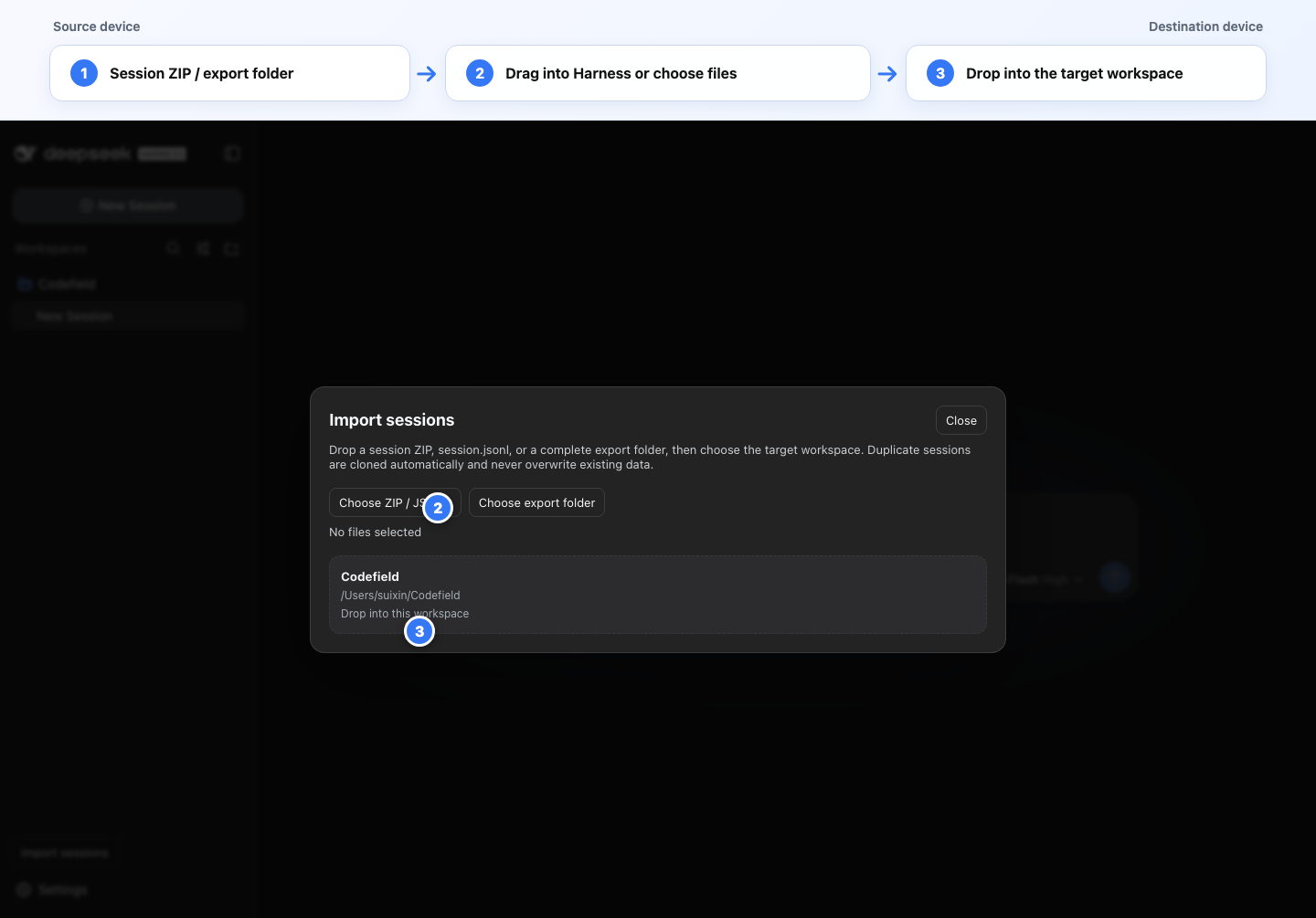
Highlights
- Visual workflow — use the sidebar action instead of memorizing commands.
- Drag and drop — drop a Harness session ZIP,
session.jsonl, or complete export folder onto the page, then choose a target workspace. - Cross-device workspace mapping — rewrites every imported session's
cwdto the destination workspace. - Complete session trees — imports the root session and every
subagents/<id>/session.jsonldescendant. - Safe duplicate imports — never overwrites an existing session. If any source ID already exists, the complete tree receives new IDs while lineage and Harness provenance references are remapped together.
- Attachment migration — restores referenced PNG, JPEG, WebP, and GIF objects and verifies their content-addressed IDs.
- Harness-native validation — decodes storage rows with
decodeStorageRecord()and validates each reconstructed log withSession.create()before writing. - Immediate original titles — warms Harness's projection cache during import, so workspace rows show their durable session titles before the sessions are opened.
- English and Chinese UI — follows the active Harness language automatically.
- CLI fallback —
/session-importremains available for local, scripted workflows.
Requirements
- DeepSeek Harness
0.1.1-rc.2or a compatible build. - The destination workspace directory must already exist on the destination host.
- Project files are not included in a session export; migrate the project separately with Git or another synchronization method.
Install
Clone this repository on the machine running Harness:
git clone https://github.com/Suixin04/dsh-session-migrator.git
cd dsh-session-migrator
npm install
npm run build:client
Install it into the Web profile:
dsh plugin --profile web add /absolute/path/to/dsh-session-migrator
Restart the existing dsh web process. The Import sessions action then appears at the bottom of the sidebar.
Updating
package.json, Host code, or the profile composition requires a Harness restart. Rebuildingclient.jsalone may be picked up only when the matching client-plugin watcher is running.
Export on the source device
Harness already provides session export. Open the source session and either:
- run
/export, or - click Session log in the session header.
The browser downloads a file similar to:
dsh-session-session-xxxxxxxx.zip
The archive normally includes the root session, all descendant subagent sessions, and referenced image attachments.
Import on the destination device
Visual import
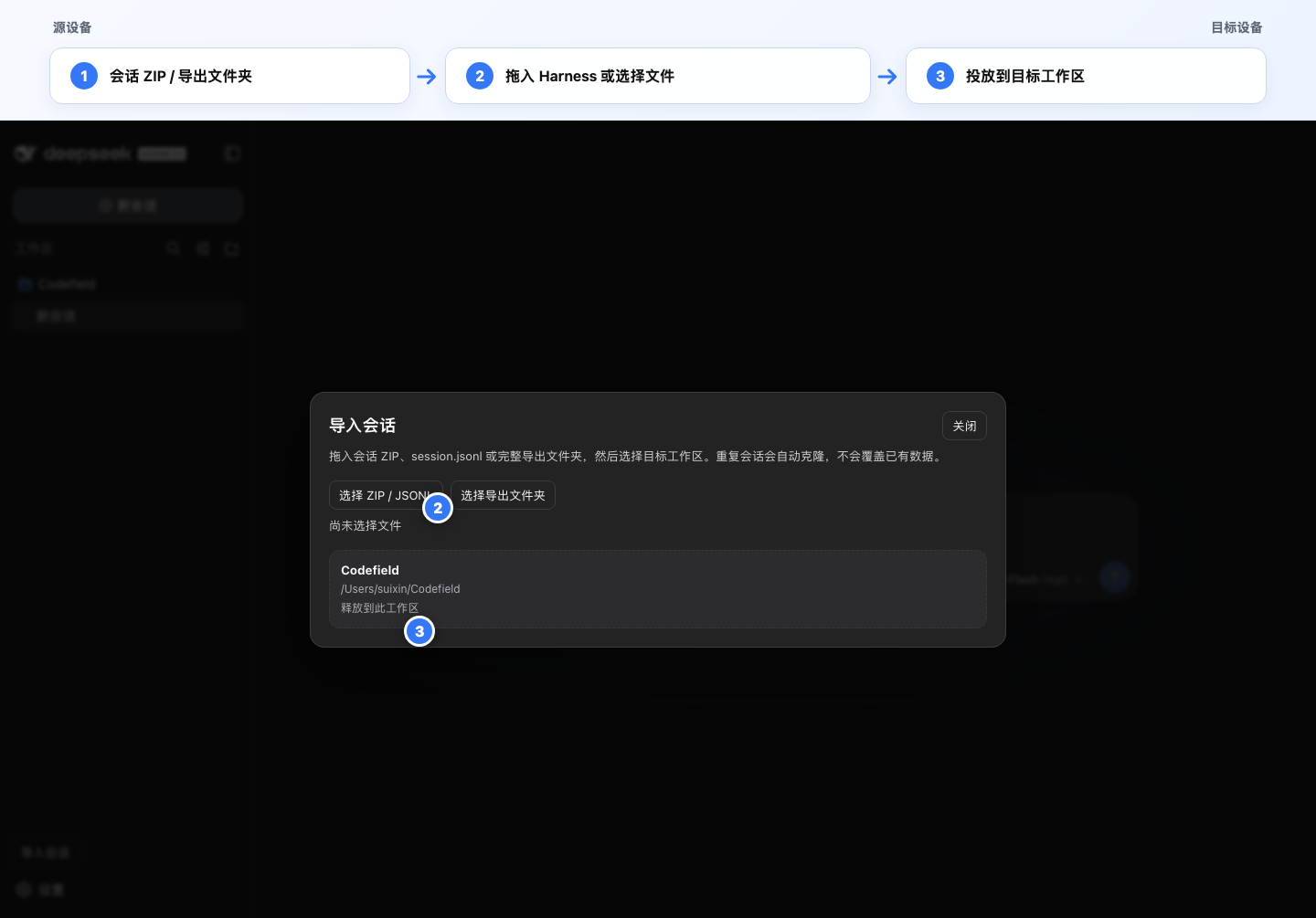
- Click Import sessions in the sidebar.
- Choose a ZIP/JSONL file, choose a complete export folder, or drag it directly onto the Harness page.
- Click or drop onto the destination workspace card.
- Wait for validation and persistence to finish.
- Click Open imported session.
The interface follows the current Harness language:
Command import
Use the current session's workspace:
/session-import "/absolute/path/dsh-session-xxx.zip"
Choose another existing workspace explicitly:
/session-import "/absolute/path/dsh-session-xxx.zip" --workspace "/absolute/path/to/project"
An unpacked export directory or a single JSONL file is also accepted:
/session-import "/path/to/unpacked-export" --workspace "/path/to/project"
/session-import "/path/to/session.jsonl" --workspace "/path/to/project"
Duplicate strategy
When none of the imported IDs exists locally, original session IDs are preserved.
When any ID conflicts, the plugin clones the complete imported tree:
- every session receives a new UUID;
- header
idandparentSessionfields are remapped; - Harness
senderSessionIdprovenance fields are remapped; - structured Session Reference targets inside the imported tree are remapped;
- existing local logs are never overwritten.
User/model-authored text, historical tool arguments, and tool-result text are intentionally not searched and replaced. They are immutable conversation content, and blindly rewriting ID-like strings could corrupt meaning. If a continued cloned conversation tries to reuse an old subagent ID, call list_agents to obtain the current cloned address.
Supported input layout
session.jsonl
subagents/
  <session-id>/
    session.jsonl
media/
  <attachment-id>.<png|jpg|jpeg|webp|gif>
A ZIP may contain one extra top-level directory. The importer detects and strips that single wrapper when locating the root session.jsonl.
Safety and limitations
- Session exports may contain complete prompts, responses, system context, tool calls, absolute paths, and images. Treat them as sensitive data.
- The importer enforces archive, JSONL, and entry-count limits and rejects unsafe paths, duplicate entries, malformed logs, duplicate IDs, cyclic lineage, and orphan descendants.
- Harness persistence is append-only and currently exposes no public deletion or multi-session transaction API. The plugin validates the complete archive before writing, but a storage failure during the final write phase can leave a successfully committed prefix.
- Importing again after a partial write creates a fresh cloned tree. Inspect the workspace first to avoid unwanted duplicates.
- This plugin migrates session state and referenced images, not repository files, credentials, model-provider settings, or external services.
Development
npm install
npm run build:client
npm test
Important files:
index.js— Host plugin,/session-import, andPOST /api/session.import.core.js— parsing, validation, attachment restore, ID remapping, and persistence.client-src.js— React UI source and drag/drop workflow.client.js— prebuilt Harness lazy-CJS browser bundle.build-client.mjs— browser bundle build script.cordis.patch.yml— DSH profile bundle patch.
License
MIT
No comments yet. Be the first to write one.