dsh-ros2
ROS2 debugging toolset and robot-state vision analysis for DeepSeek Harness (DSH), shipped as a plugin. 中文版见 README_CN.md.






版本对应关系:npm 上的
dsh-ros2@0.1.0就是本仓库当前版本(monorepo 布局)。 GitHub 的v0.8.0 ~ v0.15.0标签是已废弃的旧单体布局历史,从未发布到 npm。 版本号在 2026-08 monorepo 拆分时重新基线。详见 docs/versioning.md。
dsh-ros2 gives a DSH agent full robot development / debugging capabilities on any host with ROS2, organized in four capability tiers:
| Tier | Capability | Safety boundary |
|---|---|---|
| L1 | Read-only diagnostics: package/workspace/dependency checks, node/topic/service/action/param/interface enumeration, one-shot topic sampling, TF tree queries, whole-graph topology JSON, ros2doctor, bag summaries, MoveIt discovery, robot-profile load, safety-state read & VLM semantic arbitration |
Pure read-only, no approval |
| L2 | Approval-gated management: colcon build (background job), rosdep install, message skeleton generation, param set, bounded bag record, one-click ROS2 install, launch management, rosbag replay, MoveIt motion, zero-pose calibration, robot registration & topology learning, safety_monitor start / human-gated lock / unlock |
Writes always ask first (fail-closed) |
| L3 | Visualization: RViz2 / rqt lifecycle management, screenshots, multimodal vision description, xdotool-level window interaction | Local session operations |
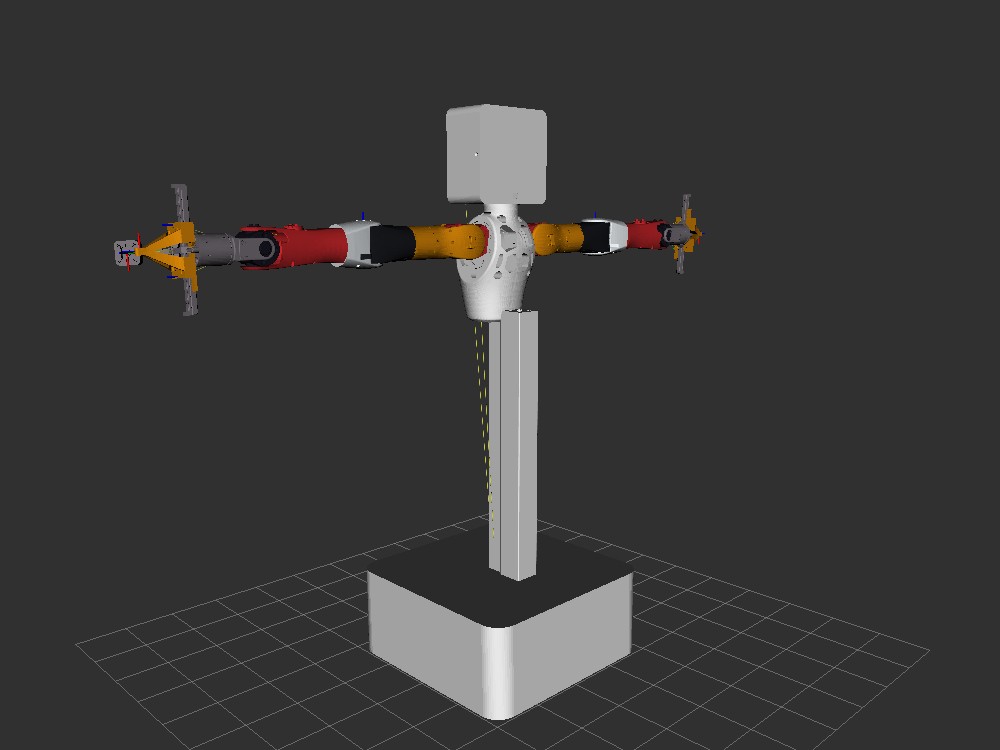
| L4 | Realtime vision: parallel VLM ROS2 node + image-topic acquisition (headless; vision_bringup periodically refreshes per-topic bridges), plus RViz2 offscreen rendering (OGRE kernel → /rviz/scene topic) |
Pure software/GPU rendering, no display needed |
All tools run plain ros2 / colcon / rosdep CLI commands on the host; L1 never modifies anything, L2 always asks first.
Screenshots
RViz2 offscreen render (latest lite_urdf, real material colors) |
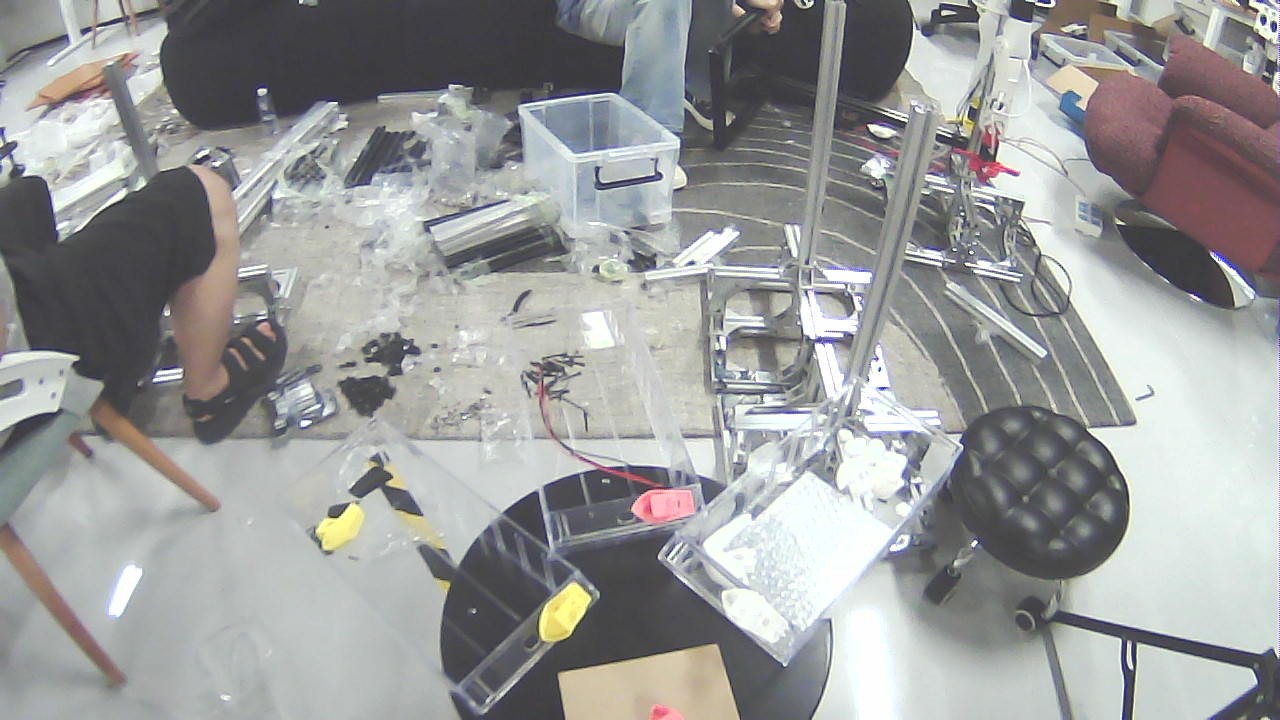
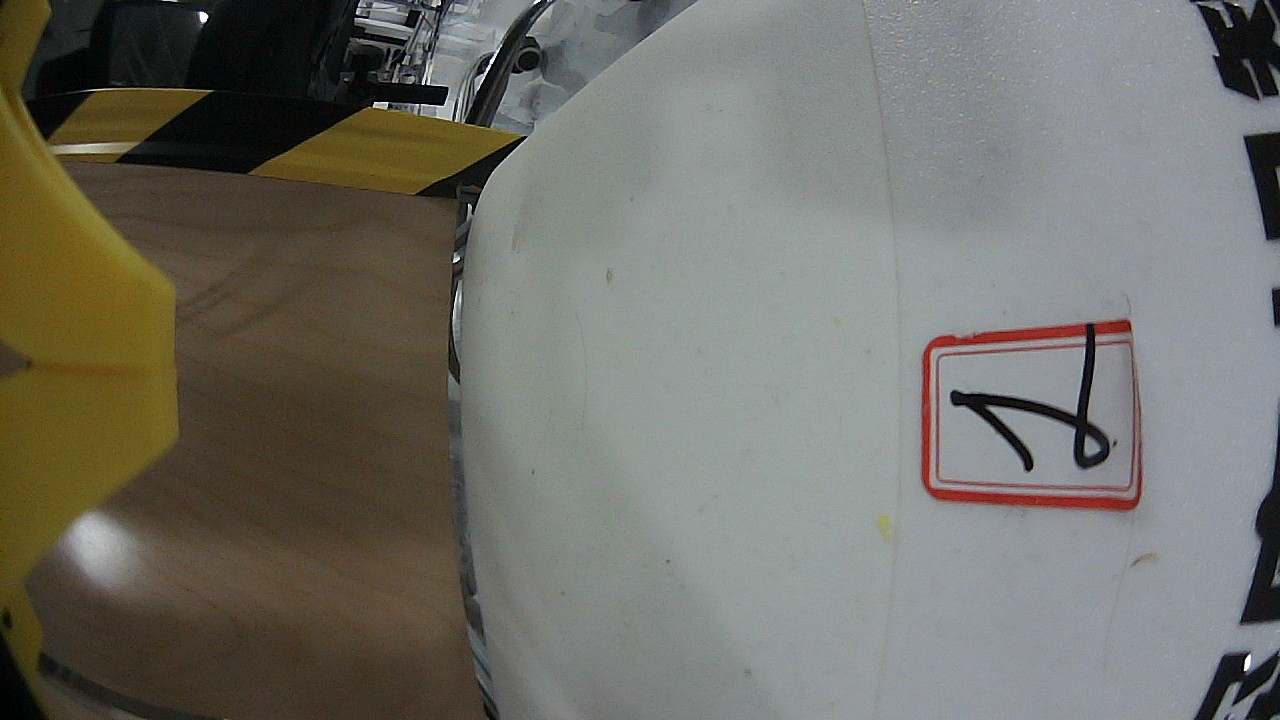
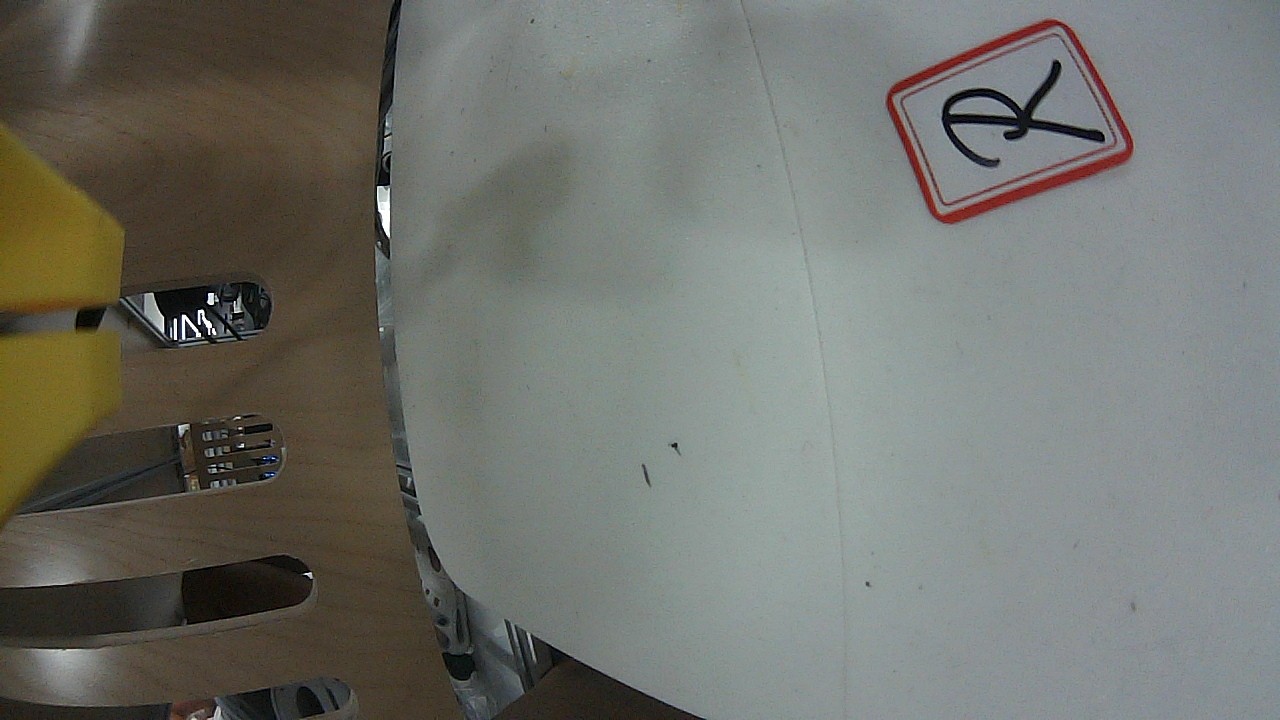
Head camera | Wrist-left camera | Wrist-right camera |
|---|---|---|---|
 |
 |
 |
 |
Left:
rviz_offscreen_noderenders with the real rviz stack (OGRE) and publishes to the/rviz/sceneimage topic. Right: three frames grabbed from live camera topics byros2_image_snapshot(1280×720). Full test record:docs/test-robot-state-vision.md.
Features
- Zero-intrusion diagnostics: 79 tools cover most ROS2 debugging scenarios — from "is the package installed?" to "what is on this topic right now?", one command, one answer;
- Whole-graph topology:
ros2_graphfolds nodes/publishers/subscribers/services/actions into one JSON — see the system structure in seconds; - Approval-gated writes: builds, dependency installs, message scaffolding etc. go through the DSH approval service; fail-closed, denial = failure;
- Visualization as a service: "see" headlessly — screenshots / multimodal description / window interaction are fully local, no remote display;
- Parallel realtime vision: the VLM runs in a separate ROS2 process (
vlm_node, service/vlm/describe); images come from topics (sensor_msgs/Image/CompressedImage);vision_bringupauto-creates one bridge per image topic, headless-ready; - RViz2 offscreen rendering (motion render ~22 Hz on llvmpipe; 30 Hz full rate with GPU): the real rviz render kernel (
rviz_common+ OGRE) renders any.rvizscene on a virtual display and publishes it as an image topic — no screenshots, no X11 window-stacking dependency. Performance optimizations: open3d low-poly meshes (scripts/simplify_visual_meshes.py) + direct OGRE pixel read (no PNG round-trip) + double-render elimination → motion rendering 1.9 → ~22 Hz on llvmpipe (11×), and 30 Hz full rate with NVIDIA GPU passthrough (v0.9.3), memory −2.5×; - Real-time safety framework (
safety_monitornode +robot_safety_*tools, see Safety framework): layered defense — tool-layer safety gate (pre-execution/safety/statecheck) → reactive monitors (motion tracking/stall with hysteresis, joint-feedback loss, watchdog, optional torque) → event-driven VLM semantic arbitration → human arbitration. LatchedNORMAL/LOCKEDstate machine (lock persists until a human unlocks; non-fatal events never lock); every threshold/topic/lock-action is registered per robot in the profilesafetysection; the geometric pre-check (joint limits / velocity / FK self-collision) is a reserved layer; - Bundled skills (4):
ros2-diagnostics(which tool to use when, narrow-down methodology),robot-state-vision-analysis(status → offscreen render → VLM → cross-check),robot-registration(first-contact body profile + topology baseline) androbot-retrieval(instant profile load and bring-up).
Quick start
Requirements
- A host with ROS2 (Jazzy verified; Humble should work),
ros2onPATH; - Node
^22.19 || >=24(DSH host requirement); - L4 vision additionally needs Python 3
rclpyand an OpenAI-compatible VLM gateway (e.g. Gemini or a self-hosted gateway).
Install the plugins (9 npm packages, since the monorepo split)
Install the domain bundles you need — or the dsh-ros2 aggregate for the
full 79 tools + 4 skills (its patch inserts all domain ids). All packages are
published to npm at 0.1.0 (see docs/versioning.md for
the GitHub ↔ npm version correspondence).
Via the DSH plugin CLI (recommended; resolves through npm):
# full set (aggregate; pulls core/profile/moveit/safety/vision as deps)
dsh plugin --profile <profile> add dsh-ros2
# or lean installs — e.g. diagnostics only:
dsh plugin --profile <profile> add dsh-ros2-core
# dsh-ros2-common is a plain library, auto-installed as a dependency.
Via npm directly (same packages; useful for inspecting/installing the optional add-ons):
# the aggregate (pulls dsh-ros2-common/core/profile/moveit/safety/vision)
npm install dsh-ros2
# optional add-ons — the sidecar data plane + its control-plane state client:
npm install dsh-ros2-state dsh-ros2-sidecar
Package roles:
dsh-ros2(aggregate) ·dsh-ros2-common(shared library) ·dsh-ros2-core(core diagnostics) ·dsh-ros2-profile(profiles/topology) ·dsh-ros2-moveit(MoveIt motion) ·dsh-ros2-safety(safety framework) ·dsh-ros2-vision(vision pipeline) ·dsh-ros2-state(state client) ·dsh-ros2-sidecar(data-plane daemon).
Minimal configuration (per-bundle, whole-object replacement)
After the split, each bundle carries its own run-seam config (same keys
repeated per id) and the vision provider lives only on dsh-ros2-vision:
# fragment of a DSH profile patch (id-targeted config overrides)
- id: dsh-ros2-core                 # also: -profile / -moveit / -safety
  config:
    rosSetup: source /opt/ros/jazzy/setup.bash &&   # prepare the ROS2 environment
    workspaceRoot: /home/you/ros2_ws                 # default cwd for colcon/rosdep
- id: dsh-ros2-vision
  config:
    rosSetup: source /opt/ros/jazzy/setup.bash &&
    vision:
      provider: gemini                               # mock | gemini | openai
      apiKey: ${VLM_API_KEY}                         # ${ENV} 引用从环境变量解析,勿明文写 key
- id: dsh-ros2-safety
  config:
    safetyStrict: warn                               # 'warn' (default) | 'reject' (fail-closed); LOCKED always rejects
Three-minute taste
ros2_graph                          # whole system topology in one shot
ros2_topic_list                     # all topics and types
ros2_topic_echo /joint_states       # sample one frame of joint states
ros2_tf_list                        # TF tree edges
ros2_doctor                         # system health report
Tool reference
Tools live in domain packages: L1/L2/L3 →
dsh-ros2-core;motion_validate/moveit_*→dsh-ros2-moveit;robot_*/ros2_zero_pose_semantics→dsh-ros2-profile;robot_safety_*→dsh-ros2-safety; vision tools →dsh-ros2-vision.
L1 read-only diagnostics
| Tool | Command behind it | Purpose |
|---|---|---|
ros2_pkg_list |
ros2 pkg list |
Installed packages (optional substring filter) |
ros2_pkg_prefix / ros2_pkg_executables |
ros2 pkg prefix <pkg> / ros2 pkg executables [pkg] |
Install prefix of a package / executables (structured) |
ros2_colcon_list |
colcon list |
Packages in a colcon workspace |
ros2_rosdep_check |
rosdep check --from-paths src --ignore-src |
Dependency health (missing deps = finding, not error) |
ros2_node_list |
ros2 node list |
Running nodes |
ros2_node_info |
ros2 node info <node> [-v] |
Subscribers / publishers / services / actions of one node |
ros2_topic_list |
ros2 topic list -t |
Topics with types |
ros2_topic_find |
ros2 topic find <type> |
Topics carrying a message type |
ros2_topic_info |
ros2 topic info <topic> [-v] |
Topic metadata / QoS |
ros2_topic_echo |
ros2 topic echo <topic> --once |
One message sample (JSON when possible); --qos-reliability / --qos-durability overrides reach TRANSIENT_LOCAL latched topics |
ros2_topic_hz |
ros2 topic hz <topic> [--window N] |
Measure publish frequency (average/min/max/std dev over the window); natural termination = measurement timeout |
ros2_env_check |
resolved-setup probe | Self-check the environment: which setup is sourced, path existence, visible packages/nodes |
ros2_workspace |
source <ws>/install/setup.bash && |
Switch/show the workspace in-session (use/show/reset) — no config edit, no restart |
ros2_topic_bw / ros2_topic_delay |
`ros2 topic bw | delay ` |
ros2_service_list |
ros2 service list -t |
Services with types |
ros2_service_type / ros2_service_find |
`ros2 service type | find ...` |
ros2_action_list |
ros2 action list -t |
Actions with types |
ros2_action_info |
ros2 action info <action> |
Action type & status |
ros2_action_type |
ros2 action type <action> |
Action type |
ros2_param_list |
ros2 param list <node> |
Parameters of a node |
ros2_param_get |
ros2 param get <node> <param> |
Read one parameter value |
ros2_param_dump |
ros2 param dump <node> |
Dump all parameters of a node |
ros2_interface_show |
ros2 interface show <type> |
Full field definition of a message/service/action |
ros2_interface_list / ros2_interface_prototype / ros2_interface_package |
`ros2 interface list | prototype |
ros2_graph |
ros2 node list + per-node node info |
Folded JSON topology graph |
ros2_tf_list |
ros2 topic echo /tf --once |
Current TF tree edges |
ros2_tf_echo |
ros2 topic echo /tf --once |
Transform between two frames |
ros2_doctor |
ros2 doctor |
System health report |
ros2_bag_info |
ros2 bag info <path> |
Bag summary |
moveit_discover |
scans MoveIt packages + parses SRDF + probes move_group | Discover MoveIt2 config packages (any package shipping an SRDF), their planning groups and named poses, and whether /move_action / /execute_trajectory / /compute_cartesian_path are online. Pass srdf to parse a specific file directly — generic, not bound to a specific package |
robot_safety_state |
ros2 topic echo /safety/state --once |
Read the latched safety state (NORMAL / LOCKED + severity + trigger cause + detail); reports monitor_running: false when the monitor is offline |
robot_safety_arbitrate |
ros2 run dsh_ros2_safety safety_vlm_arbitrate ... |
Event-driven VLM semantic arbitration (plan change / post-anomaly): fixed-format prompt + fresh offscreen frame via /vlm/describe; any non-safe verdict flags human arbitration |
motion_validate |
motion_validator.py --trajectory <file> --config <json> |
Deterministic pre-execution validation (read-only): joint limits, NaN/Inf, names & group coverage, timestamps/duration, freshness, optional workspace box, fingerprint + TTL — collision/singularity stay with MoveIt planning |
L2 management (approval-gated)
Every L2 tool performs a write operation and asks the user first via the DSH approval service (fail-closed when unavailable or denied). The read-only helpers ros2_jobs_list / ros2_job_status need no approval.
| Tool | Command behind it | Notes |
|---|---|---|
ros2_colcon_build |
colcon build [--packages-select ...] [--symlink-install] |
Runs as a background job (ctx.jobs); returns jobId, track with ros2_job_status |
ros2_rosdep_install |
rosdep install --from-paths src --ignore-src -y |
dryRun previews with --simulate |
ros2_interface_create |
writes <root>/<pkg>/<msg|srv|action>/<Name>.* |
Skeleton generator; never overwrites existing files |
ros2_param_set |
ros2 param set <node> <param> <value> |
JSON numbers/booleans are typed, other values treated as strings |
ros2_bag_record |
ros2 bag record <topics...> --output <dir> |
Bounded recording: stops automatically after duration seconds |
ros2_jobs_list |
ctx.jobs.list |
Background jobs of this agent (read-only) |
ros2_job_status |
ctx.jobs.get |
Status of one job by id (read-only) |
ros2_install |
FishROS one-click installer (interactive PTY session) | When ROS2 is missing: check probes (installed / installed-not-sourced / absent); start (approval) launches the installer; send / status / stop drive and observe the interactive menus |
ros2_bag_play |
ros2 bag play <path> [--topics ...] [--rate X] [--loop] [--start-offset S] |
Replay a rosbag into its topics (approval-gated; publishes to the graph); foreground for timeoutMs |
ros2_topic_pub |
`ros2 topic pub "" [-r Hz] [-n N | --once |
ros2_run |
ros2 run <pkg> <executable> [args] |
Run any installed ROS2 executable (approval-gated): foreground (bounded) or background job |
ros2_process_cleanup |
pgrep -f '[p]attern' + kill |
Kill leftover ROS2 processes matching a pattern (self-safe); approval-gated |
ros2_service_call |
ros2 service call <svc> <type> "<yaml>" |
Call a service (approval-gated); response parsed from the repr |
ros2_action_send_goal |
ros2 action send_goal <action> <type> "<yaml>" [--feedback] |
Send an action goal (approval-gated); returns goal id + status |
ros2_daemon |
`ros2 daemon status | stop |
ros2_param_delete |
ros2 param delete <node> <param> |
Delete a node parameter (approval-gated) |
ros2_lifecycle |
`ros2 lifecycle get | list |
ros2_component |
ros2 component list / load <container> <pkg> <type> |
Component containers list (L1) / load (L2 approval) |
ros2_launch |
ros2 launch <pkg> <launch_file> [args] |
Launch a launch file as a background job (approval-gated; returns jobId, stop via DSH job controls) |
ros2_zero_pose_semantics |
publish-zero → offscreen render → VLM → confirm | Calibrate zero-pose semantics interactively (generic): analyze renders the all-zero pose and asks the VLM its posture across three aspects (arm: lateral_raise/hanging, elbow: forward/upward, palm/camera-mount: up/forward/down); confirm records the user-approved combo (or a customText free-text description) to ~/.dsh-ros2/zero-pose.yaml for skills |
robot_register |
collects URDF/TF/cameras/MoveIt/zero-pose → writes ~/.dsh-ros2/robots/<name>.yaml |
Register a robot body profile on first contact (approval-gated) for instant later reuse |
robot_load |
reads ~/.dsh-ros2/robots/<name>.yaml |
Load a registered robot profile as structured JSON (fast path — no discovery); empty name lists all profiles |
robot_topology |
aggregate snapshot + progressive node learning (strict schema) | Robot comms topology trade-off: snapshot (approval) records node/topic/service lists (light, not verbose); learn (approval) records ONE important node's role/description + pub/sub/srv/act; show (read-only) reads them back |
moveit_move |
unified: /move_action + /execute_trajectory |
One tool, five essential modes (approval-gated): joint_abs, joint_rel, pose_abs, pose_rel (frame ee/world), trajectory. Generic: standard moveit_msgs + SRDF only. Single motion path: plan → deterministic validation (motion_validator, robot profile for full limits) → human approval (validation summary shown) → execute → verify. Gates on /safety/state (LOCKED always rejected; monitor-down per safetyStrict) |
robot_safety_start |
ros2 run dsh_ros2_safety safety_monitor --profile <yaml> |
Start the generic safety monitor as a background job (approval-gated); all robot-specific values come from the profile safety section |
robot_safety_lock / robot_safety_unlock |
`ros2 service call /safety/set_lock | unlock ...` |
moveit_status |
probes move_group interfaces + samples /joint_states |
Runtime status: online probe + current joint state + SRDF planning frame (read-only) |
L3 visualization
GUI lifecycle + screenshots + multimodal vision ("see first, then move") + xdotool-level interaction ("see and move"). Screenshots use Pillow ImageGrab on X11 (no extra CLI install); vision providers are pluggable; interaction requires xdotool (sudo apt install xdotool).
| Tool | Purpose |
|---|---|
ros2_gui_start |
Launch RViz2 (with -d config) / rqt_graph / rqt on the host display; sessions are tracked |
ros2_gui_list |
Tracked sessions + X11 windows (wmctrl -lG) |
ros2_gui_close |
Close a session (SIGTERM) |
ros2_screenshot |
Capture the screen or one window to a PNG |
ros2_vision_describe |
Describe an image with the configured multimodal model (Gemini / OpenAI / mock) |
ros2_gui_observe |
Ensure a GUI is running → screenshot → return the multimodal description (the "see it" workflow) |
ros2_gui_interact |
unified xdotool interaction: action=click (click/scroll, button 4/5 = scroll), action=drag (press-drag-release: RViz2 orbit/pan/zoom), action=key (combos like ctrl+shift+r or typed text) |
Interaction recipes (model-facing): orbit the RViz2 view with ros2_gui_interact {action: "drag", windowTitle: "rviz2", button: 1, toX: <dx>, toY: <dy>}, zoom with action: "drag", button: 3, reload a display config with ros2_gui_interact {action: "key", keys: "ctrl+shift+r"}. When wmctrl cannot enumerate windows (e.g. no window manager on the display), window-relative interaction reports "window not found" — fall back to absolute screen coordinates. Interaction is local to the host session (no approval, same as other L3 tools).
L4 realtime vision (parallel VLM over ROS2, headless image topics)
Perception matches the robot-control stack: the VLM runs in a separate ROS2 process (vlm_node, service /vlm/describe + cached topic /vlm/description), and images come from sensor_msgs/Image topics, never X11 screenshots — headless-ready. Acquisition (ros2_image_snapshot) needs no custom package (plain rclpy); only ros2_vlm_analyze/ros2_vision_analyze require the dsh_ros2_vlm ROS2 package (vlm/) — build/run see docs/architecture.md §4. When the pipeline is down, ros2_vlm_analyze/ros2_vision_analyze return an explicit VLM_UNAVAILABLE + degradation hint, and the snapshot JPEG can be read directly by the Agent's own multimodal model.
| Tool | Purpose |
|---|---|
ros2_image_snapshot |
Grab one frame from a topic (raw/compressed) and save as JPEG — plain rclpy script, no custom ROS2 package needed; --v4l ffmpeg fallback for silent topics; the JPEG is ready for the Agent's own multimodal model |
ros2_vlm_analyze |
Analyze an image file or the bridge's latest frame (useBridge) via the parallel VLM |
ros2_vision_topics |
List live image topics with their auto bridge service names |
ros2_vision_doctor |
One-shot pipeline self-check: vlm workspace built / vlm_node+vision_bringup running / gateway reachable / visible image topics / apiKey resolution status (config/env/secrets/missing) + build-launch guidance |
ros2_vision_set_key |
Store the user-provided VLM API Key into ~/.dsh-ros2/secrets.json (0600, outside the repo — never committed, never uploaded, never echoed); use it when a tool returns VLM_API_KEY_REQUIRED |
ros2_vision_analyze |
Analyze any topic's latest frame via its auto bridge (ros2_vision_analyze {topic, prompt}) |
# build + launch the vision pipeline (auto bridge per image topic)
mkdir -p /tmp/vlm_ws/src && ln -s <repo>/vlm /tmp/vlm_ws/src/dsh_ros2_vlm
cd /tmp/vlm_ws && colcon build --symlink-install && source install/setup.bash
VLM_API_KEY=... ros2 run dsh_ros2_vlm vlm_node &       # parallel VLM process
ros2 run dsh_ros2_vlm vision_bringup &                 # discover topics, one bridge each
RViz2 offscreen rendering (dsh_ros2_rviz_offscreen)
The real rviz rendering stack (rviz_common + OGRE + rviz_default_plugins) loads a .rviz scene offscreen under Xvfb and publishes it to the /rviz/scene image topic — read from the render kernel, not X screenshots, no window-stacking dependency.
# build (needs a colcon workspace like vlm_ws)
ln -s <repo>/offscreen /tmp/vlm_ws/src/dsh_ros2_rviz_offscreen
cd /tmp/vlm_ws && colcon build --symlink-install && source install/setup.bash
# run (config_path points at a .rviz scene file)
xvfb-run -a -s "-screen 0 1280x800x24" ros2 run dsh_ros2_rviz_offscreen rviz_offscreen_node \
  --ros-args -p config_path:=/tmp/robot_scene.rviz -p topic:=/rviz/scene \
  -p width:=800 -p height:=600 -p rate:=5.0
Robot body mesh rendering essentials (pitfalls collected; details in docs/architecture.md §4.4):
- Jazzy RobotModel properties: use
Description Source: Topic+Description Topic: <topic>(the legacyRobot Description:is ignored →Linksempty); - mesh paths: use absolute paths or a
file://prefix in the URDF (bare paths fail inresource_retriever); the description publisher must stay alive (transient-local, late subscribers miss it otherwise); - URDF must bind to TF by name: URDF link names must exactly match the live TF frame names (publishing the robot's actual
/robot_descriptionworks). Mismatch → every link transform lookup fails → all meshes pile at the fixed-frame origin; - View distance: Orbit
Distance≈ 1.5–2.0 m for an RViz-like close full-body view (> 5 m shrinks the robot to a tiny center blob); - Health signal: ~3 s after startup the node logs
FM: ... frames=NandtransformHasProblems(...)=0— meshes correctly bound to TF.
MoveIt2 motion — five essential modes, one tool
Design intent. Robot motion through MoveIt is, at its core, only five
operations: set joints absolutely, nudge joints relatively, place the
end-effector at an absolute pose, move it by a relative delta, or execute a
pre-planned trajectory. Rather than a growing zoo of named tools, dsh-ros2
abstracts them into one tool moveit_move with a mode parameter — so the
interface stays small, predictable and scriptable, and works with any MoveIt
package (it reads the SRDF and speaks only standard moveit_msgs).
| Tool | Role |
|---|---|
moveit_discover (L1) |
Read any MoveIt package's SRDF: planning groups, named poses, chain tip; probe the standard interfaces (/move_action, /execute_trajectory, ...) online |
moveit_status (L1) |
Runtime probe: interfaces online + current /joint_states sample + SRDF planning frame |
moveit_move (L2, approval) |
One tool, five modes: joint_abs (joints "j1:=v1 j2:=v2"), joint_rel (deltaJoints = current + delta), pose_abs (pose "x y z rx ry rz" in the planning frame), pose_rel (deltaPose "dx dy dz drx dry drz", frame ee/world), trajectory (execute a saved trajectory JSON) |
moveit_move {mode: "joint_abs", group: "right_arm", joints: "right_shoulder_roll:=0.5"}
moveit_move {mode: "joint_rel", group: "right_arm", deltaJoints: "right_elbow_pitch:=-0.2"}
moveit_move {mode: "pose_rel",  group: "right_arm", deltaPose: "0.05 0 0 0 0 0"}
moveit_move {mode: "pose_abs",  group: "right_arm", pose: "0.5 0 0.8 0 0 0"}
moveit_move {mode: "trajectory", group: "right_arm", trajectory: "/tmp/traj.json"}
How it works. moveit_discover/moveit_status tell you what you can move
(groups, joints, EE link from the SRDF chain tip, online state); moveit_move
turns any mode into a standard MoveGroup goal (/move_action), executes via
/execute_trajectory, and — with planOnly + trajectoryOut — saves the
planned trajectory so mode: "trajectory" can run it later (plan/execute
separation). Nothing is bound to a specific MoveIt package; only the SRDF path
matters (auto-resolved by package scan, or explicit srdf/package).
Safety framework
Design intent. A two-tier strategy that keeps real-time and semantic
judgment apart (full contract: docs/safety-handover.md, the handover doc for
downstream robot-adaptation agents — generic framework/interfaces belong here,
body-specific data sources/schemes/algorithms belong downstream):
tool-layer safety gate (pre-execution: /safety/state LOCKED; monitor-down per safetyStrict)
  → reactive monitors (in-execution: motion tracking/stall + hysteresis,
    joint-feedback loss, watchdog, optional torque; detect at control frequency,
    response budget ≤100 ms)
  → VLM semantic arbitration (post plan-change / anomaly, seconds — pulled up only when needed)
  → human arbitration (non-safe verdicts always escalate; human-gated unlock)
safety_monitornode (dsh_ros2_safetypackage): subscribes the joint feedback (+ optional commanded stream / torque stream), runs the checkers on acontrol_frequencytimer, and latchesLOCKEDon any CRITICAL event — the latch persists until a human unlocks (no auto-reset into the same danger). Publishes/safety/state(transient-local),/safety/event,/safety/heartbeat,/safety/lock_active; services/safety/get_state,/safety/unlock,/safety/set_lock.- Latched lock, non-fatal never locks: any CRITICAL event latches
LOCKED(the latch persists until a human unlocks — no auto-reset into the same danger); watchdog separatescritical(down → lock) fromobserved(down → WARNING only); single-frame noise is filtered by M-of-K hysteresis; aWARNINGnever latches. Tool-layer fail-closed on monitor-down is persafetyStrict: 'reject'(default'warn'proceeds with a warning). - Per-robot registration:
robot_registerwrites a genericsafetysection (URDF-derived velocity/effort limits) and auto-launches the monitor;robot_profile.py safety set <key> <json>updates any threshold/topic/list (schema-validated). Torque checking auto-disables when no effort feedback exists. Reserved layers (interfaces registered, not implemented): the geometric pre-check (joint-limit / velocity / FK self-collision on the command path —motion.max_velocity/max_acceleration), the computed-torque feedforward input (torque.feedforward_topic), YOLO-style lightweight triggers, and the non-ROS estop path (estop). - Tool-layer gate:
moveit_moveconsults/safety/statebefore executing — LOCKED always rejected (SAFETY_LOCKED); if the monitor is unreachable,safetyStrict: 'reject'(fail-closed) or'warn'(default) proceed-with- warning.robot_safety_arbitrateruns the fixed-format VLM arbitration and flags any non-safe verdict for human arbitration. - Forensics: a ring buffer of joint/torque samples is dumped to
forensics.dump_diron every CRITICAL lock, for post-hoc / VLM diagnosis.
# build the safety package (same colcon workspace as vlm/ and offscreen/)
ln -s <repo>/safety /tmp/vlm_ws/src/dsh_ros2_safety
cd /tmp/vlm_ws && colcon build --symlink-install && source install/setup.bash
The safety_core pure logic ships with a fault-injection self test
(python3 packages/safety/safety/scripts/safety_core.py --selftest, 12 scenarios) — no ROS2
needed to verify the state machine.
Robot profiles & communication topology
Design intent. A robot's body (URDF links/joints, cameras, MoveIt groups,
zero-pose semantics) and its comms graph are costly to rediscover every time.
The plugin persists them as a structured profile (~/.dsh-ros2/robots/<name>.yaml):
register once on first contact, then load instantly forever after. For the
comms graph, full verbosity does not scale (a complex robot has hundreds of
topics/services), so the design is a trade-off: an aggregate snapshot
(light node/topic/service lists) plus progressive learning of only the
important nodes as you actually work with them.
| Tool | Role |
|---|---|
robot_register (L2) |
Collect body info (URDF links/joints, TF root, cameras, MoveIt SRDF groups, auto-links the zero-pose calibration and a generic safety section with URDF-derived limits) into the profile; auto-launches the safety monitor (startSafety: false to skip) |
robot_load (L1) |
Load the profile as structured JSON — the fast path, no rediscovery; empty name lists all |
robot_topology (L1/L2) |
Comms graph: snapshot (L2, aggregate lists), learn (L2, one important node's role/description + pub/sub/srv/act, strict schema), show (L1, read back), diagnose (L1 — knowledge-augmented diagnosis: cross-references the learned knowledge base + snapshot against the LIVE graph: missing / new / drift / topic_drift), search (L1 — efficient retrieval in the knowledge archive: reverse-lookup by topic / keyword match on name/role/description/connections) |
ros2_zero_pose_semantics (L2) |
Calibrate zero pose via render + VLM + user confirm (arm/elbow/palm combos or free text); the profile auto-includes it |
Two bundled skills complete the workflow: robot-registration (first-contact
flow: ask name/URDF → collect → register → verify, plus the topology baseline
snapshot) and robot-retrieval (load the profile instantly and bring up
renders/diagnostics/motion from it, including the learned topology and zero-pose
semantics).
How it works. Everything is plain structured YAML under ~/.dsh-ros2/ —
robots/<name>.yaml (body + topology) and zero-pose.yaml (calibration).
robot_register snapshots the body; robot_topology snapshot snapshots the
aggregate layer; robot_topology learn appends one node at a time (idempotent
merge) as you discover what matters. robot_load and robot_topology show read
them back instantly — one call instead of N discovery calls.
The knowledge base is consumed, not just stored. robot_topology diagnose
(L1, read-only) is the entry point for knowledge-augmented diagnosis: it
loads the learned nodes + snapshot and cross-references them against the LIVE
ros2 graph —
missing: learned nodes that are offline now (controllers/publishers down) — highest priority;new: live nodes not in the knowledge base (learn candidates);matched[].drift: per learned node, expected pub/sub/srv/act vs actual (a missing topic = a gone connection; a new topic = the node changed);topic_drift: aggregate snapshot topics vs live topics.
The ros2-diagnostics and robot-retrieval skills both start diagnosis with
diagnose and close the loop by learning important new nodes — so the
knowledge base improves with every session and every diagnosis gets faster.
Bundled skills
| Skill | Content |
|---|---|
ros2-diagnostics |
Which tool to use when, narrow-down methodology, debugging "topic has no data" / message-mismatch / TF problems |
robot-state-vision-analysis |
Full pipeline: status → offscreen render → VLM → cross-check (includes Jazzy Description Source/Topic, URDF↔TF frame-name matching, file:// meshes, view distance, FM frames signal, calibrated zero-pose semantics) |
robot-registration |
First-contact flow: ask name/URDF → collect body info + zero-pose calibration → robot_register → topology baseline snapshot |
robot-retrieval |
Instant profile load (robot_load) and bring-up of renders / diagnostics / motion; read & progressively learn the comms topology (robot_topology) |
Configuration
| Key | Type | Default | Meaning |
|---|---|---|---|
rosSetup |
string | '' |
Shell prefix to prepare the environment, e.g. source /opt/ros/jazzy/setup.bash && |
timeoutMs |
number | 15000 |
Per-command timeout |
rosLogDir |
string | '' |
Override ROS_LOG_DIR (helps when ~/.ros/log is not writable) |
workspaceRoot |
string | '' |
cwd for colcon / rosdep when a tool omits cwd |
includeStderr |
boolean | false |
Attach trailing stderr to successful results |
display |
string | '' |
DISPLAY override for GUI/screenshot tools |
screenshotDir |
string | '' |
Screenshot output dir (default $TMPDIR/dsh-ros2) |
screenshotCommand |
string | '' |
Custom screenshot command; {output} is replaced with the PNG path |
vision.provider |
string | 'mock' |
mock | gemini | openai |
vision.apiKey |
string | '' |
Your API key (user-supplied; never logged) |
vision.model |
string | '' |
Model override (e.g. gemini-2.5-flash, gpt-4o-mini) |
vision.baseUrl |
string | '' |
API base URL override (OpenAI-compatible endpoints) |
rosLogDiralso covers ROS2 Python CLIs spawned by tools (topic echo/pub,ros2 run); additionallyrunCommandauto-falls back to a writable dir when~/.ros/logis not writable.
Project layout
dsh-ros2/                      # pnpm monorepo (workspace root, private)
├── pnpm-workspace.yaml        # packages/*
├── tsconfig.base.json
├── packages/
│   ├── common/                # dsh-ros2-common (not a bundle): runner / parse / toolkit + scripts/robot_profile.py (zero-copy)
│   ├── core/                  # dsh-ros2-core (59 tools): L1 diagnostics + L2 management + L3 GUI + ros2-diagnostics skill + gui.ts + pty_session.py
│   ├── profile/               # dsh-ros2-profile (4 tools): robot_register/load/topology + zero-pose calibration + registration/retrieval skills
│   ├── moveit/                # dsh-ros2-moveit (4 tools): discover/status/motion_validate/moveit_move + moveit_*.py + motion_validator.py
│   ├── safety/                # dsh-ros2-safety (5 tools): robot_safety_* + safety/ ROS2 pkg + safetyStrict config
│   ├── vision/                # dsh-ros2-vision (7 tools): vision tools + vlm/ + offscreen/ ROS2 pkgs + vision provider service + state-vision skill
│   └── dsh-ros2/              # aggregate bundle (empty apply, backward compat)
├── docs/                      # architecture.md · safety.md / safety-handover.md / safety-todo.md / safety-gpt-review.md · test-*.md · plugin-split-plan.md
├── .github/workflows/         # CI: Node 22/24 → workspace typecheck/test/build + per-package tarball validation
└── CHANGELOG.md               # version history (Keep a Changelog)
Plugin split (9 packages)
Since v0.15.0 the plugin is a pnpm monorepo of 9 npm packages (per
docs/plugin-split-plan.md, ISP-tightened): 79 tools +
4 skills preserved with unchanged names and behavior. Install the domain
bundles you need (or the dsh-ros2 aggregate for the full set):
dsh-ros2-commonis a plain library (not a cordis bundle) — shared runner, parsers, toolkit andscripts/robot_profile.py(zero-copy).- Cross-package runtime contracts stay unchanged:
/vlm/describe,/safety/state,/safety/set_lock…;safetyStrictsemantics unchanged. dsh-ros2-visionfixes the npm publish defect: itsfilesincludevlm/+offscreen/.- The vision provider is an optional cordis service (
dshRos2.vision);ros2_gui_observe(core) andros2_zero_pose_semantics(profile) degrade toVISION_UNAVAILABLEwhen it is absent.
Troubleshooting / FAQ
~/.ros/logPermission denied: ROS2 cannot write its log dir. SetrosLogDir(e.g./tmp/ros-log);runCommandalso falls back automatically.- A flood of
RTPS_TRANSPORT_SHM/ FastDDS SHM warnings in stderr: harmless noise when SHM transport is unavailable (common in containers/restricted environments); tools drop it by default. ros2 topic echoreturns empty: checkros2_topic_info -vfor publisher count and QoS; sample transient-local topics with--qos-durability transient_local.- Offscreen render: "all parts piled at origin": URDF link names do not match TF frame names (see mesh essentials #3); check the node log
FM transformHasProblems(<link>)=1first. - RobotModel shows no meshes (
Linksempty): on Jazzy you must useDescription Source/Topic; the legacyRobot Description:does nothing. Could not load resource ... Unable to open file: mesh paths need absolute paths or afile://prefix.- Description missing after the publisher exits: the URDF publisher must stay alive (transient-local only re-sends once to late subscribers; gone when the process exits).
vision_bringupmissed some image topics (2/4 measured): fixed — it now refreshes discovery every--refreshseconds (default 10), auto-spawning bridges for topics that appear later and stopping bridges for topics that disappear.
Development
Install with **pnpm 11.x** (the repo pins `packageManager: pnpm@11.22.0`; CI installs the matching
pnpm via `pnpm/action-setup@v4`). Node `^22.19 || >=24` is required.

```bash
pnpm install
pnpm run typecheck   # tsc --noEmit
pnpm run test        # vitest (187 cases; plus 10 sidecar + 6 zero-pose Python checks)
pnpm run build       # tsc -> lib/ + lib/types/
CI (.github/workflows/ci.yml): on push to main / PRs, runs typecheck/test/build on Node 22 and 24, and validates that the pnpm pack artifact contains the patch layer (cordis.patch.yml) and the build output.
Release workflow (npm & GitHub Releases): see PUBLISH.md.
Roadmap
-
vision_bringuppolling/refresh discovery (auto-bridge late topics, stop bridges for gone topics); - Zero-pose semantics: generic calibration flow (
ros2_zero_pose_semantics, render + VLM + user confirm, 3-axis combos) linked into robot profiles; - npm publishing (9 packages @ 0.1.0 on npmjs, published 2026-08-30;
dsh-ros2-state/dsh-ros2-sidecaradded 2026-09; see docs/versioning.md); - More ROS2 distros (Humble / Rolling) compatibility validation.
Docs
| Doc | Content |
|---|---|
docs/architecture.md |
Design overview, four tiers, L4 vision & offscreen rendering architecture, performance evolution, safety model |
docs/compatibility.md |
Compatibility baseline |
docs/safety.md |
Safety boundary: six layers (agent permission / human approval / motion validation / execution monitoring / post-execution verification / physical robot safety), fail-closed & degradation policy, "DSH is not a functional-safety system" |
docs/safety-handover.md |
Handover for downstream robot-adaptation agents: generic framework/interfaces vs body-specific data sources/algorithms, profile safety schema, interfaces |
docs/safety-todo.md |
GPT review decisions + batches: 0.14.1 done (deterministic validation), 0.15+ (GUI whitelist / audit / C++ real-time node ...) |
docs/test-robot-state-vision.md |
End-to-end real-robot tests: pipeline, realtime, mesh/TF binding fix & verification, 4-channel joint analysis (with images) |
docs/test-gpu-passthrough.md |
GPU passthrough verification: hardware, troubleshooting, results, usage |
CHANGELOG.md |
Version history (Keep a Changelog) |
docs/versioning.md |
GitHub tag ↔ npm package version correspondence (monorepo re-baseline; old single-package tags v0.8–v0.15 were never on npm) |
Contributing
Issues and PRs welcome (in Chinese or English). Please keep pnpm run typecheck && pnpm run test && pnpm run build green and update the relevant docs.
Acknowledgments
- DeepSeek Harness — plugin host framework;
- ROS2 / RViz2 community — rendering and toolchain foundations.
No comments yet. Be the first to write one.