dsh-remote-ssh
SSH remote hosts for DeepSeek Harness: pick a machine from your existing ~/.ssh/config, keep an SSH local forward alive, and open that machine's DSH web UI in your browser.
It is the DSH equivalent of VS Code Remote-SSH — same SSH config, same keys, same jump hosts, but the remote side serves DSH instead of a language server.
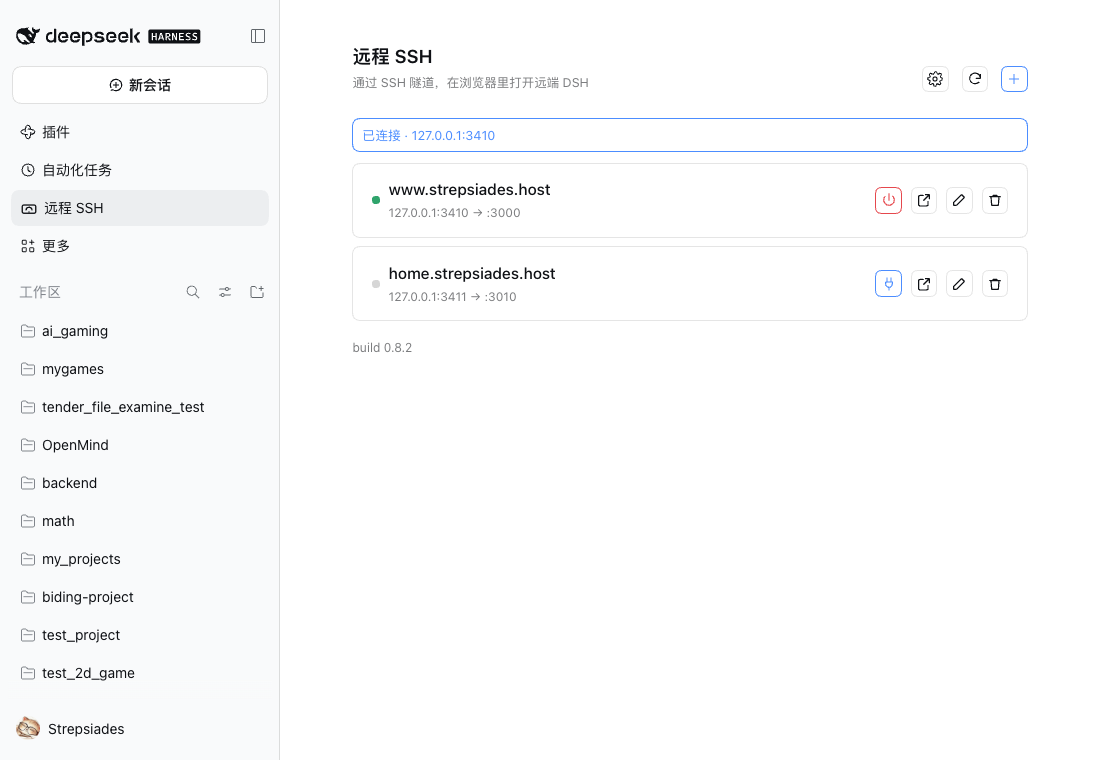
Features
- Hosts come from
~/.ssh/config— one source of truth, nothing to retype - One click connect / disconnect — opens a local forward to the remote DSH port over SSH
- Automatic web token — reads the remote log over SFTP (no remote shell involved), takes the newest line for that port, and verifies it through the tunnel before you ever see a 401
- Actionable failures — port in use, network unreachable, and authentication failure each get their own next step
- Password / MFA hosts — a dialog asks for the password when needed; it is used for that connection only and never written to disk
- Pure-JS SSH client (
ssh2): no systemsshbinary, no askpass helper — the same code runs on macOS, Linux and Windows - Password and keyboard-interactive authentication on every platform; keys via
IdentityFileor an agent - ProxyJump hops (SSH over SSH), so internal hosts behind a bastion work without extra forwarding
- The tunnel and the remote commands that read the token share one authenticated connection
- Ships a
remote-dsh-opsskill so an agent can turn a bare machine into a remote DSH host
Install
From a plugin index (Discover) — recommended
DSH has no official market; a market is any HTTPS URL serving a format-1 index.json. This repository publishes one:
https://cdn.jsdelivr.net/gh/Strepsiades2/dsh-remote-ssh@main/market/index.json
Enable Plugins → Experimental plugins → Custom plugin indexes, open the Discover tab, add that URL, and install from there. Installing from the plugin page enables the bundle automatically. (Raw fallback: https://raw.githubusercontent.com/Strepsiades2/dsh-remote-ssh/main/market/index.json.)
Manually
dsh plugin add @strepsiades/dsh-remote-ssh
Then open Plugins and switch Remote SSH on: adding a dependency installs the package but does not select the bundle. Reload DSH afterwards if the sidebar has no Remote SSH entry.
Usage
- Sidebar → Remote SSH → +
- Pick a host from your SSH config
- Click Connect
- Click the external-link icon to open the remote DSH UI
Requirements
| Side | Requirement |
|---|---|
| DSH | 0.2.1-rc.5 or newer |
| Local machine | Anything Node runs on — macOS, Linux or Windows. No SSH client is required: SSH is implemented in-process |
| Remote machine | An OpenSSH server on macOS / Linux. Windows can serve DSH, but the launch/stop commands sent to it are still POSIX |
The plugin does not provide reachability. If the host is not already reachable over SSH (LAN, VPN, Tailscale, jump host), the connection fails — by design.
Settings
| Setting | Meaning |
|---|---|
| SSH config path | Empty means ~/.ssh/config |
| Default remote port | Fallback for new hosts and when opening (default 3000) |
| Start the remote DSH automatically | Off by default. When on, connecting to a host whose dsh web is down will launch it |
| Stop the remote DSH when disconnecting | Off by default. When on, disconnecting also stops the process listening on the DSH port |
Starting the remote DSH
If the tunnel is up but dsh web is not answering, the error offers Start remotely: the plugin runs a launch command on the remote, waits up to 30 seconds for it to become ready, and then continues opening the UI.
If the token found in the log no longer matches the process that is actually running (usually because dsh web was started more than once), the error offers Restart remote DSH: it stops the listener on that port and starts a fresh process, which prints a matching token.
The row also shows three states: Idle (no tunnel), Service not responding (tunnel up but the port is silent, or answers like something other than DSH) and Ready. A DSH web answers GET / with 401 when no session cookie is present; anything else on that port is reported as "not DSH" with an AI-assisted repair action. If a local port is held by a leftover ssh that is not ours, the error offers Clean up port, which matches only ssh processes carrying our exact forward and ends them; nothing else is touched.
The default launch command resolves whichever install exists (dsh on PATH, else ~/.local/dsh/node_modules/.bin/dsh), detaches with setsid when available, and logs to ~/.dsh-web.log. A host may override it with its own command, where {port} is replaced by the remote DSH port.
Per-host options
| Option | Meaning |
|---|---|
| Remote DSH port | Where dsh web listens on the remote |
| Local port | Leave empty to auto-assign; pinning it keeps the browser cookie valid (cookies bind to hostname:port) |
| Web token | Usually empty — read from the remote log on every connect. Fill it only to pin a value |
| Start command | Optional override used when the plugin has to start dsh web; {port} is substituted |
How it works
- The host half registers
/api/remote-ssh/*inside DSH's authenticated/apichannel, reads and writes a small registry, spawnsssh, and parses the token - The client half renders the panel and talks to the same-origin API
- Connect flow: open the tunnel → HTTP health probe through the tunnel → read the token → verify the token (expect
303) → return the URL - The token lives in memory only; the registry is written with
0600permissions - A leftover tunnel from a previous DSH run is reported as a port conflict instead of being mistaken for a live connection
Security
- Custom routes ride DSH's authenticated
/apichannel: Host / Origin checks and the owner principal are enforced by the connection layer before this plugin runs - SSH destinations starting with
-are rejected, so a registry entry cannot smuggle an ssh option - Passwords never touch a command line, a log, or the disk: they go to the in-process SSH client and are dropped after the attempt
- The plugin never reads or copies your private keys — which keys are used is up to
~/.ssh/config - The browser cookie is issued by the remote
dsh weband lasts 30 days by default
Platform support
| macOS | Linux | Windows | |
|---|---|---|---|
| Plugin (client): connect, token, browser | ✅ verified | ✅ expected | ✅ verified (1.0.0) |
| Password / keyboard-interactive auth | ✅ verified | ✅ expected | ✅ expected (same code path) |
| Remote: token read (SFTP, shell-free) | ✅ verified | ✅ verified | ✅ expected (same SFTP path) |
| Remote: start / stop DSH | ✅ verified | ✅ verified | ❌ commands are POSIX |
Known gaps: ProxyCommand is not implemented (it runs a local command, so the system ssh binary remains the right tool there). ProxyJump chains are implemented; only the single-hop case has been exercised so far. Host keys are learned trust-on-first-use into ~/.dsh/ssh-known-hosts.json; a mismatch fails the connection until the stale entry is removed.
Limitations
- No reachability layer: reverse tunnels, Tailscale, frp and friends are out of scope
- No mobile-specific client: you get the remote DSH web UI in a browser
- A Windows remote needs
dsh webto log its token to%USERPROFILE%\.dsh-web.logor.dsh\logs\web.log
Development
| File | Role |
|---|---|
index.js |
Host half: routes, registry, remote commands, skill registration |
client.js |
Client half: panel and dialogs |
transport.js |
SSH transport: config resolution, auth, ProxyJump, forwarding, SFTP, exec |
tools/build-market-index.mjs |
Generates market/index.json from the published npm metadata |
skills/remote-dsh-ops/SKILL.md |
Runbook for preparing a machine as a remote DSH host |
locale/ |
Plugin metadata strings |
cordis.patch.yml |
Bundle insert declaration |
Local UI checks live in scripts/ and are intentionally not tracked.
License
MIT © Strepsiades
中文说明
从 ~/.ssh/config 里选一台机器,保持一条 SSH 本地转发,然后在浏览器里打开那台机器上的 DSH Web 界面。
这是 DSH 版的 VS Code Remote-SSH:同一份 SSH 配置、相同的密钥与跳板机,只是远端跑的是 DSH。
功能
- 主机列表直接来自
~/.ssh/config,不重复维护连接信息 - 一键连接 / 断开:通过 SSH 建立到远端 DSH 端口的本地转发
- 自动读取 web token:通过 SFTP 直接读远端日志(不依赖远程 shell),按端口取最新一行,并通过隧道验证后再交给浏览器
- 错误可操作:端口占用、网络不通、认证失败分别给出下一步
- 密码 / MFA 主机:需要时弹窗输入,仅用于本次连接,不落盘
- 纯 JS SSH 客户端(
ssh2):不依赖系统ssh、不需要 askpass,macOS / Linux / Windows 同一套代码 - 密码与 keyboard-interactive 认证全平台可用;密钥走
IdentityFile或 agent - ProxyJump(SSH over SSH):内网主机可以经跳板机直接连,无需额外转发
- 隧道与读取 token 共用同一条已认证连接
- 附带
remote-dsh-opsskill,可让 agent 把一台空机器准备成远程 DSH 主机
安装
从插件索引安装(Discover,推荐)
DSH 没有官方市场;市场就是任意一个提供 format-1 index.json 的 HTTPS 地址。本仓库发布了一份:
https://cdn.jsdelivr.net/gh/Strepsiades2/dsh-remote-ssh@main/market/index.json
打开 插件 → 实验性插件 → 自定义插件索引,进入 Discover 标签,添加该地址后即可浏览安装;从插件页安装会自动启用。(备用地址:https://raw.githubusercontent.com/Strepsiades2/dsh-remote-ssh/main/market/index.json)
手动安装
dsh plugin add @strepsiades/dsh-remote-ssh
然后在 插件 页把 远程 SSH 打开:只加依赖不会选中 bundle。若侧栏没有「远程 SSH」,刷新 DSH。
使用
侧栏「远程 SSH」→「+」→ 选主机 → 「连接」→ 点外链图标打开远端界面。
依赖
- DSH
0.2.1-rc.5或更新 - 本机:能跑 Node 的系统即可——不需要安装 SSH 客户端(插件内置纯 JS 实现)
- 远端:macOS / Linux 上运行 OpenSSH 服务端(Windows 可作服务端,但启动/停止命令仍是 POSIX)
本插件不提供可达性。 如果这台机器本来就不能通过 SSH 到达(局域网、VPN、Tailscale、跳板机),连接会失败——这是刻意的边界。
设置
| 项 | 说明 |
|---|---|
| SSH 配置文件路径 | 留空表示 ~/.ssh/config |
| 默认远端端口 | 新主机与打开时的兜底值(默认 3000) |
| 远端未运行时自动启动 | 默认关闭。打开后,连接到 dsh web 没运行的主机会自动启动它 |
| 断开时同时停止远端 DSH | 默认关闭。打开后,断开会在远端停掉监听该端口的进程 |
每台主机
| 项 | 说明 |
|---|---|
| 远端 DSH 端口 | dsh web 在远端的监听端口 |
| 本地端口 | 留空自动分配;固定它可让浏览器 cookie 长期有效 |
| Web token | 一般留空,每次连接自动读取 |
| 启动命令 | 可选;插件需要启动远端时执行,{port} 会替换为远端端口 |
启动远端 DSH
如果隧道已建立但 dsh web 没有响应,错误提示里会出现【启动远端】:插件在远端执行启动命令,最多等待 30 秒就绪,然后继续打开界面。
如果日志里的 token 与正在运行的进程不匹配(通常是因为 dsh web 被启动过不止一次),错误里会出现【重启远端 DSH】:它会停掉监听该端口的进程并重新启动,从而得到一条匹配的新 token。
行内状态分三种:未连接、服务未响应(隧道在,但端口没响应,或响应的不是 DSH)、已就绪。判定依据是:未带 cookie 的 GET / 必须返回 401;别的服务占了端口会明确报「不是 DSH」并给出【AI 帮我配】。如果本地端口被一条不属于本插件的 ssh 占着,错误里会出现【清理端口】——它只匹配带本插件同款转发参数的 ssh 进程,其他连接一律不碰。
默认启动命令会自动探测安装位置(PATH 里的 dsh,或 ~/.local/dsh/node_modules/.bin/dsh),有 setsid 时用它脱离会话,日志写到 ~/.dsh-web.log。每台主机可以覆盖这条命令,{port} 会被替换为远端端口。
安全
- 自定义路由挂在 DSH 已鉴权的
/api通道内,Host / Origin 校验与 owner 身份由 Connection 层完成 - 拒绝以
-开头的 SSH 目的地,避免参数注入 - 密码只交给进程内的 SSH 客户端:不进命令行、不进日志、不落盘
- 插件不读取也不复制私钥,使用哪些密钥完全取决于
~/.ssh/config - 浏览器 cookie 由远端
dsh web签发,默认 30 天
平台支持
| macOS | Linux | Windows | |
|---|---|---|---|
| 插件(客户端):连接 / token / 浏览器 | ✅ 已验证 | ✅ 预期可用 | ✅ 已验证(1.0.0) |
| 密码 / keyboard-interactive 认证 | ✅ 已验证 | ✅ 预期可用 | ✅ 预期可用(同一代码路径) |
| 远端:读取 token(SFTP,不依赖 shell) | ✅ 已验证 | ✅ 已验证 | ✅ 预期可用(同一 SFTP 路径) |
| 远端:启动 / 停止 DSH | ✅ 已验证 | ✅ 已验证 | ❌ 命令是 POSIX |
已知缺口:ProxyCommand 未实现(它要执行本机命令,用系统 ssh 更合适)。ProxyJump 链已实现,目前只实测了单跳。主机密钥采用 TOFU,记录在 ~/.dsh/ssh-known-hosts.json;不匹配时连接失败,需删除旧记录后重试。
许可
MIT © Strepsiades
No comments yet. Be the first to write one.