dsh-workspace-status




Colored status marks on the workspace rows of the DeepSeek Harness sidebar: waiting for you, running, and just finished.
Harness draws a status dot on every conversation row, but nothing on the workspace (folder) row above it. Collapse a group, or scroll it out of view, and the folder row cannot tell you that an agent inside is stuck waiting for an approval or still working. This plugin gives the folder row the same kind of mark, aggregated from its sessions:
| Mark | Meaning | Color |
|---|---|---|
| solid dot | at least one session is waiting for you — approval, plan review, or an answer | amber (--dsw-alias-state-warn-primary) |
| stroked ring, spinning | at least one session is running, including a running subagent | blue (--dsw-static-deepseek-450) |
| solid dot | at least one session finished recently and has not been opened since | green (--dsw-alias-state-success-primary) |
The mark sits in the empty right-hand end of the workspace row — the same place a session row puts its timestamp — and does not displace the title. It appears for expanded and collapsed groups alike, and its state is described to screen-reader users in a hidden sentence ("Workspace activity: 2 running, 1 waiting for you — api, web").
Quick start
dsh plugin --profile web add dsh-workspace-status
Restart the Harness (or refresh the Web UI). Workspace rows gain a colored status mark.
More from this suite: Moodboard · Composer Predictions · Move to Workspace · Workspace Status · Prompt Rewrite
⭐ If this saves you a step, a star helps the next DSH user find it.
Preview
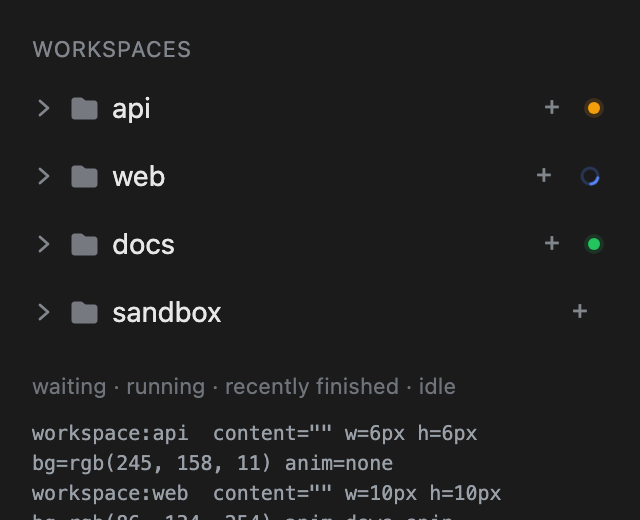
This is the plugin's own stylesheet rendered over a local reproduction of the sidebar row DOM and theme tokens — a design preview, not a live screenshot. The shipped app draws the same marks on the real rows.
Rules
- Precedence matches the shipped session row: waiting for the user beats running, which beats the finished reminder. A workspace therefore shows one mark at a time; the hidden description still reports every count.
- Subagents count as their parent's activity. A running subagent keeps the parent session's workspace marked even when the parent turn has settled. Subagent rows never produce a mark of their own — they are not workspace members.
- Archived sessions are ignored, the same way the default browser view hides them.
- The finished mark is a notice, not a flag. It lapses one hour after the session's last update, or one hour after the plugin watched it stop if that is later. The shipped per-row green dot persists until opened; a folder row has no timestamp to contradict it, so a permanent green dot would outlive the news. A finished session that was never seen running is judged by its own updated time only.
- Ungrouped sessions mark the "Ungrouped" bucket row, which behaves like a workspace row in the sidebar.
- No mark when everything is idle. The plugin renders nothing at all in that case — no stylesheet, no hidden text.
The active workspace (the one containing the open conversation) is already marked natively: Harness paints the folder icon of the active chain blue. This plugin does not duplicate that.
Install
From npm:
dsh plugin --profile <profile> add dsh-workspace-status
From a local checkout (development):
dsh plugin --profile desktop add /absolute/path/to/dsh-workspace-status
dsh plugin add links the checkout and appends this package to
dsh.profile.bundles because it declares dsh.bundle. Use the profile that
runs your client — desktop for the macOS/Windows app, web for dsh web.
Or use sidebar → Plugins → Add plugin and pass the absolute path to this
directory. The host half contributes nothing, but the profile composition still
changes, so restart the profile's Host (quit and reopen the desktop app, or
restart dsh web) after installing. Then reload the page if the client half
does not appear.
Manual mount without the CLI: copy the package into the profile's
node_modules, add "dsh-workspace-status" to dsh.profile.bundles in the
profile's package.json, and insert the row from cordis.patch.yml into the
profile's patch layer.
Verify
- Start a session in a workspace and collapse that group while it runs — a blue ring appears at the end of the folder row.
- Trigger an approval (or a plan review / question) in a session of another workspace — that folder row shows an amber dot even while expanded.
- Let a session finish without opening it — a green dot appears, and lapses an hour later.
- Expand the group: the mark stays on the folder row; the session rows keep their own dots unchanged.
- With every session idle, no extra element appears in the sidebar.
The client half writes nothing into the sidebar DOM — it reacts to the public Workspace/Session feeds and emits CSS keyed on the row the browser already renders. If the mark is missing, check the browser console for a failed client bundle load first; nothing else in the sidebar is affected.
How it works
- The mount is an entry in the additive
sidebar.footer.actionseat. It renders only a<style>element and a visually hidden<span>; it is not a control and adds nothing visible at the foot. - Aggregation reads the same public data the browser uses:
useWorkspaces(items,archivedSessionIds),useSessions(byId) anduseSessionStatus(running,pendingInteraction,completionUnread). - The visible mark is the workspace row's trailing pseudo-element, emitted as a
rule targeting
[data-row-key="workspace:<id>"]::after. - Removing the plugin removes the mount, which removes the stylesheet; no state is written anywhere.
The one internal dependency
data-row-key="workspace:<id>" is an internal detail of
@deepseek-ai/dsh-client-ui-workspace, not a public slot contract. A future
Harness release could rename it, in which case the marks would silently stop
appearing until this package is updated. The failure mode is deliberately
"no indicator", not "broken sidebar": the plugin never touches the DOM, so a
stale selector can only produce a missing dot.
Compatibility
- DeepSeek Harness
>=0.2.1-rc.2 <0.3.0-0(developed and verified against0.2.1-rc.3); Web and Desktop clients. - Node
>=22.18.0for the build-free package and its tests. - No runtime dependencies, no host services, no settings, no model-visible tools or prompt changes.
Development
npm test
The suite loads the classic-script client envelope in a sandbox, drives the slot component with fake standard hooks, and asserts the emitted stylesheet and hidden description across waiting/running/finished, subagent, archived, ungrouped, expiry and selector-escaping cases. A manifest test checks the bundle patch, export map, locale parity and the loader envelope.
There is no build step: index.js and client.js are the published artifacts.
Remove
dsh plugin --profile <profile> remove dsh-workspace-status
Restart the Host. The sidebar returns to stock; nothing else is left behind.
License
MIT
No comments yet. Be the first to write one.