dsh-moodboard




A visual reference moodboard for DeepSeek Harness. Collect screenshots and inspiration images in the Web UI, tag and annotate them, pin the ones that define your app's visual language, and let the agent read that style guide before it generates or restyles UI.
The panel is the Warm Sand Studio interface: a warm sand canvas, white cards, one coral accent, deep warm ink, soft 18–22px radii and pill controls. It is built from the Harness theme tokens, so light and dark follow the host. See docs/UI-REDESIGN.md.
Preview
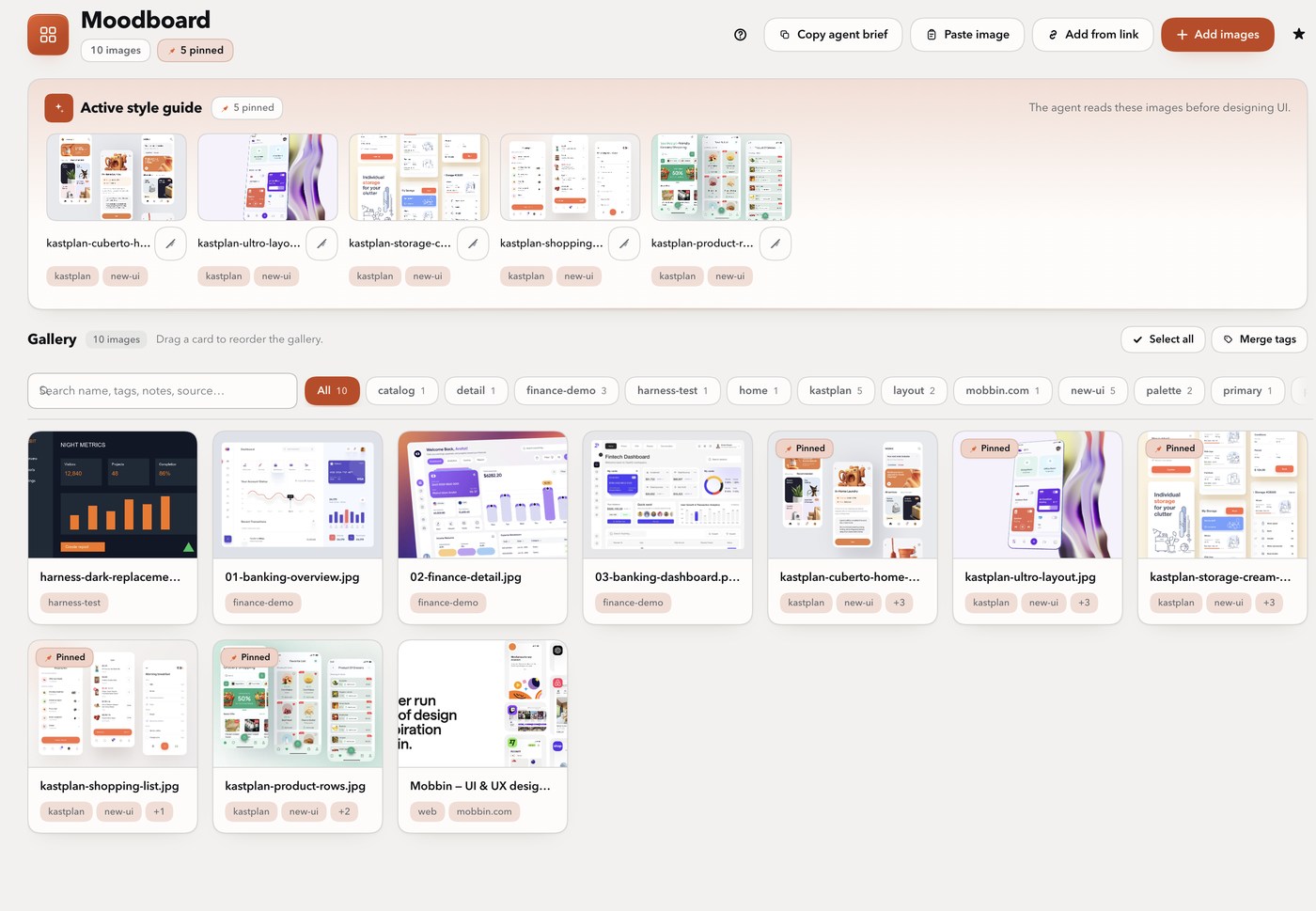
A quick tour after installation:
- Open Moodboard from the sidebar. The header shows the image and pinned counts, Add images, Add from link, Paste image, Copy agent brief, shortcut help and the quiet suite star link.
- Add references by dragging files anywhere on the page, pasting with ⌘V/Ctrl+V, picking files with Add images, or opening Add references to paste links or search Mobbin/Are.na. Add tags and turn on Pin imported references there.
- Select a card to open the inspector. Edit its name, tags, notes and source URL, copy/paste metadata onto another reference, or pin it with the Style guide switch. Manage moves, replaces or removes it.
- Use the search box and tag chips, open a reference in the lightbox, or
Cmd/Shift-click several cards for the bulk bar. Press
?for shortcuts. - Insert the reference directive with the composer's Moodboard button, or copy a ready-made agent brief from the header.
Install · Requirements · Agent API · Limits
Quick start
The fastest path is the Plugins page: Add plugin → dsh-moodboard,
which installs the package and enables the Moodboard bundle. From the CLI:
dsh plugin --profile web add dsh-moodboard
The CLI installs the package; the Moodboard bundle still has to be enabled on the Plugins page. Restart the Harness (or refresh the Web UI) if the sidebar entry does not appear.
More from this suite: Moodboard · Composer Predictions · Move to Workspace · Workspace Status · Prompt Rewrite
⭐ If this saves you a step, a star helps the next DSH user find it.
What's new in 0.4
- Warm Sand Studio redesign. Warm sand canvas, white cards, one coral accent for primary actions, pins and active filters, deep warm ink, 18px cards / 22px dialogs / 12px inputs, pill buttons and chips, and soft warm shadows. Light and dark both derive from the host tokens.
- Redesigned Add references dialog. Gradient header, segmented From links
/ Discover tabs, live
n / 20link counter, a real pin setting row with an explanation, and a sticky footer with the coral primary on the right. - Redesigned reference inspector. Kicker row with a solid Style guide pill, 16:10 preview, section labels with trailing rules, grouped move pair, borderless remove, and a sticky footer whose disabled Save reads as inactive.
- Responsive and verified. The inspector becomes a bottom sheet on narrow
screens; a real-render harness captures the live
client.jsin light and dark across page, dialog, inspector, lightbox, bulk bar and phone widths.
Full history: CHANGELOG.md.
What you get
- Moodboard panel in the Web UI (sidebar icon) with a coral mark, title, image/pinned count pills, and one row of actions: Add images, Add from link, Paste image, Copy agent brief, keyboard-shortcut help and the quiet suite star link.
- Warm Sand Studio styling built from
--dsw-alias-*through a local--mb-*layer: a warm canvas, card surfaces, hairline warm borders, one coral accent, warm ink, 4px-based spacing and soft shadows. Motion honoursprefers-reduced-motion; focus rings, live regions and labelled controls are preserved. - Active style guide hero: pinned thumbnails, a pinned count and the “The agent reads these images before designing UI” reminder. Click a thumbnail for the lightbox, unpin in place, and see each reference's top tags.
- Gallery: search across name, tags, notes and source; tag chips with
counts in the same sticky toolbar; drag-to-reorder; Select all; lazy,
paged thumbnails; card hover actions for expand, pin, replace and remove;
pinned badges and a
+ntag overflow count. - Reference inspector: a kicker row with a solid Style guide pill when pinned, a 16:10 preview, and grouped Details (name, tags, notes, source URL), Metadata (copy/paste tags, notes and source), Style guide (the pin switch and what the agent does with it) and Manage (move pair, replace, borderless remove with inline confirm). The sticky footer shows saved/unsaved status with Cancel and Save.
- Add references dialog: From links / Discover tabs, a live
n / 20 linkscounter, tag editor, pin setting row, and a sticky footer with Close plus the coral primary. Discover has source, query, platform and results fields with the Mobbin key hint; results report added / already-on-board / failed counts and offer Copy workflow. - Capture: drag-and-drop image files, clipboard paste with ⌘V/Ctrl+V, the Paste image and Add images buttons, Open Graph/Twitter link previews, Mobbin and Are.na discovery, and local screenshot paths from a browser MCP through the agent tool.
- Organize: drag cards to set the gallery order; Shift/Cmd-click to select several; the floating bulk bar pins, unpins, tags or removes the selection; the tag manager renames or merges a tag across every reference with per-tag counts.
- Reuse: copy tags, notes and source from one reference and paste them into another, then save.
- Find & inspect: search and tag filters combine; open any reference in a full-size lightbox with previous/next navigation, a position counter, Edit details, Pin/Unpin, tags, notes and source.
- Live sync: references the agent uploads through the HTTP API (or edits made from another window) show up within a few seconds — no page reload and no desktop app restart. The panel fetches the board on activation, then a cheap revision poll plus window focus / visibility checks keep it current.
- Keyboard & accessibility:
⌘V/Ctrl+V paste,/search,⌘Aselect all,⌘⇧Ainvert,Alt+←/→reorder a focused card,←/→browse the lightbox,Escclear or close, and?for the shortcuts list. Dialogs are labelled and focus-trapped; selection and filter changes are announced through live status regions. - Agent integration:
moodboardtool withactive/query/list/get/brief/import/sources/workflowactions.activeandqueryreturn the reference images themselves as image content blocks, so the model analyses the actual pixels, plus tags, notes and source URLs.- A
moodboard:style-guidesystem-prompt section tells the agent the moodboard exists and to load it before designing UI. - A
moodboard:inspiration-workflowprompt section and a copyable workflow turn references into tokens and components instead of copied screens. - A compact Moodboard button in the composer inserts a directive into the draft that points the agent at the pinned references (it never sends).
- Persistence: metadata survives restarts in
<DSH_HOME>/moodboard/board.json; image bytes live in the durable attachment store (<DSH_HOME>/attachments/v1). Survives sessions, reloads and restarts.
Pull inspiration automatically
The panel's Add from link button opens the Add references dialog, which has two intakes:
- From links — paste up to 20 public page URLs. The Host fetches each page and stores its Open Graph/Twitter preview image with the title, author, site, description and canonical source URL. Direct image URLs work too.
- Discover — search Mobbin screens (official REST API, Team/Enterprise
key) or Are.na (public, no key) and add the results in one action. Mobbin
image URLs expire, so the plugin downloads the bytes immediately; Mobbin app
names and both providers' source links are preserved as tags/notes. Discovery
accepts only
mobbinandarenaas the source; other ids are rejected withinvalid-argumentbefore any request. Are.na search returns a mixed text/image result list, so only image blocks count toward the requested number of results — text blocks are skipped, not counted and not reported as failures.
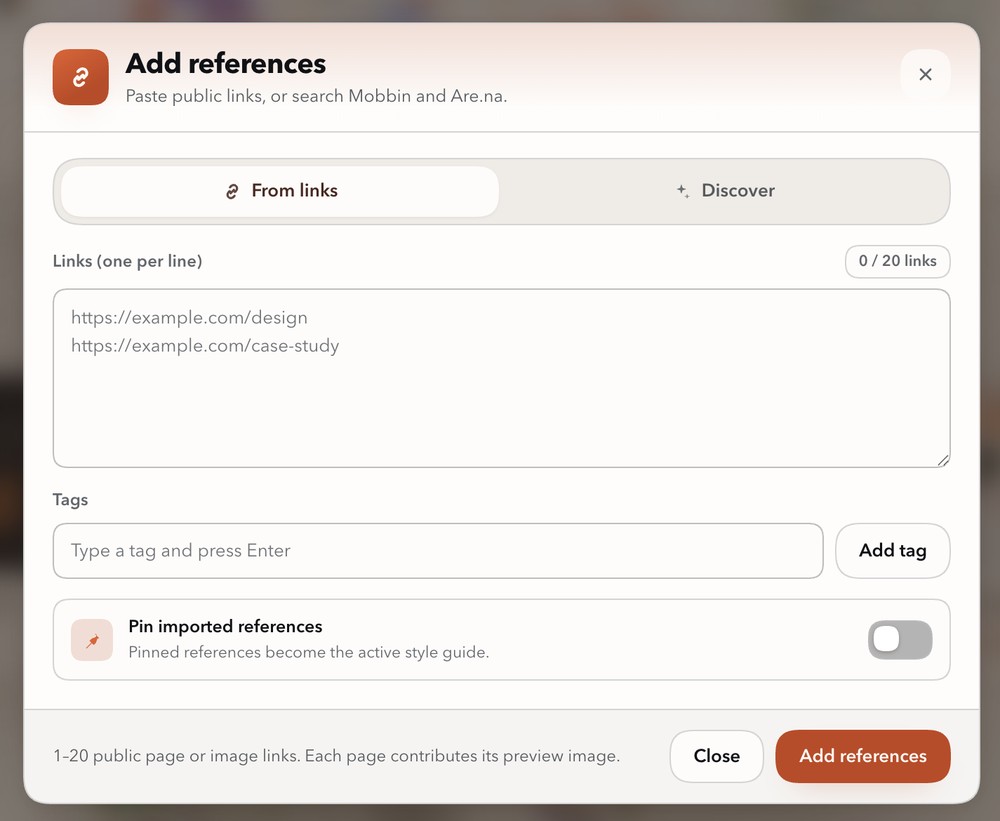
The dialog is the redesigned intake surface: a gradient header with a coral link
badge, icon segmented tabs, a live n / 20 links counter, a proper pin setting
row, and a sticky footer with Close and the right-most coral primary. After an
import it shows added / already-on-board / failed counts, the first failure
messages, and a Copy workflow action. The import does not close the dialog;
the board refreshes silently behind it.
The agent has the same abilities through the moodboard tool:
action: "import" with urls, paths (local screenshots from a browser MCP)
or source + query; action: "sources" lists what is configured; and
action: "workflow" returns the reference-to-component method.
Configure Mobbin with MOBBIN_API_KEY or
<DSH_HOME>/moodboard/sources.json ({ "mobbinApiKey": "…" }; the default
DSH home is ~/.dsh). The file is re-read on every import, and the environment
variable wins. Dribbble blocks server-side page fetches, so capture it with a
browser MCP or upload the screenshot — see
docs/INSPIRATION-WORKFLOW.md for the browser
MCP setup, the source matrix and the designer-respect rules.
Inspect and refine references
Selecting a gallery card opens the reference inspector next to the gallery.
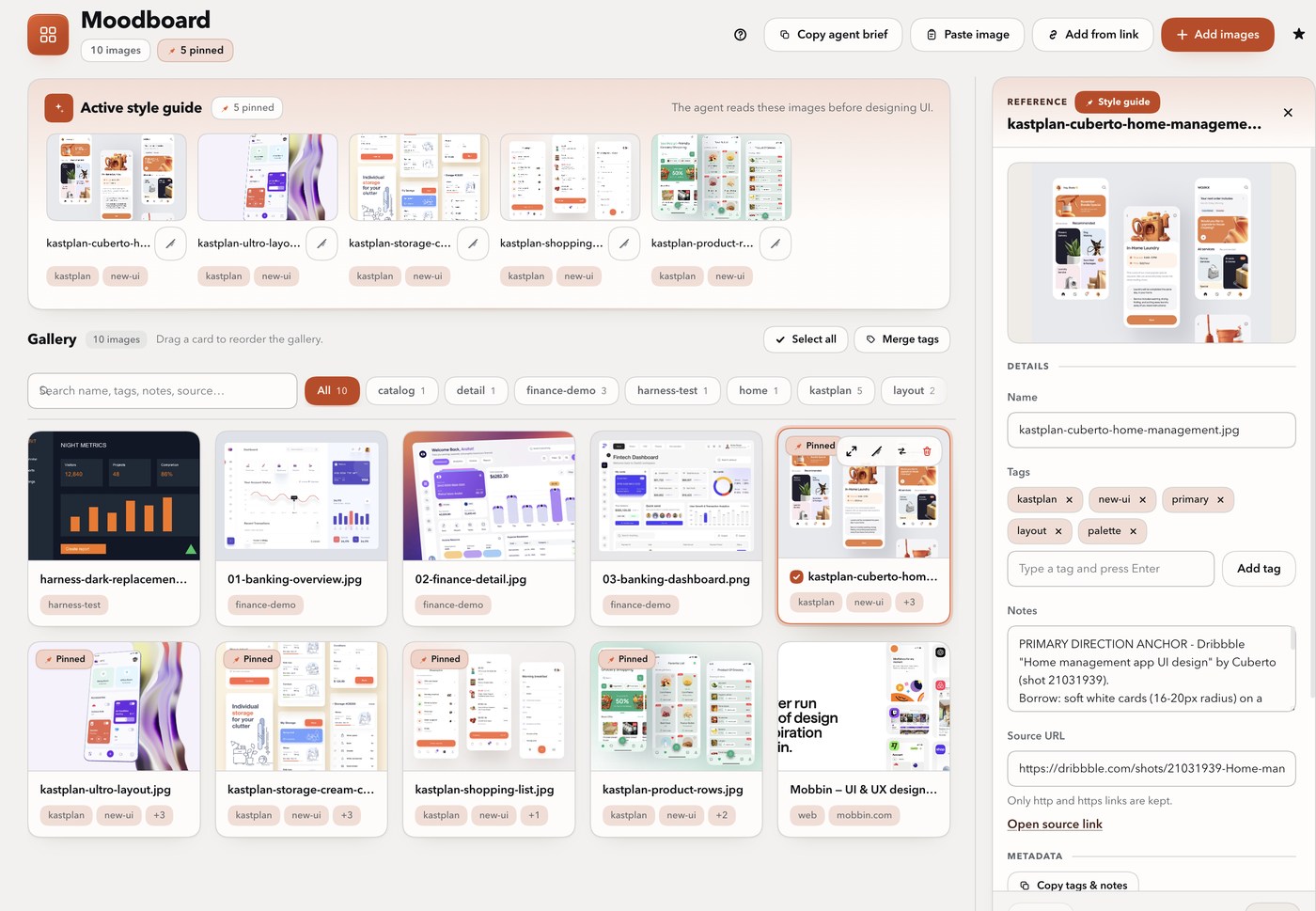
The inspector keeps the working surface close to the reference:
- Details — name, tags with autocomplete and per-tag remove, notes, source URL with an Open source link action, and the “Only http and https links are kept” hint.
- Metadata — Copy tags & notes captures tags, notes and source URL; Paste copied metadata applies them to another reference and marks the form dirty until Save.
- Style guide — the Use as a style-guide reference switch with the hint that the agent reads these pinned images before designing UI. The header's Style guide pill mirrors the pinned state.
- Manage — a grouped move-left/move-right pair for keyboard and touch, a Replace action, and a borderless Remove with inline confirm.
- Footer — saved/unsaved status plus Cancel and the coral Save. A disabled Save reads as a neutral inactive surface, not a broken grey block.
The inspector is a 360px side column on wide screens, narrows to 330px below 1100px, and becomes a dismissible bottom sheet at 1024px and below. The gallery, lightbox, bulk bar, tag merge dialog and shortcuts dialog use the same Warm Sand tokens.
From inspiration to components
The plugin ships the method as a prompt section and a copyable workflow, not just a gallery:
- Collect 5–10 references for the same job, with source links.
- Curate with role tags (
layout,type,palette,component,motion,flow) and pin the 2–4 that define the direction. - Extract borrow/avoid notes: structure, spacing rhythm, type scale, color roles, radius/elevation, icon style, motion — and what not to copy.
- Translate into your own tokens and content for the page archetype.
- Build one representative component per role, with states, dark mode, keyboard/focus, responsive behavior and reduced motion.
- Verify at the same viewport: structure/rhythm, then type/color, then interaction; check contrast, hit targets, overflow and motion fallbacks.
- Record the component and reuse the pinned references as the style guide.
Full guide: docs/INSPIRATION-WORKFLOW.md.
Requirements
DeepSeek Harness >=0.2.1-rc.3 <0.3.0-0 with the Web profile (the Host half
needs attachments, tools, systemPrompt, webServer, and connection;
the browser half needs the slots and locale services).
Install
Renamed in 0.2.7. This plugin publishes as
dsh-moodboard. The earlier scoped name@stijnus/dsh-moodboardwas unpublished, so pins to it now return 404 — installdsh-moodboardand remove the old entry from your profile.
The Plugins page installs the package and enables the bundle in one step. The
agent's plugin_manager tool does the same:
plugin_manager action: "install_bundle" target: "dsh-moodboard"
install_bundle installs the package and selects the bundle; target is the
package name or an absolute local bundle directory. The CLI command only
installs the package:
dsh plugin --profile <profile> add dsh-moodboard
Then enable the Moodboard bundle on the Plugins page. Reload the Web UI if the sidebar icon does not appear immediately.
Or add a plugin market index to Discover (Plugins → Discover → Index sources):
- Suite index:
https://raw.githubusercontent.com/Stijnus/dsh-composer-predictions/main/market-index.json - Moodboard-only index:
https://raw.githubusercontent.com/Stijnus/dsh-moodboard/main/market-index.json
Development
CI runs Node 24. The plugin has no runtime dependencies, so a fresh clone needs no install step:
git clone https://github.com/Stijnus/dsh-moodboard.git
cd dsh-moodboard
npm test              # syntax checks + the full node:test suite
npm run pack:check    # verify the published tarball file list
A real-render harness executes the actual client.js under a stubbed Harness
host and captures the panel, Add references dialog, inspector, lightbox, bulk
bar and responsive states:
node verification/harness/capture.mjs
It drives Chrome through Playwright's playwright-core; set
HARNESS_PLAYWRIGHT_CORE for a custom entry or HARNESS_CHANNEL for a
different browser channel. Generated PNGs stay local; shots/console.json
records the run. See
verification/harness/REPORT.md.
Install a local checkout into a profile for manual testing:
plugin_manager action: "install_bundle" target: "/absolute/path/to/dsh-moodboard"
The current build contract for the Host and Client halves is docs/CONTRACT.md.
Agent API
Tool moodboard
| action | meaning |
|---|---|
active (default) |
pinned style guide, or the whole board when nothing is pinned. Returns metadata and the images themselves. |
query |
filter by tag(s): tags: ["dark","typography"], match: "any" | "all". Returns matching images. |
list |
metadata for every image, no image bytes (cheap overview). |
get |
one image by id, with complete notes, tags and source URL. |
brief |
text-only style brief (names, tags, notes, sources). |
import |
add references: urls (link capture), paths (local screenshots), or source + query (Mobbin/Are.na discovery). Optional tags, notes, pinned; platform (ios/web) and limit (1–12) for discovery. |
sources |
list the configured inspiration sources, the local config path and the browser-MCP bridge hint. |
workflow |
the reference-to-component method plus the active brief. |
includeImages: false suppresses image content blocks. Image content is capped
at 6 per call. active and query return abbreviated overviews with reference
IDs; use get for complete metadata, or list to find all reference IDs.
import returns imported images, duplicates (already on the board) and
per-item failures; a failed item never fails the whole batch.
HTTP endpoints
The Host half serves one authenticated prefix route /moodboard (owner
session cookie required, same origin as the Web UI). The agent normally uses
the tool; these endpoints exist for the panel and for programmatic reads:
| Method + path | Purpose |
|---|---|
GET /moodboard/api/state |
full board + revision |
POST /moodboard/api/images |
upload { data, mediaType, name?, tags?, notes?, sourceUrl? } |
PATCH /moodboard/api/images/<id> |
update name, tags, notes, sourceUrl, pinned, order |
POST /moodboard/api/images/<id>/replace |
replace bytes, keep metadata |
DELETE /moodboard/api/images/<id> |
remove |
POST /moodboard/api/images/reorder |
set the complete gallery order { ids: [...] } |
POST /moodboard/api/images/bulk |
bulk { ids, pinned?, addTags?, removeTags?, delete? } |
POST /moodboard/api/tags/merge |
rename/merge { from, to } across the board |
GET /moodboard/api/active |
active guide with tags/notes/sources/brief |
GET /moodboard/api/query?tag=…&match=any&limit=50 |
tag lookup (limit 1–200, default 50) |
GET /moodboard/api/health |
liveness + image count |
GET /moodboard/api/revision |
cheap change detector for the open panel { revision, updatedAt, images } |
GET /moodboard/api/sources |
configured inspiration sources, workflow text, config path |
POST /moodboard/api/import |
{ urls } / { paths } / { source, query, platform?, limit? } + tags?, notes?, pinned?; returns { imported, duplicates, failures } |
GET /moodboard/image/<id>?v=<attachmentId> |
normalized image bytes for that revision |
All JSON responses use { ok: true, … } or
{ ok: false, error: { code, message } }. GET /moodboard/api/state carries
the same process-local revision as /api/revision; the panel compares it (and
the board timestamp, so a Host reload is noticed too) with what it last applied
and only re-reads the full board when either changed.
Data
- Metadata:
<DSH_HOME>/moodboard/board.json(atomic writes; corrupt files are backed up asboard.corrupt-<timestamp>.jsonand the board starts empty). - Images: content-addressed in the harness attachment store. They are normalized on upload (WebP/JPEG, max edge 1600 px from the UI) and never deleted automatically; removing a board entry only removes the reference.
- Source config:
<DSH_HOME>/moodboard/sources.json(optional; currently{ "mobbinApiKey": "…" }and the snake_casemobbin_api_keyalias). The environment variableMOBBIN_API_KEYwins. The file is re-read on every import. - If the saved board cannot be read or its recovery backup cannot be written, the plugin reports a storage error and blocks changes. Correct the storage problem and reload the plugin; existing board data is retained.
Visual language
Plugin chrome composes the Harness theme tokens (--dsw-alias-*) through a
small local layer (--mb-*): warm sand canvas, white cards, hairline warm
borders, one coral accent, deep warm ink, 18px cards, 22px dialogs, 12px inputs
and pill controls. Light and dark both derive from the host tokens, so the
panel follows theme switching without a theme hook. Motion is quiet
(180ms; prefers-reduced-motion turns transitions and lift off), focus rings
are visible, and image thumbnails are the user's own artwork. The design brief
and token table are in
docs/UI-REDESIGN.md.
Limits
- Up to 200 images, 20 tags per image (48 chars each), 4000-char notes, 200-char names and 2000-char source URLs.
- Uploads are re-encoded client-side (max edge 1600 px, quality 0.85) before upload; a source file is capped at 25 MiB and the API image payload at 32 MiB of base64.
- Imports: up to 20 links or paths per call and 12 discoveries per call (default 6); remote pages are capped at 4 MiB and remote images at 12 MiB; only http(s) URLs, with private/loopback hosts blocked.
- Are.na discovery counts only image blocks toward the requested result limit
(text blocks are skipped);
sourceis limited tomobbinorarena, and any other value fails withinvalid-argumentbefore a request is made. - The
moodboardtool returns at most 6 image content blocks per call. - The HTTP endpoints are owner-authenticated for same-origin/browser callers.
A bash/curl caller has no session cookie — use the
moodboardtool instead.
Releases and provenance
Releases are tag-driven and published from GitHub Actions using npm
trusted publishing (OIDC). No long-lived npm token is stored in the
repository: npm trusts this repository's release.yml workflow at a tagged
commit, and the short-lived credential minted for that run cannot be reused
elsewhere.
Every release of dsh-moodboard from 0.2.8 onward is published with a
provenance attestation that binds the tarball to this repository, the workflow
file, and the commit. 0.2.7 (the first release under the current name) has no
attestation, and the earlier @stijnus/dsh-moodboard versions are unpublished.
The npm package page shows the Provenance badge for the attested versions.
Verify a release:
npm view dsh-moodboard@<version> dist.attestations
npm view dsh-moodboard@<version> dist.integrity
The attestation URL resolves to the signed in-toto statement; npm prints the matching Sigstore transparency-log entry during the release. The one-time publisher setup, tag/release steps, and post-publish checks are in RELEASING.md; version history is in CHANGELOG.md.
License
MIT. Icon and screenshots: original artwork for this plugin; the screenshots use the project's own reference board.
No comments yet. Be the first to write one.