dsh-moodboard




A visual reference moodboard for DeepSeek Harness. Collect screenshots and inspiration images in the Web UI, tag and annotate them, pin the ones that define your app's visual language, and let the agent read that style guide before it generates or restyles UI.
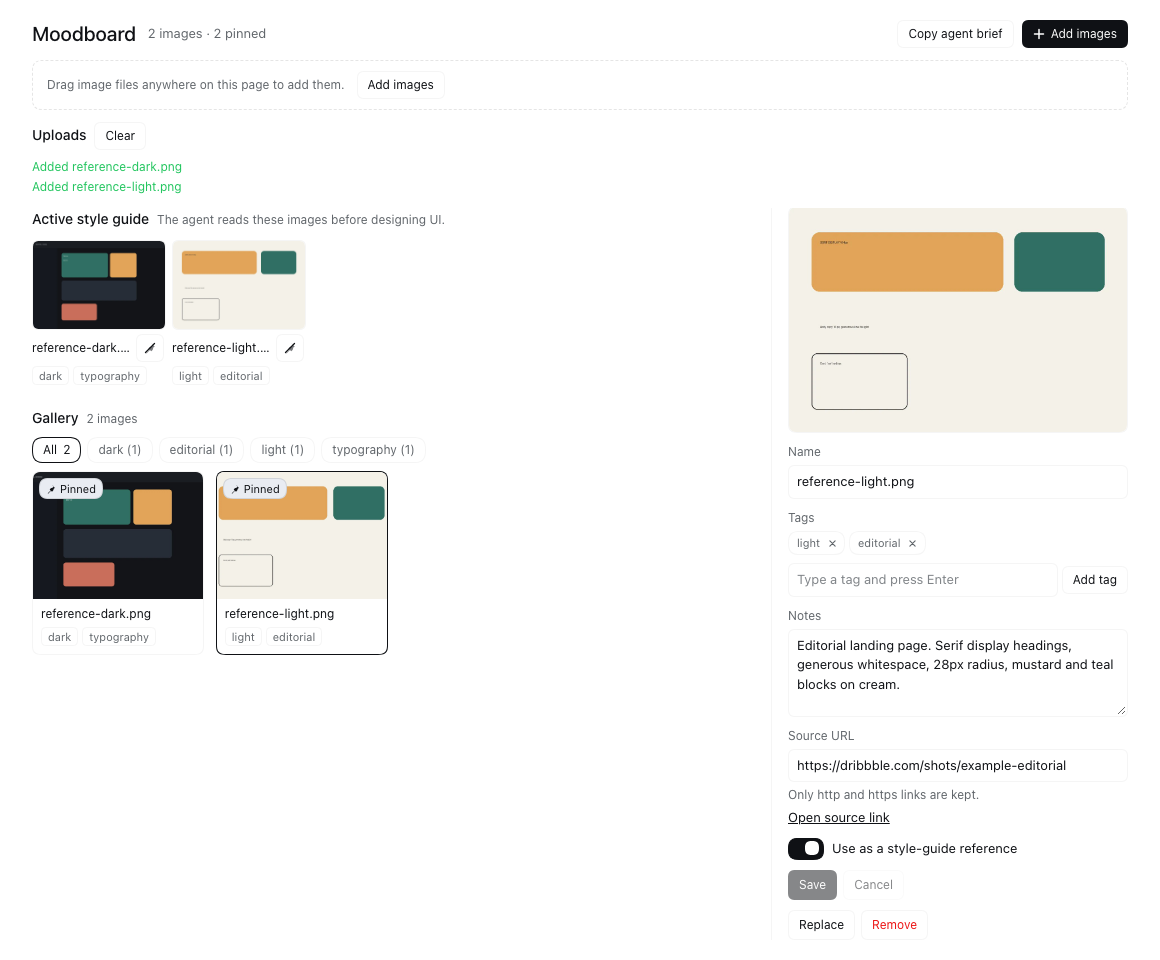
What you get
- Moodboard panel in the Web UI (sidebar icon): drag-and-drop, clipboard paste or file-picker upload; gallery of thumbnails with drag-to-reorder and multi-select bulk actions; tag filter; and an active style-guide strip.
- Capture: drop files from Finder, paste images with ⌘V/Ctrl+V, or use the Paste / Add images buttons. Every image is downscaled and stored durably.
- Organize: drag cards to set the gallery order, Shift/Cmd-click to select several, then pin, unpin, tag or remove them in one action.
- Per-image metadata: tags, notes, source URL, name — editable in a metadata panel, with pin / replace / remove actions.
- Active style guide: pin one or more references. The agent treats pinned images as the source of truth for typography, color, spacing, radius, iconography and component styling.
- Agent integration:
moodboardtool withactive/query/list/get/briefactions.activeandqueryreturn the reference images themselves as image content blocks, so the model analyses the actual pixels, plus tags, notes and source URLs.- A system-prompt section tells the agent the moodboard exists and to load it before designing UI.
- A compact Moodboard button in the composer inserts a directive into the draft that points the agent at the pinned references (it never sends).
- Persistence: metadata survives restarts in
<DSH_HOME>/moodboard/board.json; image bytes live in the durable attachment store (<DSH_HOME>/attachments/v1). Survives sessions, reloads and restarts.
Requirements
DeepSeek Harness >=0.2.1-rc.3 <0.3.0-0 with the Web profile (the Host half
needs attachments, tools, systemPrompt, webServer, and connection;
the browser half needs the slots and locale services).
Install
From npm once a release is published, through the Plugins page or
plugin_manager install_bundle:
plugin_manager install_bundle target: "@stijnus/dsh-moodboard"
Manual equivalent (installs the package into a profile; the bundle still has to be enabled through the Plugins page):
dsh plugin --profile <profile> add @stijnus/dsh-moodboard
Reload the Web UI if the sidebar icon does not appear immediately.
Development
git clone https://github.com/Stijnus/dsh-moodboard.git
cd dsh-moodboard
npm test              # syntax checks + node:test smoke suite
npm run pack:check    # verify the published tarball file list
Install a local checkout into a profile for manual testing:
plugin_manager install_bundle target: "/absolute/path/to/dsh-moodboard"
The current build contract for the Host and Client halves is docs/CONTRACT.md.
Agent API
Tool moodboard
| action | meaning |
|---|---|
active (default) |
pinned style guide, or the whole board when nothing is pinned. Returns metadata and the images themselves. |
query |
filter by tag(s): tags: ["dark","typography"], match: "any" | "all". Returns matching images. |
list |
metadata for every image, no image bytes (cheap overview). |
get |
one image by id. |
brief |
text-only style brief (names, tags, notes, sources). |
includeImages: false suppresses image content blocks. Image content is capped
at 6 per call.
HTTP endpoints
The Host half serves one authenticated prefix route /moodboard (owner
session cookie required, same origin as the Web UI). The agent normally uses
the tool; these endpoints exist for the panel and for programmatic reads:
| Method + path | Purpose |
|---|---|
GET /moodboard/api/state |
full board + guide summary |
POST /moodboard/api/images |
upload { data, mediaType, name?, tags?, notes?, sourceUrl? } |
PATCH /moodboard/api/images/<id> |
update name, tags, notes, sourceUrl, pinned, order |
POST /moodboard/api/images/<id>/replace |
replace bytes, keep metadata |
DELETE /moodboard/api/images/<id> |
remove |
POST /moodboard/api/images/reorder |
set the complete gallery order { ids: [...] } |
POST /moodboard/api/images/bulk |
bulk { ids, pinned?, addTags?, removeTags?, delete? } |
GET /moodboard/api/active |
active guide with tags/notes/sources/brief |
GET /moodboard/api/query?tag=…&match=any |
tag lookup |
GET /moodboard/api/health |
liveness + image count |
GET /moodboard/image/<id> |
normalized image bytes |
All JSON responses use { ok: true, … } or
{ ok: false, error: { code, message } }.
Data
- Metadata:
<DSH_HOME>/moodboard/board.json(atomic writes; corrupt files are backed up asboard.corrupt-<timestamp>.jsonand the board starts empty). - Images: content-addressed in the harness attachment store. They are normalized on upload (WebP/JPEG, max edge 1600 px from the UI) and never deleted automatically; removing a board entry only removes the reference.
Visual language
Plugin chrome uses Harness theme tokens (--dsw-alias-*) so the panel follows
light/dark switching. Image thumbnails are the user's own artwork.
Limits
- Up to 200 images, 20 tags per image (48 chars each), 4000-char notes.
- Uploads are re-encoded client-side (max edge 1600 px, q 0.85) before upload.
- The HTTP endpoints are owner-authenticated for same-origin/browser callers.
A bash/curl caller has no session cookie — use the
moodboardtool instead.
Releases and provenance
Releases are tag-driven and published from GitHub Actions using npm
trusted publishing (OIDC). No long-lived npm token is stored in the
repository: npm only accepts a publish from this repository's release.yml
workflow at a tagged commit, and the short-lived credential minted for that run
cannot be reused elsewhere.
Every release from 0.1.1 onward is published with a provenance attestation
that binds the tarball to this repository, the workflow file, and the commit.
The npm package page shows the Provenance badge for those versions.
0.1.0 was published manually before the publisher was configured, so it has
no attestation.
Verify a release:
npm view @stijnus/dsh-moodboard@<version> dist.attestations
npm view @stijnus/dsh-moodboard@<version> dist.integrity
The attestation URL resolves to the signed in-toto statement; the matching Sigstore transparency-log entry is printed in the release workflow log. The one-time publisher setup, tag/release steps, and post-publish checks are in RELEASING.md; version history is in CHANGELOG.md.
License
MIT. Icon and panel screenshot: original artwork for this plugin.
No comments yet. Be the first to write one.