
Starlight · one-click prompt optimizer
DSH plugin · by Starlit Sky




A circular four-pointed-star button on the left of the DSH composer toolbar, wearing a hairline ring and soft glow so it lifts off the toolbar. One click turns your draft into a clearer, more complete, more executable prompt. Every rule, slider and model is editable, and there is a dedicated settings page (Settings → Starlight).
A standalone plugin. No DSH source edits, no
index.htmlinjection, two official slot seats.
┌───────────────────────────────────────────────┐
│  Draft text…                                  │
│                                               │
│  (✦) [+] [permissions]       [model] [send]  │
│   └ star button (left, ringed)                │
└───────────────────────────────────────────────┘
Features
| ✦ One click | Read the draft → rewrite with the rule set → atomic write-back, caret returned to the editor |
| ✦ Editable rules | 11 built-in rules grouped as structure / expression quality / fidelity guards, each toggleable, with per-group counters and all-on / all-off |
| ✦ Custom rules | One per line; they outrank the built-in rules |
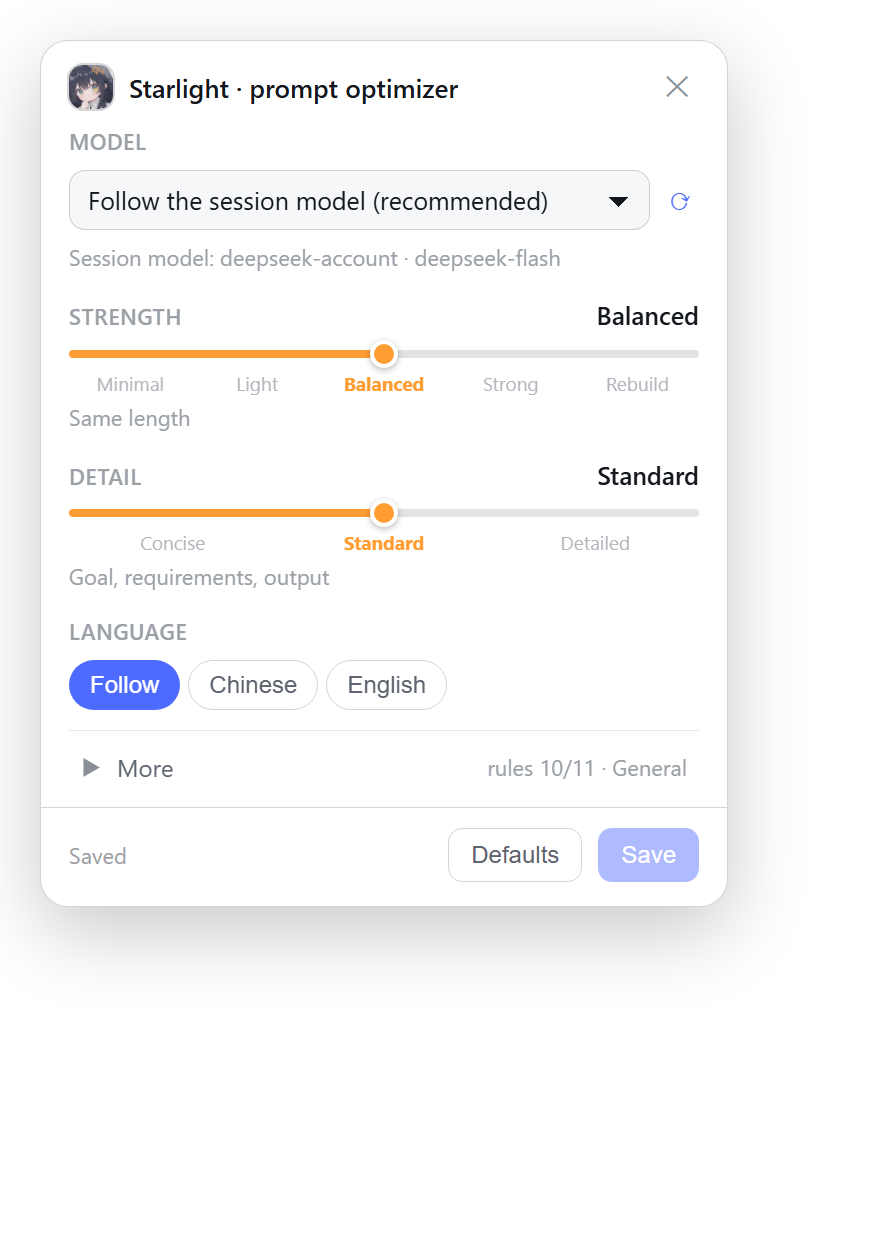
| 🎚 Slider-first | Strength (5 stops: minimal → light → balanced → strong → rebuild) and Detail (3 stops) are sliders with real stops, not three values padded into five |
| ✦ Scenario | General / engineering / writing / analysis, folded under “More” |
| ✦ Output language | Follow the draft / force Chinese / force English |
| 🎛 Model switching | Pick any model the host advertises (provider · friendly name), or keep the default "follow the session model". Affects only Starlight's side call, never your session model |
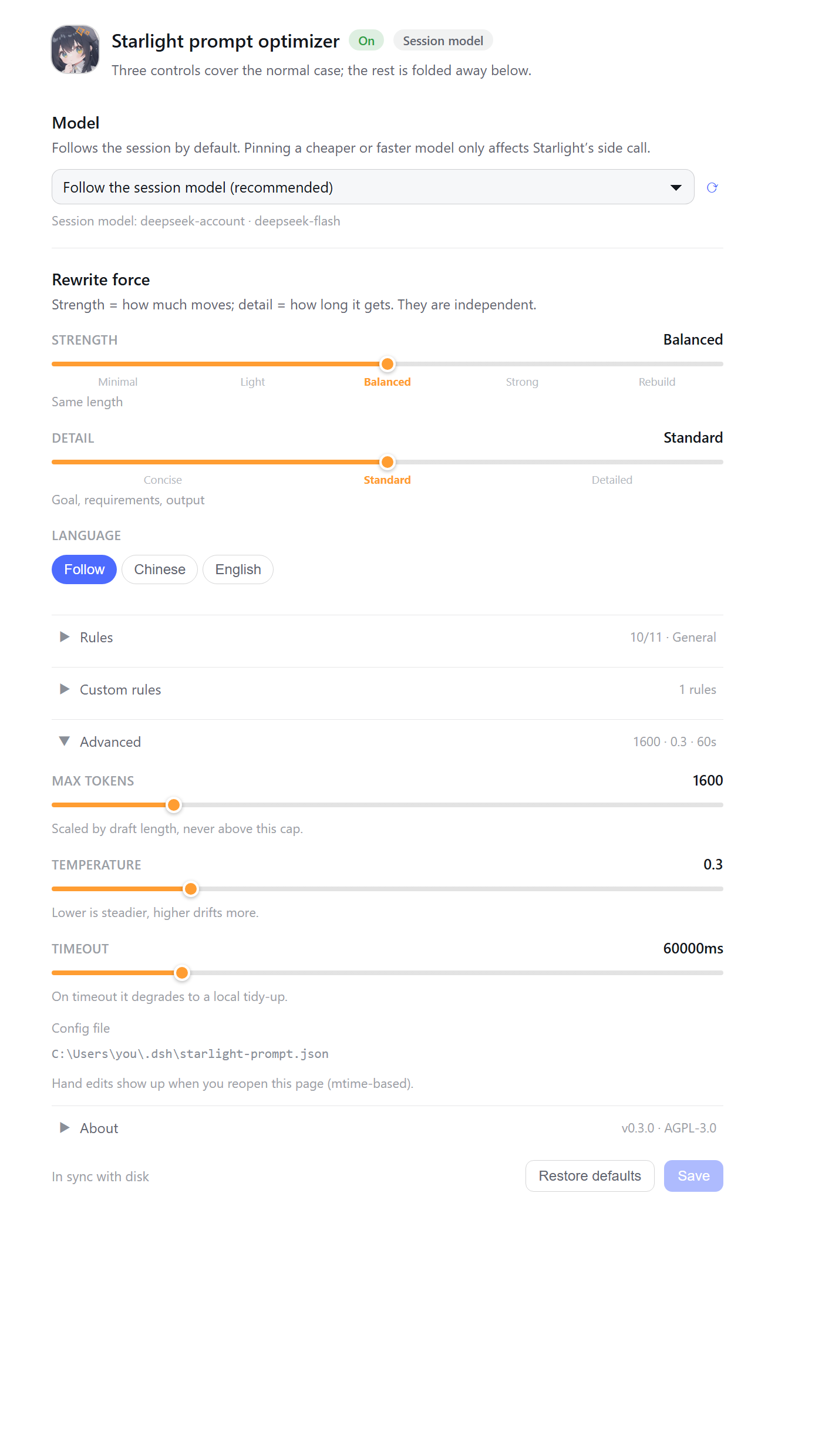
| ⚙ Settings page | Settings → Starlight: switch, shape, all 11 rules, custom rules, model, temperature / token cap / timeout — in one place |
| ↩ Undo | A toast after each run restores the previous draft in one click |
| ⌨ Shortcut | Ctrl/⌘ + Shift + O inside the composer |
| 🛟 Local fallback | No model, timeout or offline → mechanical tidy-up plus a stated reason, never a silent failure |
| 🖱 Right-click / long-press | Opens the compact rules popover (520 ms for touch); the settings page has everything else |
It never sends messages, creates turns, writes to the session log, or touches other plugins' settings.
What it looks like
Popover (right-click / long-press) — four controls by default, everything else folded into “More”:
Settings page (Settings → Starlight) — model first, then the two sliders, the rest collapsed:
Both are rendered from the real components by
node tools/make-shots.mjs(jsdom + React + headless Edge), not hand-drawn mockups — they cannot drift from the shipped UI.
Interface details
- The settings page leads with a star badge plus status pills (
On/Off, current model) and a footer that always saysUnsaved changes/Saved/In sync with disk; Save is disabled while clean. - Rules lay out in two columns above 560 px, with an enabled/total counter per group. Loading shows a skeleton instead of a bare "loading…" line.
- The popover header shows an Unsaved pill; the undo toast carries a star and the model's friendly name.
prefers-reduced-motionis respected: no spin, no pulse, no slide-in.
Install
One npm package = one host half + one browser half.
A. Install from a plugin market (recommended)
DSH ships no official market — a "market" is a format: 1 JSON index hosted at any https URL. This repository carries one, so you can treat it as a market listing just this plugin:
Sidebar Plugins → More next to Experimental plugins → enable Custom plugin markets
Open Discover and add the index URL (prefer the fastly host):
https://fastly.jsdelivr.net/gh/Starlit-Sky-code/dsh-prompt-starlight@main/market/index.jsonjsDelivr's edge hosts differ a lot in reachability, especially on mainland China networks. Measured here:
Index URL Measured https://fastly.jsdelivr.net/gh/Starlit-Sky-code/dsh-prompt-starlight@main/market/index.json本次实测可达(1.4s) https://gcore.jsdelivr.net/gh/Starlit-Sky-code/dsh-prompt-starlight@main/market/index.json本次实测可达(0.9s) https://testingcf.jsdelivr.net/gh/Starlit-Sky-code/dsh-prompt-starlight@main/market/index.json本次实测可达(1.1s) https://cdn.jsdelivr.net/gh/Starlit-Sky-code/dsh-prompt-starlight@main/market/index.json官方 CDN 域名,本网络下 SSL 失败 https://raw.githubusercontent.com/Starlit-Sky-code/dsh-prompt-starlight/main/market/index.jsonunreachable on this network Switching hosts is just a domain swap — the path is identical. Avoid
github.com/.../raw/...: the host refuses redirects and that URL 302s to raw.githubusercontent.Install from the list. DSH installs it into the current profile pinned to the exact 40-character commit in the index, so the result is reproducible.
The index is validated with the official
@deepseek-ai/dsh-plugin-market-index(npm run market:validate). The host caches a successful read for ten minutes, so a release is not visible instantly.
B. Install a pinned commit directly
dsh plugin add "git+https://github.com/Starlit-Sky-code/dsh-prompt-starlight.git#<40-char-commit>"
C. Install the prebuilt tarball from a GitHub Release
Every version ships a packed tgz, so installing needs neither a local pnpm build nor a build-authorisation prompt:
dsh plugin add "https://github.com/Starlit-Sky-code/dsh-prompt-starlight/releases/download/v0.4.0/dsh-prompt-starlight-0.4.0.tgz"
The asset name carries the version, so the URL pins the
v0.4.0tag; bump both when you upgrade. Caveat: the download 302s to GitHub's release CDN (objects.githubusercontent.comand friends), which is frequently unreachable on mainland China networks — use option A (the jsDelivr index) or D in that case.
D. Link this directory into the current profile (local development)
$profile = "$env:DSH_HOME\profiles\desktop"
$pkg = Get-Content "$profile\package.json" -Raw | ConvertFrom-Json
$pkg.dependencies | Add-Member -NotePropertyName 'dsh-prompt-starlight' -NotePropertyValue 'link:D:\plugins\dsh-prompt-starlight' -Force
$pkg.dsh.profile.bundles += 'dsh-prompt-starlight'
$pkg | ConvertTo-Json -Depth 20 | Set-Content "$profile\package.json" -Encoding utf8

& "$env:DSH_HOME\resources\runtime\pnpm\bin\pnpm.cmd" install --dir $profile
Then restart DSH — the host half has to reload before the HTTP routes exist.
The desktop profile is named
desktop, and the CLI'sdsh plugin --profilerefuses it. Use the GUI or the manual link above; don't copy--profile webinstructions from web-edition tutorials.
Verify
http://127.0.0.1:19387/dsh-starlight/health
http://127.0.0.1:19387/plugins/dsh-prompt-starlight/client.js
JSON with providers = host half alive. JavaScript = the browser half made it into the boot graph. Both fine but no star? Hard-refresh (Ctrl+Shift+R).
Where it is listed
| Channel | Mechanism | Status |
|---|---|---|
| Index in this repository | market/index.json (format 1, official validator passes) |
✅ live, URL above |
| awesome-dsh-plugin | one PR adding data/plugins/<owner>__<repo>.yml |
📝 entry ready in market/awesome-entry.yml, pending the "repo at least 1 day old" gate |
| dshbase.com | per their docs, adding the dsh-plugin GitHub topic is what makes a repo discoverable |
⏳ topic still to add |
| npm | npm publish, then dsh plugin add dsh-prompt-starlight |
⚠️ package is ready, but the starlit_sky npm account is temporarily suspended (recent security-sensitive action); publishing is refused with 403 until it lifts |
| Personal indexes (e.g. Silentforfar's market) | each author's private index | — not something to push an entry into |
Publishing to npm (optional)
npm login            # once; the publish target is already pinned to the official registry
npm publish
Then the shortest install form works:
dsh plugin add dsh-prompt-starlight
package.jsonpinspublishConfig.registry = https://registry.npmjs.org/on purpose. If any global.npmrcpoints the registry atnpm.pkg.github.com, publishing fails withENEEDAUTHeven when you are logged in, and the error only says "you need to log in" — a genuinely hard bug to trace. Pinning the target rules that failure mode out.
Every release must re-pin the index, otherwise users install the old commit:
npm run market           # pin index.json to HEAD + the package.json version
npm run market:validate  # run the official validator
Usage
| Action | Effect |
|---|---|
| Left click | Optimize the current draft (greyed out when empty) |
| Right click / long-press | Open the compact rules popover |
| Settings → Starlight | Open the dedicated settings page (everything, plus advanced fields) |
Ctrl/⌘ + Shift + O |
Optimize while the editor is focused |
Popover and settings-page edits both apply on Save and share one config document. Restore defaults resets every rule, slider and model override.
What the settings page holds
Navigation id: starlight.
| Section | Contents |
|---|---|
| Switch | Master switch; off ⇒ the button only tidies formatting and never calls a model |
| Rewrite force | Strength (5-stop slider) + Detail (3-stop slider) + language (3 segments); the current stop's explanation sits under each slider |
| Rules | Folded by default: scenario chips, 11 grouped checkboxes with per-group counters, all-on / all-off, master switch |
| Custom rules | Folded: multi-line textarea, one rule per line |
| Model (first) | Dropdown to switch models (Follow the session model or any advertised model), with ⟳ to re-read the catalog |
| Advanced | Folded: maxTokens / temperature / timeoutMs as sliders, plus the config-file path |
| Config file | Absolute path of the config document; a clear reason plus Retry when the host is unreachable |
The footer shows Unsaved changes (amber) / Saved / In sync with disk, with Restore defaults and Save (disabled while clean).
How model switching behaves
Follow the session model (recommended)writes noprovider/model: every click uses whatever model your session is on.- Picking a concrete model pins it in the config — handy when you want a strong model for chat and a cheap fast one for rewriting.
- Host-side route order: pinned config route → the session route reported by the browser → the host default model. A failing candidate (
NO_ADAPTER, missing credential, auth) falls through to the next. - The catalog comes from
GET /dsh-starlight/models(60 s cache,?refresh=1forces, 4 s timeout per provider, and a failing provider only becomes one entry inerrors).
Custom rules
Config file: $DSH_HOME/starlight-prompt.json (created on first save; safe to hand-edit, picked up immediately)
{
  "version": 1,
  "enabled": true,
  "verbosity": "standard",
  "lens": "auto",
  "locale": "auto",
  "depth": "balanced",
  "disabledRules": ["assumptions"],
  "customRules": ["Always include an Acceptance section", "No 'please make sure' filler"],
  "maxTokens": 1600,
  "temperature": 0.3,
  "timeoutMs": 60000,
  "provider": "",
  "model": ""
}
Built-in rule ids:
goal requirements output structure concise precise
preserve verbatim noinvent assumptions acceptance
To replace the whole rule set, put all 11 ids in disabledRules and write your own rules into customRules.
How it works
browser (lib/client.js)                      host (lib/index.js)
─────────────────────────                  ─────────────────────────
conversation.input.left slot                GET  /dsh-starlight/manifest
  └─ circular star button (ringed)          GET  /dsh-starlight/models
      ├─ read:  input.state snapshot         POST /dsh-starlight/optimize
      ├─ write: input.setDraft(text)         POST /dsh-starlight/config
      └─ undo:  previous draft               POST /dsh-starlight/reset
settings.section slot                        GET  /dsh-starlight/health
  └─ settings page (same form state)               │
                                            ctx.llm.stream({ provider, model,
                                              system: built from the rules,
                                              messages: JSON-framed draft })
Deliberate choices:
- Rules live host-side, once. The browser half is a classic script wrapped by DSH's
__ModuleLoader__, so it cannotimportlocal modules; the catalog always comes from/manifest. No two drifting copies. - The popover and the settings page share
useRulesConfig(). Loading, dirty-checking, saving and restoring have one implementation; the two surfaces are just different layouts over the same state machine, so they can never disagree. - The model catalog is its own request.
listModelsmay hit the network; folding it into/manifestwould let a slow provider stall the rules panel. Separate route, 60 s cache, 4 s timeout per provider — a slow provider only shows up as one line of text. - The draft is JSON-framed before it reaches the model, so
```,<system>or---inside it cannot forge a structural boundary. - The system prompt forbids executing the draft. Otherwise "write me a binary search" gets answered with code instead of an improved prompt.
- A failed model call is not a failed click: it degrades to a mechanical tidy-up and says why.
- The ring is
box-shadowlayers (1 px outline + near shadow + far bloom), notborder, so the button stays exactly 28×28 and never nudges the toolbar height; hover swaps the outline to the accent colour and blooms a 4 px halo. - Every registration is a reversible side effect: routes via the
webServer.register()disposer, styles taggeddata-pluginfor DSH to reclaim, listeners added inctx.effect()and removed in its return value.
Security boundary
All six routes require a loopback Host (localhost / 127.0.0.0/8 / ::1), reject Sec-Fetch-Site: cross-site, and require Origin to match Host when present. Write routes (/config, /reset) additionally require the request to come from this machine. If the host exposes connection.requestRejection, it is consulted too and the stricter result wins.
Behind a reverse proxy or on a LAN, whitelist explicitly:
STARLIGHT_TRUSTED_HOSTS=192.168.1.9:19387,my-box.local
(The whitelist only relaxes read routes; writes always require the local machine, so possessing a web session never grants permission to rewrite your prompt rules.)
Development
node tools/test-package.mjs   # package shape & signatures: 67 checks
node tools/test-host.mjs      # host: 86 checks
node tools/test-client.mjs    # browser: 96 checks
test-client.mjs needs real React and jsdom, installed only under tools/fixture:
cd tools\fixture
npm install
See the interface without restarting
npm run preview # = node tools/make-preview.mjs && node tools/check-preview.mjs
Writes tools/preview.html — just open it. It is not a hand-drawn mock: the script mounts the real components (button, right-click popover, settings page) in jsdom with real React, then lifts the injected stylesheet and the rendered outerHTML into one page. So the preview cannot drift from what ships. It covers the toolbar position, five button states, a 3× zoom of the ring, the popover and the settings page, in light and dark themes.
tools/check-preview.mjs asserts the preview really contains those pieces, so it can't silently degrade into an empty shell.
Regenerate the README screenshots
node tools/make-shots.mjs # writes docs/screenshots/{popover,settings}{,.zh}.png
Also renders the real components, then screenshots them with the local Edge/Chrome in headless mode — one set per locale.
tools/asar-list.mjs lists or unpacks DSH's app.asar for debugging.
Compatibility
Verified against DSH 0.2.0-rc.2 (@deepseek-ai/dsh-client-ui-conversation and -settings-general inside app.asar):
| Interface used | Source |
|---|---|
conversation.input.left slot (kind: list, scope: session) |
registerComposerBar() |
settings.section slot (kind: list, scope: root; entries carry id / order / label()) |
SettingsRoot in dsh-client-ui-settings-general |
ctx.slots.inject() / slots.register() / inject(sessionId) |
dsh-client-ui-slots |
conversation.input.for(actx), .shell(sessionId), .setDraft(), .state snapshot |
SessionInputShell / InputHub |
session.projections.faceOf('modelSelection') |
SessionInputShell.submissionState() |
ctx.llm.listProviders() / .listModels(provider) |
@deepseek-ai/dsh-llm |
ctx.llm.stream({ provider, model, messages, system, maxTokens, signal }) |
@deepseek-ai/dsh-llm |
ctx.webServer.register({ kind, path, handler }) |
@deepseek-ai/dsh-host-webserver |
agentDefaultModel.currentSelection() |
@deepseek-ai/dsh-agent-default-model |
Every possibly-absent service (llm, agentDefaultModel, connection, sessions, conversation) is read lazily through ctx.get() inside try/catch: a missing one only degrades a feature — it never parks the plugin in PENDING and never makes the composer disappear. A missing settings.section slot (older host) simply means no settings page; the button keeps working.
Signature & license
© 2026 Starlit Sky · AGPL-3.0 — see NOTICE and LICENSE.
- Every source file opens with the same signature header, generated by
node tools/stamp-signature.mjsand verified mechanically with--check— stripping it fails the test suite. lib/client.jsships to the browser verbatim, so the header and a runtime watermark appear directly in devtools.- The host half prints the same line to the startup log (
STARLIGHT_QUIET=1silences it).
AGPL-3.0 is a strong copyleft licence with a network clause: running a modified version as a network service obliges you to offer users the corresponding source. Forks and redistributions stay under AGPL-3.0 and must keep the signature headers and LICENSE.
Relicensing under a permissive licence (vendoring into a closed product or hosted service) requires a commercial licence from the copyright holder — open an issue to discuss. Relicensing is the copyright holder's decision; don't route around it.
No comments yet. Be the first to write one.