dsh-agent-notify


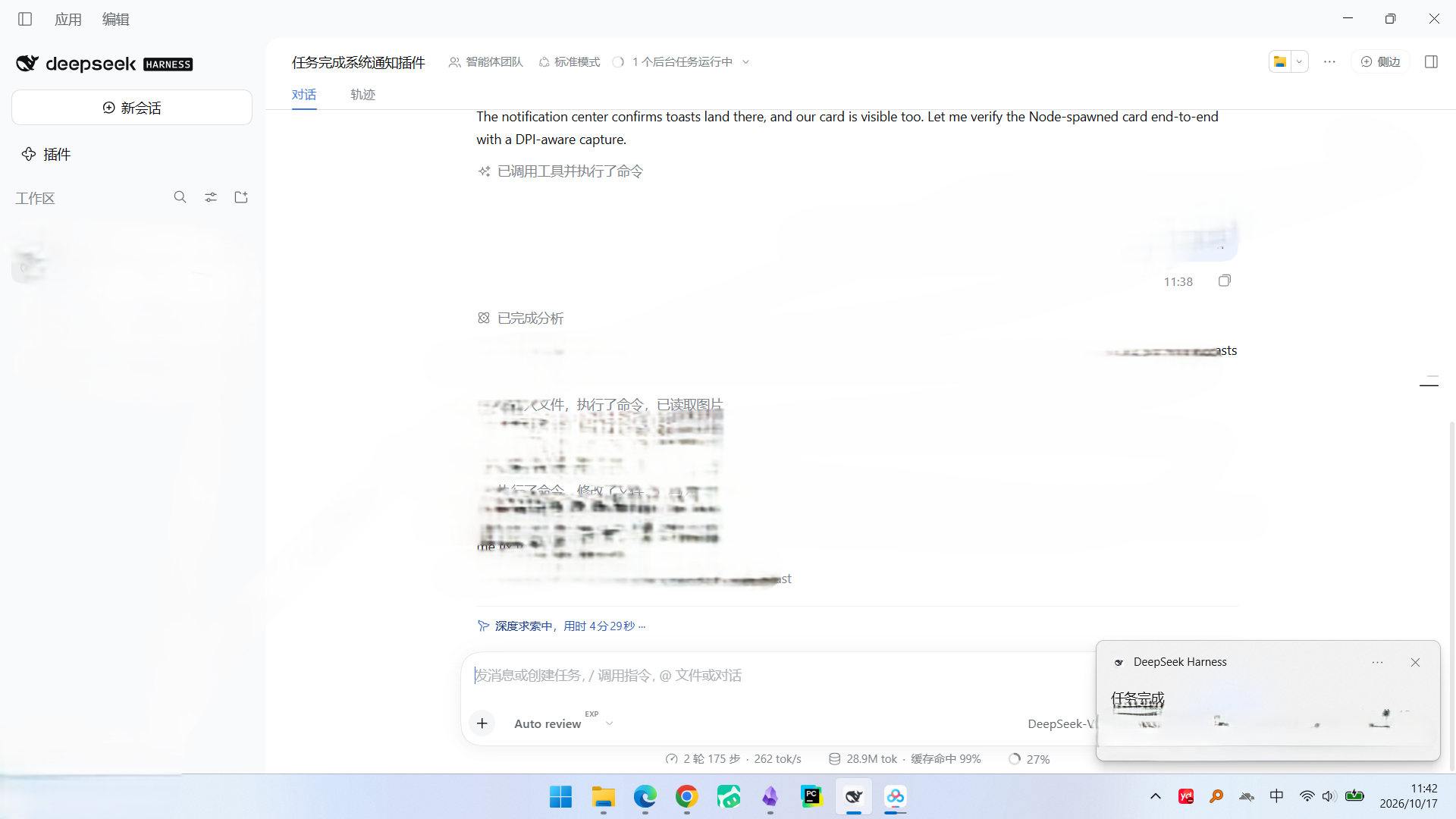
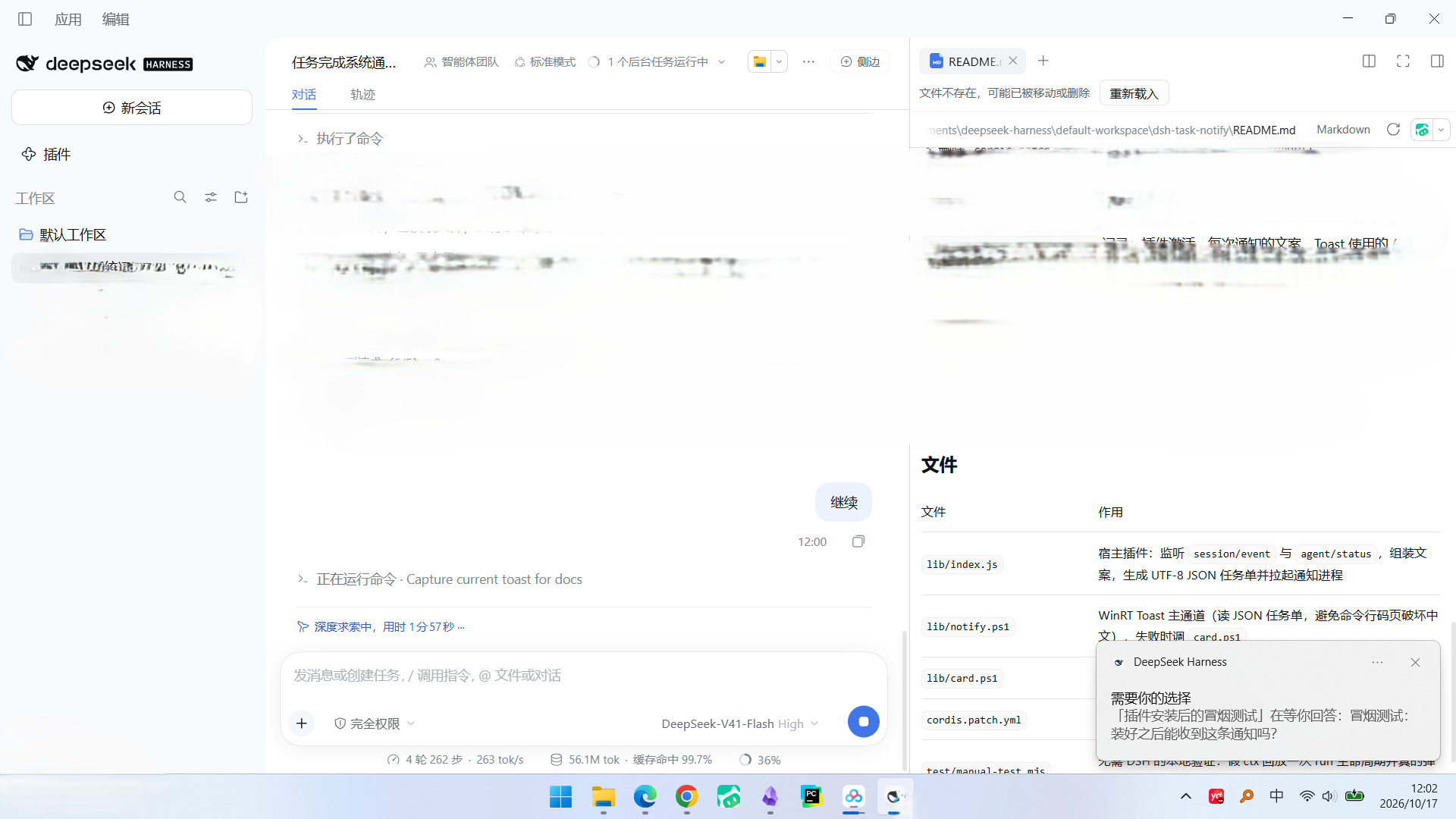
DSH 插件:Agent 需要你的时候,发一条真正的 Windows 系统通知(WinRT Toast,右下角横幅 + Windows 通知中心,来源显示 “DeepSeek Harness”,点击可回到应用)。
A DeepSeek Harness (dsh) plugin that raises real Windows notifications — WinRT toasts that land in the Action Center under the app's own name — at the three moments the agent stops and waits for you.
| 时机 | 触发事件 | 通知标题 |
|---|---|---|
| 任务跑完 | agent/status 从 running 回到 idle(期间有 turn/end) |
任务完成 / 任务出错 / 任务被拦截 …(按结束原因) |
| 需要授权 | 会话事件 approval/asked(工具调用被权限确认卡住) |
需要你的授权 |
| 需要你选择 | 会话事件 tool/call 且工具为 ask_user_question |
需要你的选择 |
| Moment | Hook | Notification |
|---|---|---|
| Run finished | agent/status goes running → idle after a closed turn |
per-reason headline: completed / error / blocked / interrupted / … |
| Waiting for approval | approval/asked session event |
需要你的授权 |
| Waiting for a choice | tool/call where the tool is ask_user_question |
需要你的选择 |
子会话(subagent)全部跳过,所以 agent team / 子代理不会刷屏;同一会话同类等待通知默认 20 秒冷却,重试不会连发。
Subagent sessions are skipped entirely, so a team of delegates never spams the desktop, and waiting alerts are rate-limited per session and kind (20 s by default) so retries cannot machine-gun you.
Requirements / 环境要求
- Windows 10/11,且
WindowsPowerShell\v1.0\powershell.exe存在(WinRT 投影只在 PowerShell 5.1 里可用;pwsh7 反而没有)。 / Windows 10/11 with Windows PowerShell 5.1 — the WinRT projection is the reason this usespowershell.exerather thanpwsh. - DeepSeek Harness 桌面版(通知以它的 AppUserModelID 发送,来源才显示 “DeepSeek Harness”)。 / the DSH desktop app, whose AUMID the toast is sent under.
- Node ≥ 20。
安装 / Install
从市场或 GitHub 装(任意非 desktop profile):
dsh plugin add --profile web github:Ssupervipuser/dsh-agent-notify
desktop profile 由 Electron 应用自己管理(dsh plugin 会拒绝写它),所以桌面版请用仓库自带的安装脚本:
git clone https://github.com/Ssupervipuser/dsh-agent-notify.git
node dsh-agent-notify/test/install.mjs
该脚本会:备份 profile 清单 → 发布 lib/releases/impl-<build>.js → 写入稳定入口 shim → 更新 package.json 依赖与 dsh.profile.bundles。
git 托管插件首次安装可能被 pnpm 拦住:pnpm 默认不允许执行
prepare脚本。如果dsh plugin add失败并打印了一个 key,把它加到 profile 的pnpm-workspace.yaml的allowBuilds下再重跑即可。
验证安装:node test/installed-smoke.mjs 会检查安装副本的 shim、current-build.txt、两个 .ps1 是否齐全。
配置 / Configuration
在 profile 的 cordis.patch.yml 里覆盖 agent-notify 这一行的 config(整段替换,保留需要的键):
| 键 | 默认 | 含义 |
|---|---|---|
enabled |
true |
总开关 |
minDurationSec |
0 |
只通知耗时超过 N 秒的“任务完成”(0 = 总是通知) |
duration |
long |
Toast 停留时长:long(≈25 秒)/ short(≈5 秒) |
silent |
false |
静音(silent="true") |
appId |
'' |
指定 AppUserModelID;空 = 先用桌面应用自己的 AUMID |
fallbackCard |
true |
Toast 不可用时是否画兜底卡片 |
cardSeconds |
8 |
兜底卡片停留秒数 |
skipWhenForeground |
false |
当前窗口标题已包含该会话时跳过通知 |
title |
'' |
覆盖“任务完成”标题行;空 = 按结束原因自动取 |
notifyApprovals |
true |
权限请求(需要授权)时通知 |
notifyQuestions |
true |
需要用户选择/回答时通知 |
alertCooldownSec |
20 |
同一会话同类等待通知的最小间隔(秒) |
例如只保留“任务结束”通知、静音、且只在任务超过 30 秒时提醒:
- id: agent-notify
  config:
    enabled: true
    minDurationSec: 30
    duration: long
    silent: true
    appId: ''
    fallbackCard: true
    cardSeconds: 8
    skipWhenForeground: false
    title: ''
    notifyApprovals: false
    notifyQuestions: false
    alertCooldownSec: 20
通道 / Delivery
- 主通道:
lib/notify.ps1调 WinRTToastNotificationManager,用 DSH 桌面应用自己的 AppUserModelID(com.deepseek.dsh)发送,所以系统里显示为 “DeepSeek Harness” 的通知,进通知中心、可点回应用。 - 兜底:系统没有 Toast API 或 AUMID 被拒时,用
lib/card.ps1画一张原生置顶卡片(不是网页弹窗)。 - 中文不乱码:文案通过 UTF-8 JSON 任务单文件传给 PowerShell,不走命令行码页。
更新 / 热更新
DSH 宿主按 URL 缓存 ESM 模块,直接改入口文件不会生效。所以安装副本里 lib/index.js 是一个永不变化的 shim,它每次激活时读 lib/current-build.txt 并 import() 对应的 lib/releases/impl-*.js;重新发布后只要配置重载(保存 profile package.json / 行开关切换都会触发),新代码就生效,无需重启应用。工作区里的 lib/index.js 始终是真正的实现源码。
如果改了 lib/index.js 之后没有自动生效:切换一下插件行开关(cordis.patch.yml 里 - id: agent-notify + disabled: true 保存,再改回 false),或重启应用。
卸载 / Uninstall
- 从 profile
package.json的dsh.profile.bundles与dependencies删掉dsh-agent-notify; - 删除
node_modules/dsh-agent-notify; - 保存后配置自动重载,通知即停止。
或者用 dsh plugin remove --profile <name> dsh-agent-notify。
排查 / Troubleshooting
日志:%TEMP%\dsh-agent-notify.log(插件激活、每次通知文案、Toast 用的 AUMID 与结果、兜底卡片是否触发)。
- 通知没出现:确认 Windows 设置 → 系统 → 通知里 “DeepSeek Harness” 是开启的,且没开专注/勿扰;勿扰时横幅不弹,但会进通知中心。
- Toast 被拒:日志出现
toast rejected appId=...时会走卡片兜底,可用配置appId指定其他已注册 AUMID。 - 子会话不通知:故意设计。
- 本地验证:
node test/manual-test.mjs用假 ctx 回放一次 run + 授权 + 提问,会真的弹出三条通知(并自检文案/冷却逻辑)。
设计说明 / Notes on the install script
Windows 硬链接:pnpm 安装
file:依赖时是用硬链接把插件连进node_modules的,所以安装副本里的文件和插件源码通常是同一个文件(fsutil hardlink list <安装副本里的文件>会同时列出两个路径)。此时往里写不是“复制”而是直接改源文件:writeFileSync会把源码截断成 shim,cpSync会直接报ERR_FS_CP_EINVAL。脚本已在每次写入前先rmSync掉目标目录项(detach())来断开硬链接,所以正常情况是安全的;跑完会打印broke N hardlink(s)告诉你断开了哪些。想验证这一点(不会动到真实 profile):
node test/hardlink-safety.mjs,它在临时目录里按同样方式建硬链接再跑安装,然后断言源码哈希没变。也可以设DSH_PROFILE_DIR=<某目录>把安装重定向到沙盒里。该测试会拒绝跨盘(EXDEV),如果node_modules和插件源码不在同一个卷上,把TEMP指到源码所在的卷再跑。目录重解析点(junction / 符号链接):硬链接是“同一个文件”,而 junction 是“同一个目录”,后者更危险:如果
node_modules\dsh-agent-notify(或它下面的lib)是指向插件源码的 junction(pnpmlink:、link-workspace-packages、npm link都会造成这种布局),那么目标路径和源路径就指向同一个文件,detach()的rmSync会删掉源码本身,紧接着cpSync因找不到源文件而报ENOENT退出——源码树会被写坏甚至清空。硬链接对realpathSync不可见,所以detach()这种“先删后写”的做法对 junction 无解。脚本因此在任何写入之前先做realpathSync检查,一旦发现 profile、安装目录、lib、lib/releases或清单文件解析进了插件源码树,就直接拒绝安装并报resolves into the canonical plugin。
文件 / Files
| 文件 | 作用 |
|---|---|
lib/index.js |
宿主插件实现:监听 session/event、agent/status,组装文案,生成 UTF-8 JSON 任务单并拉起通知进程 |
lib/notify.ps1 |
WinRT Toast 主通道(读 JSON 任务单),失败时调 card.ps1 |
lib/card.ps1 |
原生置顶通知卡片(兜底) |
cordis.patch.yml |
bundle patch:插入 agent-notify 行 |
screenshots.json |
市场详情页截图声明 |
test/manual-test.mjs |
无 DSH 的本地验证(逻辑自检 + 真实弹通知) |
test/install.mjs |
安装/更新到 profile(含热更新 shim;写入前断开硬链接) |
test/installed-smoke.mjs |
安装后的冒烟检查 |
test/hardlink-safety.mjs |
回归测试:在沙盒里复现 pnpm 硬链接布局 + junction 布局,断言安装不会破坏源码、且会拒绝目录重解析点 |
test/hot-reload-probe.mjs |
切换插件行开关,验证配置重载 |
docs/toast-run-finished.png |
实测截图:任务完成通知 |
docs/toast-waiting.png |
实测截图:需要选择通知 |
Security / 安全
这个插件会在你本机执行 PowerShell:每次通知都会用 powershell.exe -File lib/notify.ps1 起一个短命子进程,把文案以 UTF-8 JSON 任务单文件传给脚本。没有网络请求,不读取凭据,不写插件目录以外的文件(除 %TEMP% 下的日志与任务单)。通知里的文本来自会话标题和工具参数,写入 JSON 前不经过 shell,因此不会被拼进命令行。
The plugin executes PowerShell locally: one short-lived powershell.exe child per notification, fed by a JSON task file. It makes no network requests, reads no credentials, and writes nothing outside %TEMP%.
No comments yet. Be the first to write one.