dsh-video-skin
DSH 视频皮肤:一段短片循环铺成整个界面的聊天背景(无声、透明度界面里就能调), 另一段做有声的开机动画(片尾交叉溶解进界面、点击画面随时跳过)。零依赖。
安装(Install)
设置 → 插件 → 添加插件,把下面这一行贴进输入框,点「安装」,然后完全退出并重新打开 DSH:
github:Something11235/dsh-video-skin#main
桌面版(Electron)的索引注入表是宿主启动时收集一次的快照,所以装完必须完全重启 DSH 才会生效(刷新页面不够)。卸载:
dsh plugin --profile <你的 profile> remove dsh-video-skin, 或者用仓库里的scripts/uninstall.ps1。
装好之后:右下角会出现一个半透明小圆钮,点开就是透明度滑块(调完刷新还在,不用重启); 启动时会先播放开机动画,点一下画面就跳过。
English: install github:Something11235/dsh-video-skin#main from Settings → Plugins → Add plugin,
then fully quit and relaunch DSH. A small pill appears in the bottom-right corner for the
transparency sliders; click anywhere during the boot animation to skip it.
A video skin for DSH: one clip becomes a looping, silent video backdrop behind the whole Web UI, and a second clip becomes a boot animation — played with sound, played through to its end, then fading into the app, and skippable with a click.
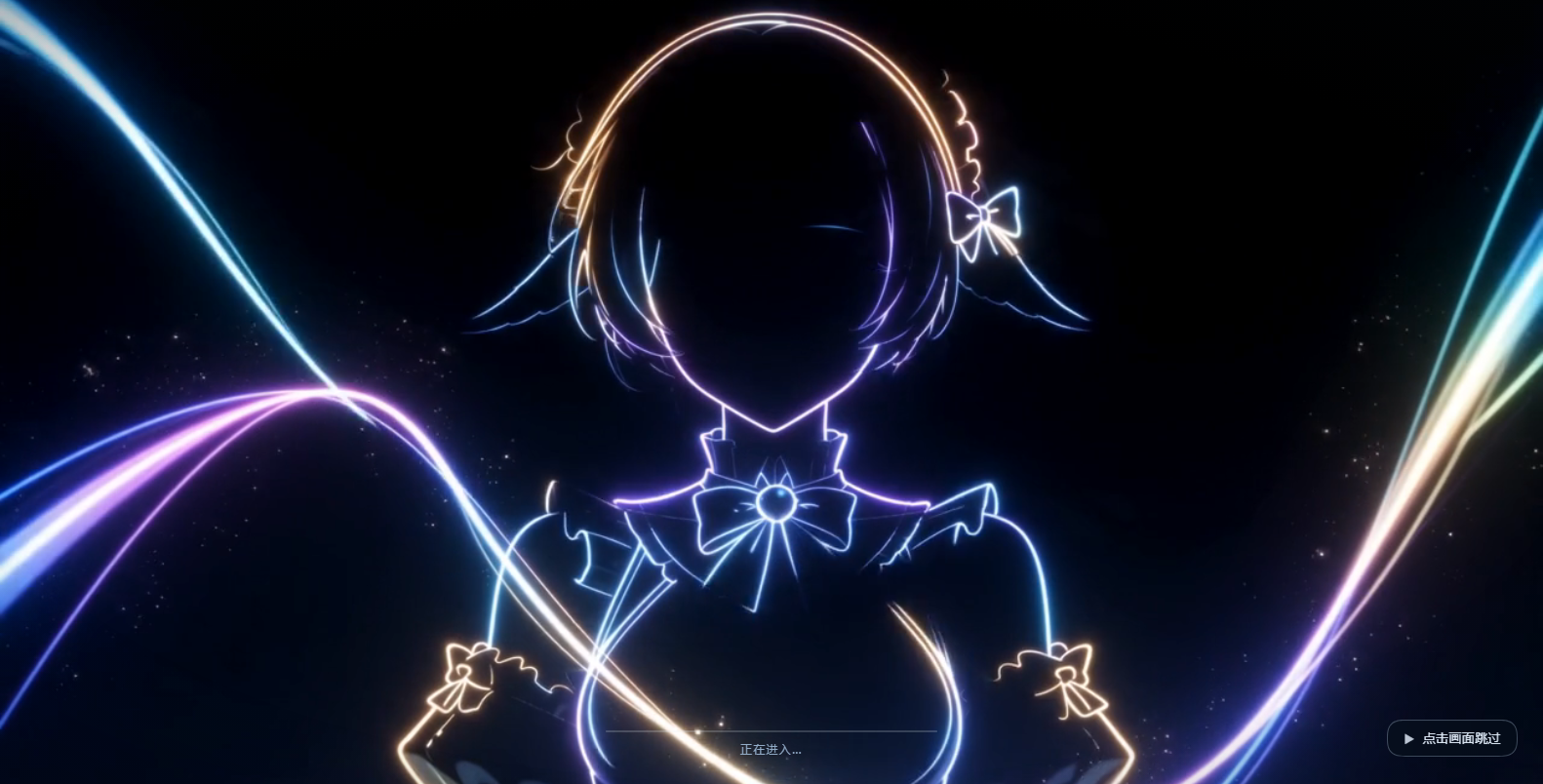
- Boot animation: full-window clip with audio, a progress bar driven by the kernel's real activation
progress, and a permanent “click to skip” pill. The clip finishes first (
ended), then the overlay fades out over a fixedfadeMs; the volume fades with it instead of being cut off.Earlier builds cross-dissolved over the clip's tail and used the actual remaining time as the fade duration — when the app became ready late that left only 100–200 ms, which read as a hard cut. Default is now
exitMode: 'end';exitMode: 'tail'restores the crossfade (still with a fixed fade). - Backdrop: silent, looping,
object-fit: cover, with the app's surface tokens made translucent — the picture is clearly visible and the text stays readable. - A transparency slider in the UI (bottom-right pill): two sliders, three presets, and a live body-text contrast readout; changes apply on refresh with no DSH restart.
- Zero dependencies. The host half imports only
node:builtins; the browser half is one inline script. Nothing in the built artifact has animport— which is also why a plaingithub:install works with no build step and nopreparescript.
中文完整说明(安装、调参、控件用法、机制约束、排错、自检)见 README.zh.md。
Screenshots (captured on this machine by scripts/verify-browser.mjs)
 |
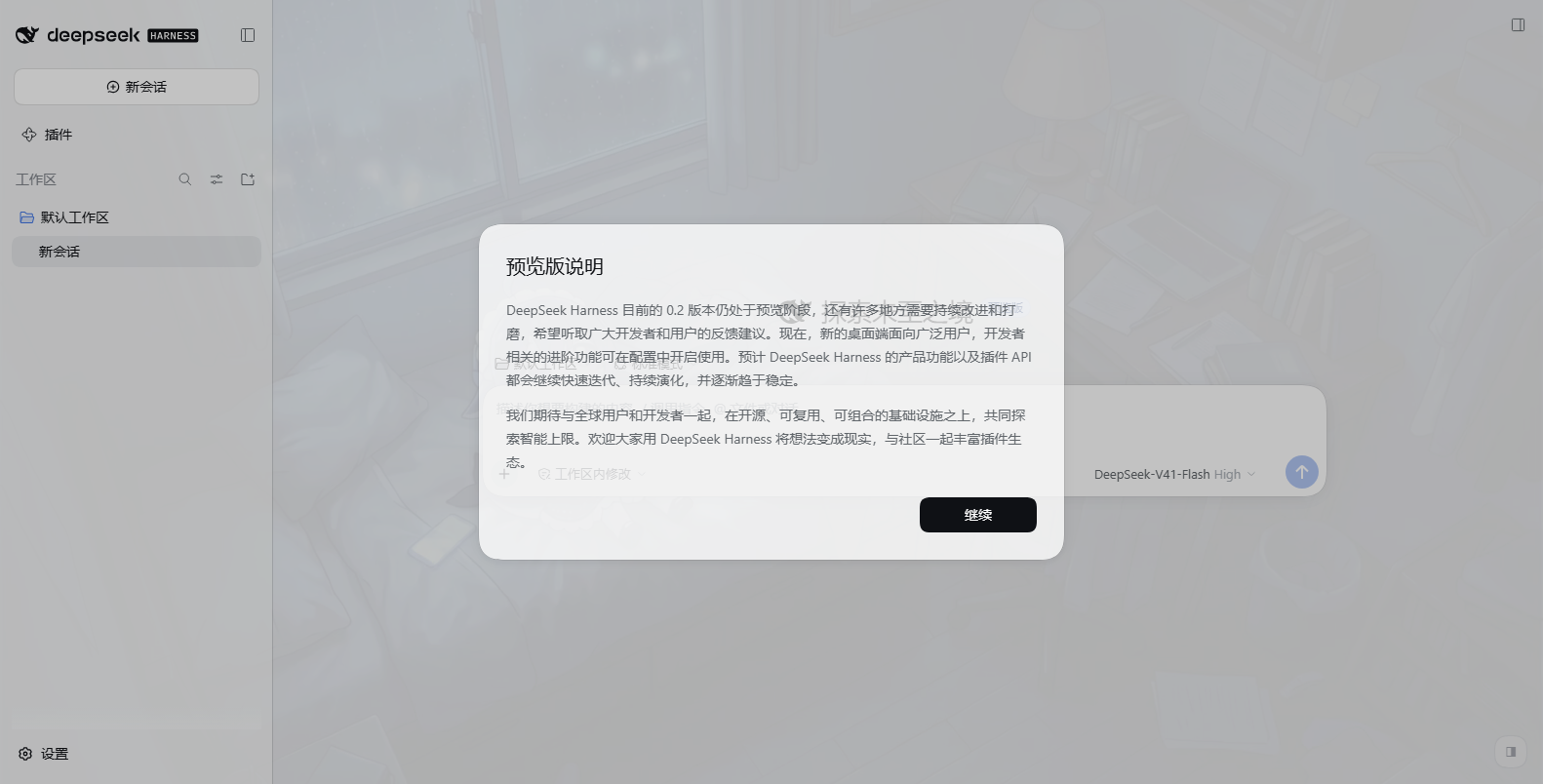 |
| Boot animation: clip fills the window (with sound), real boot progress bar, permanent "click to skip" pill | Light theme: backdrop fills the window, body-text contrast p5 = 7.90 |
 |
|
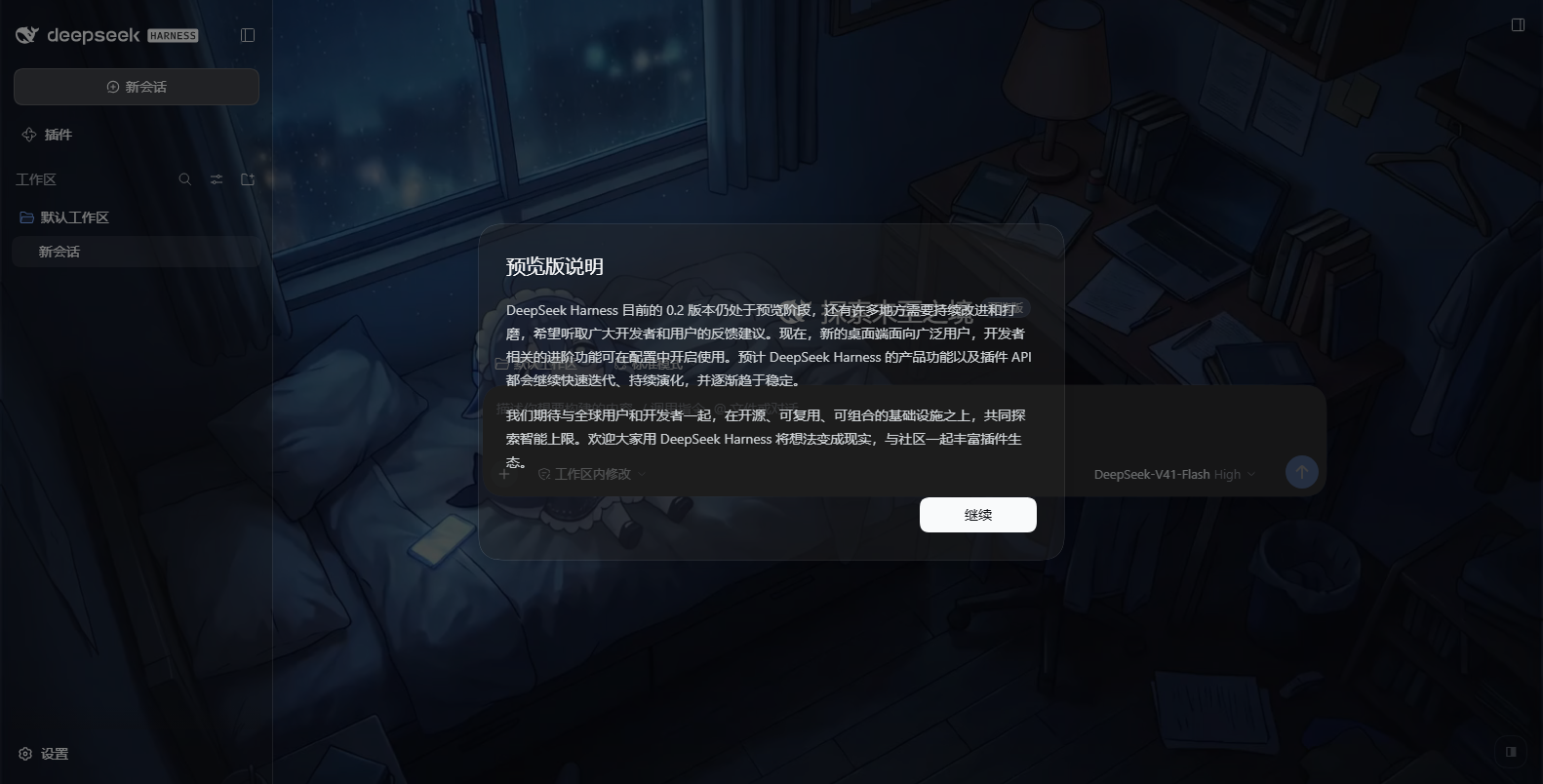
| Dark theme: video clearly visible, body-text contrast p5 = 6.86, median 16.06 (AA needs 4.5) |
Sound
The desktop shell sets no webPreferences.autoplayPolicy, so Electron's default
(no-user-gesture-required) applies: an unmuted play() succeeds and the boot animation starts with
sound. A plain browser (dsh web in Chrome) blocks unmuted autoplay by default; the runtime then
falls back to muted playback (never trapping you on a dead screen) and shows a separate sound
button in the bottom-left — clicking it turns sound on without skipping, so the two intents never
collide. Set boot.sound: false for a silent boot.
Transparency
surface (dark theme) and surfaceLight (light theme) are the two knobs that trade picture strength
against readability; veil / veilLight are the scrims over the video. They are deliberately different
per theme: text is light in dark mode and dark in light mode, and this asset is dark (YAVG ≈ 0.25), so
an equally thin white surface drops dark text below 3:1. Measured in a real browser:
surface |
surfaceLight |
dark min / p5 / median | light min / p5 / median |
|---|---|---|---|
| 0.2 | 0.6 | 2.49 / 6.81 / 16.05 | 7.74 / 7.91 / 8.72 |
| 0.2 | 0.4 | 2.52 / 6.85 / 16.06 | 4.34 / 4.52 / 5.37 |
| 0.05 | 0.6 | 1.53 / 4.89 / 15.24 | 7.38 / 7.56 / 8.37 |
| 0 | 0.55 | 1.22 / 4.14 / 14.71 | 5.87 / 6.06 / 6.90 |
p5 (the 95% of frame area) is the meaningful readability number; --sweep prints this table live.
Tuning it in the UI
A small half-transparent pill sits in the bottom-right corner. Clicking it opens a panel with two sliders (panel opacity / video scrim), three presets, a live body-text contrast readout measured from the current video frame, and a reset button.
- Dragging applies immediately; releasing writes to
$DSH_HOME/dsh-video-skin.jsonthrough aPOST/DELETE /dsh-video-skin/overrideroute. Only those four knobs are written; everything else in the file is preserved. A refresh picks the values up (no DSH restart), and the file stays hand-editable. - A file rather than
localStorage: the desktop page is served from thedsh-app://scheme, where Web Storage availability is not guaranteed. - If the write fails (read-only home), the panel says so — it does not pretend to have saved.
Escor a click outside closes the panel;Alt+Btoggles it;background.controls: falseremoves it.- The pill sits at
z-index: 900, below the kernel'sModaloverlay (1000) on purpose: a modal should cover everything, and a wallpaper control must not steal its clicks.
Install
powershell -ExecutionPolicy Bypass -File scripts\install.ps1     # writes profile package.json + bundles
powershell -ExecutionPolicy Bypass -File scripts\uninstall.ps1   # removes both again
A full restart of DSH is required. The desktop (Electron) shell serves a static index.html and
collects the index-injection table once at host startup, with no refresh path; tapIndex never
applies there. So a newly installed plugin's injection rows only reach the page on the next launch.
Configure
Defaults work as shipped. To tune, write either file (the second wins):
<plugin>/video-skin.config.json%USERPROFILE%\.dsh\dsh-video-skin.json
Changes apply on page refresh. On the desktop shell the boot-animation fields are baked into the startup snapshot, so those need a restart.
{
  "boot":       { "enabled": true, "fadeMs": 1000, "exitMode": "end", "skipFadeMs": 320, "holdMs": 18000, "hint": "点击画面跳过" },
  "background": { "enabled": true, "veil": 0.32, "surface": 0.5, "delayMs": 1200, "playbackRate": 1 }
}
veil (scrim over the video) and surface (opacity of the app's --dsw-alias-* surfaces) are the two
knobs that trade picture strength against text readability.
How it is wired
Host half
  ├─ ctx.on('webserver/index-inject', table => table.push(styleRow, scriptRow))  ← first thing in apply()
  └─ ctx.inject(['webServer'], …) → /dsh-video-skin/{boot.mp4,background.mp4,config.json}
                                    with Range / ETag / 206 / 416 / HEAD
Three constraints that must not be broken (each one was paid for):
- Never
kind:'script-src'. The desktop interpreterawaits external script rows and a rejection kills__DSH_BOOT_READY__, i.e. the whole app fails to start. An inlinekind:'script'row cannot fail. - Register the injection listener synchronously in
apply(). An object-levelinjectdelaysapplypast the host's one-shot collection, and the row then never lands. - Keep the overlay on
document.body, never inside#root. The kernel hydrates#root's existing boot DOM (:scope > [data-dsh-boot]); inserting a node there breaks hydration.
The backdrop is a position: fixed; z-index: -1 first child of body, so nothing in the app needs a
z-index and no pointer interaction is blocked.
Verify
node scripts/check-syntax.mjs
node --test "tests/**/*.test.mjs"
node scripts/verify-all.mjs
tests/runtime.test.mjs runs the injected script inside a stub DOM with a virtual clock and asserts the
real timing properties (the clip plays to ended before the fade; the fade span is always the configured
fadeMs, never the remaining time; a click uses
skipFadeMs; unmuted is tried first and muted is the fallback; the sound button toggles sound
without skipping; the volume fades to 0 with the picture; unknown duration / no first frame / media
error (retried once) / a never-ready kernel each have an upper bound that never truncates the clip).
tests/host.test.mjs drives the real apply()
against a real HTTP server for the Range, ETag, 304, 416 and cache-header contracts.
Two more suites need a live target:
# 75 assertions (Electron-equivalent autoplay) / 65 (plain browser) in a real headless Chromium over CDP:
#   --autoplay allow (Electron-equivalent): unmuted playback, no sound button,
#                                          webkitAudioDecodedByteCount > 0 (the audio track really decodes)
#   --autoplay block (plain browser)      : muted fallback, sound button visible, a real mouse click on it
#                                          does NOT skip and does unmute
# Plus: overlay covers the viewport, a click at the viewport centre really skips, the fade removes the
# node, the backdrop layer is body's first child at z-index:-1, the --dsw-alias-* tokens really
# *resolve* to translucent colours, the backdrop video really decodes, and the app really mounted.
# It also samples the video frame into a canvas and reports measured WCAG contrast for body text
# (this machine: dark p5 6.86 / median 16.06, light p5 7.90 / median 8.70). --sweep prints the full table.
node scripts/make-verify-profile.mjs
node scripts/verify-browser.mjs --url "http://127.0.0.1:19388/?token=..." --shot-dir docs
node scripts/verify-browser.mjs --url "http://127.0.0.1:19388/?token=..." --autoplay block --port 9445

# Composition rehearsal with the kernel's own loadProfileDirectory, which is the first thing that
# can throw on the boot path. Needed because `dsh --profile desktop --dump-config` is refused.
$env:ELECTRON_RUN_AS_NODE='1'
& 'D:\AI\Agent\DSH官方\DeepSeek Harness.exe' scripts\rehearse-profile.mjs desktop
License
MIT — see LICENSE.
No comments yet. Be the first to write one.