DSH Theme
English | 简体中文

Theme palettes, a full DIY color editor, fonts, and interface text size for the DeepSeek Harness Web GUI — switchable from a palette icon at the bottom-left of the sidebar.
Dark and light are first class: every preset and every DIY color carries a value for both modes, so it keeps working when the native appearance switches between light, dark, and system.
Screenshots
| Chinese UI | English UI |
|---|---|
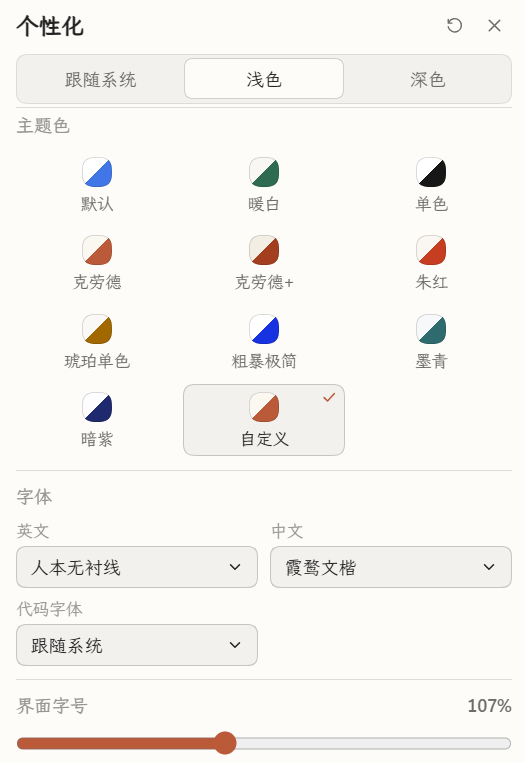 |
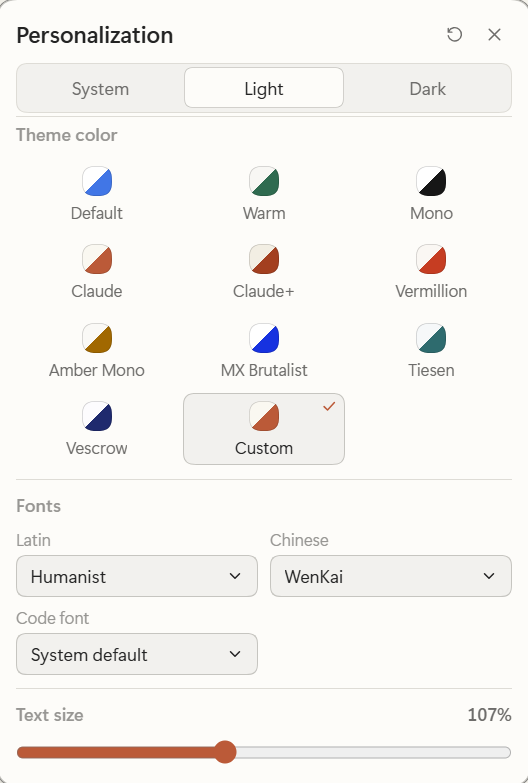 |
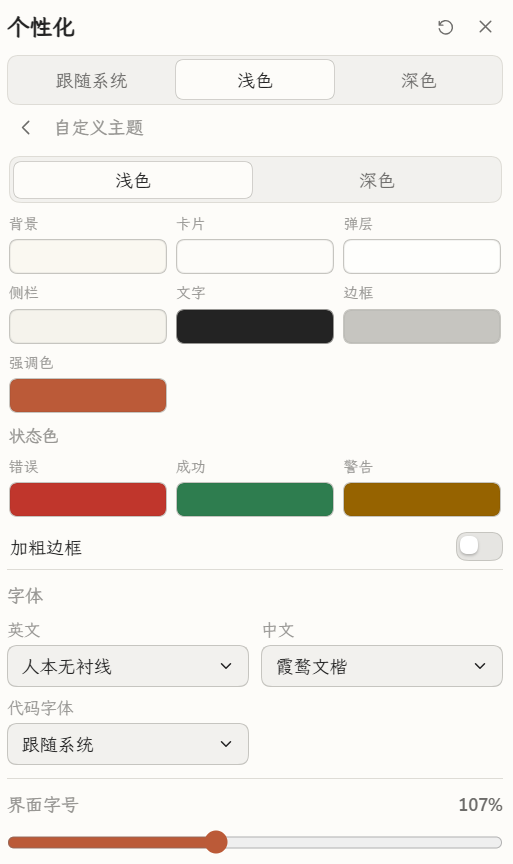 |
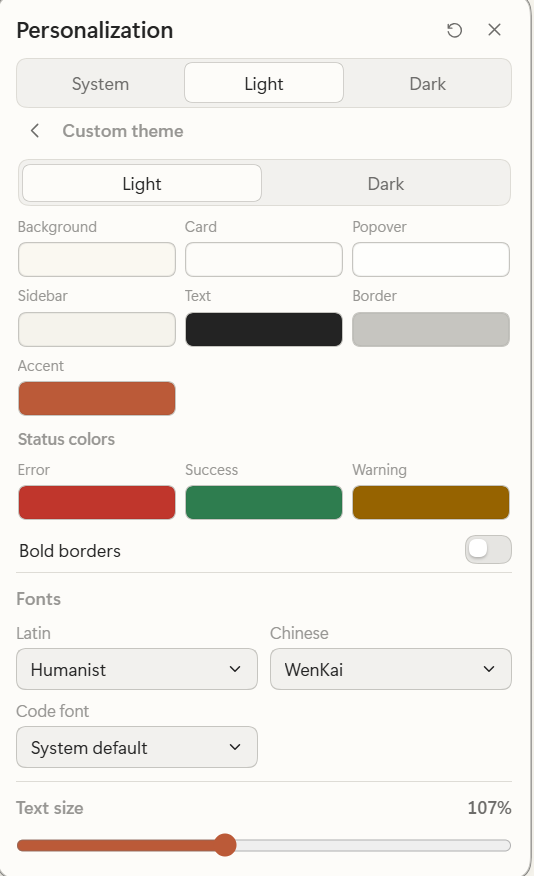 |
Entry point: the palette icon at the bottom-left of the sidebar — the action row of icons directly above the Settings button. Click it to open the panel; the same options are also available under Settings → 个性化 / Personalization.
The interface copy follows the app language (Simplified Chinese / English).
Features
- Bottom-left trigger — a palette icon in the sidebar foot (row above Settings). One click opens a compact popover anchored bottom-left.
- Settings page — the same content is also a dedicated 个性化 / Personalization page in Settings.
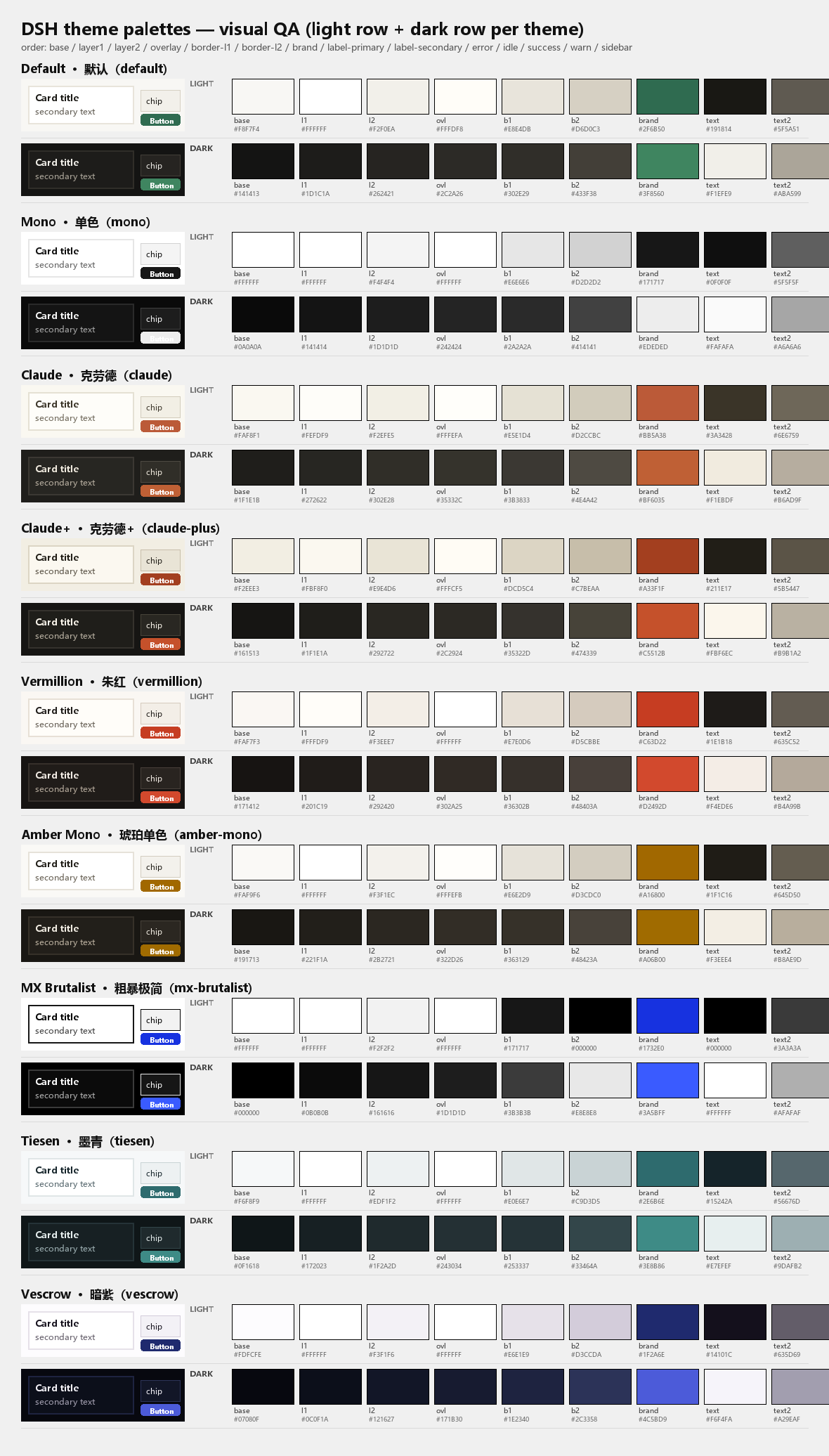
- 10 presets — Default (stock harness), Warm, Mono, Claude, Claude+, Vermillion, Amber Mono, MX Brutalist, Tiesen, Vescrow, plus a Custom card.
- DIY theme editor — per light/dark mode: background, card, popover, sidebar, text, border, and that mode's accent color; shared error/success/warning colors; and a Bold borders switch (1 px borders everywhere + ink-strength border tokens). Unpinned slots derive from the background/text automatically.
- Fonts — independent Latin and Chinese stacks plus a code font, applied to interface, conversation, and code text.
- Text size — 10–22 px through the native theme service, so it survives
reloads and shares the Ctrl/Cmd
+/-shortcuts. - Bilingual UI — follows the app language (Simplified Chinese / English).
- Restart-safe persistence — choices are stored in DSH's Host settings
document, so they survive app restarts and profile changes of the localhost
port. No
localStoragesurprises.
Palette reference
All ten presets, with their light and dark token swatches:
Install
Discover — recommended
No npm account and no manual profile wiring:
Open Plugins → Discover.
Add this index source:
https://cdn.jsdelivr.net/gh/SolvasHQ/dsh-theme@v1.4.0/market/index.json
The index is version-pinned so it is available immediately. Replace the tag with
@main for the moving branch — jsDelivr may cache it for up to 12 hours.
- Find DSH Theme, open its page, and press Install.
Discover installs the pinned Git commit of the release, so nothing has to be
published to npm. A prebuilt dsh-theme.tgz is also attached to the latest
GitHub Release. jsDelivr may cache the @main branch for up to 12 hours; purge
https://purge.jsdelivr.net/gh/SolvasHQ/dsh-theme@main/market/index.json to pick
up a new release immediately.
From source (development)
This is a local DSH bundle. It is installed by linking the cloned directory into a DSH profile and adding it to that profile's bundle list. Node.js 20+ and pnpm are required.
Clone the repository somewhere stable:
git clone https://github.com/SolvasHQ/dsh-theme.git
cd dsh-theme
Install the plugin's runtime dependencies inside the plugin directory. DSH loads profile plugins with symlink-preserving resolution, so the schema library and its transitive packages must live in the plugin's own
node_modules:pnpm install --prodRegister the bundle in your DSH profile. The recommended way is to ask your DSH agent to install the bundle from this directory (Plugin Manager's bundle installation with the absolute path). Manual wiring is also possible — in
<profile>/package.json:{ "dsh": { "profile": { "bundles": ["@deepseek-ai/dsh-base", "@deepseek-ai/dsh-web-app", "@solvashq/dsh-theme"] } }, "dependencies": { "@solvashq/dsh-theme": "link:/absolute/path/to/dsh-theme" } }then run
pnpm installinside the profile directory and restart DSH.Open the Web GUI: the palette icon appears at the bottom-left of the sidebar, and Settings → 个性化 / Personalization shows the same page.
After that, client-side changes to client.js are hot-swapped by DSH's client
HMR transport within about a second; Host-side changes need a DSH restart.
How it works
- Theme layer — the client half registers a single
ctx.theme.overrideTokens('@solvashq/dsh-theme', tokens)layer. Every token is a{ light, dark }pair, so the layer composes over whichever built-in palette is active and survives OS scheme flips without touching the theme registry. - Token generation — 14 anchor colors per palette/mode are expanded into the
~97
--dsw-alias-*/--dsw-specific-*semantic tokens (surfaces, borders, labels, buttons, states, markdown/code, diff views, scrollbars, toasts, sidebar) with contrast guards. - DIY palettes — derived at runtime from the picked backgrounds, borders, text colors, and per-mode accents, so a background change keeps a mode coherent until the user pins a specific slot.
- Fonts —
--dsh-font-family-text/--dsh-font-family-coderide in the same token layer. The Latin and Chinese stacks are composed together; the unselected side falls back to the harness's built-in stack. - Text size — uses the theme service's own persisted
setFontSize('text', px). - Persistence — the host half declares one
.volatile()string field on the plugin entry; the client reads/writes it throughctx.configForms. DSH persists that value in the active profile's patch, keyed by the authenticated browser identity. Light/dark preference and text size stay with the native theme settings.
Development
# rebuild client.js after editing src/client.template.js or research/palettes.json
node build/build-client.mjs
node --check client.js

# static checks (manifest, locales, icon, generated artifact)
node tools/check-manifest.mjs

# token/contrast verification for every palette and DIY cases
node tools/verify-tokens.mjs

# functional smoke test of the panel components (render → click → assertions, zh + en)
node tools/check-panel.mjs
The browser module loader cannot import local files, so
build/build-client.mjs inlines research/palettes.json into client.js.
client.js is a committed build artifact; CI rebuilds it and fails if the
committed file is stale.
Project layout
client.js                 built browser module (committed artifact)
index.js                  host half: volatile settings field
cordis.patch.yml          bundle patch inserting the plugin row
locale/                   plugin metadata for en / zh
src/client.template.js    client source template
build/build-client.mjs    build script (palettes → client.js)
market/index.json         Discover market index (format 1)
docs/screenshots/         README screenshots (Chinese and English UI)
research/                 palette anchors, design notes, palette sheet
tools/                    manifest, market, token, and panel checks
Compatibility
Tested against DeepSeek Harness desktop 0.2.1-rc.2 (Web GUI). The plugin uses
the documented client seams (slots, theme, locale, configForms) and
host-side volatile config; it does not patch the harness or read other plugins'
DOM.
License
MIT — see LICENSE.
No comments yet. Be the first to write one.