dsh-sidebar-rail





Reach workspaces, recent sessions, scheduled tasks, plugins and your account while the DeepSeek Harness sidebar is collapsed on macOS Desktop.
The rail starts hidden. Collapse the host sidebar, then move the pointer into the 12px strip along the window's left edge to reveal a 56px icon rail. Hover an icon to browse its flyout and choose an entry to navigate. Expanding the sidebar keeps the host's search, workspace tree, account menu and settings.
Screenshots
These cropped screenshots show the real macOS Desktop client in Chinese, with a dark appearance and the Catppuccin skin. Workspace names and session titles are blurred. Recent count is set to 9 in the images; its default remains 5.
| Workspaces, pins and recent sessions | My plugins |
|---|---|
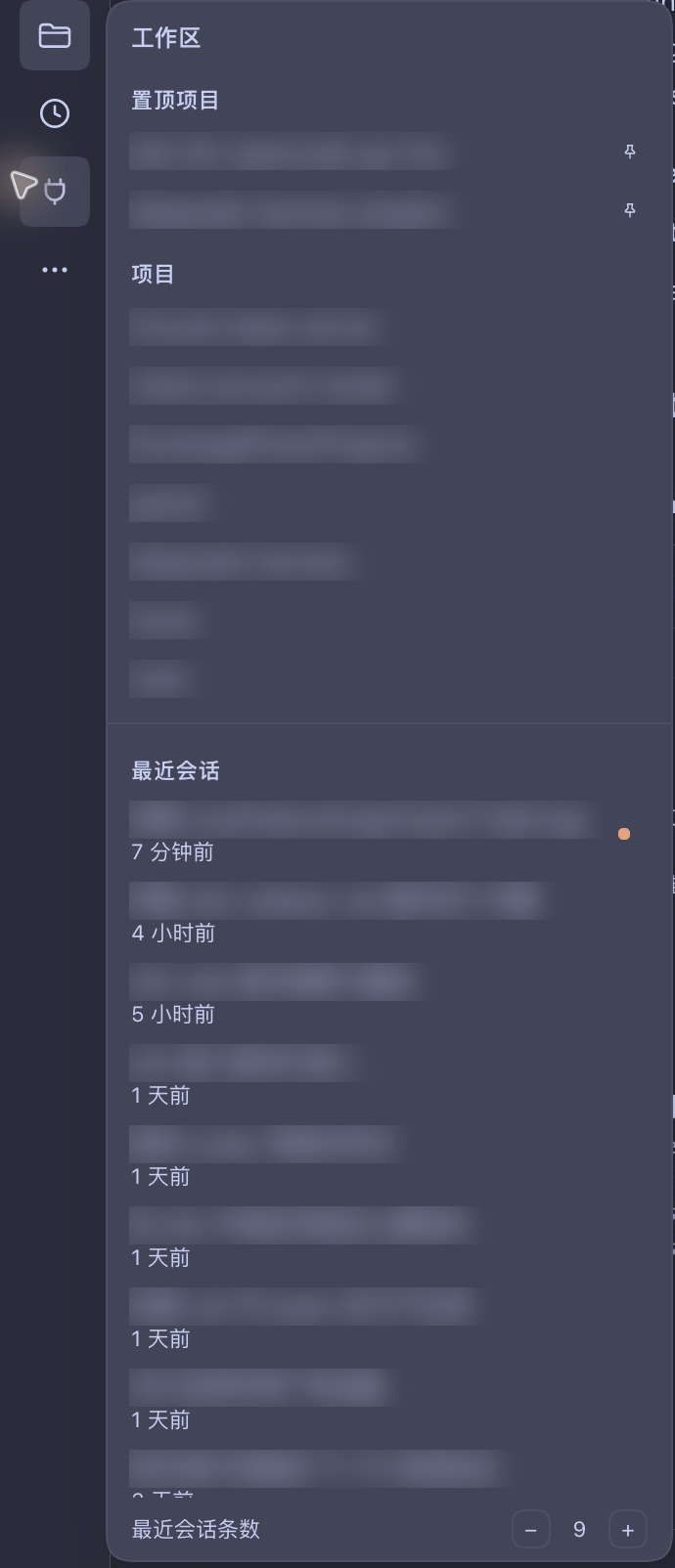 |
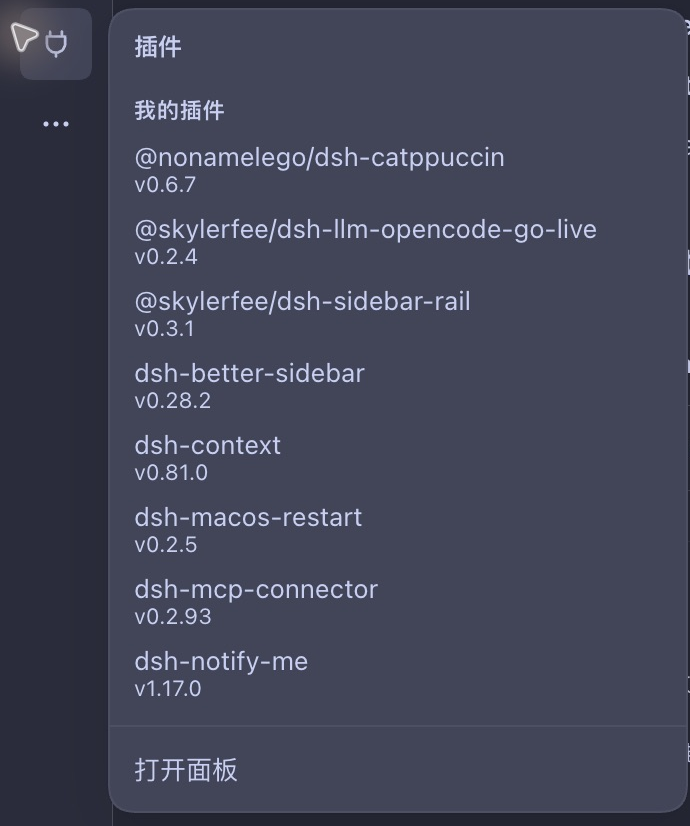 |
Navigation
Screenshots · Install and manage · Usage · Preferences and local data · Troubleshooting · Development and contributions · Documentation
Support
| Environment / state | Behaviour |
|---|---|
| macOS Desktop, sidebar collapsed, viewport width ≥ 768px | Hidden rail, revealed by the edge strip or keyboard focus |
| macOS Desktop, sidebar collapsed, viewport width < 768px | No rail; the host button still expands the sidebar |
| macOS Desktop, sidebar expanded | No rail; the host sidebar remains available |
| Web, any platform | No rail; the host keeps its existing collapsed rail |
| Windows / Linux Desktop | No rail; support is untested |
Recorded Desktop checks used macOS Desktop 0.2.2-rc.1. See peerDependencies in package.json for other compatible host versions. Some new settings and balance displays still have unverified paths; see the verification log. Source development and checks require Node.js ≥ 22.19.0, with no dependency installation or build step.
Install and manage
Requires the DSH Desktop or Web client and a profile. Installation only affects that profile; it never modifies DSH itself.
Option 1: Plugins page (recommended)
Open the Plugins page from the DSH sidebar, choose Add plugin in the top right, enter the package name in the field and press Install:
@skylerfee/dsh-sidebar-rail
That field accepts an npm package name, a Git repository address or a local directory; this plugin needs only the npm name. Restart or reload DSH when prompted, then confirm Sidebar rail is enabled.
Option 2: Command line
dsh plugin --profile desktop add @skylerfee/dsh-sidebar-rail
dsh plugin forwards its arguments to pnpm inside the profile directory. Replace desktop with the profile you actually use; a first run initializes it. You can also run pnpm add directly in the profile directory. Restart DSH afterwards.
Option 3: Ask the assistant
A profile with plugin management enabled can install it for you (this is a tool request, not a terminal command):
{
  "action": "install_bundle",
  "target": "@skylerfee/dsh-sidebar-rail"
}
For local development, replace target with this repository's absolute path — that installs a link: dependency, so code changes appear after a restart.
Disable and uninstall
Enabling is a profile configuration switch and belongs to the Plugins page; the command line only installs and removes packages.
| Operation | How |
|---|---|
| Disable | Turn off the Sidebar rail switch on the Plugins page (the dependency stays installed, so re-enabling is instant) |
| Enable again | Turn the same switch on |
| Uninstall | Choose Uninstall on the detail page, or run dsh plugin --profile desktop remove @skylerfee/dsh-sidebar-rail |
The assistant can also call plugin_manager with set_bundle (enable/disable) or remove_bundle (uninstall). Local preferences in localStorage (pinned projects, recent count) survive disabling or uninstalling.
Usage
- Collapse the sidebar with the host button. Move the pointer to the window's left edge, below the window controls, to reveal the rail.
- Hover an icon for about 120ms to open its flyout. Leaving closes the flyout after about 200ms. Moving between rail icons switches the flyout without retracting the rail.
- Choose an entry to navigate and retract the rail. Expand the host sidebar for native search, settings or workspace management.
| Entry | Available actions |
|---|---|
| Workspaces | Browse pinned projects and projects by name; choose a name to switch workspace or use the pin button to pin or unpin it |
| Recent sessions | Scroll independently at the foot of the workspace flyout, newest first, excluding archived, blank and subagent sessions; open an existing session and see its relative time and host-provided status mark |
| Scheduled tasks | Browse tasks that have not ended or paused; choose a row or Open panel to enter the task panel |
| My plugins | Browse bundles you installed and enabled, excluding host bundles; choose a row to enter the plugin manager |
| More | Open other host panels or expand the native sidebar |
| Account and settings | See the host avatar and available balances, bonuses, View usage and Top up links; signed-out accounts get a hint; the flyout also names the path to the host Settings panel (expand the sidebar, then Settings at its foot); sign-in, sign-out and payment remain in the host or destination page |
Keyboard: Tab to an icon reveals the rail. On a top-row function icon, press ↓ or → to enter its flyout, then Tab through the list. Escape inside the flyout closes it and returns focus to its trigger. Enter activates the focused button like a click; activating an icon navigates directly rather than entering its flyout list.
Preferences and local data
Recent count defaults to 5, with a range of 1–20. Adjust it with the stepper at the foot of the workspace flyout or on the plugin detail page.
The workspace flyout keeps a fixed height (about 70% of the viewport): projects on top, recent sessions below, roughly equal panes with their own fixed header rows. Changing the count only changes whether the recent list scrolls, never the panel height.

Preferences belong to this client and use localStorage['dsh.sidebar-rail.v1']:
| Field | Purpose |
|---|---|
pinnedWorkspaceIds |
Pinned workspace IDs, most recently pinned first |
recentCount |
Number of recent rows, normalised to an integer from 1 to 20; unparseable values use the default |
The host owns the collapse state; the plugin only reads it. Account and balance data come from host services and are not written to these preferences. Clearing client storage loses local settings. Both settings surfaces share this preference; see the verification log for real Desktop checks of immediate synchronisation between them.
Troubleshooting and limitations
| Symptom | Check or recovery |
|---|---|
| No rail after installation | Confirm macOS Desktop, the enabled plugin, a collapsed sidebar and viewport width ≥ 768px; the rail starts hidden and needs the left-edge strip |
| A recent session is missing | Check Recent count; archived, blank and subagent sessions are excluded |
| Task or plugin loading fails | Missing services, structured failures and requests exceeding 5s enter the failure state; use Open panel for the host page, or close and reopen the flyout to retry |
| No avatar or balance | A missing avatar uses a fallback glyph; unavailable balances get a hint. Account data are read on component mount and are not guaranteed to refresh live; use the host account page for full details |
| A revealed rail covers the page's left edge | It is a temporary overlay that reserves no host grid space; the hidden default preserves the conversation tab entry, and moving the pointer away lets the rail retract |
| Sidebar rail unavailable or a boot import error | Keep the visible error and host diagnostics, disable the plugin through the native sidebar, and report the host version, plugin version and reproduction steps in this repository; omit credentials and conversation content |
The plugin keeps the expanded host sidebar and its column width. The top 48px remain clear for macOS window controls; reduced-motion preferences are respected. For light themes, other platforms, real remote failures, plugin-detail settings interactions and the primary balance row on a funded account, rely on the actual results and unverified items in the verification log.
Development and contributions
npm test               # Pure logic and client factory registration tests
npm run check          # Repository rules, syntax checks for both entries, and tests
npm run hooks:install  # Optional: enable this repository's commit hooks
The client is a hand-written static module with no dependency installation or build step. Tests extract pure functions from the #region sections of client.js; the registration test requires the factory ID to match the full scoped package name. These checks do not replace real Desktop validation.
Use Conventional Commits for PR titles, with the summary, description and verification results in Simplified Chinese. Keep code identifiers and original diagnostics in English. Follow the PR template for the problem, changes, validation and unverified items; update both README languages when behaviour changes. UI, loading or registration changes require real environment and operation results in docs/verify.md. See AGENTS.md and CODING_STANDARDS.md for the full rules.
Follow ADR-0003 to release: update and push the version, then create a GitHub Release tagged v<version>. publish.yml validates it and uses npm OIDC trusted publishing; the npm Trusted Publisher must allow direct publishing.
Documentation
| Document | Content |
|---|---|
| Product requirements | Use cases, interactions and acceptance criteria |
| Design | Additive registration, layout, data sources, cleanup and local storage |
| Verification log | Recorded results, historical defects and unverified paths |
| 0.2.0 audit report | Findings and reproduction evidence from that version; later verification entries track fixes |
| Glossary | Shared terms for the rail, sidebar, flyout and current session |
| Architecture decisions | Narrow-window eligibility, zero dependencies and release workflow |
License
MIT © 2026 SkylerFee. See LICENSE.
No comments yet. Be the first to write one.