READMESource: master@60bfb34d
dsh-session-plugin-manager
会话级三方插件/工具管理插件 for DeepSeek Harness (dsh)。
在对话页新增一个 「会话插件」 tab,按会话(session)管理本机安装的三方插件与全局工具: 禁用某个三方插件的模型工具,或禁用任意全局工具——配置按会话持久化,模型下一轮立即生效。
English · 安装 · 使用 · 工作原理 · 开发与发布
功能
- 对话页新增 tab:会话视图环(
conversation.view槽)追加「会话插件」tab。 - 三方插件清单:自动扫描
$DSH_HOME/profiles/*/package.json的dsh.profile.bundles, 列出非@deepseek-ai/*的第三方插件(含版本号、是否有客户端面、可屏蔽的工具数)。 - 会话级工具禁用:勾选任意全局工具,保存后通过 agent 作用域的
tools.restrict({ deny })精确屏蔽, 只影响当前会话,agent 销毁自动清理。 - 插件级工具屏蔽:插件开关会屏蔽该插件注册的模型工具(见宿主端
PLUGIN_TOOL_MAP,内置dsh-updater-local → dsh_docs_search / dsh_docs_read)。 - 筛选与批量操作:插件区支持「仅显示有工具的插件」,工具区支持按名称/描述过滤与「仅显示已禁用」; 两区都有全选 / 反选。
- 持久化:配置存于
$DSH_HOME/plugin-data/session-plugin-manager.json,重启不丢; 新 agent 创建时自动套用,运行中保存即时重应用。
安装
# 从 npm 安装(推荐)
dsh plugin --profile web add dsh-session-plugin-manager

# 或从 GitHub 安装
dsh plugin --profile web add github:SiriusWJ/dsh-session-plugin-manager
本地开发安装(link 方式):
# 在仓库根目录
dsh plugin --profile web add .
安装后重启 dsh web,刷新页面,对话区顶部会出现 「会话插件」 tab。
使用
打开任一会话 → 点击对话区顶部的 「会话插件」 tab:
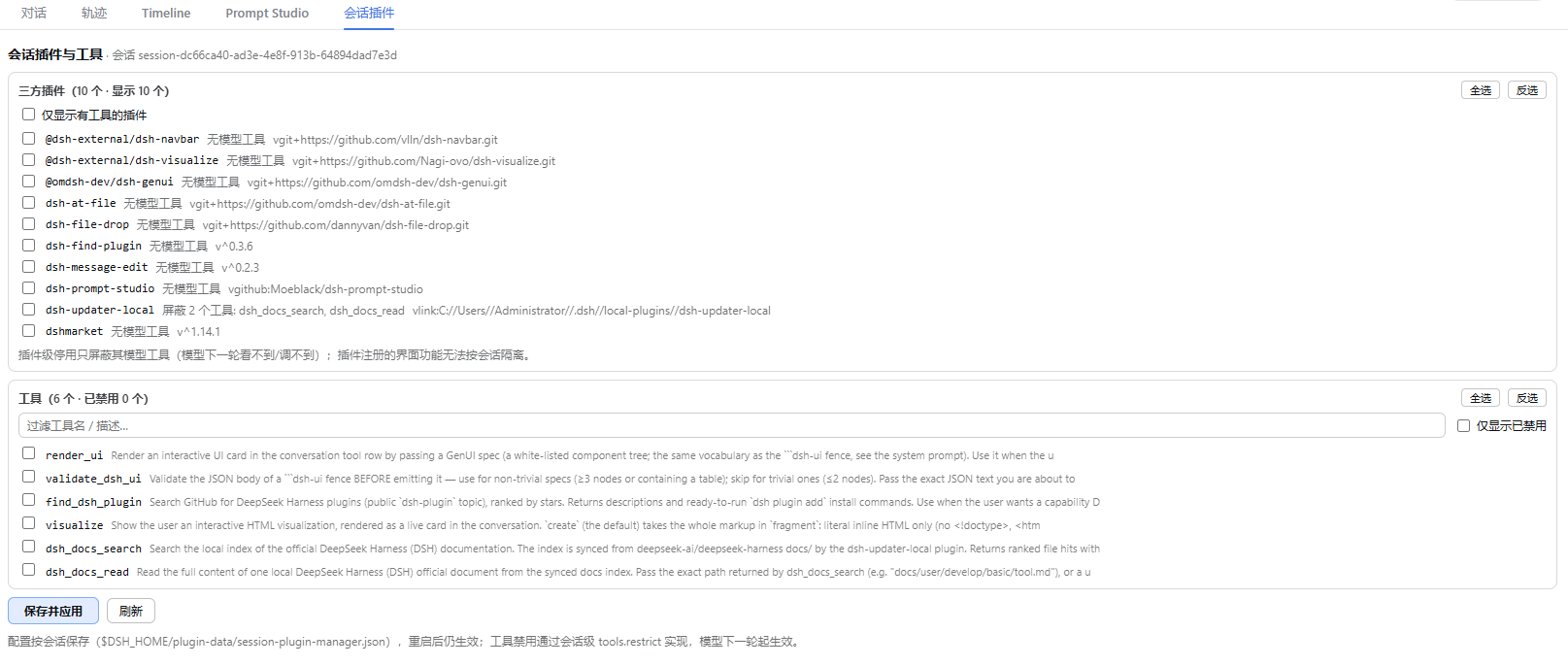
- 三方插件区:勾选插件 → 会话内屏蔽其模型工具;勾选「仅显示有工具的插件」可隐藏纯界面插件。
- 工具区:勾选任意全局工具 → 会话内禁用;支持搜索过滤与「仅显示已禁用」。
- 点击 保存并应用:配置持久化,并对当前会话 agent 即时生效(模型下一轮看不到/调不到被禁用的工具)。
插件级停用只屏蔽其模型工具;插件注册的界面功能(设置页卡片、侧边栏等)是全局的,无法按会话隔离。
工作原理
- 宿主端(
lib/index.js):HTTP 路由GET /dsh-session-plugin-manager/state?session=<id>(清单 + 当前配置)、POST /dsh-session-plugin-manager/set?session=<id>(同源保护,提交后即时重应用)。 监听agent/created,对每个新 agent 用agent.ctx.tools.restrict({ deny })应用其会话配置。 - 客户端(
client/client.js):注册conversation.view槽(id: session-plugins), 渲染插件/工具开关 UI,通过同源 HTTP 与宿主通信。 - 配置存储:
$DSH_HOME/plugin-data/session-plugin-manager.json。
开发与发布
pnpm install          # 无运行时依赖,仅用于本地 lint/发布
git tag v0.1.0        # 打 tag 触发 GitHub Actions 自动发布到 npm(需配置 NPM_TOKEN secret)
npm publish           # 或手动发布(需 npm 登录)
仓库结构:
├── lib/index.js          # 宿主端插件(纯 ESM,无构建)
├── client/client.js      # 客户端 bundle(window.__ModuleLoader__)
├── cordis.patch.yml      # bundle 补丁层
└── package.json          # dsh.bundle + dsh.client 清单
License
English
dsh-session-plugin-manager adds a "Session Plugins" tab to the conversation view of DeepSeek Harness, letting you manage third-party plugins and global tools per session:
- List third-party plugins (non-
@deepseek-ai/*bundles fromdsh.profile.bundles) and all global tools. - Disable any global tool per session via agent-scoped
tools.restrict({ deny })— effective from the model's next turn, auto-cleaned on agent disposal. - Disable a plugin's model tools (static
PLUGIN_TOOL_MAP; built-in mapping fordsh-updater-local). - Filters (
only show plugins with tools, tool name/description search,only disabled) plus select-all / invert. - Persisted at
$DSH_HOME/plugin-data/session-plugin-manager.json; applied onagent/createdand re-applied live on save.
Install:
dsh plugin --profile web add dsh-session-plugin-manager   # npm
# or
dsh plugin --profile web add github:SiriusWJ/dsh-session-plugin-manager
Restart dsh web after install, then open the "Session Plugins" tab in any conversation.
No comments yet. Be the first to write one.