dsh-approval-hotkeys


Approval-panel hotkeys for DeepSeek Harness, for every approval source — not just edits.
English | 中文
A deliberately minimal plugin with one generic rule: Enter always presses the confirm button (the primary, right-most action); Esc always presses the cancel button — on every button-bearing interaction panel the harness renders.
| Panel | Enter → confirm | Esc → cancel |
|---|---|---|
Approval ([data-approval-key]) |
Allow once | Reject |
Question / choice ([data-question-key]) |
Submit / Next | Discard the group |
Plan review ([data-plan-review-key]) |
Approve | Decline (or discuss) |
The panel anchors are harness-generic, so the hotkeys work on every interaction the GUI shows — edit approvals, permission escalations, tool questions, plan reviews. This is the Claude Code habit: confirm with Enter, refuse with Esc.
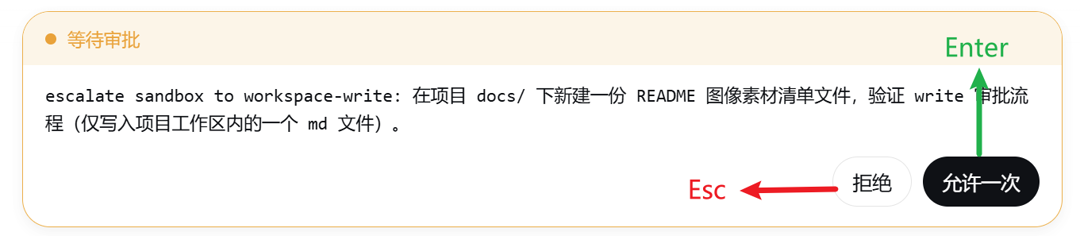
Approval panel
Every approval — edits, permission escalations, anything routed through the ApprovalPanel. Enter presses Allow once, Esc presses Reject.
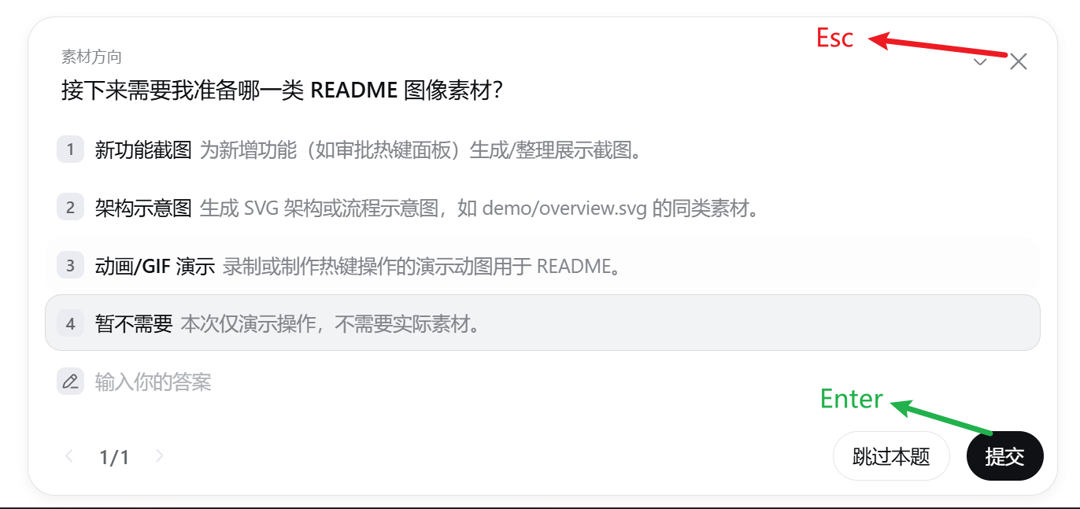
Question / choice panel
Tool questions (ask_user_question). Enter presses Submit / Next,
Esc presses Discard the group.
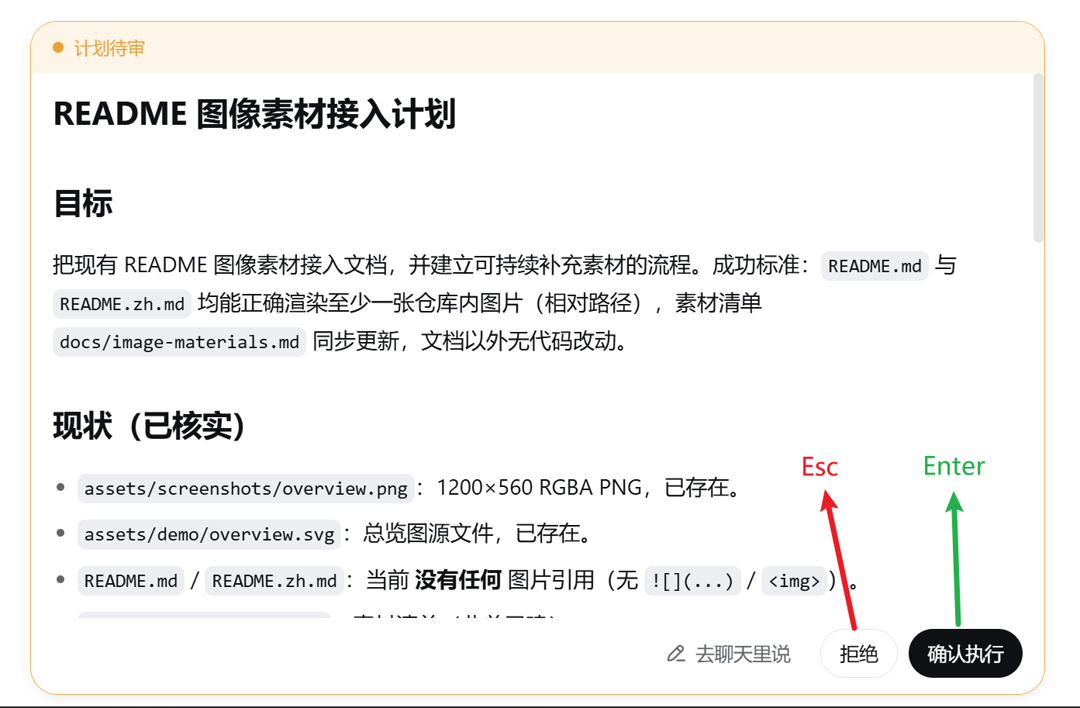
Plan review panel
Enter presses Approve, Esc presses Decline (or Discuss when the panel has no decline action).
Install
dsh plugin --profile web add dsh-approval-hotkeys
Restart dsh web — or, since this plugin is pure browser-side, just refresh the page when the host side did not change. No configuration, no settings page.
Supported harness versions: the whole 0.1 line from 0.1.0-rc.6 on, prereleases included — declared as an optional peer on @deepseek-ai/dsh-client-modules with the range ^0.1.0-rc.6 || ^0.1.1-0 || ^0.1.2-0 || ^0.1.3-0 || ^0.1.5-0 (see docs/release.md for why the || union is required).
For contributors: install from a local checkout or a pinned commit — dsh plugin --profile web add /path/to/dsh-approval-hotkeys or dsh plugin --profile web add github:SiriLee/dsh-approval-hotkeys#<sha>. A git install fails on first run until you add an allowBuilds key to the profile's pnpm-workspace.yaml (pnpm blocks git dependencies from running build scripts); after that it runs the plugin's prepare and installs it.
How it works
- Enter → confirm: clicks the panel's primary button — the last button
of its action row ("Allow once", "Submit/Next", "Approve"). The harness's
Buttoncomponent has no stabledata-variantattribute (variants are CSS-Modules hash classes), so the plugin anchors on the layout contract that the confirm action always renders last — which is exactly the primary-colored button. - Esc → cancel: clicks the panel's cancel button — Reject (first), Discard (header), Decline (footer second-last, or Discuss when the panel has no decline action). Without a panel, Esc is left alone (no pause/stop binding — the GUI's own stop button and shortcuts own that).
Guards (what the plugin deliberately does NOT do)
- Never while typing: keydown inside an input / textarea / select /
contentEditable (the composer owns
Enter/Escthere — e.g.Shift+Enternewline,Escdismisses suggestions). - Enter with focus on a button: left to the browser (it activates the focused button natively) and to the panel itself (the question composer's options submit on Enter) — acting again would double-fire.
- Never on chords or repeats:
Ctrl/Meta/Alt+keycombinations and held-key repeats are left alone. - Esc with no panel: left alone — the plugin never stops or pauses the agent; panels are the only surface it acts on.
Button resolution contract (data-hotkey="none")
Enter/Esc resolve their buttons by position (first / last / header-last /
footer-last), not by a stable semantic attribute — the harness's Button
component exposes no reliable data-role/data-variant, so position is the
only stable signal available to a client plugin that does not own the panel
DOM. That makes button order the single coupling point to the harness layout.
To keep that coupling safe when other plugins inject buttons into a panel
(utility toggles, decorative controls), this plugin skips any button marked
data-hotkey="none" when resolving the confirm/cancel action. Any plugin that
adds a non-action button into an interaction panel should mark it:
<button data-hotkey="none">Collapse diff</button>
This is a cooperative, opt-out contract, not a hard guarantee. It reliably covers "a plugin inserts an extra non-action button ahead of the action row" (such as dsh-edit-approval's diff collapse toggle). It does not cover:
- a plugin that injects a button without the marker (contract ignored), or
- a plugin that reorders / inserts a genuinely actionable button among the real confirm/cancel buttons (the semantics changed, not just a decoration added), or
- a change to the harness's own panel layout.
Those cases need a stable semantic anchor in the harness panel DOM (e.g.
data-role="confirm" / data-role="cancel") — a harness-repo change, not a
client-plugin fix. File an issue / PR against deepseek-harness if it bites.
Design notes
- Pure browser (client) plugin: the host half is a no-op stub. All behavior
is a single
documentkeydownlistener registered inside onectx.effect, torn down on unload/HMR. - Relies on the stable ApprovalPanel DOM contract: reject renders first,
allow-once last, both
disabledafter an answer — so a double-answer is impossible and the button-order dependency is the only harness coupling. - The panel lookup prefers the current session's pending approval key and falls back to the first panel in DOM order.
Development
npm install
npm run typecheck   # tsc --noEmit (host + client)
npm test            # vitest (jsdom unit tests for the dispatch logic)
npm run build       # esbuild: lib/index.js + lib/client.js + .d.ts
node scripts/verify-host.mjs
Release
The first publish is manual (npm publish --access public), then the
GitHub Actions Trusted Publishing workflow takes over — push a v<semver>
tag and CI publishes with provenance. Full steps: docs/release.md.
Security
Pure browser-side plugin: the host half is an empty stub, and all behavior is a document-level keydown listener that clicks existing panel buttons. No network requests, no file access, no credentials.
No comments yet. Be the first to write one.