dsh-share-import


Import a public chat share link into DeepSeek Harness (DSH) as a real, resumable session inside a workspace you pick. Supported sources:
- DeepSeek —
https://chat.deepseek.com/share/<id> - Doubao (豆包) —
https://www.doubao.com/thread/<id>(also withoutwww)
The imported conversation is history only: no message is sent, nothing is generated, no turn is left open. Open the session and it is already a finished conversation — your next prompt simply continues from that history.
Features
- Zero credentials. DeepSeek is read through its public share endpoint
(
https://chat.deepseek.com/api/v0/share/content?share_id=…). Doubao is read through its public JSON snapshot endpoints (regular ids viaPOST /alice/message/share/get, mobilex…ids viaPOST /im/message/share/get), falling back to the server-rendered share page. No login, no token, no headless browser. - Pick the target workspace. The panel lists the workspaces of your DSH instance and writes the session into the one you choose.
- Static import. Writes a v4 session event log directly:
session/title → turn/start → step/start → user/message → assistant/message → step/end → turn/end → session/end-seed. Nothing is scheduled. - Duplicate guard. Re-importing the same share is blocked by default (
ALREADY_IMPORTED), with an explicit "import as a new session anyway" path in the panel. - Bilingual UI. English and Chinese strings follow the DSH UI language.
- Optional sidebar entry. A switch in Settings keeps the nav entry visible or hidden; the state lives in
localStorageof the current browser. - Honest limits. Doubao shares import text only; images and videos have no textual body and become a
single placeholder line. A share that the page itself declares lazy-loaded is reported as
SHARE_LAZYinstead of importing a truncated conversation.
Screenshot
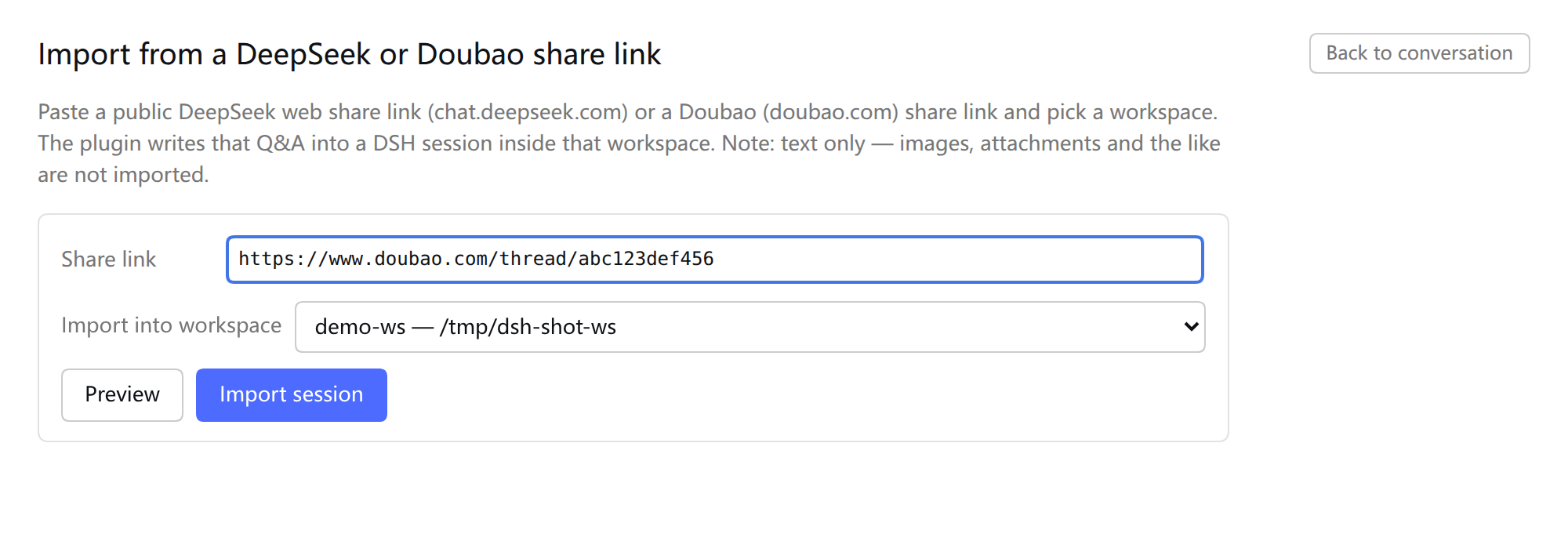
The import panel, opened from the sidebar entry or from Settings → Share import:
Requirements
- DSH 0.2.1-rc.2 (the version this plugin is written and tested against) with the
webprofile. - Node.js ≥ 20 on the machine that runs
dsh web. - A public share link that is readable without logging in. Private/expired shares cannot be imported.
The host half uses DSH services that are not a stable public API; a DSH upgrade may require an update here.
Install
From GitHub (recommended)
dsh plugin --profile web add github:Sillykjs/dsh-share-import
dsh plugin forwards its arguments to pnpm add inside the profile, so any pnpm-accepted specifier works:
# pinned tag / commit
dsh plugin --profile web add github:Sillykjs/dsh-share-import#v0.2.0
# plain git URL
dsh plugin --profile web add git+https://github.com/Sillykjs/dsh-share-import.git
From npm (once published):
dsh plugin --profile web add dsh-share-import
From a local checkout
git clone https://github.com/Sillykjs/dsh-share-import.git
cd dsh-share-import
dsh plugin --profile web add link:"$PWD"
dsh plugin add also appends dsh-share-import to the profile's dsh.profile.bundles; the insert in
cordis.patch.yml mounts the plugin. Then:
- Client half — just refresh the page (the browser bundle is re-served; the host picks the new bundle up within ~500 ms).
- Host half — restart the process that runs
dsh web. DSH 0.2.1-rc.2 has no in-process code reload for host plugin modules, so editinglib/*.jsand refreshing does nothing until the restart.
Usage
- Sidebar → Share import (third entry in the global nav, download icon). The same form is reachable from Settings → Share import (account menu → Settings).
- The switch Show the entry in the sidebar nav decides whether the sidebar entry appears (on by
default; Settings stays reachable either way). The value is stored in
localStorageunderdsh-share-import:show-nav. - Paste a share link and pick a workspace.
- Preview shows the title, number of rounds and the first/last question; then Import session.
- The panel shows the new session id; the sidebar refreshes itself and the title becomes the first question of the conversation. Back to chat returns to the current session.
A second import of the same share is blocked by default; the panel replaces the button with "Import as a new session anyway" when you really want a duplicate.
What gets imported
| Item | Behaviour |
|---|---|
| Content | Question/answer prose only. Reasoning traces, web-search results, opened pages and citation markers are dropped. |
| DeepSeek shares | Public JSON share endpoint → message fragments (REQUEST / RESPONSE). |
| Doubao shares | Public JSON snapshot first (regular ids /alice/message/share/get, x… mobile ids /im/message/share/get), then the share page's SSR data-fn-args payload (share_info + message_snapshot). Only text blocks (block_type 10000) become messages; images (2074) and rich media/video (10050) have no text, so a message that is only media becomes one placeholder line ((这条消息在豆包网页端只有图片或视频,没有文字)). If the page declares lazy loading and the snapshot has no messages, the import fails with SHARE_LAZY instead of writing a partial session. |
| Trailing question without an answer | Dropped, so no turn is left open. |
| Title | First user question, truncated to 80 bytes on a UTF-8 boundary. Doubao shares that start with an assistant message use the share title instead. |
| Generation | Nothing is generated. The imported turn is already complete. |
| Sandbox / plan mode | Not touched. The session uses your current default access mode. |
| Dedup journal | $DSH_HOME/share-import/index.json, keyed by source:id (deepseek:<id> / doubao:<id>), value {sessionId,title,importedAt}. |
| Session file | $DSH_HOME/sessions/<workspace>/<sessionId>/session.v4.jsonl.zstd, written by sessionPersistence and read back for verification. |
Error codes
SHARE_LINK_INVALID · SHARE_NOT_FOUND · SHARE_FETCH_FAILED · SHARE_MALFORMED · SHARE_EMPTY ·
SHARE_LAZY · ALREADY_IMPORTED · WORKSPACE_REQUIRED · WORKSPACE_UNKNOWN · WORKSPACES_UNAVAILABLE ·
PERSISTENCE_UNAVAILABLE · WRITE_FAILED · VERIFY_FAILED · INTERNAL
Privacy and security
- The plugin contacts only the two public share domains (
chat.deepseek.com,www.doubao.com) with plain anonymous GET/POST requests. It never reads cookies, tokens or DSH credentials. - It writes exactly two things: the v4 session under the chosen workspace, and the dedup journal above. No telemetry, no background requests, no analytics.
- The URLs it fetches are built from validated ids only; redirects are refused (
redirect: 'error') and response bodies are size-capped. - Imported content is whatever the share contains — treat it as untrusted text, exactly like a pasted conversation.
How it works
public share link
  → POST /__dsh-share-import/preview   validate → fetch → normalize → importableMessages → completeConversation
  → POST /__dsh-share-import/import    writeVerifiedSession(…, buildStaticSessionEvents) → warm projection cache
                                       → workspace.attachSession(id) (retries) → recordImport
  → client calls sessions.refresh()    sidebar shows the new session
Three POST routes are registered on the DSH web server (/__dsh-share-import/{workspaces,preview,import});
the client bundle calls them through the normal page fetch. Event invariants are asserted by the smoke
test: seq contiguous from 0, time non-decreasing, step/start before the surface events it carries,
surfaceOp only on surface types, the last event is session/end-seed, and no turn is left open.
lib/index.js        host half: routes, dedup, session write, workspace attach, projection warm-up
lib/share.js        link parsing for both sources, GET text / POST JSON transport, dispatch to readers
lib/doubao.js       Doubao readers: JSON snapshot (x… im route, message blocks, second-precision stamps)
                    and the SSR data-fn-args payload
lib/errors.js       ShareError shared by both readers (re-exported by share.js)
lib/events.js       messages → v4 session events (static-import variant)
lib/formats.js      session format detection / header construction      ← ported, see NOTICE.md
lib/persistence.js  write + read-back verification                      ← ported, see NOTICE.md
lib/client.js       client bundle: sidebar nav entry + main panel + settings section
test/smoke.mjs      offline assertions by default; real fetch only with a link
Development
node --check lib/index.js lib/share.js lib/doubao.js lib/errors.js lib/events.js \
  && node --check lib/formats.js lib/persistence.js lib/client.js
node test/smoke.mjs                                  # offline, no network
DSH_SHARE_LINK='https://chat.deepseek.com/share/…' node test/smoke.mjs   # adds a real fetch (Doubao links too)
Isolated instance (does not touch the running web process):
DSH_HOME=/tmp/dsh-si-home dsh plugin --profile web add link:"$PWD"
DSH_HOME=/tmp/dsh-si-home dsh --profile web --host 127.0.0.1 --port 3099 --no-open
The project has no build step and no runtime dependencies: lib/client.js is the browser bundle as-is,
and the host half is plain ESM loaded by Cordis. Keep it that way (see AGENTS.md for the full
maintainer notes).
Troubleshooting
| Symptom | Cause / fix |
|---|---|
| Nav entry or panel missing after install | Refresh the page; confirm the profile installed (dsh plugin --profile web why dsh-share-import). A bare /plugins/dsh-share-import/client.js (no ?rev=) is supposed to 404 — use the ?rev= URL or the Plugins event stream to check the served bundle. |
| Host-half change has no effect | Restart the dsh web process. Refreshing only reloads the client bundle. |
SHARE_LAZY |
The share page declares lazy-loaded messages and the JSON snapshot returned none. Usually a mobile/x… share that the server refuses without a session; not supported. |
SHARE_NOT_FOUND |
Share deleted, expired, made private, or the id is wrong. |
| Session shows "Untitled" in the sidebar | The projection cache was not warmed (older builds). Use a current version; the plugin warms it after import. |
License and credits
MIT — see LICENSE. lib/formats.js and lib/persistence.js are ported from
deepseek-web-import v0.2.1
(Copyright (c) 2026 wpc0323, MIT); see NOTICE.md. Everything else is written for this plugin.
This is an unofficial community plugin. It is not affiliated with DeepSeek or ByteDance.
No comments yet. Be the first to write one.