DSH Git Graph is a VS Code-style Git graph plugin for DeepSeek Harness — commit history, branch actions and inline diffs, inside a session tab.
English | 简体中文
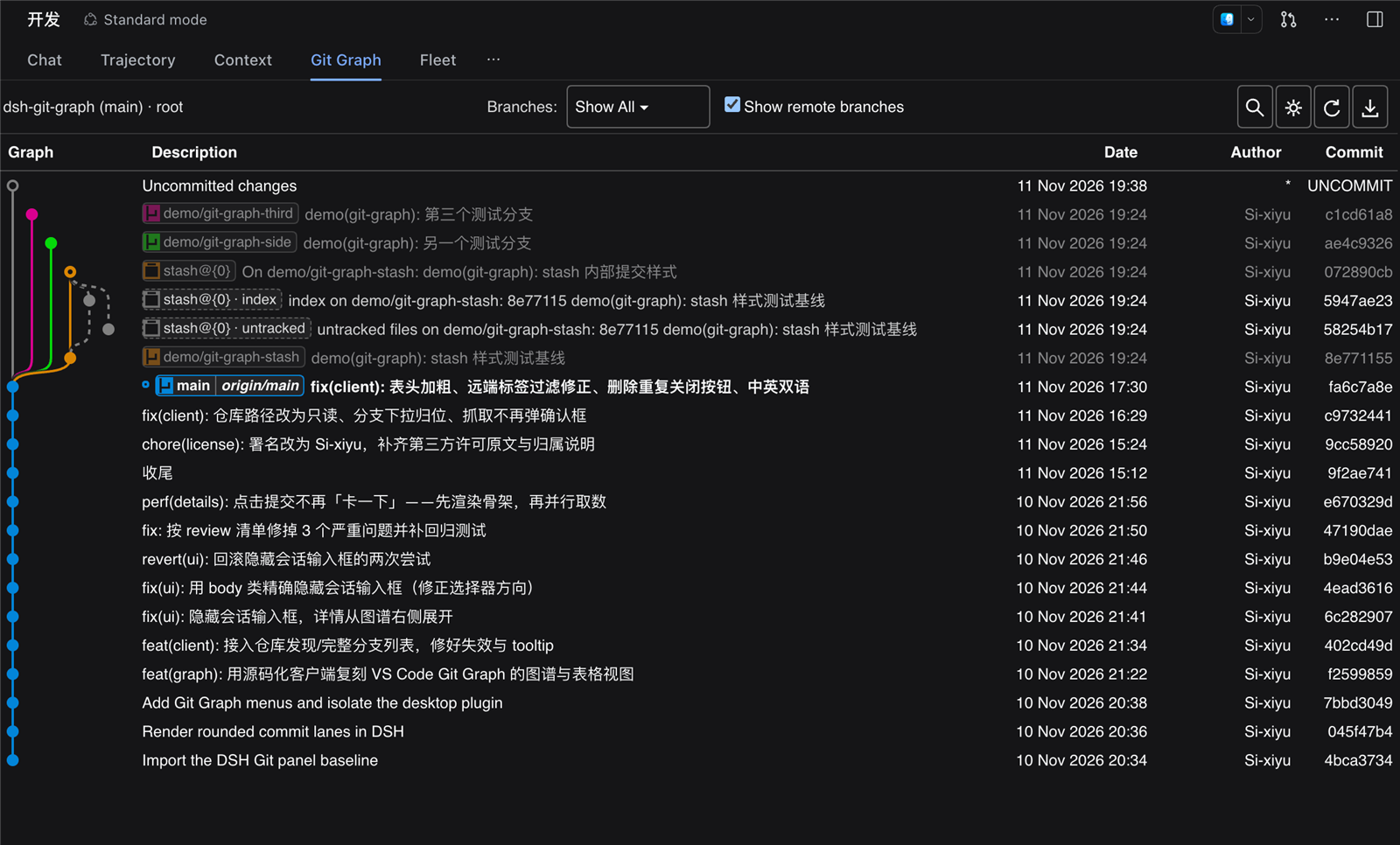
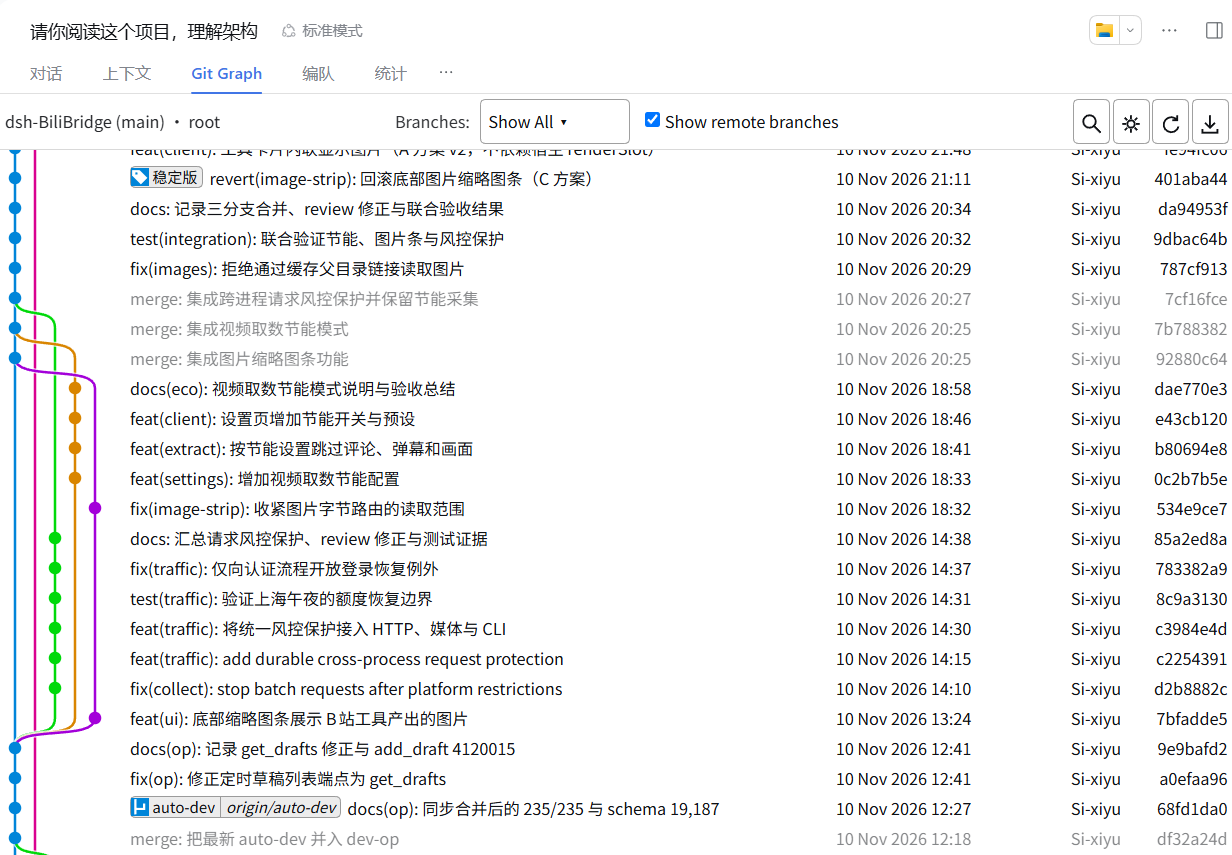
DSH Git Graph turns the repository of the current session into a commit graph you can work on without leaving the chat page: switch, create and delete branches, merge, rebase, reset, cherry-pick, tag, stash, push and pull — with an inline commit details view and a diff drawer.
Features
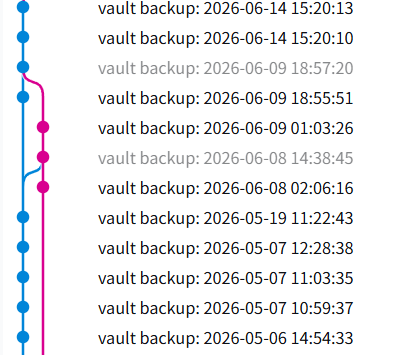
- Commit graph — branch-coloured lanes with per-row width, correct merge and side-branch
routing. Stash commits (including their internal
index/untrackedentries) and the uncommitted-changes row are drawn distinctly; commits outside the checked-out branch are muted. - Reference pills — local branches, remote branches and tags as compact pills, with the checked-out branch highlighted. Hover for a tooltip, double-click to check out.
- Inline commit details — author, committer, date, parents and the full message on the left;
changed files with
+n / -non the right. Click a file to open its diff. - Diff drawer — a resizable bottom panel with virtualised scrolling, per-file grouping and add/delete highlighting.
- History actions — checkout, create, rename, delete (optionally on remotes), merge, rebase, reset (soft / mixed / hard), cherry-pick, revert, drop a commit.
- Tags and stashes — create annotated or lightweight tags (optionally pushed), delete them locally or on a remote; push, apply, pop and drop stashes.
- Remotes — fetch (with prune options), push (normal / force-with-lease / force, set upstream), pull a specific remote branch.
- Search and keyboard —
Ctrl/⌘+Fsearch with highlighting,Ctrl/⌘+Rrefresh,Ctrl/⌘+Hjump to HEAD, arrow keys to move (Ctrl/Ctrl+Shiftfor first / alternative parent–child). - Multiple repositories — discovers repositories under the session directory and lets you switch.
- Bilingual UI — follows the host language, switchable in Preferences, remembered locally.
Quickstart
Install with the DSH CLI (recommended)
dsh plugin --profile desktop add dsh-vsc-git-graph
Restart DSH Desktop, open a session inside a Git repository, and select the Git Graph tab.
Install from a tarball (offline)
In root
npm run dist
Then Settings → Plugins → install from archive and pick dist/dsh-vsc-git-graph-<version>.tgz.
Install from source
git clone https://github.com/Si-xiyu/dsh-git-graph.git
dsh plugin --profile desktop add ./dsh-git-graph
Once the plugin is listed in the DSH plugin catalog, it can also be
installed from Settings → Plugins → Discover (dsh 0.2.1+). Add
https://cdn.jsdelivr.net/npm/dsh-plugin-catalog/index.json as an index source if the Discover tab is
empty.
Let your agent install it
Paste this into your agent:
Install the DSH Git Graph plugin from https://github.com/Si-xiyu/dsh-git-graph into my
DeepSeek Harness desktop profile.

1. Check prerequisites: `git --version` works, and `dsh --version` is >= 0.1.0-rc.5.
2. Install from npm: `dsh plugin --profile desktop add dsh-vsc-git-graph`.
3. If the npm registry is unreachable, clone the repo and install the local path instead:
   `git clone https://github.com/Si-xiyu/dsh-git-graph.git` then
   `dsh plugin --profile desktop add <absolute-path-to-the-clone>`.
4. Restart DSH Desktop, open a session inside a Git repository, and confirm a "Git Graph"
   tab appears in the session tab bar.
Machine-readable install notes for agents: AGENTS.md.
Usage
- Open the Git Graph tab in a session — the graph follows that session's working directory.
- Click a commit to expand its details; click a file to open the diff drawer.
- Right-click a branch pill, commit, tag or stash for its actions.
- Double-click a branch pill to check it out.
Requirements
- DeepSeek Harness Desktop ≥ 0.1.0-rc.5
giton yourPATH- Node.js ≥ 20 (development and build only)
Development
npm install
npm run build   # src/ -> lib/client.js (single-file client bundle)
npm test        # host + graph-engine + client bundle tests
npm run dist    # distributable tarball
The graph layout engine lives in src/graph.js and is specified behaviourally in
docs/GRAPH-SPEC.md.
License & credits
Released under the MIT License (© Si-xiyu).
- Baseline: enoughpower/dsh-git-graph (MIT), license
text in
licenses/. - The graph and its interactions are modelled after
VS Code Git Graph.
src/graph.jsis an independent implementation written against a behavioural specification: behaviour matches the reference for visual parity, while the source text is not a copy. - Per-path attribution: THIRD_PARTY_NOTICES.md.
No comments yet. Be the first to write one.