dsh-cost-pill
Continues the DSH composer's own token-usage pill with what the session has cost so far in yuan — the amount is written inside that pill, so it inherits the host's spacing and reads as part of the same row.

In the desktop app: the cost continues the composer pill row, after the token usage and cache-hit readings.

Rendered from this repository's own lib/client.js with sample usage data.
What it shows
· 费用 ¥0.0871 — the estimated cost of every token this session has billed so far.
Hovering the pill reveals the breakdown the number is made of:
费用 ¥0.0871 · 高峰 · deepseek-flash
未缓存输入 ¥0.0557 · 缓存读取 ¥0.0055 · 输出 ¥0.0259
按官网标价估算
The pill disappears while the session has billed no tokens yet.
The usage dialogs
The host's own token-usage dialogs show counts but no money. While one is open, each bucket row gains its own amount and the list closes with the estimated total, the rate window in force, and a one-line note — the same figures the pill shows.
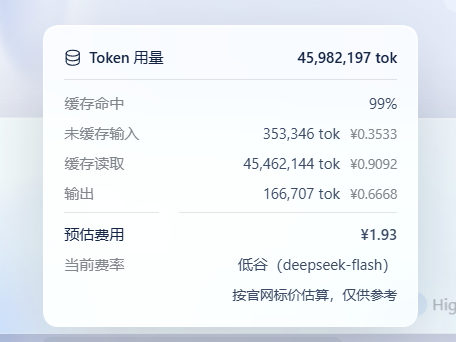
Per-turn cost (optional — installed separately)

The row under each answer — 用量 6.2M tok · 费用 ¥0.1718 — is rendered by the host
from per-turn billing buckets that are not exposed to plugins, so this plugin
cannot add that row. The repository ships the procedure in two forms; install
either one on top of the plugin.
Option A — install the skill (recommended)
- Copy
per-turn/SKILL.mdto~/.dsh/skills/dsh-per-turn-cost/SKILL.md(%USERPROFILE%\.dsh\skills\dsh-per-turn-cost\SKILL.mdon Windows). - Restart DSH so the skill catalog reloads.
- In any conversation, ask:
用 dsh-per-turn-cost 给每轮加上费用.
Option B — paste the prompt
Open per-turn/PROMPT.md, copy the fenced block, and send it
in a normal conversation. The agent does the same work without needing the skill.
What either route changes
It edits the host's own bundled dsh-client-ui-chat/lib/client.js — inside
node_modules for an npm/dsh web install, inside app.asar for the desktop app,
which must be closed first. The agent backs the file up, syntax-checks the result,
and tells you the restore command.
A DSH update replaces that file, so the row has to be added again afterwards. That is precisely why it cannot ship as a plugin: shipping it would mean writing into the host's own code on every user's machine.
Prices
Official DeepSeek list prices, yuan per 1M tokens:
| Model | Cache hit (peak / off-peak) | Cache miss (peak / off-peak) | Output (peak / off-peak) |
|---|---|---|---|
deepseek-flash |
¥0.04 / ¥0.02 | ¥2 / ¥1 | ¥8 / ¥4 |
deepseek-v4-pro |
¥0.30 / ¥0.15 | ¥9 / ¥4.5 | ¥27 / ¥13.5 |
- Peak is Beijing time 09:00–12:00 and 14:00–18:00, Monday to Friday; everything else is off-peak. The check runs on the Beijing clock, so the figure does not depend on the browser's time zone.
- The retired ids
deepseek-v4-flashanddeepseek-v4-flash-vision-expare billed at thedeepseek-flashrate, which is what DeepSeek's own sheet says happens to requests still naming them. - Cache-write tokens have no published rate; they are billed at the cache-miss rate.
- A session whose model id this plugin does not recognise is priced as
deepseek-flash, and the breakdown says so.
Install
dsh plugin --profile <name> add dsh-cost-pill
Or from a local checkout:
dsh plugin --profile <name> add /path/to/dsh-cost-pill
Then reload the page. No restart is needed on hosts that hot-apply profile patches.
Scope and limits
- The pill is an estimate for display only; billing stays whatever the provider charges.
- It prices the whole session with the session's current model. DeepSeek bills per request, so a session that switched models mid-way can be off by the rate difference between them.
- It reads the
tokenUsageandmodelSelectionsession projections for the pill, and appends amounts to the host's own usage dialogs by reading the counts those dialogs already render. It never replaces a host component, and if that markup does not look the way it expects, it leaves the dialog exactly as it found it. - No telemetry, no network calls, no files written.
License
MIT
No comments yet. Be the first to write one.