Omni Learning Anything







English · 简体中文 · 日本語 · 한국어 · Español · Français · Deutsch · Português · Русский · العربية
Study a university course, a school textbook, or your own books and papers. Learn at your pace with illustrated lessons, short checks and feedback.
Turn “I want to learn…” into a plan you can follow. Start with a personal goal, a built-in course, a textbook or your own materials. Review the plan before lessons begin.
Try “I want to study the History of Chinese Architecture at Tsinghua.” or “I want to study OpenAI Applied AI Foundations.” The agent identifies the source course, reuses what you already told it, and asks only for details that affect your plan.
| Feature | What it does |
|---|---|
| Personal learning path | Turn a broad interest or specific goal into a course matched to your background, purpose and time. |
| Built-in courses and references | Choose from 65 courses and two open references. Keep the source edition, unit order and original workload visible. |
| Chinese school textbooks | Search 1,949 entries from primary through senior secondary. Ask for the latest edition or a specific year. When the index cannot verify the book, the agent checks the upstream repository and searches online. Study a chapter, concept or formula with original figures and page references when the textbook is available. |
| Your own materials | Study selected pages, chapters or timestamps in PDF, DOCX, EPUB, PPTX, HTML, Markdown, TXT, SRT or VTT. Choose whether to include outside sources. |
| Sources and further reading | Trace key claims to an original page, chapter or timestamp, or to cited web research with dates and links. |
| Plan before lessons | Review a day-by-day curriculum and estimated workload before approving lessons. |
| Illustrated lessons | Learn through focused explanations, diagrams or source images, worked examples, short practice and recap. |
| Ten learning languages | Set the language of plans and lessons independently of your sources. Arabic uses right-to-left layout. |
| Four local formats | Save PDF, offline HTML with embedded images, DOCX or Markdown. |
| Connected destinations | Save to a local Obsidian Vault, or connect Notion, Feishu, DingTalk or Tencent Docs with authorized access. |
| Light checks | Ask for 1–3 questions after a lesson. Answer in chat or with supported cards, and ask for a hint, skip or resume. |
| Answer feedback | See what your answer got right, what it missed and one next step. Revise an answer or dispute a judgment. |
| Learning record and review | Review topics that need attention within your daily time budget. Request a recap, export your assessment record or remove it. |
| Plan iteration | Use your goals or answer evidence to propose future changes. Review them before creating a separate course version. |
| Anki export | Export selected review questions as a CSV for one-way import into Anki. |
| Continue or schedule | Pause, resume or pick up the earliest undelivered lesson. Optional scheduling uses your agent's native tools. |
| Install and update | Install in compatible agents, check discovery and update the skill while keeping course archives outside the installation. |
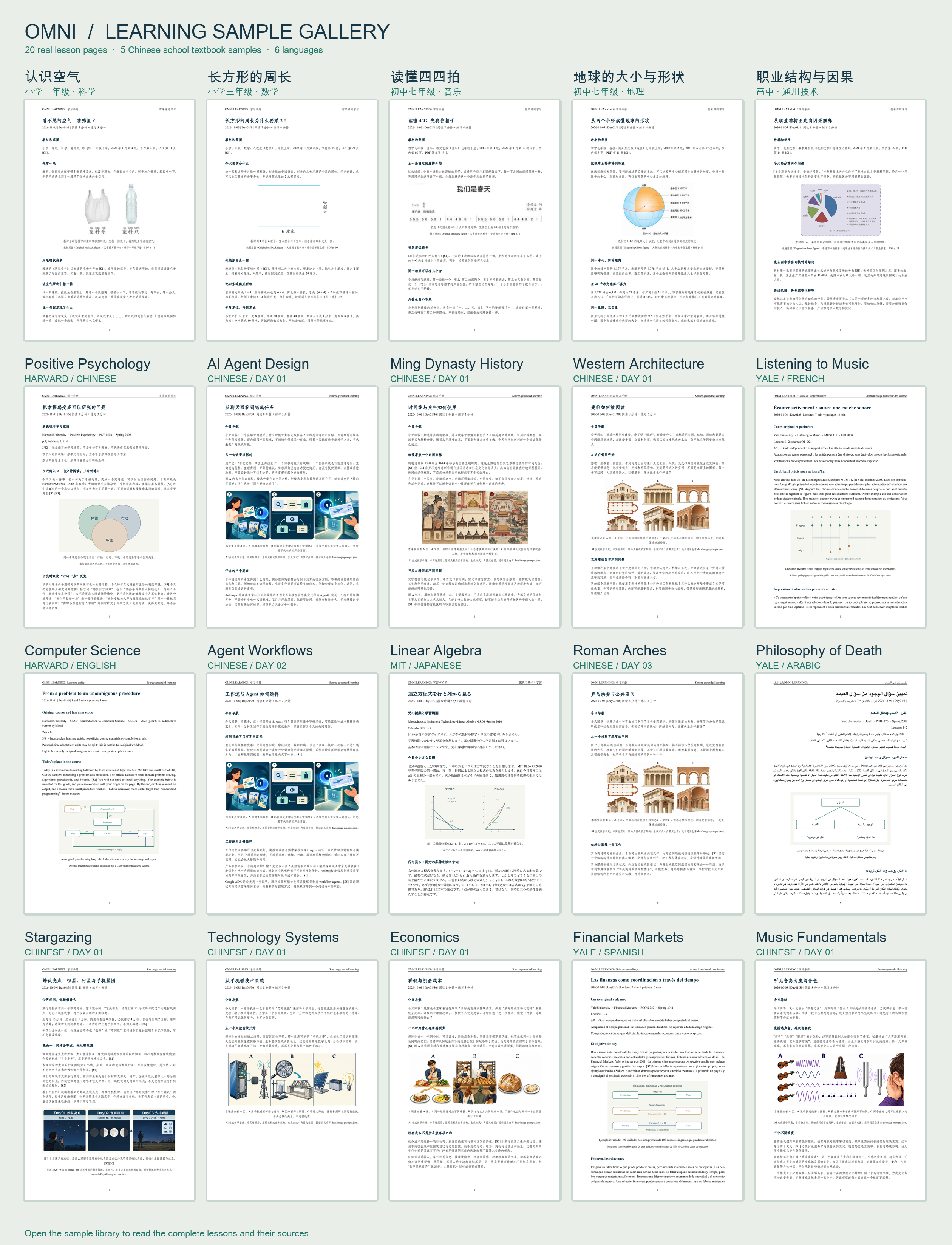
Five modern textbook lessons in Chinese
Version guide
| Version | What it brings to your learning |
|---|---|
| v4.2.0 | Find the requested textbook edition by year or ask for the latest. The agent searches beyond the index for a verifiable original. |
| v4.1.0 | Check whether you can apply what you learned to a new example, with each question reviewed against the original source. |
| v4.0.0 | Study mainland Chinese school textbooks with age-specific lessons, exact page references and original illustrations. |
| v3.0.0 | Choose a university pathway, see the source edition, and preview real multilingual learning documents. |
| v2.3–v2.6 | Ask for light checks, study your own sources, review what needs attention and install or update more easily. |
| v2 | Study in ten languages, choose four local formats, or keep your course in connected documents. |
| v1 | Approve a personal plan and receive illustrated PDF lessons with practice and further reading. |
Choose a built-in course
Ask “show me built-in courses”. Choose a course, your language and available time; the agent proposes a mapped plan for approval. These are independent learning pathways based on public course sources. Complete lecture content is not bundled; no university endorsement or certificate is implied.
Source editions and access notes
A 10-minute session covers a small learning step, not an entire original lecture or course. Original workload remains visible; longer readings, exercises and projects need their own time. Course sources and availability may change.
Bring your own materials
Use PDF, TXT, Markdown, HTML, DOCX, EPUB, PPTX, SRT or VTT. Choose chapters, pages or timestamps and whether outside supplements are allowed. Explanations and checks trace back to the selected source locations. Legacy DOC and RTF need trusted conversion first.
A rough goal works too: “I want to learn a little economics.” The agent suggests useful directions, explains its assumptions and asks only questions that affect the plan. A specific goal goes straight to planning.
Choose your learning language
English · 简体中文 · 日本語 · 한국어 · Español · Français · Deutsch · Português · Русский · العربية
Plans and lessons support all ten languages listed above, independently of the source language or the language of this page. Arabic documents use right-to-left layout.
Choose where to keep your course
| Destination | How it works |
|---|---|
| PDF · HTML · DOCX · Markdown | Choose a folder and PDF, HTML, DOCX or Markdown. HTML keeps its illustration in one offline file; external source links need internet. |
| Notion | Connect a parent page through the official ntn CLI. |
| Obsidian | Choose an existing local Vault and course folder; no Obsidian API is used. |
| Feishu / 飞书 | Connect a document folder through the official lark CLI and user authorization. |
| DingTalk / 钉钉 | Connect a folder through the official dws CLI; organization approval may be required. |
| Tencent Docs / 腾讯文档 | Choose a root or folder and complete official OAuth/MCP authorization. |
Tell the agent where to save your course. It checks existing access, guides missing setup and reuses your named connection. Do not paste passwords or tokens into chat.
Install and start
Ask your agent to install the latest release and verify that this client can discover the skill. Keep existing courses and connections when updating. With Node.js, run:
npx skills@latest add ShawnRen57/omni-learning-anything --skill omni-learning-anything -g
In Claude Code, use the plugin installer:
/plugin install omni-learning-anything --marketplace ShawnRen57/omni-learning-anything
Without Node.js, download the ZIP above and use your client’s skill upload or agent-assisted installation. skills.sh is live; the SkillHub listing is currently v2.6.0. Check the channel guide for version availability.
Try your first course
Show me built-in courses. Use Harvard CS50x 2026 as the source.
I am a beginner. Teach me in English, 20 minutes a day.
Preserve the original unit order and show the original workload.
Save offline HTML in my course folder. Show me the plan first.
Or try: “Teach me the first two chapters of my EPUB in 15-minute sessions,” or “Use Yale Financial Markets 2011 to help me understand financial institutions.”
Review and approve the plan, then ask for the first lesson. To resume, say “Continue from my earliest undelivered lesson.” Ask to pause when needed. Scheduling works only when your host supports it and you agree a time and timezone; generation begins at that time, with delivery after research and review.
Checks, feedback and review
When you want a check, request 1–3 short questions as cards or plain text. Ask for a new scenario, a mistake to diagnose, or a quick recall question. The agent chooses a question that fits the lesson, checks its original source and works through the answer before showing the prompt. Try “Test me on Day01 with a new example that uses only what the lesson taught.” Your responses inform the learning record and feedback.
Ask “What should I review today?” for a small review within your existing time budget, or “What have my answers shown this week?” for an evidence-based recap. Correct a judgment, skip a topic, or choose a new lesson. Review creates no extra automatic quiz or timer.
Approve changes to future lessons before a revised course version starts; the old plan and history remain available. Anki cards are an optional one-way CSV export, without automatic synchronization.
Short checks and plan revision in WorkBuddy
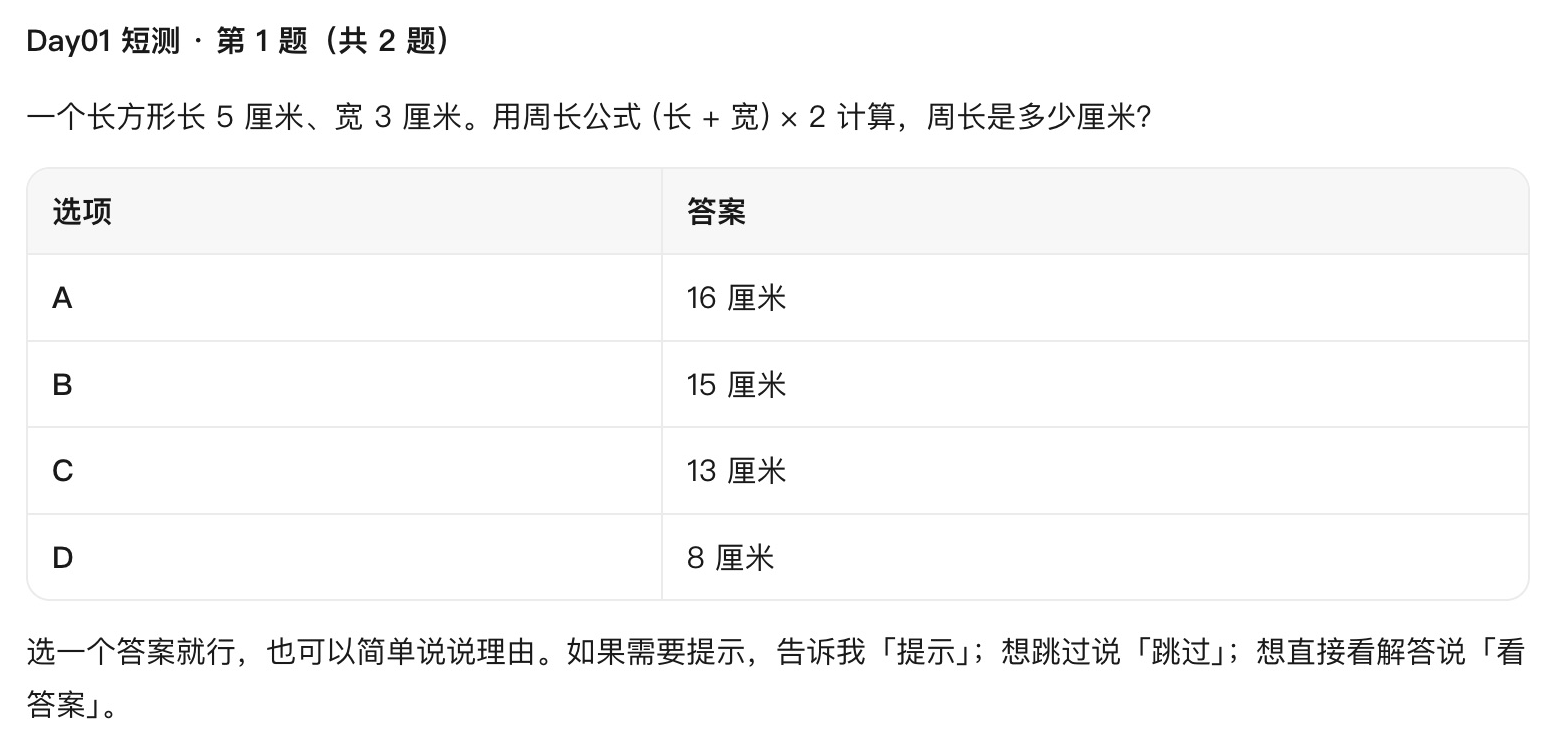
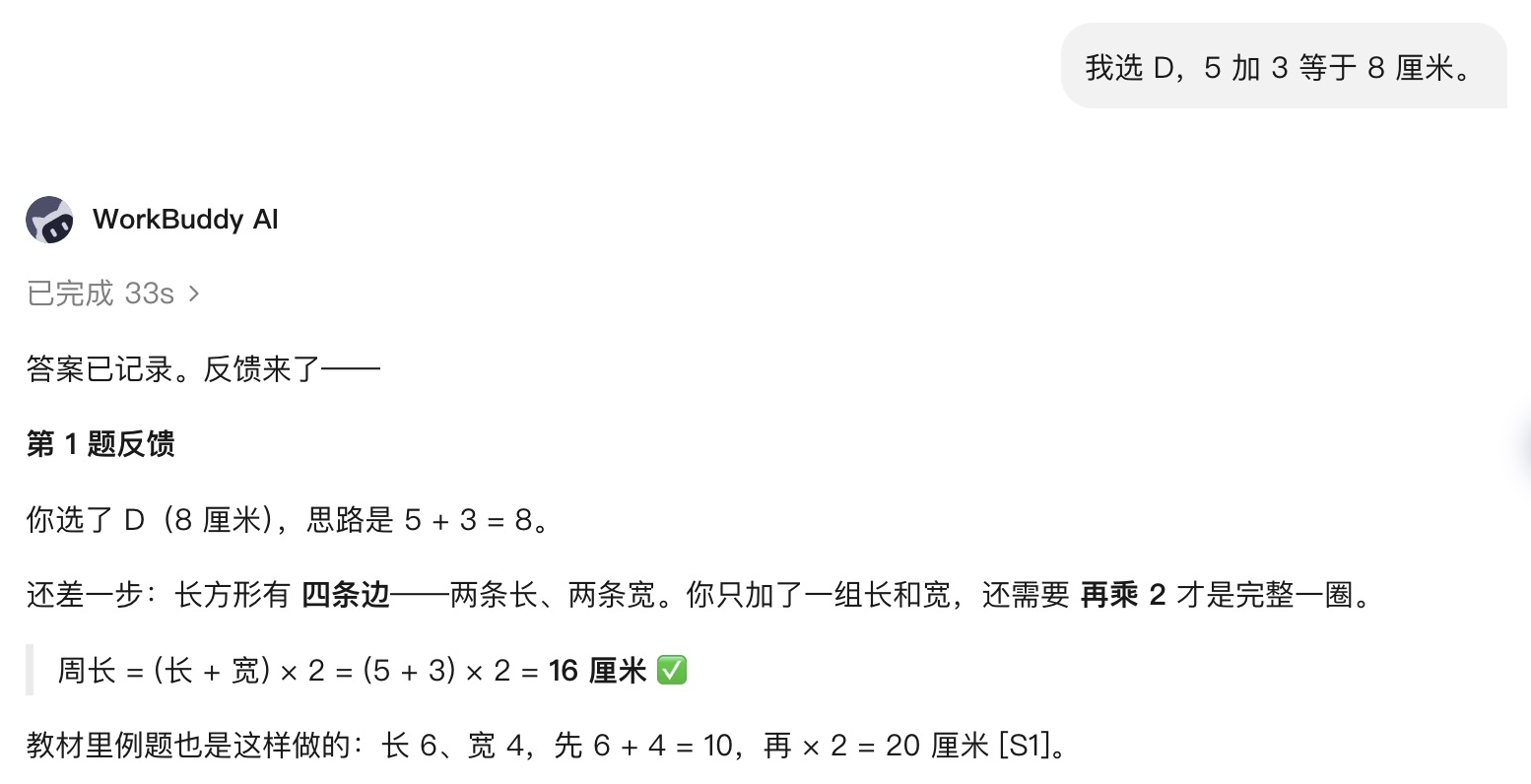
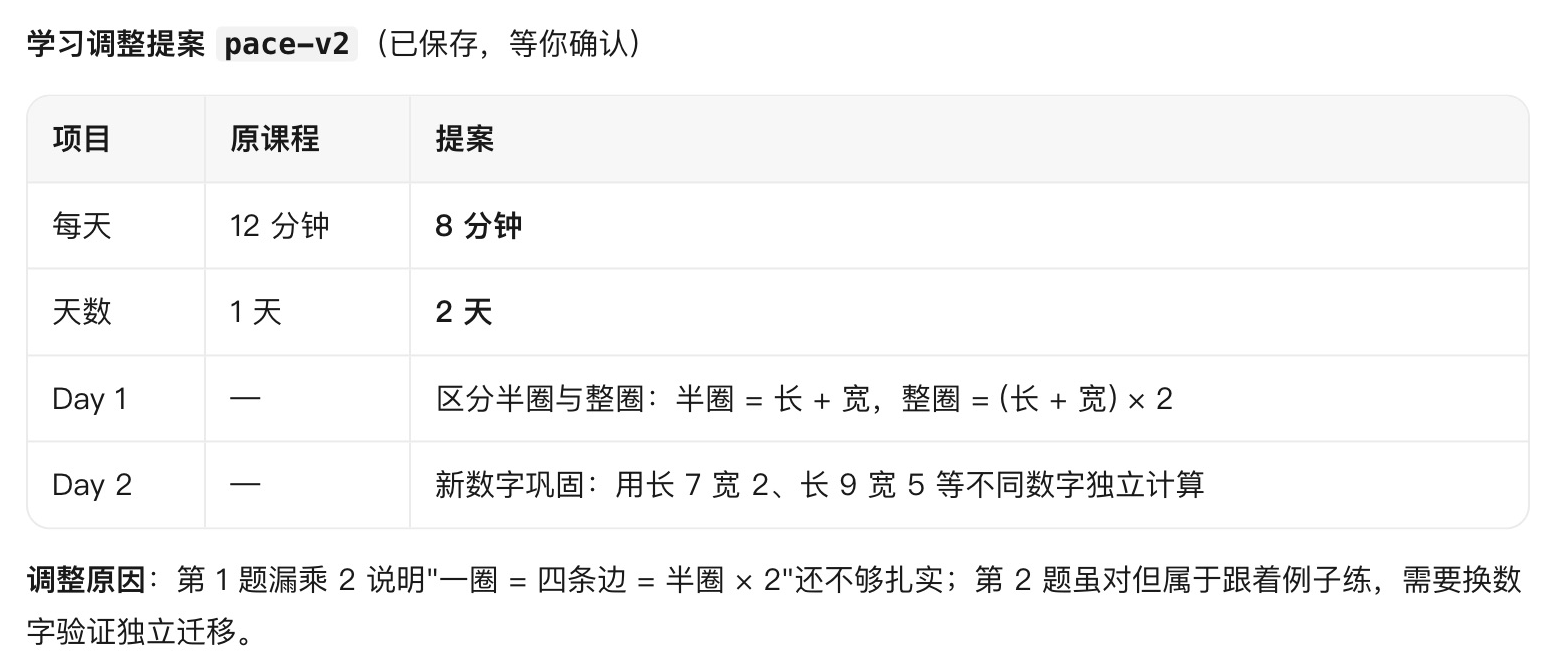
In this WorkBuddy AI 5.8.4 demo, a simulated learner answers a rectangle-perimeter question. WorkBuddy records the answer, explains that adding one length and one width gives half the perimeter, and proposes two shorter follow-up sessions based on the error. The accepted proposal creates a separate plan for review with the same textbook figure. The textbook revision uses the fix in this repository.
1. Start a short check
2. Get feedback on the answer
3. Review the adjusted plan
Guides and requirements
Installation and updates · Formats and fonts · Document connections · Channel status · v4.0.0 release validation
This Agent Skill uses the research, document and scheduling tools available in your host. PDF requires XeLaTeX; other output formats do not. Cloud access, cross-device sync and unattended delivery depend on your host, account and authorization. Support is checked for the current client; availability on every platform is not assumed.
MIT · Changelog · Attribution
No comments yet. Be the first to write one.