WHOOP Easy Connect
dsh-whoop-easy-connect · 在 DeepSeek Harness(dsh)里轻松连接你的 WHOOP 账号,数据自动同步,并拥有一个专属的健康看板。







简体中文
三个关键词
- 简单连接:不用自己拼 OAuth、不用手写配置。设置页里四步引导:打开 WHOOP 开发者平台 → 创建应用 → 粘贴 Client ID / Secret → 点一下授权。回调地址一键复制,插件自动处理本机 HTTPS 回调。
- 自动同步:连接一次,之后每次打开看板都会自动拉取最新数据;WHOOP 的访问令牌到期前会自动续期(
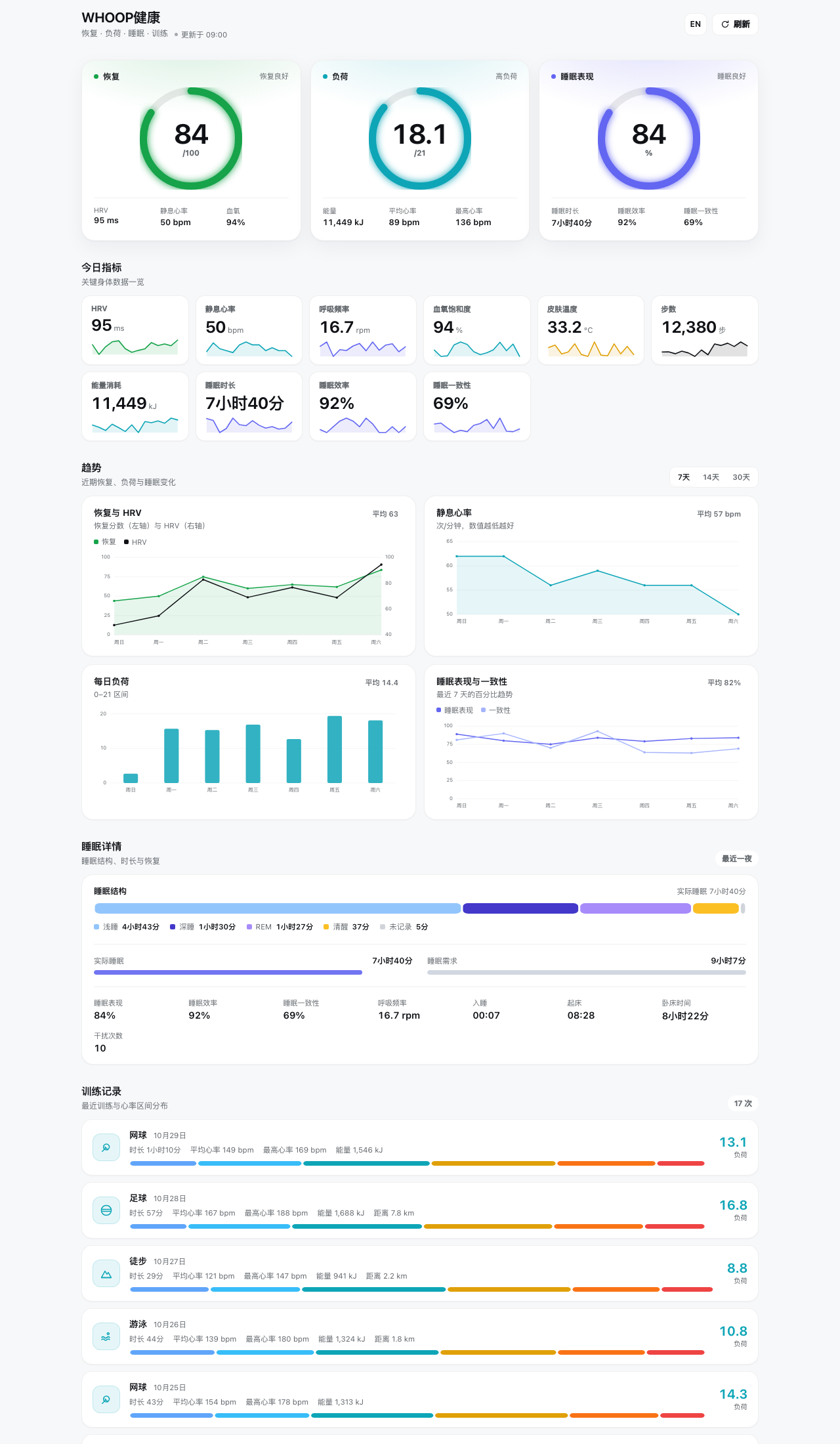
offlinescope),不需要反复登录。 - 专属看板:在 DSH 主面板里用三环、趋势图、睡眠结构和训练记录,把 WHOOP 的恢复、负荷、睡眠与运动数据集中在一个页面里看。
看板里有什么
| 区域 | 内容 |
|---|---|
| 三环主视觉 | 恢复分数(0–100,绿/黄/红语义)、每日负荷(0–21)、睡眠表现(0–100) |
| 今日指标 | HRV、静息心率、呼吸频率、血氧、皮肤温度、步数、能量消耗、睡眠时长 / 效率 / 一致性 |
| 趋势 | 恢复 + HRV、静息心率、每日负荷、睡眠表现与一致性,支持 7 / 14 / 30 天切换 |
| 睡眠详情 | 浅睡 / 深睡 / REM / 清醒结构、实际睡眠 vs 所需睡眠、入睡/起床时间、干扰次数 |
| 训练记录 | 运动类型、时长、负荷、平均/最高心率、能量、距离、心率区间分布 |
| 身体与资料 | WHOOP 账号姓名 / 邮箱、身高、体重、最大心率 |
看板右上角可以 切换中英文、手动刷新;页面每次进入都会自动刷新一次。界面适配 DSH 的明暗主题。
安装
方式一:直接安装 GitHub 仓库(推荐)
在终端运行(把 desktop 换成你的 DSH profile 名称):
dsh plugin --profile desktop add github:ShawnRen57/dsh-whoop-easy-connect
也可以让 DSH 里的 Agent 帮你安装:
plugin_manager install_bundle target=github:ShawnRen57/dsh-whoop-easy-connect
安装后在 DSH 左侧栏出现 WHOOP健康 入口;如果页面没有立即刷新,刷新一次页面。
方式二:插件市场
在 DSH 的 插件 → 发现 中添加社区插件索引,搜索 “WHOOP Easy Connect” 后安装。开放插件市场索引地址:https://dshopen.org/index.json。
连接 WHOOP(四步)
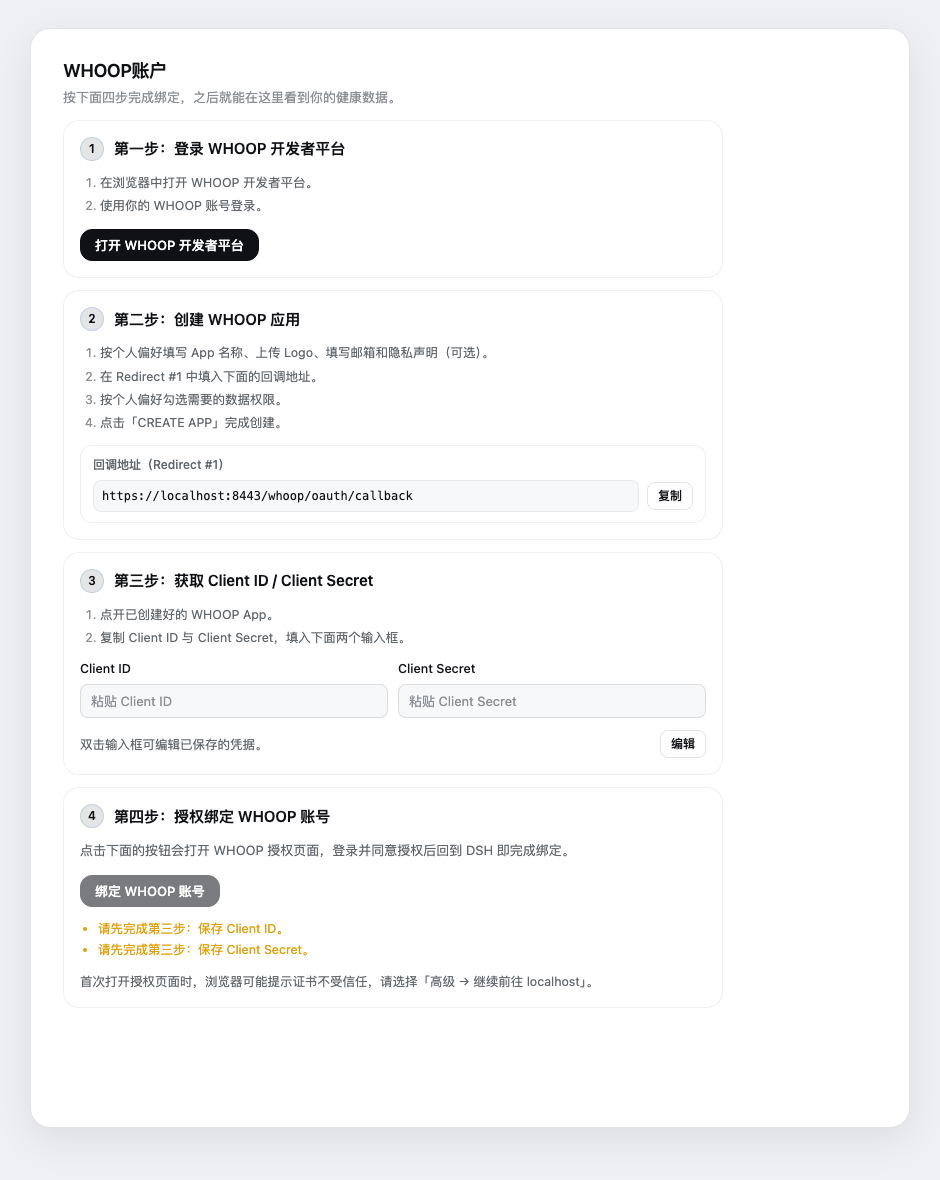
- 登录 WHOOP 开发者平台:点按钮打开 developer-dashboard.whoop.com,用你的 WHOOP 账号登录。
- 创建 WHOOP 应用:按喜好填写 App 名称、Logo、邮箱和隐私声明(可选);把页面里的回调地址一键复制,填到
Redirect #1;勾选数据权限后点CREATE APP。 - 填写 Client ID / Client Secret:双击输入框进入编辑,粘贴应用详情里的 Client ID 和 Client Secret,点保存。凭据只保存在本机。
- 授权绑定:点「绑定 WHOOP 账号」,在浏览器里登录并同意授权。第一次访问本机回调地址时,浏览器会提示自签名证书,选择「高级 → 继续前往 localhost」即可。
授权完成、浏览器显示「WHOOP 账号已连接」后回到 DSH,看板就会显示你的真实数据。
为什么需要自己创建 WHOOP 应用?WHOOP 要求每个应用使用自己的 OAuth 凭据。你只需要在它的开发者后台创建一次应用;回调、令牌交换和续期都由插件自动完成。
数据同步与隐私
- 同步方式:打开看板时自动拉取最近 30 天数据;右上角可随时手动刷新。令牌过期前自动用 refresh token 续期。
- 本地保存:OAuth 凭据与令牌保存在
~/.dsh-whoop-easy-connect/state.json(文件权限0600),自签名证书保存在同目录的tls/下。 - 数据去向:插件只直接请求 WHOOP 官方 API(
api.prod.whoop.com),不向其他第三方发送你的健康数据,也没有遥测。 - 解除绑定:设置页可以随时「解除绑定」,插件会调用 WHOOP 的吊销接口并删除本地令牌。
常见问题
- 浏览器提示证书不受信任:这是插件为「本机 HTTPS 回调」生成的自签名证书,只影响
https://localhost:8443,选「高级 → 继续前往 localhost」即可。 - 授权后仍显示未绑定:确认第 2 步复制到 WHOOP 应用的
Redirect #1与页面显示的地址完全一致;再确认第 3 步的 Client ID / Secret 已保存成功。 - 部分指标显示「—」:WHOOP 没有提供该数据(例如设备不支持血氧/皮肤温度,或当天尚未评分),不是插件故障。
- 8443 端口被占用:插件会记录警告并回退。释放端口后刷新页面,或在插件配置里更换端口并重新登记回调地址。
- 修改代码后如何生效:浏览器端改动会热更新或刷新页面生效;Host 端代码修改后如果未生效,重启一次 DSH。
开发
node scripts/build-client.mjs      # 生成浏览器端 lib/client.js
node --test scripts/test-host.mjs  # Host 端单元测试(不联网)
插件由两半组成:Host 端负责 OAuth、令牌存储和 WHOOP API 聚合;浏览器端负责侧边栏入口、设置引导和健康看板。看板使用纯 SVG 绘制图表,不依赖第三方图表库。
许可证与声明
MIT © 2026 ShawnRen57
WHOOP、WHOOP 标志及相关名称是 WHOOP, Inc. 的商标。本项目是个人开发的第三方插件,与 WHOOP 官方无关,也未获得 WHOOP 官方背书。
English
dsh-whoop-easy-connect — connect your WHOOP account to DeepSeek Harness (dsh) in minutes, keep your data in sync, and explore it in a dedicated health dashboard.
Why you'll like it
- Easy connect — no OAuth plumbing, no hand-written config. A four-step wizard in Settings walks you through creating a WHOOP app, pasting the Client ID / Secret, and authorizing. The callback URL is one click to copy, and the local HTTPS callback is handled for you.
- Automatic sync — connect once, then every dashboard visit pulls the latest data automatically. Access tokens refresh themselves before they expire (
offlinescope), so you don't have to sign in again. - A dashboard of your own — recovery, strain, sleep and workout data in one place: rings, trends, sleep stages and workout logs, inside the DSH main panel.
What's on the dashboard
| Section | Contents |
|---|---|
| Hero rings | Recovery score (0–100, green/yellow/red), daily strain (0–21), sleep performance (0–100) |
| Today | HRV, resting HR, respiratory rate, SpO₂, skin temperature, steps, energy, sleep duration / efficiency / consistency |
| Trends | Recovery + HRV, resting HR, daily strain, sleep performance & consistency — 7 / 14 / 30 days |
| Sleep | Light / deep / REM / awake stages, actual vs. needed sleep, bedtime & wake time, disturbances |
| Workouts | Sport, duration, strain, average/max HR, energy, distance, heart-rate zones |
| Body & profile | WHOOP name / email, height, weight, max heart rate |
Switch between Chinese and English or refresh manually from the top-right corner. The page refreshes once every time you open it, and follows DSH's light and dark themes.
Install
From GitHub (recommended)
dsh plugin --profile desktop add github:ShawnRen57/dsh-whoop-easy-connect
Or ask the agent inside DSH:
plugin_manager install_bundle target=github:ShawnRen57/dsh-whoop-easy-connect
After installing, the WHOOP健康 entry appears in the DSH sidebar. Refresh the page once if it does not show up immediately.
From the plugin market
Add a community plugin index under Plugins → Discover in DSH and search for “WHOOP Easy Connect”. The Open Plugin Market index is https://dshopen.org/index.json.
Connect WHOOP in four steps
- Sign in to the WHOOP Developer Dashboard — open developer-dashboard.whoop.com and sign in.
- Create a WHOOP app — fill in the name, logo, email and privacy statement as you like; copy the callback URL shown by the plugin into
Redirect #1; pick the data permissions and clickCREATE APP. - Enter Client ID / Client Secret — double-click the inputs, paste both values from the app details, and save. Credentials stay on your machine.
- Authorize — click “Bind WHOOP account”, sign in on the WHOOP page and approve access. On the first local callback the browser warns about the self-signed certificate; choose “Advanced → Proceed to localhost”.
Once the browser shows “WHOOP account connected”, go back to DSH and the dashboard will show your real data.
Why create your own WHOOP app? WHOOP requires each app to use its own OAuth credentials. You only create it once in the developer dashboard; the plugin takes care of the callback, token exchange and refresh.
Sync and privacy
- Sync — opening the dashboard fetches the last 30 days of data automatically; you can also refresh manually. Access tokens are refreshed with the refresh token before they expire.
- Local state — OAuth credentials and tokens live in
~/.dsh-whoop-easy-connect/state.json(mode0600); the self-signed certificate lives undertls/in the same directory. - Where data goes — the plugin talks only to the official WHOOP API (
api.prod.whoop.com). It does not send your health data anywhere else and contains no telemetry. - Unbind — you can unbind at any time in Settings; the plugin revokes the WHOOP authorization and deletes local tokens.
FAQ
- The browser warns about the certificate — it's the self-signed certificate generated for the local HTTPS callback. It only affects
https://localhost:8443; choose “Advanced → Proceed to localhost”. - Still unbound after authorizing — make sure the
Redirect #1value registered in your WHOOP app exactly matches the callback URL shown by the plugin, and that the Client ID / Secret were saved successfully. - Some metrics show “—” — WHOOP did not provide that value (for example a device without SpO₂ / skin temperature, or a day that hasn't been scored yet).
- Port 8443 is busy — the plugin logs a warning and falls back. Free the port and refresh, or change the port in the plugin config and register the new callback URL.
- Code changes don't show up — browser-side changes hot-reload or apply after a refresh; restart DSH if Host-side changes do not take effect.
Development
node scripts/build-client.mjs      # build the browser bundle lib/client.js
node --test scripts/test-host.mjs  # Host-side unit tests (offline)
The plugin has two halves: the Host half owns OAuth, token storage and WHOOP API aggregation; the browser half owns the sidebar entry, the setup wizard and the dashboard. Charts are hand-drawn SVG — no chart library.
License & notice
MIT © 2026 ShawnRen57
WHOOP, the WHOOP logo and related names are trademarks of WHOOP, Inc. This is an independent third-party plugin, not affiliated with or endorsed by WHOOP.
Built with DeepSeek Harness

No comments yet. Be the first to write one.