dsh-answer-me-with-html


把 Answer me with HTML 的原生体验带进 DeepSeek Harness(DSH):模型只写 Markdown 草稿,插件在本地渲染成一页离线 HTML,并把页面放到右侧 Document Preview 里打开。Web 端和桌面端使用同一份插件。
本项目与上游 Answer me with HTML 无隶属关系,只是按 MIT 许可内置其渲染器(
skill/)。上游版本固定为 v0.5.11。
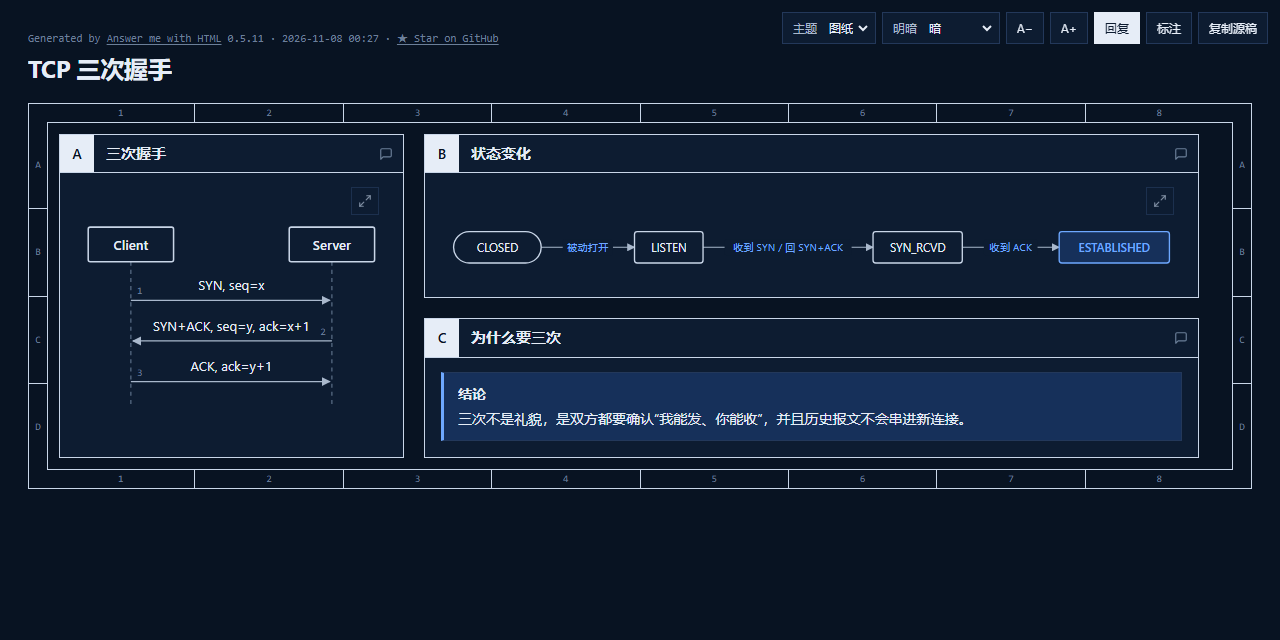
示例:模型只写 Markdown 草稿,插件渲染出的单页 HTML(深色模式、自动布局的顺序图与流程图)。
特性
- 原生工具:
answer_me_with_html,不再依赖 bash/pwsh 和 heredoc,Windows 端也不会被 PowerShell 语法卡住。 - 不依赖用户安装 Node:桌面端走 Electron 自带的 Node(
ELECTRON_RUN_AS_NODE),Web 端走宿主 Node,最后回退 PATH 上的node。 - 页面落在工作区:默认写入
<会话工作区>/.dsh/answer-pages/,右侧 Document Preview 可以直接读取;不会写到~/.answer-me-with-html。 - 不弹系统浏览器:工具固定
--no-open,页面只在应用内打开。 - 工具卡:显示页面标题、状态、STE/代码警告与错误;“打开页面”按钮直接打开右侧预览。
- 可离线安装:本地目录安装,不需要联网、不需要 pnpm 构建步骤。
- 可选 always-on:配置
alwaysOn: true后,通过系统提示要求每个结论都附带一页小页面。
与 dsh-genui 的关系
dsh-genui 与本插件是同一目标下的两种形态,可以同时安装,但不要用两者重复表达同一件事:
- 短小、可交互的界面(表格排序/过滤、表单、测验、图表、音视频、按钮动作回环、常驻面板)→ 用 dsh-genui 的
dsh-ui围栏。 - 长篇解释、图多的说明页、需要打印/PDF/离线单文件归档、希望在右侧 Document Preview 阅读 → 用本插件的
answer_me_with_html。
同一回答不要同时产出页面与内联组件。完整对比、共存验证计划和后续路线见 docs/dsh-genui-evaluation.md。
安装
要求:DSH 0.2.1-rc.2 或 0.2.2-rc.1(>0.3.0 之前),桌面端与 Web 端各装一次。
从 GitHub 安装(推荐):
在 DSH 的 Plugins 页 → Add plugin,填入:
github:ShanHaiFish/dsh-answer-me-with-html或用 CLI:
dsh plugin --profile desktop add github:ShanHaiFish/dsh-answer-me-with-html
dsh plugin --profile web add github:ShanHaiFish/dsh-answer-me-with-html
本地开发安装(无需联网,适合调试本仓库):
- Plugins 页 → Add plugin,填入本目录的绝对路径,例如
F:\path\to\dsh-answer-me-with-html; - 或 CLI:
dsh plugin --profile desktop add "F:\path\to\dsh-answer-me-with-html"。
安装后新开一个会话,问一个适合画图解释的问题(例如“解释 TCP 三次握手”),模型会调用 answer_me_with_html,会话中出现页面卡片。发布页见 Releases。
不要同时安装上游
answer-me-with-html和我们这个插件,否则会出现两份同名 skill。二选一。
使用
正常提问即可;模型根据 answer-me-with-html skill 判断是否值得出页面。也可以直接说“用 HTML 解释 TCP 三次握手”。
生成的页面路径会作为工具卡和回复末尾的链接出现,点击后在右侧 Document Preview 打开。页面自带的主题切换、面板评论、ask 决策和 Reply 按钮保留了上游的行为;能否运行页面内脚本取决于 DSH 的 Coding Tools 设置,静态阅读不受影响。
配置
当前通过 profile 的 cordis.patch.yml 覆盖 answer-me-with-html 行的 config:
- id: answer-me-with-html
  name: dsh-answer-me-with-html
  config:
    outputDir: ''          # 空 = <workspace>/.dsh/answer-pages;也可填绝对路径
    theme: auto            # auto | blueprint | shadcn | paper | 已安装主题
    mode: auto             # auto | light | dark
    style: '80'            # off | 80 | strict
    alwaysOn: false        # true = 每个结论都附带页面
    nodePath: ''           # 手动指定 node;空 = 自动探测
    maxDraftBytes: 200000
修改配置后重启对应 profile(或等待 HMR 重新加载)。
工作方式
提问
 └─ 模型读 skill:草稿格式 / 选组件 / 写作规则
      └─ 调用 answer_me_with_html(draft, file_name, theme, mode, style)
           ├─ Host 解析运行时:Electron-as-node → 宿主 Node → PATH node
           ├─ spawn skill/scripts/am.mjs render - --no-open -o <workspace>/.dsh/answer-pages/x.html
           ├─ 解析 ✓ / ✗ Lxx / STE 警告
           └─ 返回 { ok, path, title, warnings, errors }
                ├─ 客户端工具卡:标题 / 状态 / 警告 / 打开按钮
                └─ 打开按钮 → Document Preview
开发
node --check lib/host.js
node --check lib/renderer.js
node --check lib/client.js
node --test test/
同步上游渲染器:
node scripts/sync-upstream.mjs v0.5.11
已知限制
- 只支持 HTML 页面;
am video/am serve/am export不在本插件范围内。 - 页面内脚本(主题、Reply 等)是否运行取决于 DSH 的 Coding Tools 设置;关闭时页面仍可静态阅读。
- 尚未提供设置页;配置写在 profile patch 中(
settings页在后续版本加入)。 - 上游 skill/渲染器更新需要手动执行同步脚本并回归测试。
验证情况
- DSH Desktop
0.2.2-rc.1:安装、Host 工具、页面渲染、skill 目录、客户端 bundle 组装均已验证;工具卡在 UI 中的最终视觉效果需在使用时确认。 dsh web0.2.1-rc.2:profile 安装与 Web boot graph 中的客户端 bundle 已验证。- 单元测试:
node --test test/renderer.test.mjs test/client.test.mjs(渲染、错误行、路径安全、卡片逻辑、注册协议)。
发布(可选)
当前 package.json 带 "private": true,只用于本地目录安装。要发布到 npm:
- 去掉
private,把version升到新值,并把repository改成本仓库地址; - 确认
files包含lib/、skill/、locale/、icon.svg、cordis.patch.yml和许可文件; npm publish --access public。
发布后即可用 dsh plugin --profile <name> add dsh-answer-me-with-html 安装。
许可
本项目代码:MIT,见 LICENSE。
内置的 Answer me with HTML skill 与渲染器:MIT,版权归上游作者,见 LICENSE-answer-me-with-html。第三方依赖(marked、dagre、temml、Bangers 字体)声明见 THIRD_PARTY_NOTICES.md。
No comments yet. Be the first to write one.