dsh-conversation-files
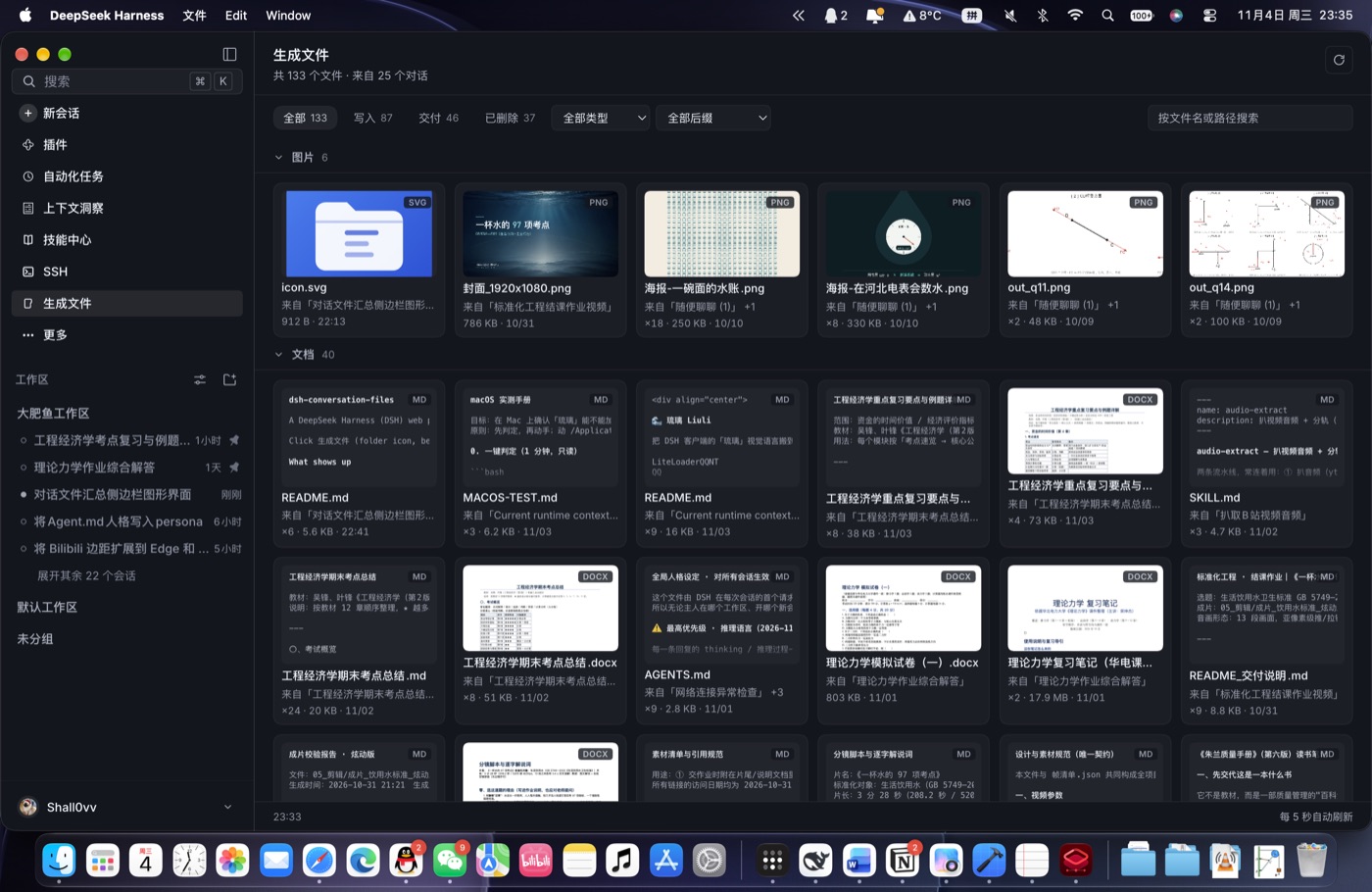
A DeepSeek Harness (DSH) web plugin: a left-sidebar entry that gathers every file the assistant generated for you — across all conversations — into one gallery panel, grouped by file type.
Click 对话文件 (folder icon, below SSH) in the left sidebar to open the panel.
中文版: README.zh.md
What shows up
The panel replays the event log of every conversation in the profile and keeps only files the assistant produced:
| kind | where it comes from |
|---|---|
| 写入 / Written | files written, edited or patched by tools (write, edit, apply_patch, …) |
| 交付 / Delivered | files handed over by present-style tools |
Read-only touches (read, view_image, …) and user attachments are deliberately not generated files and never appear here.
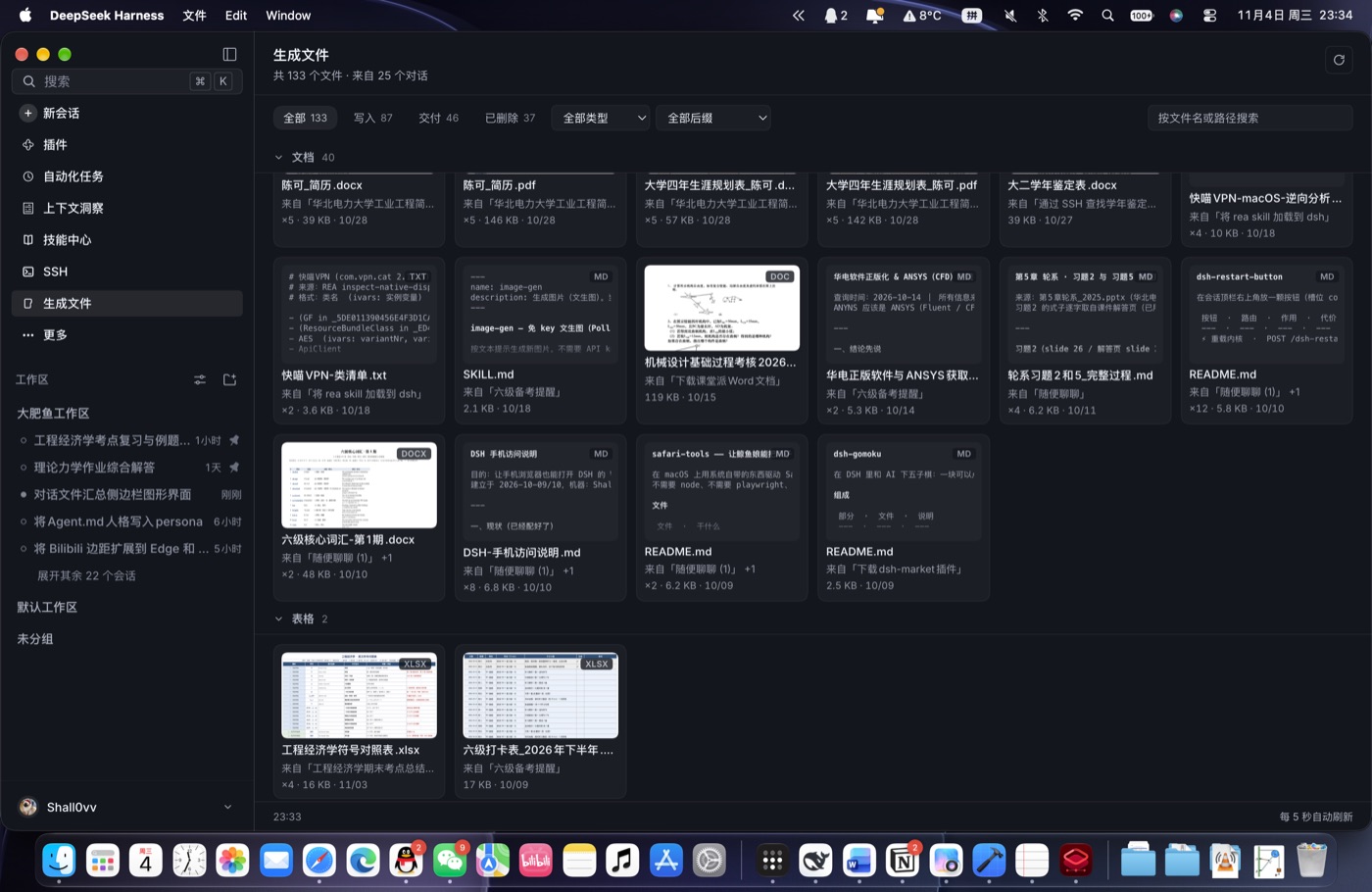
Files are grouped by extension:
| group | extensions |
|---|---|
| 图片 / Images | png jpg jpeg webp gif svg bmp avif ico |
| 文档 / Documents | md mdx txt rtf pdf doc docx docm dot dotx odt pages epub |
| 表格 / Spreadsheets | xls xlsx xlsm xlsb numbers ods csv tsv |
| 演示文稿 / Slides | ppt pptx pptm pps ppsx pot potx key odp |
| 代码 / Code | js mjs cjs ts tsx jsx py rb go rs java kt c cc cpp h hpp cs swift sh bash zsh ps1 css scss less html htm vue lua php |
| 配置 / Config | json jsonc json5 yaml yml toml ini conf cfg env gitignore plist lock |
| 数据 / Data | jsonl ndjson xml parquet sqlite db sql |
| 压缩包 / Archives | zip tar gz tgz bz2 xz 7z rar dmg iso |
| 音视频 / Media | mp3 wav m4a flac aac ogg opus mp4 mov mkv webm avi |
| 其他 / Other | everything else (e.g. ttf woff) |
Each card opens with a preview thumbnail:
| card type | thumbnail |
|---|---|
| images | the image itself, downscaled by the browser |
| code, text, config | the first 8 lines of the file in a small monospace block, faded at the bottom |
| markdown | the same, with heading markers, list bullets and emphasis stripped so it reads like prose |
| PDF / Word / PowerPoint / Excel / iWork | the first page, rendered on demand by macOS QuickLook |
| everything else (archives, media, binaries) | a large extension label plus a type icon |
Every card carries the extension in its top-right corner and shows the conversation it came from (plus +N when more conversations touched it), how many times it was written, its size and the time of the last write. The full path is in the tooltip.
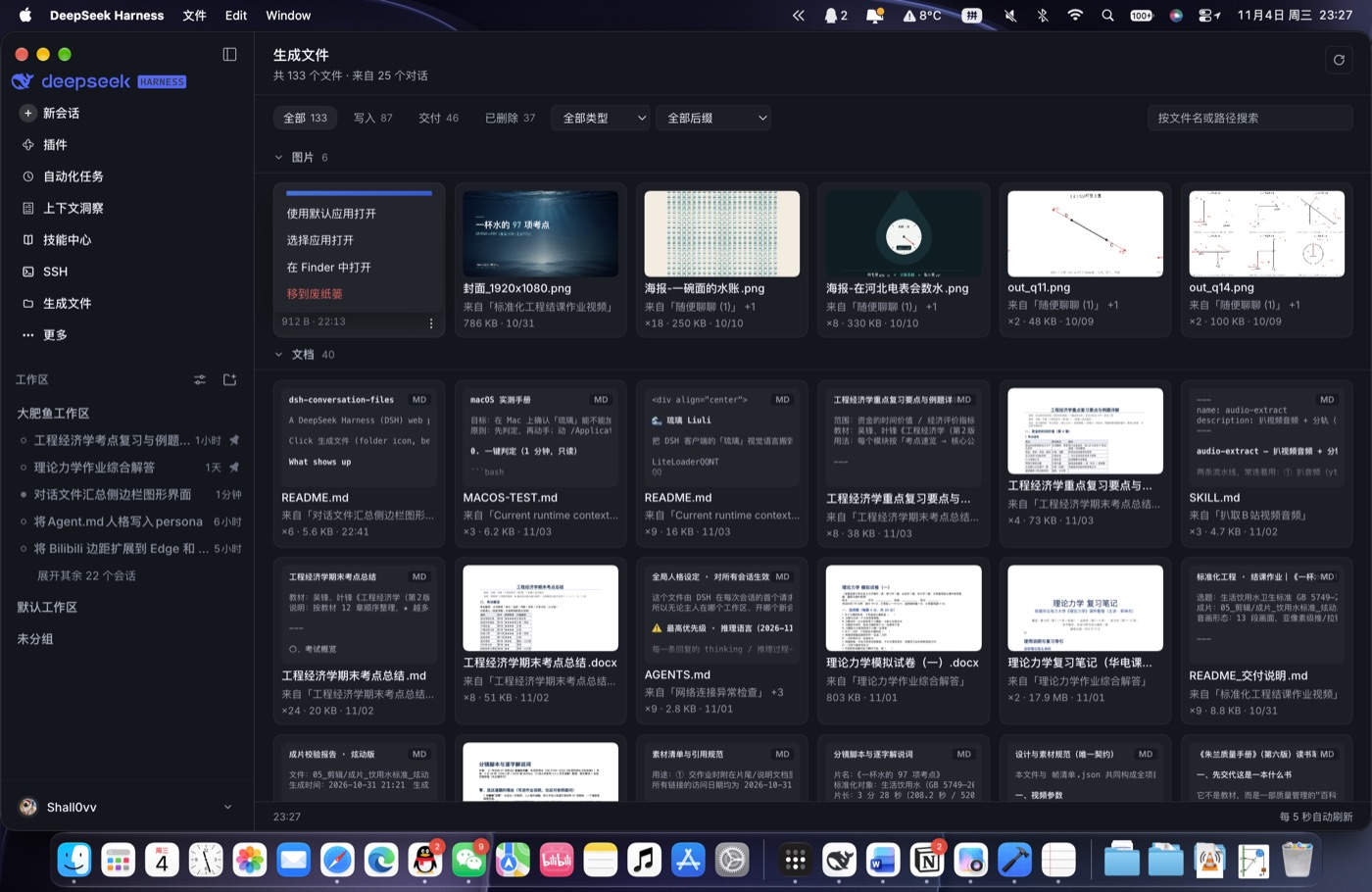
Clicking a card opens the file with its default application. The ⋮ button in the bottom-right corner opens a menu (pop/fade animation both ways):
| menu entry | action |
|---|---|
| 使用默认应用打开 / Open with default app | hands the file to open |
| 选择应用打开 / Open with… | a second menu listing the apps macOS can open this file with (the default one first, then Other… for the system chooser) |
| 在 Finder 中打开 / Show in Finder | open -R |
| 移到废纸篓 / Move to Trash | moves the file into ~/.Trash (recoverable), after a confirmation |
Files that no longer exist on disk are not part of 全部: they get their own 已删除 chip, a red 已删除 badge and no thumbnail.
Interactions:
- Fold a group — click its header; the grid animates closed and the fold state is persisted in
localStorage. - Filter by kind — chips: 全部 (existing files) / 写入 / 交付 / 已删除.
- Filter by file type — the 全部类型 dropdown narrows to one group (with live counts).
- Filter by extension — the 全部后缀 dropdown lists only the extensions present in the current type filter (选「文档」时只剩 md/docx/pdf…), most common first; picking a type that no longer contains the chosen extension resets it to 全部后缀.
- Search — filters by file name or full path.
- Switch views — the 网格 / 列表 buttons at the right of the toolbar flip between the card grid and a compact list (thumbnail, name, source conversation · writes · size · date, extension badge, ⋮ menu). The choice is persisted in
localStorage. - Switching the view, the kind chips, the type filter or the extension filter replays a staggered expand transition — grid cards pop in from
scale(.92)and list rows unfold from a squashed bar, 14 ms apart. - Group headers are sticky while scrolling; the panel refreshes every 5 s while visible and skips polling while the window is hidden.
How it works
- Host (
lib/index.js)GET /dsh-conversation-files/generated—sessionQuery.listSessions()→ skiporigin: 'subagent'→ batch titles viareadTitleSnapshots→ read each log (live sessions from memory, persisted ones viareadSession) → parse onlytool/callarguments (nevertool/result, whosemeta.pathis the operated-on file) → canonicalise paths withrealpathSync→ merge per path across conversations →statthe first 400 → sort by last write, newest first.GET /dsh-conversation-files/thumb?path=…— returns image bytes only for files that appear in the most recent scan, only for image extensions, only up to 12 MB.GET /dsh-conversation-files/text?path=…— the first 40 lines of a generated text file (≤ 256 KB, binary files rejected), used for the code/markdown previews.GET /dsh-conversation-files/preview?path=…&size=…— a page thumbnail for a generated document, rendered withqlmanage -tand cached in~/.dsh/cache/dsh-conversation-files/previews/(one PNG + one JSON of{mtimeMs,size}per file, keyed by path hash and size), memory-cached per process.GET /dsh-conversation-files/raw?path=…— original bytes (images, PDF, audio/video) for the in-panel viewer.GET /dsh-conversation-files/apps?path=…— the applications that can open a generated file, best match first (JXA +NSWorkspace.URLsForApplicationsToOpenURL), cached per extension for 10 minutes.POST /dsh-conversation-files/open,/open-with(with or without an explicitapp=),/reveal,/trash— the card actions above; every one validates the path against the current snapshot first.- All routes reject cross-site requests through
connection.requestRejection.
- Client (
client/client.js) — registerssidebar.panellist(idconversation-files, order 50) and the matchingmainpanel; polls the route, buckets files bygroup, and renders sticky group headers with a responsive card grid.
Caching happens at three levels, so the panel is never stuck on a loading screen for long:
- Per-session results (live sessions keyed by sequence number, persisted ones for 60 s).
- A full snapshot persisted to
~/.dsh/cache/dsh-conversation-files/generated.json. A snapshot younger than 10 minutes is served as-is; one younger than a day is served immediately and rebuilt in the background (the footer shows 「后台更新中」). - The panel keeps its last payload in memory, so switching panels and coming back renders the grid instantly.
A warm-up scan runs five seconds after the host starts, so even a cold process has a snapshot ready before you click the sidebar entry.
Screenshots
Limits
- Files written through
bashredirections (>,tee, …) are invisible — that is not a structured write call. Only tool arguments are parsed. - A file with a
.conf/.lockextension lands in 配置; unknown extensions (fonts, binaries) land in 其他.
Install
git clone https://github.com/Shall0vv/dsh-conversation-files
Then, in DSH:
plugin_manager install_bundle target=<absolute path to the cloned folder>
To update an installed copy, remove it first:
plugin_manager remove_bundle  target=dsh-conversation-files
plugin_manager install_bundle target=<absolute path to the cloned folder>
The bundle is linked into ~/.dsh/profiles/<profile>/package.json and listed in dsh.profile.bundles, so it survives a restart. Removing the bundle from the profile removes the sidebar entry.
Requirements
- macOS, for the QuickLook thumbnails (
qlmanage), the Trash move (~/.Trash) and the app list / open-with picker (osascript+NSWorkspace). The gallery itself, the text previews and the filters work anywhere. - DSH with a
webclient bundle — no extra dependencies.
No comments yet. Be the first to write one.