Universal Diagnostic Tutor for DeepSeek Harness
From a Tutor Skill to a Learning Runtime.
Diagnosis-first AI learning runtime for DeepSeek Harness — map what you need, learn interactively, and move to the next best step.
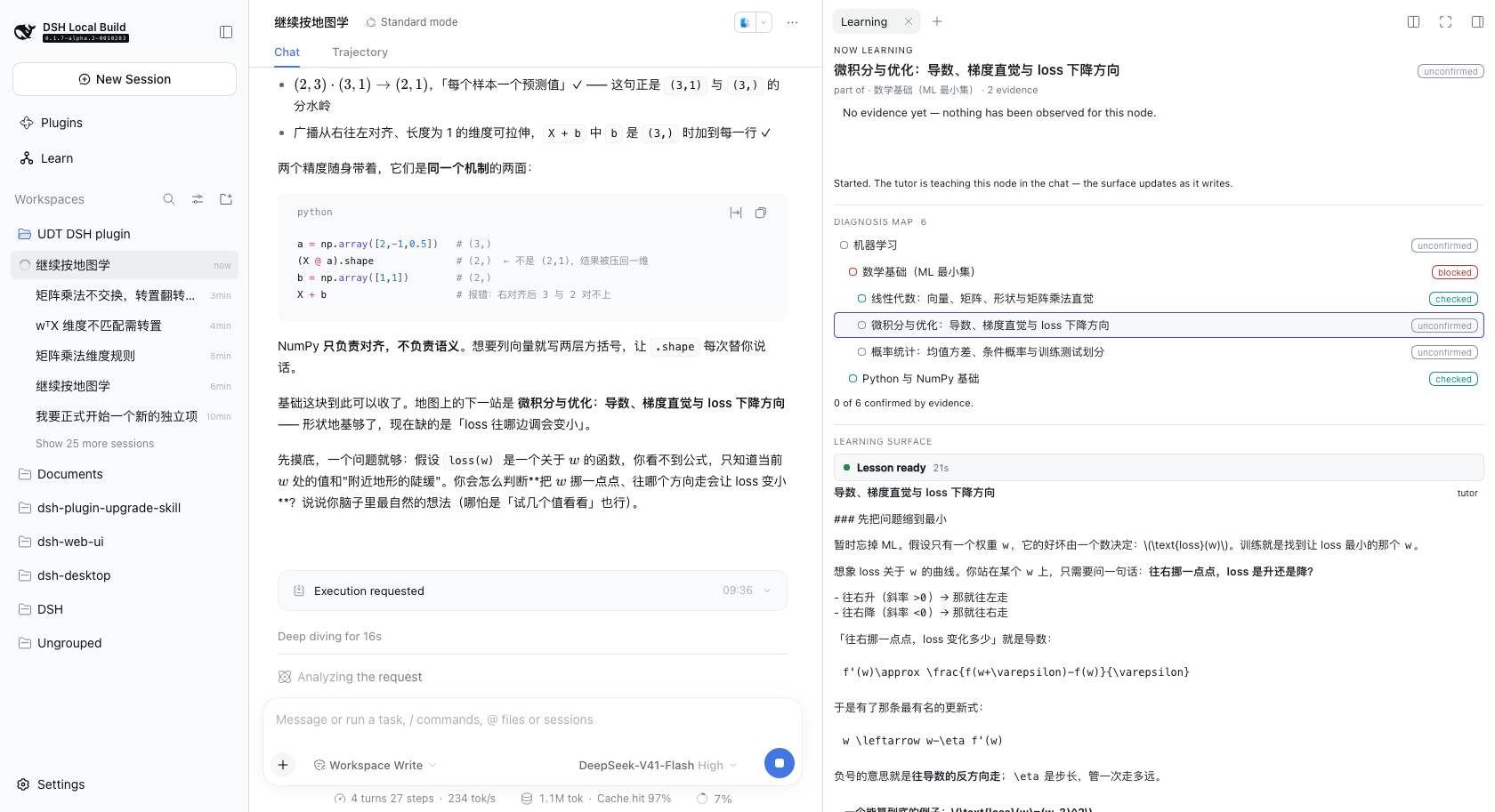
The learning surface docked in the right sidebar, beside the conversation. The map, the lesson and the chat are on screen at once, so answering a check never means leaving the lesson.
Early development
v0.0.x. The learning loop works end to end — a real goal, a real diagnosis
map, a tutor-written lesson, a check answered in the chat, recorded evidence,
and a next step the tutor chose — but this is not a finished product. Expect
breaking changes, and expect gaps to be documented rather than papered over.
Not built yet, and not claimed anywhere below: PDF or document ingestion, RAG,
flashcards, resource libraries, analytics, or course generation.
Two halves, one system
The unusual thing about this project is that the teaching and the runtime are separate programs, and only one of them makes decisions.
| Owns | Where | |
|---|---|---|
| Universal Diagnostic Tutor skill = the teaching brain |
What to teach next: diagnosis, teaching moves, pacing, when a check is passed, what the next step is | that repository (v2.1, MIT) |
dsh-diagnostic-tutor= the learning runtime |
Where it is kept: persistent learner state, the diagnosis map, structured lessons, the UI | here |
That split is not a packaging detail. This repository contains no teaching logic: no rule that says "if blocked, explain the prerequisite", no rule that says "if wrong, give a simpler example". Those live in the skill. The runtime stores what the tutor decided, shows it, and never decides it.
The loop
Goal  →  Diagnose  →  Map  →  Learn  →  Check  →  Decide  →  Next lesson
 │                      │        │         │         │            │
 │                      │        │         │         │            └ the tutor names
 │                      │        │         │         │              the next node, with a reason
 │                      │        │         │         └ the learner answers in the chat
 │                      │        │         └ the tutor writes the lesson into the side panel
 │                      │        └ nodes appear only as diagnosis reveals them
 │                      └ the tutor asks what you actually know
 └ stated in your own words, in the chat
Read left to right, that is also the guarantee: the runtime never advances on its own. A decision is stored with the tutor's reason, shown to the learner, and waits to be pressed.
The demo scenario
The screenshots below come from one scenario, run against real DeepSeek Harness with the real skill:
I want to learn machine learning. I know some Python, but my math is weak.
The tutor asks what the goal is for before it teaches anything, then grows a map one diagnosis at a time.
Nothing in these images is a fixture or a mock — they are screenshots of the
running app. demo-1 is a cold start from an empty store; the rest are the same
scenario resumed, because the clarify-then-diagnose phase costs several model
turns and a cold start to a full lesson runs to roughly fifteen minutes.
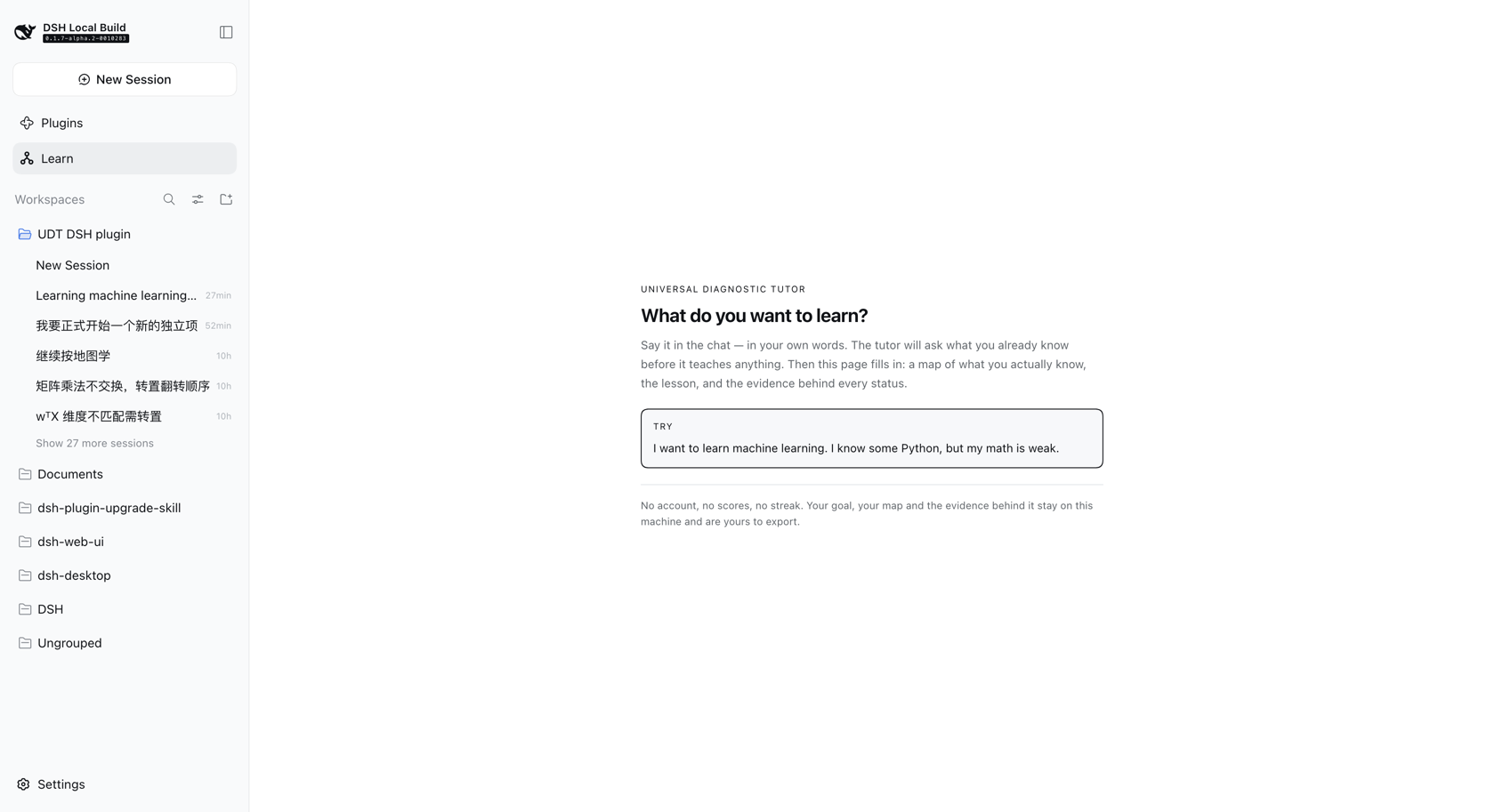 |
First use. No goal yet. One question, and the sentence that answers it — no wizard, no empty dashboard. |
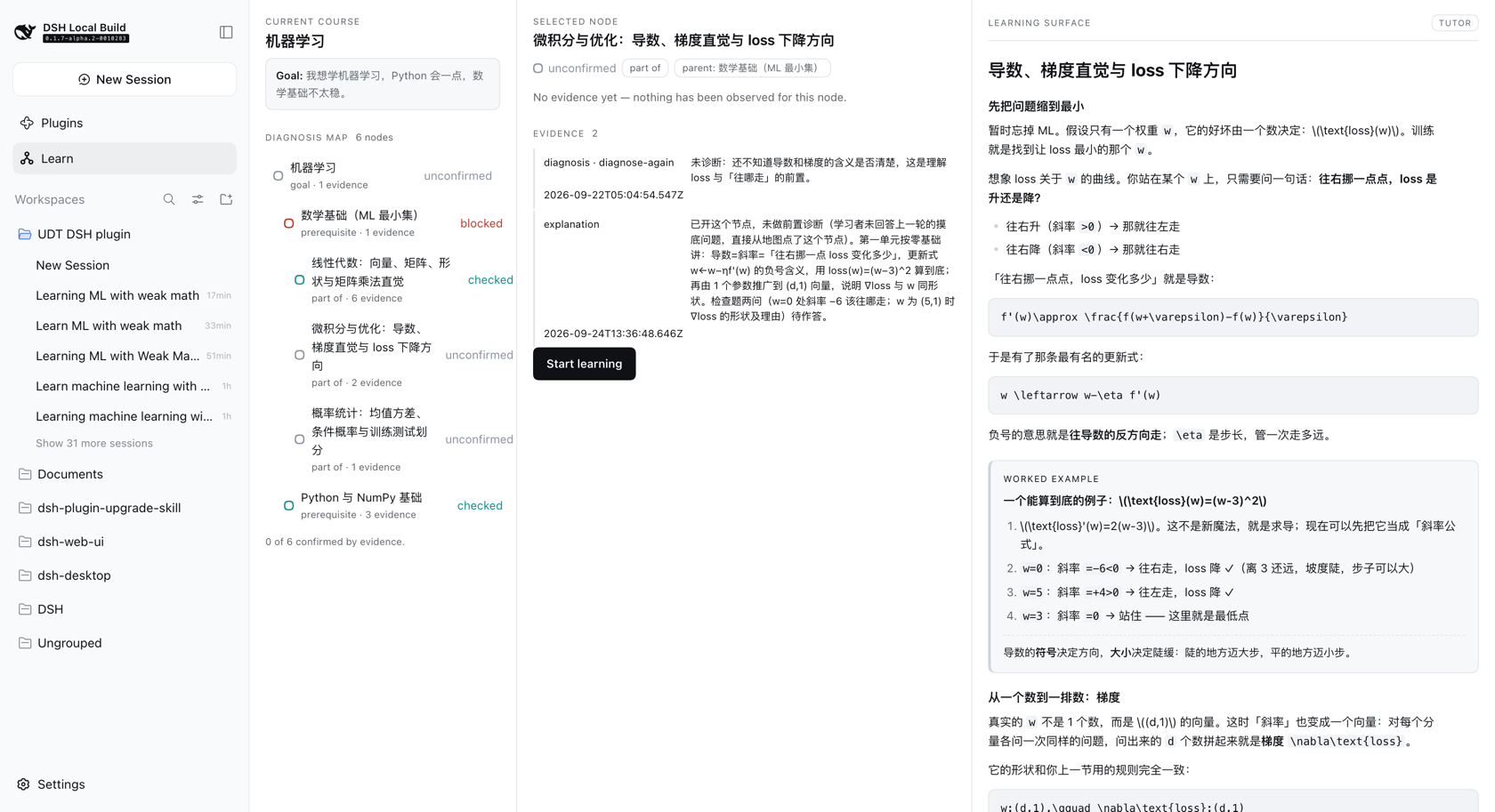 |
The diagnosis map. Six nodes, each traceable to evidence, nested by depth. blocked and checked read at a glance; nothing is confirmed without a check behind it. |
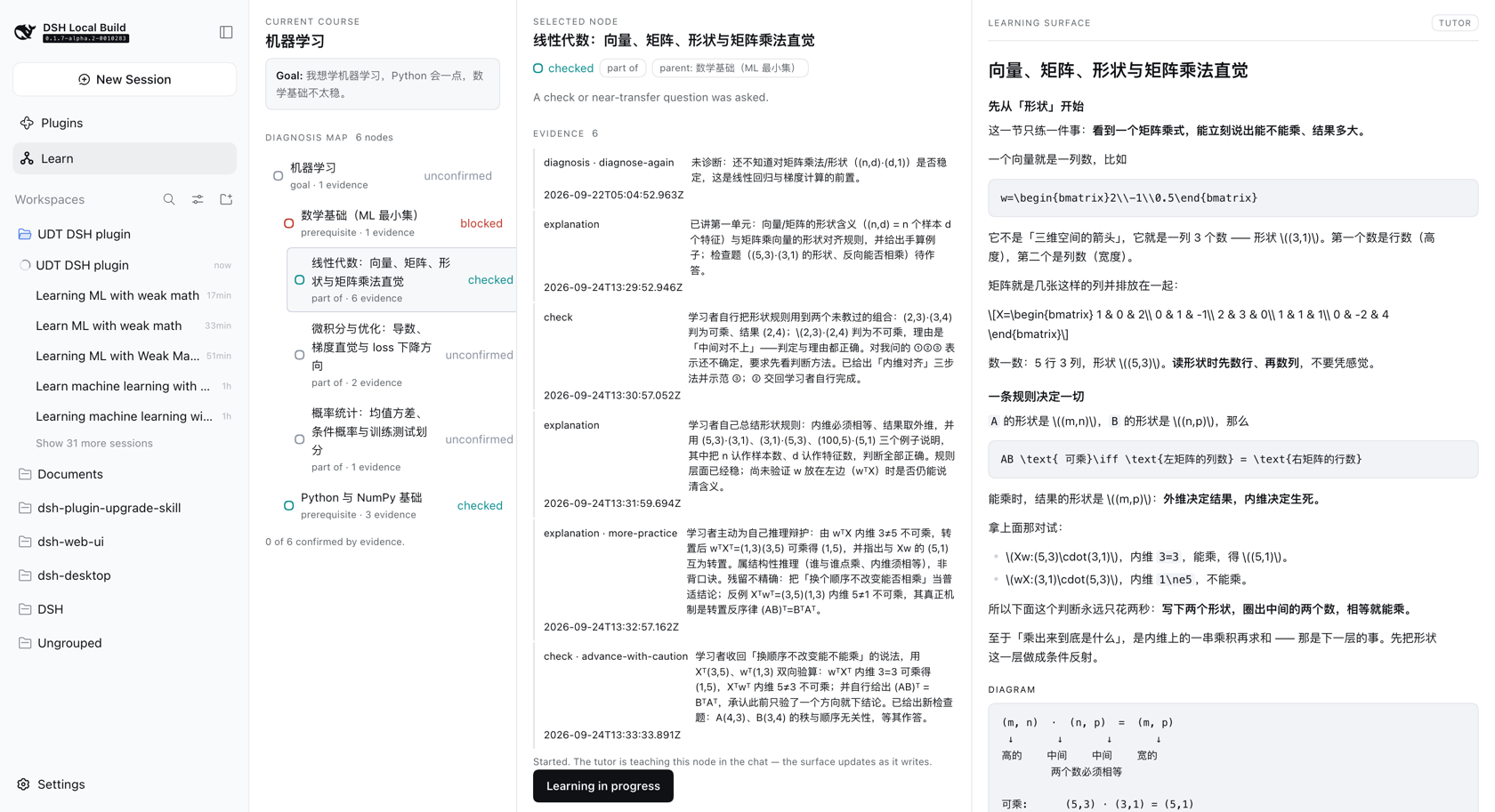 |
A lesson. Real headings and lists, a worked example set apart, a diagram in its own frame, and a check that hands the turn back to the learner. |
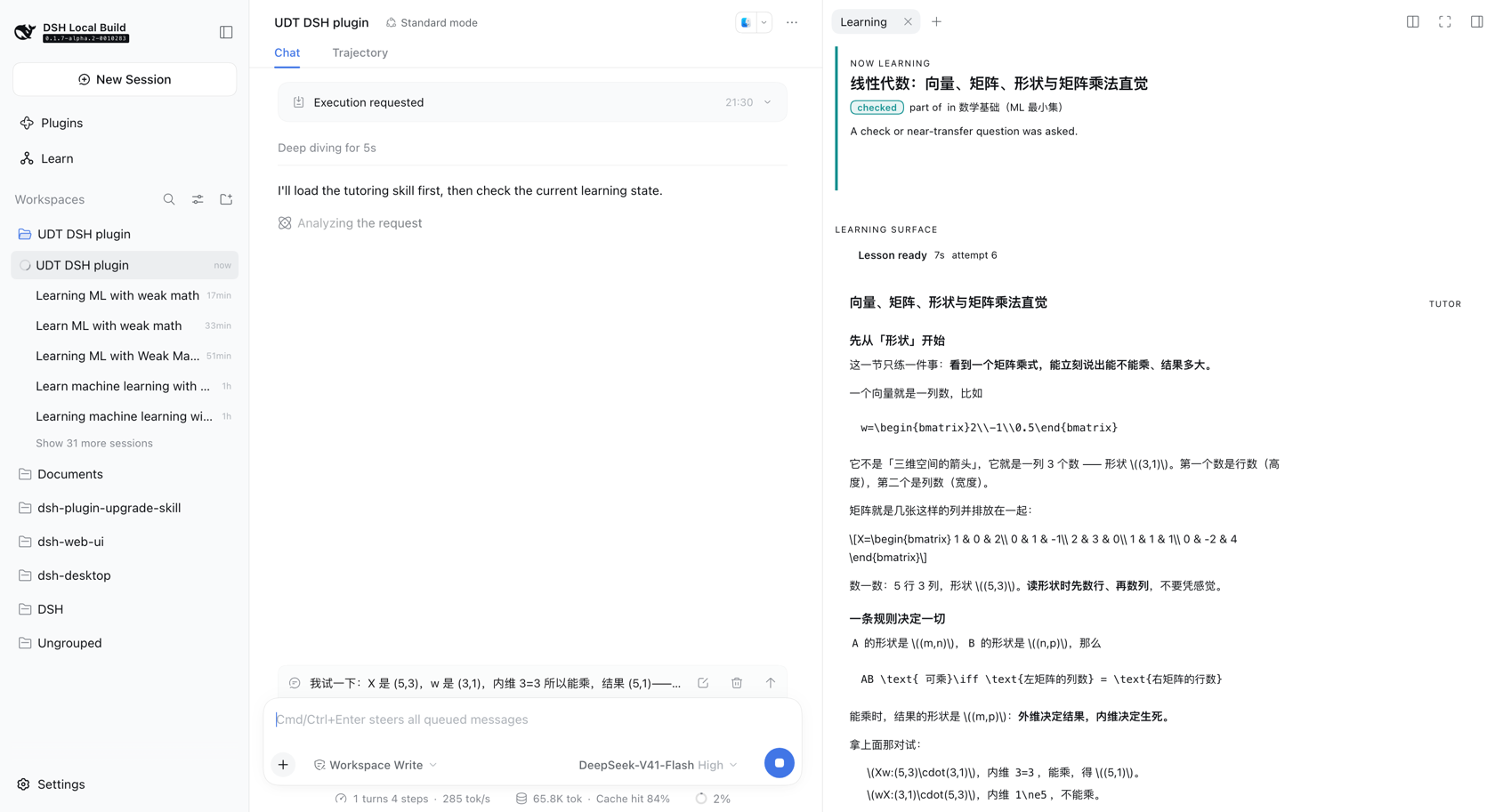 |
The docked surface. The same loop in the right sidebar, with the handoff progress line (Lesson ready 7s) so a slow model turn reads as working rather than broken. |
Why this is not just another AI tutor
Most "AI tutor" projects are a prompt wrapped around a chat box: the model teaches, and nothing about the learner survives the conversation. Three things are different here.
The teaching brain is a real, separate artifact. Diagnosis, teaching moves, pacing and mastery judgement live in a written skill with its own protocols — not in a system prompt this repository invented. This plugin depends on it and refuses to duplicate it.
State is real, and it is the learner's. A goal, a map of what you actually
know, and a record of the evidence behind each status. Nothing is confirmed
without a check to back it, nothing is scored, and it is all visible and
exportable.
The runtime does not decide. The tutor names the next step and says why; the runtime stores that and shows it; the learner presses Continue. There is no path by which progress advances on its own.
Its state vocabulary is not invented here either: nodes carry the skill's own seven status terms, and checks carry its six readiness outcomes.
Why a map does not contradict diagnosis-first
The skill is explicit that a broad goal must never become a pre-expanded
curriculum or a course outline. This plugin does not produce one. Nodes appear
only as diagnosis reveals them, every node is unconfirmed until a check
produces evidence, and the map is reversible — new evidence moves it. What you
see is a diagnosis map, not a syllabus.
Compatibility
A DSH profile can resolve more than one harness version at once (the running host, the shared profile fallback, and each plugin's own store). Treat this matrix as load-bearing, not decoration.
| This plugin | Verified against DSH | Node |
|---|---|---|
0.0.10 |
0.1.7-alpha.2 (also composed under 0.1.5-rc.1) |
^22.19.0 || >=24.0.0 |
Rules this repository enforces mechanically:
- Named exports only. A
export defaultplugin makes Cordis' loader prefer.defaultand silently dropinject— a documented DSH outage. Pinned by a test that fails if a default export is ever introduced. @deepseek-ai/*is importedtype-only, so the compiler erases it and no second runtime copy can be resolved. Enforced byverbatimModuleSyntax, and verified on the built artifact (it contains zero imports).- No
instanceofacross package boundaries. Take runtime objects fromctx. - Peer ranges are wide (
<0.2.0); dev dependencies pin one exact cohort.
Install
There is no npm release yet. Install from the repository; that is the only path until
v0.1.0.
Requirements
| DeepSeek Harness | verified against 0.1.7-alpha.2 |
| Node | ^22.19.0 || >=24.0.0 |
| pnpm | for the build, and because dsh plugin forwards to it |
| the Universal Diagnostic Tutor skill | the teaching brain. Without it the runtime loads and records state, but no lesson is ever written — and it says so, in the log and in the panel |
Install
git clone https://github.com/SenmuuuuW/dsh-diagnostic-tutor
cd dsh-diagnostic-tutor
pnpm install
pnpm build

# --profile is mandatory: `dsh plugin` without it exits non-zero, because it is
# a thin pnpm forwarder that needs a profile to forward into.
#
# Use an absolute path. `dsh plugin` runs pnpm inside the profile directory, so
# a relative path would resolve against the profile, not your checkout.
dsh plugin --profile <profile> add "$PWD"
Verify it mounted
# The plugin should appear in the merged tree, as an insert row.
dsh --profile <profile> --dump-config | grep -A2 dsh-diagnostic-tutor
Then start the profile with a web surface and look for Learn in the sidebar:
dsh <profile> --port 8399 --no-open
A --dump-config entry only proves a loader row exists — it is not proof the
plugin runs. For that, open the panel: a first run shows What do you want to
learn?, and a profile with no skill shows the no-tutor notice instead.
Known install limitation. A github: install also requires approving the
package's build script in the profile's pnpm-workspace.yaml, which is
permission for that code to run on your machine at install time. Prebuilt
artifacts remove this step, and are the intent from v0.1.0 onward.
Learner state and the diagnosis map
State lives in one Cordis storage domain (udt, version 1) over the
official storageDomain seam. The profile chooses the medium — the standard
profiles route it through dsh-storage-json under dshHomePath('storages') —
so this plugin never hardcodes a path.
With the json backend you get exactly one document, <storage root>/udt.json
(~/.dsh/storages/udt.json for a default install):
{
  "unit": { "name": "udt", "version": 1 },
  "global": { "initializedAt": "…", "updatedAt": "…", "activeCourseId": "…" },
  "tables": { "courses": { "…": {} }, "nodes": { "…": {} } }
}
| Slot | Holds |
|---|---|
global |
the learner singleton — preferences, active goal, initializedAt |
tables.courses |
one record per learning goal, in the learner's own words |
tables.nodes |
the diagnosis map: id, courseId, title, parentId?, relation, state, evidence[] |
Two deliberate rules:
- zod is the contract. Every record is validated at the durable boundary, so a hand-edited or corrupt document fails loudly instead of entering memory.
- No scores, ever. There is no field for points, grades or percentages — the skill forbids turning mastery into a score, and a test asserts that no such key exists anywhere in the persisted document.
Records are never mutated in place; writes go through put/set on one
per-domain write chain, so concurrent writers cannot interleave.
How the map is kept from becoming a syllabus
The rules are enforced in src/diagnosis.ts as pure functions, so no tool can
route around them:
- a node is born
unconfirmed, and stays there without evidence; confirmedrequires acheckortransferevidence entry. Explanation or practice alone never confirms — the skill is explicit that "explanation alone and one lucky answer never confirm readiness";- a goal node can never be confirmed: it is the frame of the map, not a claim about the learner;
- every non-goal node must attach to a parent that already exists in the same course, and there are no cycles — so the map grows outward from what has been diagnosed, one step at a time;
- at most 8 nodes per call and 40 per course. A single call cannot plant a term's worth of material;
relationisgoal | part-of | prerequisite | related. There is deliberately nonext-in-course, because nothing in this runtime knows a teaching order.
Tools
Five, and none of them decides anything about teaching.
| Tool | Does |
|---|---|
udt_status |
reports the runtime: domain, version, goals, map, and the current focus |
udt_goal_create |
records a goal and plants the map root — and nothing else |
udt_map_get |
reads the map with each node's relation, state and evidence |
udt_map_update |
add-nodes · set-state · add-evidence |
udt_lesson_update |
writes teaching into the learning surface as blocks |
udt_decide_next |
records where the learner should go next, and why |
The division is the architecture: the tutor decides what to teach, when to check, and what an answer showed; the runtime decides what may be stored and renders it. There is no branch anywhere in this repository that says "if blocked then explain the prerequisite" — that is the skill's call, made in the chat.
The loop
press Start learning
   → focus recorded (courseId, nodeId, startedAt, status)
   → the tutor is woken in that conversation with the node named
   → the tutor teaches into the surface via udt_lesson_update
   → the learner answers the check in the chat
   → the tutor judges, records evidence via udt_map_update, decides the next move
   → the panel follows
   → the tutor decides the next step with udt_decide_next
   → the panel shows the recommendation and its reason
   → the learner presses Continue, and the next node begins
The decision
action is the skill's six readiness outcomes, reused rather than re-invented:
the words for "what this concept showed" and "where that sends the learner" are
the same words. The runtime only needs one structural fact about each — whether
it names a target:
| outcome | target | means |
|---|---|---|
advance / advance-with-caution |
required | move there |
step-down |
required | the blocker; usually a prerequisite |
review-first |
optional | go back, or review here |
more-practice / diagnose-again |
forbidden | stay here |
A move ends the focus and stamps endedAt; staying leaves it open. Nothing
moves on its own — the learner reads the reason and presses Continue.
The wait, measured
Moving to a node is not instant, so the wait is a persisted record keyed by target node — which makes it idempotent, refresh-proof, restart-proof and retryable — and it carries a timestamp per stage:
requestedAt → focusRecordedAt → promptedAt → firstActivityAt → lessonAt → observedAt
The same record is the progress line (focus recorded → tutor requested →
tutor working → lesson ready, with elapsed seconds) and the measurement. A
real run against DSH 0.1.6-alpha.2 and the real skill:
| stage | when |
|---|---|
| focus persisted | 0.0s |
| followup accepted | 0.0s |
| first tutor activity | 1.0s |
| lesson written | 26.1s |
| UI observed | 26.1s |
The plugin costs about a second; the rest is the model writing. A stall is derived from the record rather than stored, and retrying never touches the focus — a timeout is a statement about the wait, not about where the learner is.
Start learning is a user-role turn attributed to this plugin, not injected
context: agent.inject() would add model-visible context without waking an idle
agent, so nothing would happen until the learner typed. Opening a turn is what
the button means.
Two surfaces, one state
| Surface | Where | For |
|---|---|---|
| Learning tab | right sidebar, beside the chat | everyday work — map, node and lesson while you talk |
| Learning panel | the main column (main) |
focus mode — the whole runtime at once |
The tab is the reason the loop is usable: the full panel fills the main column, which is also where the conversation lives, so with only that panel answering a check meant leaving the lesson. The right sidebar is a separate column.
Both run on one shared useLearning state, so they cannot disagree about what
is focused or what the tutor wrote. The panel's Answer in the chat button
returns to the conversation and docks the tab in the same step.
The right sidebar hosts session-scoped tabs, so it can only accept one while a session surface is mounted — which is why docking happens on the way back to the conversation rather than at load.
Teaching-brain detection
At load the plugin asks the platform's own skill registry whether the Universal Diagnostic Tutor skill is installed — no path is hardcoded, no skill root is assumed, and nothing is copied. A missing catalog, a missing skill and an unreadable body each degrade to a reported status rather than an error.
Compatibility is probed by capability, not by a version string: the skill's
maintenance contract permits only name and description in frontmatter, so
it cannot declare a version. The result carries a short content digest as a
version hint.
Detection results stay internal — logged at debug, absent from every tool
output. The skill forbids naming its files, versions or repository in
learner-facing text, and this runtime will not be what leaks them.
How the two halves agree
The skill's guardrails say mastery tracking must never become "scores, databases, hidden memory, or a curriculum roadmap", while this runtime deliberately persists state and renders a map.
Until v0.0.8 that tension was bridged from this side: a short system-prompt
section explained the runtime's storage semantics to the teaching brain. UDT
v2.1's learning_runtime_contract.md now states all of it in the skill's own
words — what a runtime may hold, when a decision is recorded, and that a turn
which judged an answer is not finished until the next step is recorded — so
the bridge was deleted rather than kept as a second voice. The plugin got
better at it, which is the evidence it belonged upstream.
The panel
The browser half registers two things and nothing else: a sidebar icon
(sidebar.panellist, a list) and the page it opens (main, a keyed slot).
The sidebar id and the panel key come from one constant — a drift between
them would leave the icon opening nothing.
It reads as one sentence, left to right:
[ Course + Diagnosis Map ] → [ Selected node ] → [ Learning surface ]
There is no dashboard: three panes, and the map is the navigation.
Learning Blocks
A block is { id, type, content, metadata? }. The schema is host-side
(zod-validated at the durable boundary) and the renderers are browser-side,
keyed by type:
| Type | Content |
|---|---|
text |
md — markdown, with the skill's \(...\) math convention |
example |
title, steps[], takeaway? |
diagram |
format (ascii | mermaid), spec, caption? |
check |
prompt, expect?, hint? — the stop-and-wait surface |
Adding Formula, Code, Comparison, Practice or Resource later means adding one registry entry, never rewriting the lesson renderer. An unknown type renders a readable placeholder rather than throwing, so a lesson authored by a newer host still renders here.
Browser API
Three calls, at /diagnostic-tutor/api:
| Route | Returns |
|---|---|
GET /overview |
the current course and its whole map (course: null on a first run) |
GET /node?id= |
one node with its evidence, parent and children |
POST /lesson {nodeId} |
the prototype lesson, built once and reused after that |
Every request passes a trust fence: a bare ctx.webServer.register() route
inherits no authentication, so the route checks that the request arrived at a
loopback Host, from a loopback Origin, and is not marked cross-site. Anything
else gets 403 and no body. The browser receives views only — no storage
path, no domain handle, no raw record.
Preview
The panel takes its API as a prop, so the UI runs with no DSH and no agent:
pnpm build && pnpm preview # then open the printed URL
preview/index.html loads the real built bundle through a
__ModuleLoader__ shim over preview/fixture.js, which models a learner who
said "I want to learn machine learning" with shaky maths:
Machine Learning            [goal, unconfirmed]
├─ Math Foundations         [prerequisite, blocked]
│  ├─ Linear Algebra        [part-of, unconfirmed]
│  ├─ Calculus              [part-of, unconfirmed]
│  └─ Probability           [part-of, unconfirmed]
└─ Python                   [prerequisite, unconfirmed]
To capture the panel from a live profile instead:
pnpm screenshot "<dsh-url-with-token>" preview/dsh-ui.png
Development
pnpm install
pnpm typecheck   # tsc --noEmit  (host and client)
pnpm test        # 250 tests: unit, guard, DOM, render, real composition
pnpm build       # tsc -> lib/ (host) + tsdown -> lib/client.js
tests/harness.ts mounts the same storage stack the standard profiles use
(systemPrompt → tools, and storage → storage-json → storage-domain)
over a temporary root. Persistence tests therefore exercise a real
serialize → file → reparse → validate round trip rather than a fake, and
--dump-config is never mistaken for proof that a plugin loads: that only
shows a loader row exists.
Roadmap
| Version | Ships |
|---|---|
v0.0.1 |
installable bundle, plugin loads, guard + composition tests |
v0.0.2 |
udt storage domain, learner round-trip, udt_status tool |
v0.0.3 |
teaching-brain detection, udt_goal_create, the diagnosis map (udt_map_get / udt_map_update) |
v0.0.4 |
the client half: slot-mounted panel, clickable map, node detail, Learning Blocks, browser API |
v0.0.5 |
the loop: learning focus, tutor-written lessons, check → evidence → state, live panel |
v0.0.6 |
the learning surface docks beside the chat; both surfaces share one state |
v0.0.7 |
the tutor decides the next step; focus lifecycle; NEXT BEST STEP card |
v0.0.8 |
handoff record, progress line, retry, and the latency measured |
v0.0.9 |
DSH 0.1.7 compatibility, the first real A → B, and product polish |
v0.0.10 |
current — export and delete your data |
v0.1.0 |
first playable MVP — state export/reset, settings, i18n, math typesetting |
Trust
DSH does not sandbox plugin code: an installed plugin runs in-process with your
privileges, and a bare ctx.webServer.register() route inherits no
authentication. This plugin's commitments:
- reads and writes only its own storage domain;
- serves its browser half only from loopback-fenced routes it checks itself;
- makes no outbound network requests;
- writes no files outside the harness's own storage;
- keeps learner state visible, exportable and deletable — never hidden memory. Export my data writes one self-describing JSON file; Delete everything removes it, behind a second click, irreversibly. An undo would mean keeping a copy of exactly what was asked to be deleted.
If the store is damaged
The runtime declares invalidRecords: 'backup-and-skip', which is the
platform's recovery path: a record that fails its schema is moved aside and the
domain opens without it. It does not currently take effect here, because the
platform only honours it when the unit can move a per-record document aside,
and this domain uses the default single layout — one udt.json holding
everything. So one malformed record still rejects the open, the plugin reports
it and stays inert rather than failing the profile, and nothing is destroyed:
removing the offending record by hand restores the rest.
The fix is a one-line change to layout: 'per-record', which the JSON backend
seeds from the existing single file. It is not done yet because it changes the
on-disk format, and that is a decision worth making deliberately rather than as
a side effect. Until then, export before you edit.
License
MIT. The Universal Diagnostic Tutor skill is a separate MIT project by the same author and is not vendored here.
Planning and architecture research for this project live in
docs/planning/.
No comments yet. Be the first to write one.