dsh-multitask — the Multitask "shock absorber" mode
中文 · Design notes and measured evidence · MIT License
A work mode for DSH in which the main conversation does exactly three things: understand what you asked for, turn it into task briefs, and report back what the Subagents concluded. Every piece of process data — file contents, command output, build logs, search results, dead ends — is digested inside a Subagent's context and never enters the main one. The main conversation therefore holds only high-value information.
This is a mechanism, not a prompt asking the model to behave. Once the mode is selected, the main conversation (the coordinator) genuinely has a narrower tool surface: the tools that would drag in process data — writing files, running commands, searching the web — are not in its visible set. It cannot call them, so it cannot pollute its own context. A Subagent (worker) is the opposite: it gets the full tool surface, does the work, and returns only its conclusion.
Zero runtime dependencies. No changes to DSH source.
How it differs from other modes
| Main conversation (coordinator) | Subagent (worker) | |
|---|---|---|
| Tool surface | read-only checks + delegation + result retrieval + interaction | full (write files, run commands, build, search…) |
| Context | your request + task briefs + conclusions | all the process data |
| Job | understand, translate, dispatch, verify, report | do the work |
What the coordinator keeps (a whitelist):
- Read-only checks —
readgrepglobfile_info - Delegation —
subagentsubagent_forksubagent_ptcsubagent_minimal - Subagent control —
send_messageinterrupt_agentlist_agents - Result retrieval —
job_listjob_outputjob_kill - Orchestration —
workflow - Interaction and self-management —
ask_user_questiontodo_writecreate_goalget_goalupdate_goalexit_plan_modepresentskill
Anything not on that list is withheld by default — write, edit, pwsh, web_search, web_fetch, read_image, ssh_*, task_board_*, plugin_manager, and so on. The rule is a complement: withheld = currently visible − kept. Any tool the host adds later is therefore also withheld from the coordinator by default, with no change needed in this plugin.
The read-only tools are kept on purpose: the coordinator is meant to verify a Subagent's claims independently instead of trusting them blindly.
Installation
From the published package (recommended)
dsh plugin --profile <profile> add dsh-multitask
--profile is an option and cannot be dropped — dsh plugin add dsh-multitask fails outright with error: required option '--profile <name>' not specified. <profile> is the profile to install into: the desktop app owns one called desktop, and this checkout commonly uses web; if you are unsure, look at the directories under ~/.dsh/profiles/.
The package then lands in that profile's node_modules, and DSH automatically appends dsh-multitask to the profile's dsh.profile.bundles layer list (because this package declares dsh.bundle.patch). The bundled cordis.patch.yml inserts a bare package name with no absolute paths — so it works on any machine, any user name, any install location. Restart the app afterwards — bundle layers are composed at startup.
You can also install it from the in-app Plugins page, which needs no command line.
Desktop (Electron) note. Fully quit the app first — pnpm rewrites the profile's
node_modules, and the running app holding those files open will make it fail. The desktop app's owndshlauncher can managedesktop; adshinstalled separately from npm is refused outright (error: profile "desktop" is managed exclusively by the Electron application). In that case use the in-app Plugins page, or the source route below.
From a source checkout
To run the sources in your working tree (edits without going through npm), append this block to the profile's cordis.patch.yml, pointing at your local entry with an absolute file:// URL:
- insert:
    - id: multitask
      name: 'file:///absolute/path/to/dsh-multitask/lib/index.js?v=6'
Two things to watch:
- Spaces and
%in the path must be percent-encoded (common on Windows). Let a program encode it rather than typing it by hand — in PowerShell:(New-Object System.Uri('H:\my repo\dsh-multitask\lib\index.js')).AbsoluteUri. - The trailing
?v=Nis a cache key, and it only means anything in thisfile://mode (see Development → "Making source edits take effect").
Adding this row needs no restart: DSH watches cordis.patch.yml and hot-reloads it.
Usage
When creating a new session, pick "Multitask 减震器模式" in the mode selector, then just ask for what you want.
The mode can only be chosen before a session starts. A session that is already running cannot switch into it — that is an existing DSH constraint (the tool surface and prompt freeze on the first turn), not a limitation of this plugin.
The coordinator translates your request into self-contained task briefs — a Subagent cannot see this conversation, so a brief must carry everything it needs (goal, verified current state, project conventions, safety rails, numbered tasks, conditional branches, stop conditions, report format). Independent briefs are dispatched in parallel, and the coordinator keeps working while they run.
The four kinds of Subagent
The coordinator has four delegation paths, and the difference is mainly the tool surface:
| Delegation tool | Tool surface | Best for |
|---|---|---|
subagent |
full | the default — writing code, running tests, editing files, execution work |
subagent_fork |
full + the completed turns of this conversation | review and continuation — when the work must build on what is already established here |
subagent_ptc |
PTC-collapsed: only run_code is directly callable; every other tool is reached from inside a program via a generated SDK |
programmatic bulk work — filtering, aggregating, or moving large data sets whose intermediate values should never enter the context |
subagent_minimal |
read-only: write and execute tools are removed | investigation, quick answers, fact-checking |
When in doubt, use subagent. That guidance lives in the coordinator persona, and the coordinator picks per task.
Delegation is one level deep: coordinator → worker, and a worker cannot delegate further. Jobs that need splitting are split by the coordinator into flat briefs.
Settings
Once installed, DSH's settings gain the following.
The "Multitask" page — two cards
| Card | Field | What it does |
|---|---|---|
| Model used by Subagents | multitask.subagentModels[] |
the default model for each of the four worker kinds. Either "use one model for every Subagent" or per-kind; the default is "inherit coordinator". Applies only to sessions created afterwards |
| Subagent parallelism limit | subagent.maxActiveSubagents |
the same field as the row in Settings → General, and it takes effect immediately |
The "General" page — two rows (alongside the built-in language / appearance / developer-tools rows)
| Row | Field | Scope |
|---|---|---|
| Maximum recursion depth | subagent.maxDepth |
host-level: applies to every mode, not just Multitask |
| Subagent parallelism limit | subagent.maxActiveSubagents |
same; and it is the same value as the card on the Multitask page |
The session header also shows how many Subagents are currently running.
The model card's shape is derived, never stored: all four kinds pointing at one route means "use one model for every Subagent", anything else means per-kind. Switching the shape creates no dirty state.
The Subagent parallelism limit
There is only one value: the host's subagent.maxActiveSubagents. It appears in two places in Settings (the card on the Multitask page, and a row in General), but both edit the same field — change it in either and the other follows immediately. This plugin adds no cap of its own, and there is no second layer cutting you off.
That field's default is 8: with no configuration, 8 is all you get. But 8 is a default, not a ceiling — whatever you write is the limit. To run N, set it to N — in either of the two Settings locations, or by giving the host row a config:
- id: subagent
  config:
    maxActiveSubagents: 16
When the limit is exceeded, the extra delegations are dropped before anything starts, with this error, verbatim:
Error: subagent limit reached (active child limit: 8); wait for an existing child to finish or complete this work with the current agents
The refusal is the host's. It is neither a broken plugin nor a fault: the host raises it while handing out slots, before any Subagent is created — so you get a plain error rather than a Subagent id. The fix is to wait for existing Subagents to finish, or merge several tasks into one brief for a single Subagent. Do not retry the same fan-out unchanged.
The count is "total live Subagents under one main Agent", not just the ones you started in the same round: a worker that has finished its brief but has not exited still occupies a slot. So the safe pattern is "dispatch a batch → let them all finish → dispatch the next batch".
⚠️ "I dispatched 10 and they all succeeded" does not prove the limit was raised. That is blocking / serial execution: one runs at a time, and the next starts only after the previous ends, so the live count never exceeded 1. Only a fan-out inside a single message actually competes for slots. To tell parallel from serial, look at how many Subagents are running at one instant, not at how many you dispatched in total.
Approving dangerous operations
In this mode all the real work is done by Subagents, and DSH turns their approval chain off by default (the policy is pinned to never, and the model is additionally told to self-censor). This plugin wires it back up as a two-level gate:
| Level | Behaviour |
|---|---|
| Level 1 (deterministic rules) | safe commands run directly, without interrupting you — no extra model request, no change to the sandbox |
| Level 2 (relay to the parent session) | dangerous commands raise an approval card in the main conversation for you to allow or reject — reusing the existing approval panel, with no new UI |
Level 1 covers what the sandbox cannot express: destructive commands inside the workspace (rm -rf ., git reset --hard, git clean -fd), non-file dangers (git push --force, npm publish, curl | bash, privilege escalation, execution-policy changes), and writes outside the workspace. A missed pattern behaves exactly like having no plugin at all, so Level 1 can only add a prompt — never remove protection.
The red line: all of this is enabled only in interactive sessions — the parent session's approval policy must be ask. Headless and unattended deployments rely on never to guarantee they are never left waiting for an answer that will not come, and this plugin does nothing at all in that environment.
Authorisation is one-shot every time: "Allow once" authorises that call only, and the same call prompts again next time. There is no "always allow".
With a background dispatch whose turn has ended, the first relay fails (it needs the parent session to have an open turn). The plugin then sends a message from that Subagent into the main conversation, naming which child session it is, what it wants to run, and where to answer — and that message itself wakes the idle parent session, so the plugin immediately retries the relay against the turn it just opened. In practice an ordinary approval card therefore appears in the main conversation within seconds; answer it there.
Only if that retry also fails (the window elapses, 10 seconds by default) do you need to open the child session named in the message and decide there. The message is not an approval — the message channel carries no approval result, so reading it as a go-ahead would bypass the gate; until you answer, that call stays blocked.
Common problems
The mode does not appear in the new-session selector. First confirm the plugin row is actually installed (visible in the plugins list, and not disabled), then restart the app. If it is still missing, look in the log for warnings beginning with dsh-multitask — they name the cause (registry absent, composition invalid, id held by an earlier module instance, and so on).
A Subagent fails to run any command at all, with this error, verbatim:
Error: SetNamedSecurityInfoW failed (Win32 5): grantWrite(<workspace path>)
This is not about concurrency (it reproduces with a single Subagent running) and not about the command (even Get-Location fails). It is a directory-permission precondition on the workspace folder: DSH's ACL sandbox must write a security descriptor onto the session's writable root, and that call includes a mandatory integrity label. The label lives in the SACL, so the call additionally needs WRITE_OWNER, while the owner's implicit rights cover only READ_CONTROL and WRITE_DAC. A folder that grants you only Modify therefore lacks it and the call fails — which is why a workspace under your user profile works with no setup, while a folder created directly under a drive root (inheriting only Modify) does not.
The repair is already automatic. At session start this plugin checks the workspace folder and, if WRITE_OWNER is missing, adds exactly that one permission (a non-inherited TakeOwnership) and stops. It needs no approval and no elevation, and you should never widen a folder to Full control for this — that would additionally hand over the right to change permissions and take ownership, far beyond what is needed.
If a Subagent is still refused, the automatic grant did not land: the folder is owned by another account, or it is not writable by this process. In that case, treat it as your decision — it is the specific, fixable cause, with the folder named. Read-only tools are unaffected, so content and file-metadata tasks are always delegable.
You hit the parallelism limit. See "The Subagent parallelism limit" above; the refusal is the host's. Wait for existing Subagents, or merge tasks into one brief.
No approval card appeared. First check that the session's approval policy is ask (a headless configuration is never, and then this plugin stays entirely out of the way). If you dispatched in the background and the turn has ended, see the last paragraph of "Approving dangerous operations".
Source edits have no effect. You must restart the app. Bumping ?v=N in the profile patch alone is a no-op for a row that is already running: the loader only sees that its name changed, so it neither reloads the module nor restarts it. See "Making source edits take effect" in docs/DESIGN.md.
Verifying that it actually works
With the mode selected, have the coordinator try these:
| You say | Expected |
|---|---|
| "Read package.json yourself and tell me the version." | ✅ succeeds (read-only checks are kept) |
"Run git status yourself." |
❌ the call is impossible — the tool is not in its visible set |
"Delegate to a Subagent to run git status and report the conclusion." |
✅ the Subagent runs it and brings back only the conclusion |
| "Delegate to a Subagent to read package.json and report the file name and size." | ✅ the read-only route always works (read / file_info) |
The log shows which tools were actually withheld (all lines are prefixed dsh-multitask:):
dsh-multitask: coordinator scope engaged — withheld N tool(s): edit, pwsh, read_image, ssh_exec, ...
The approval gate's preconditions and its verification steps — including the fallback path for background dispatches — are in docs/DESIGN.md, under "Verifying that it actually works" and "Approving dangerous operations".
Self-correction: each side's conclusions get checked by the other
This mode has a quiet but important property: a claim from either side must be grounded in evidence — neither gets by on "I remember" or "I assumed". It does not depend on a model being asked to review itself; it rests on two mechanisms:
- When the coordinator's premise is wrong, the worker pushes back. The worker persona requires it to ground every claim in what it actually observed, never to report a result it did not obtain, and — on hitting a blocking situation — to stop and report it verbatim instead of improvising a workaround. So when a premise in the brief does not hold, it names the premise that does not.
- Whatever a worker reports, the coordinator re-checks independently. Keeping the read-only tools (
read/grep/glob/file_info) is exactly what lets it go and look for itself rather than treating the report as fact.
In other words: the worker is not there to agree with the brief, and the coordinator may not promote a report into a conclusion — neither side accepts the other's assertion on trust.
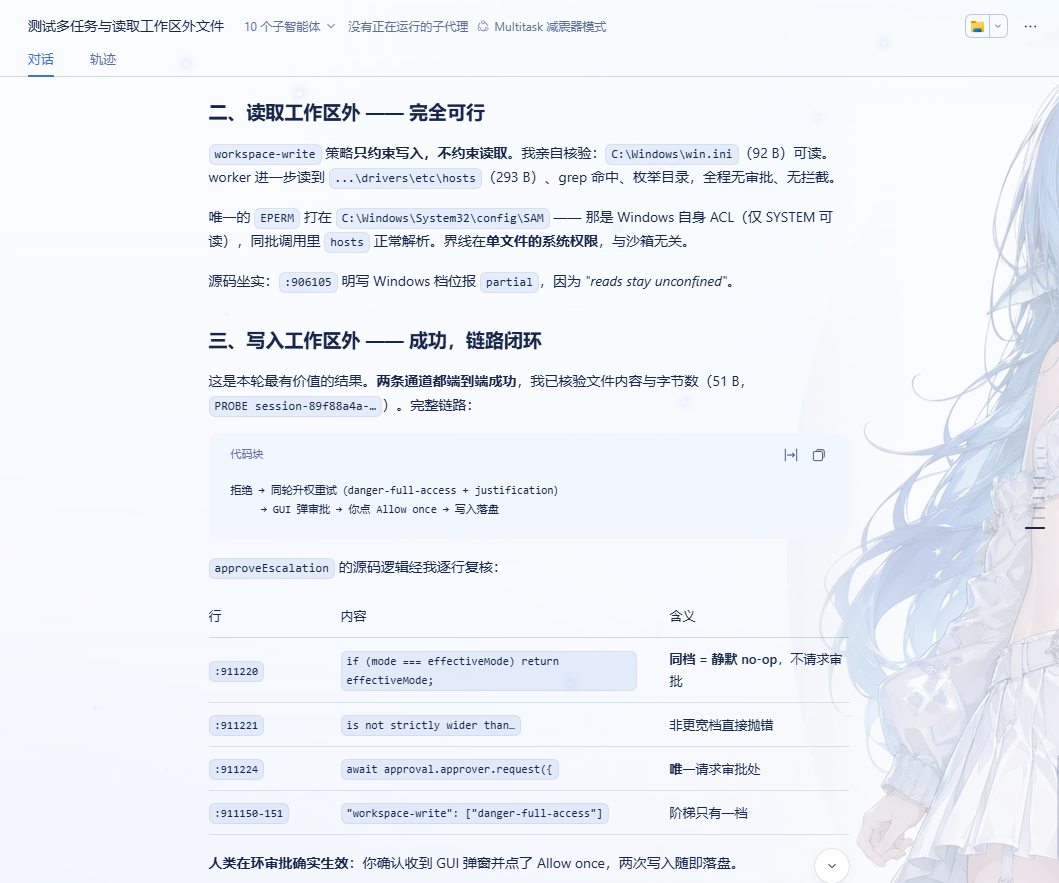
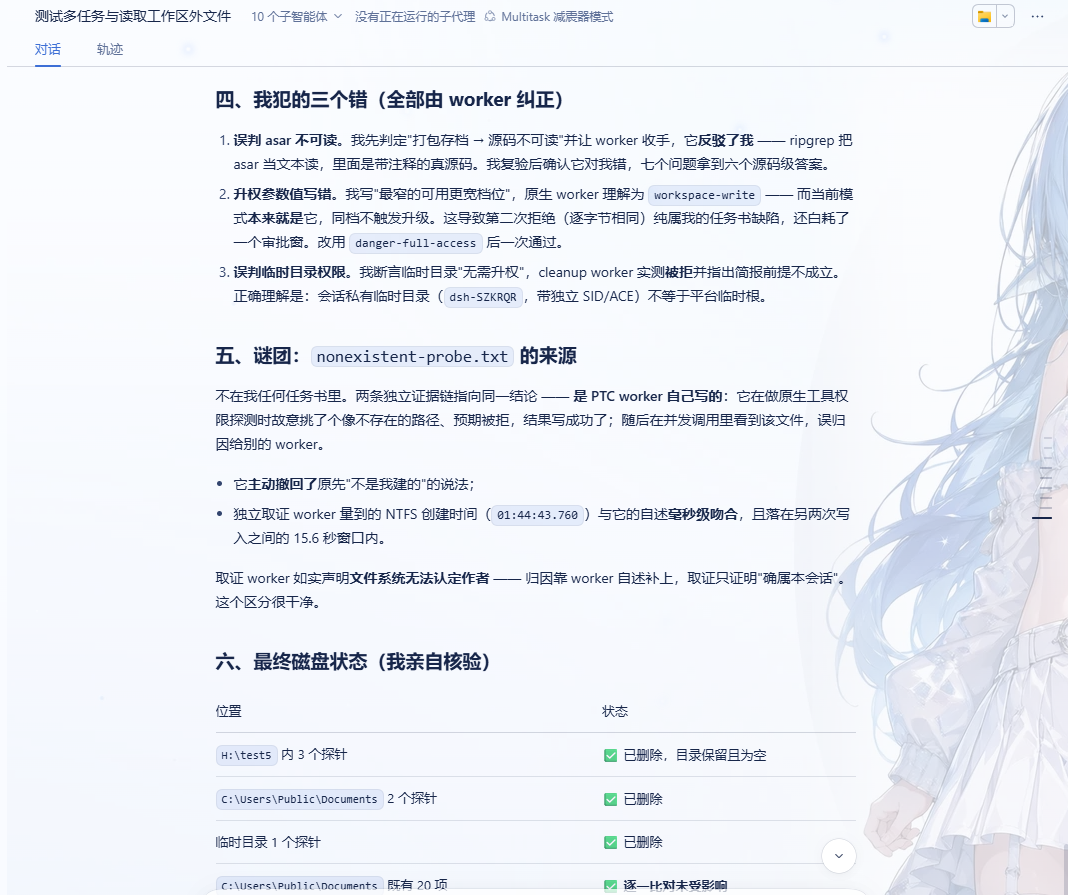
That is not inferred from the design intent; it was measured. The three screenshots below are consecutive views of one end-to-end test report, and the three mistakes in it were all corrected by a worker:
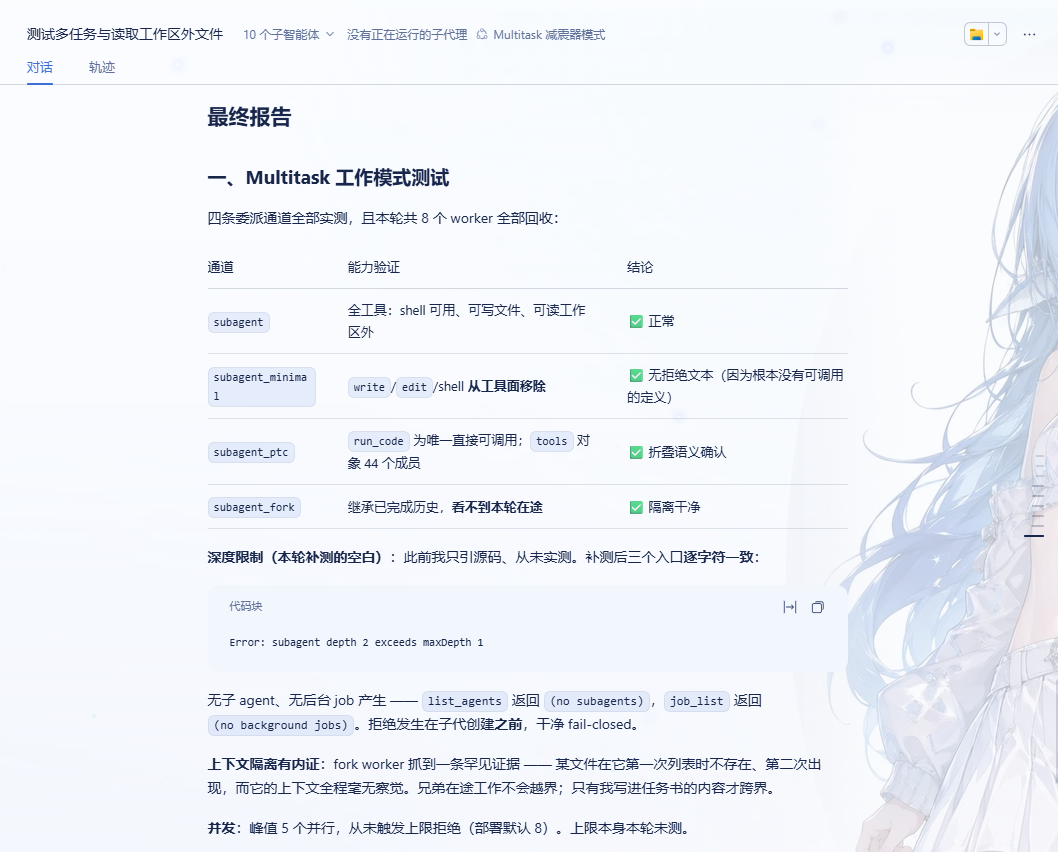
- Misjudged the asar as unreadable. The coordinator first concluded "a packed archive means the sources are unreadable" and told the worker to back off; the worker contradicted it —
ripgrepreads.asaras text, and inside is the real, commented source. The coordinator re-checked, confirmed the worker was right and it was wrong, and got source-level answers to six of seven questions. - Wrote the wrong escalation value. The coordinator wrote "the narrowest escalation that is still wider", which the native worker read as
workspace-write— the mode it was already in. Line-by-line verification of the source left no room for interpretation:app.asar:911220readsif (mode === effectiveMode) return effectiveMode;— the same level is a silent no-op that never requests approval;:911221readsis not strictly wider than(a level that is not wider throws outright); and the ladder has exactly one rung (:911150-151,"workspace-write": ["danger-full-access"]). The second refusal (byte-for-byte identical to the first) was therefore purely a defect in the brief, and it burned an approval window for nothing. Switching todanger-full-accesswent through on the first try. - Misjudged the temp directory's permissions. The coordinator asserted the temp directory "needs no escalation"; the cleanup worker measured it being refused and pointed out that the brief's premise did not hold. The correct reading: a session-private temp directory (with its own SID and ACE) is not the same as the platform temp root.
One more case from the same run: a file appeared that no brief had asked for, and two independent lines of evidence agreed it was written by a PTC worker probing its own native tool permissions — it deliberately picked a path that looked nonexistent, expected a refusal, and the write succeeded; seeing the file in a concurrent call, it first misattributed it to a sibling worker, and later withdrew its own "it was not me". An independent forensic worker measured the file's NTFS creation time and found it matching that account to the millisecond, inside a 15.6-second window between two other writes — while stating plainly that the filesystem cannot attribute authorship. The evidence established that the file belonged to this session; attribution came from the worker's own account, and that distinction was not glossed over.
To check this yourself: put a deliberately wrong premise in a brief (assert that some file is unreadable, say), and expect the worker to name the premise that does not hold rather than work around it.
Tunables (profile)
Override by id, appending after the dsh-multitask insert block (a later entry with the same id wins):
- id: multitask
  config:
    presetId: multitask          # change this to install several variants side by side
    order: 5                     # position in the mode selector
    guardEnabled: true           # false = disable the shock absorber (soft constraints only; diagnostics)
    keep:                        # appended to the coordinator's keep list
      - web_search
      - web_fetch
    extraDeny:                   # force-remove (wins over the keep list)
      - read
enabled: false turns the whole plugin off (no preset is declared, and the mode disappears from the selector).
The remaining switches live in the config of the corresponding rows in presets/multitask/composition.mjs:
| Row | Effect of disabling |
|---|---|
subagent-mode |
the PTC presentation is off, and subagent_ptc degrades to the same native surface as subagent |
minimal-guard |
the read-only worker reverts to "only the static three withheld" and can see write-capable tools installed by other plugins again — no security benefit |
approval-gate |
dangerous operations no longer prompt (back to default DSH behaviour) |
workspace-acl |
WRITE_OWNER is no longer granted automatically (or use config.autoGrantWriteOwner: false) |
The environment variable DSH_MULTITASK_MULTI_MODE=0 disables the subagent_ptc and subagent_minimal paths and the PTC presentation plugin in one step, without touching the original subagent / subagent_fork; it is read at module load, so it needs an app restart.
The approval-gate row's switches
The profile patch cannot reach this row's config — the host half applies only the top-level switches, and only to the coordinator-guard row. To change it, edit its config in presets/multitask/composition.mjs and restart the app:
| Field | Default | What it does |
|---|---|---|
classify |
true |
Master switch for Level 1 (the deterministic rule table). false = dangerous commands are no longer stopped to ask; the Level-2 relay still runs |
relay |
true |
Master switch for Level 2 (the relay). false = a Subagent's request no longer reaches the main conversation |
relayRetryWindowMs |
10000 |
How long to wait for the parent session to open a turn when the turn was just closed (ms). 0 disables the retry (back to notice-only) |
notifyOnRelayFailure |
true |
The fallback notice when the relay fails. false turns it off (the retry still runs) |
extraDangerPatterns |
[] |
Extra danger patterns, each { id, re } or a bare string / regex. It can only add a prompt, never remove one |
safePatterns |
[] |
Extra "match but do not ask" allow-patterns. ⚠️ This is a prompt-suppressing channel: a mistake silently lets a dangerous command through |
shellTools |
['pwsh', 'bash'] |
Extra tool names whose command text should be classified (a wrong name does not error, it silently misses) |
fileTools |
['write', 'edit'] |
Extra write tools whose file_path may point outside the workspace |
extraDangerPatterns / shellTools / fileTools are additive: missing one only means those cases are not examined (equivalent to not having this module), and it never lets through something this module would have asked about. safePatterns is subtractive: it cancels a danger this module has already judged, which is why it is deliberately empty by default — a mistake there is a silent permit, not one fewer prompt.
Source edits take effect only after a restart.
Uninstalling
If you installed from the package manager, let it do the work: dsh plugin --profile <profile> remove dsh-multitask, or uninstall from the Plugins page.
If you installed from a source checkout, delete the whole - insert: - id: multitask block from the profile patch.
Either way the mode disappears from the selector for new sessions (running sessions are unaffected), and no restart is needed — DSH hot-reloads that patch, and the plugin unregisters its own preset declaration on unload. To suspend it temporarily instead, add disabled: true to that row.
Development
dsh-multitask/
├── package.json                        # dsh.bundle.patch → inserts the host row on install; dsh.client → the browser half
├── cordis.patch.yml                    # inserts the plugin row into the profile roster
├── lib/
│   ├── index.js                        # host half: declares the bundled preset with agentPresets
│   └── client.js                       # browser half: the Multitask settings page + two General rows
├── presets/multitask/
│   ├── composition.mjs                 # the preset composition + coordinator persona + the four worker personas
│   ├── coordinator-guard.mjs           # the shock absorber (including the mode-isolation ownership check)
│   ├── subagent-mode.mjs               # PTC presentation: collapses a marked Subagent onto run_code
│   ├── minimal-guard.mjs               # adaptive narrowing for the read-only worker
│   ├── approval-gate.mjs               # the approval gate for dangerous operations
│   ├── workspace-acl.mjs               # workspace ACL: grants WRITE_OWNER (the only module that changes system state)
│   └── file-info.mjs                   # the read-only metadata tool file_info
├── docs/
│   ├── DESIGN.md                       # design reasoning, upstream evidence, known boundaries
│   └── test_image/                     # the screenshots the READMEs embed
├── README.md (English) / README.zh.md (Chinese)
└── LICENSE
The preset modules (presets/multitask/*.mjs) import nothing: they pull in no @deepseek-ai/* dependency, because a failed import means the whole preset fails to mount. The cost is that a few constants are duplicated, and changing one means changing the other.
Making source edits take effect
Restart the app after editing the sources. This package lives outside the HMR-watched root, so Node's ESM cache keeps serving the old module; and although the profile patch itself is hot-reloaded, bumping ?v=N on a row that is already running only changes its name — the loader takes the name-only branch and does not reload. A fresh process reading that row for the first time is what actually picks up your latest source.
Two related traps: a relative import does not inherit the entry's query (this package propagates it explicitly, so one bump refreshes the whole module graph), and "delete and re-add within one save" does not work either (the comparison is by id, so it is still the same row) — you must delete, let it settle, then add it back.
Known boundaries
- The mode is only selectable in a new session. A running session cannot switch in.
- What the coordinator cannot see, it cannot verify. Keeping read-only tools is exactly what lets it check a Subagent's claims; remove
read/grep/globand that ability is gone. - Self-correction is a dependable tendency, not a hard guarantee. That all three mistakes were pushed back on is a measured result, and it rests on two mechanisms being present at the same time: the worker persona forbidding results it did not obtain, and the coordinator keeping its read-only tools. With either one gone, the correction may simply not happen.
- Delegation depth is 1. A worker cannot delegate further; very large jobs must be split by the coordinator into parallel briefs.
- PTC's "collapse" is a presentation collapse, not a capability cut — by design, not a defect. The direct surface of
subagent_ptcreally is justrun_code, but the SDK binding table remains fully callable from inside a program; remove it and PTC is an empty shell. - The read-only worker is "two layers of narrowing", still not a sandbox. The static
toolFilterand the adaptive narrowing intersect insidedsh-tools, so they cannot widen anything; but if a plugin registers a new mutating tool after that worker is created, it will not be withheld (a deliberate trade-off). - The approval gate's fallback is only a pointing notice. When the relay fails the request stays pending, and the notice does not release it; only answering in that child session does.
- The rule table is pattern matching, so it will miss novel dangerous commands. The real gate is therefore the Level-2 relay; Level 1 only exists to keep safe commands from bothering you.
- An upstream change can disable a guard, and every such failure fails towards "the behaviour you had without that guard", never towards wider permissions.
More complete boundaries, unverified items, and the measured evidence behind every claim are in docs/DESIGN.md.
No comments yet. Be the first to write one.