📇 DSH Member Manager / 成员管理
A DeepSeek Harness plugin for a runnable company org — departments, employee codes, dual M/P channels, DAG dispatch, audit and cost attribution.
给 DeepSeek Harness(DSH)加一层可运行的公司化组织:部门与工号、M/P 双通道等级、工单派工与验收、任务图(DAG)并行派发、审计与成本归因;名册覆盖层负责显示名 / 岗位 / 职责 / 技能 / 模型覆盖。
dsh-member-manager · v0.5.1 · MIT · Node ≥ 22.19 · 零运行时依赖
新手先看 docs/28-新手使用教程.md。
点击下方标题可查看 中文 或 English。
Click a heading below to view English or 中文 .
🀄 中文(默认打开)
简介
本插件在 DSH 的「成员名不可改、不可删」约束之上,维护一层名册覆盖层(显示名 / 岗位 / 职责 / 技能 / 模型覆盖),并在其上提供公司化运行时:部门编号、员工工号、M/P 双通道等级、工单与派工凭证、任务图(DAG)并行派发、审计与 token 成本归因。
- 数据目录
~/.dsh/storages/member-manager/(名册与公司化数据格式稳定,可跨版本升级) - 入口:设置 →「成员管理」面板;对话里的
member_*(16 个)与company_*(14 个)工具
界面一览
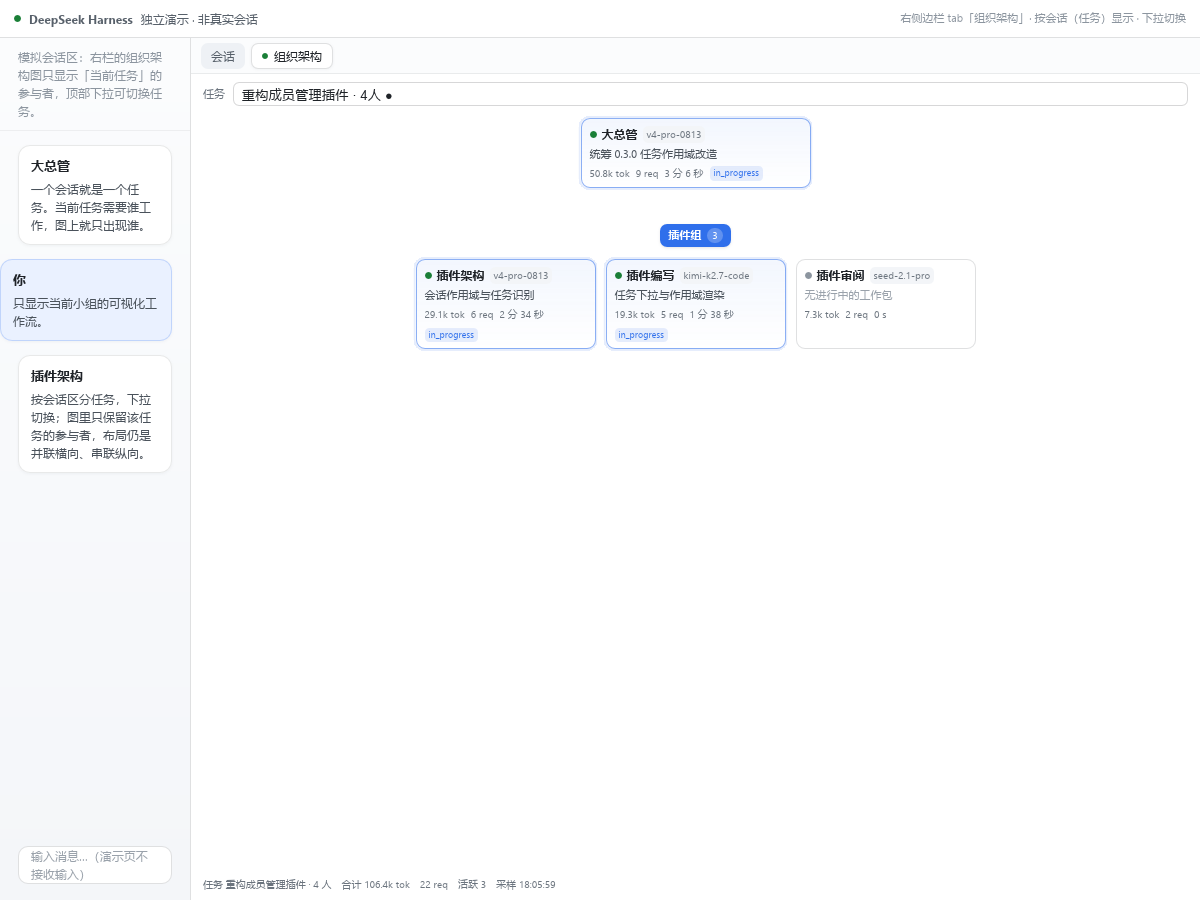
组织架构:管理层 → 部门/小组 → 成员拓扑,按会话(任务)切换(独立演示渲染)
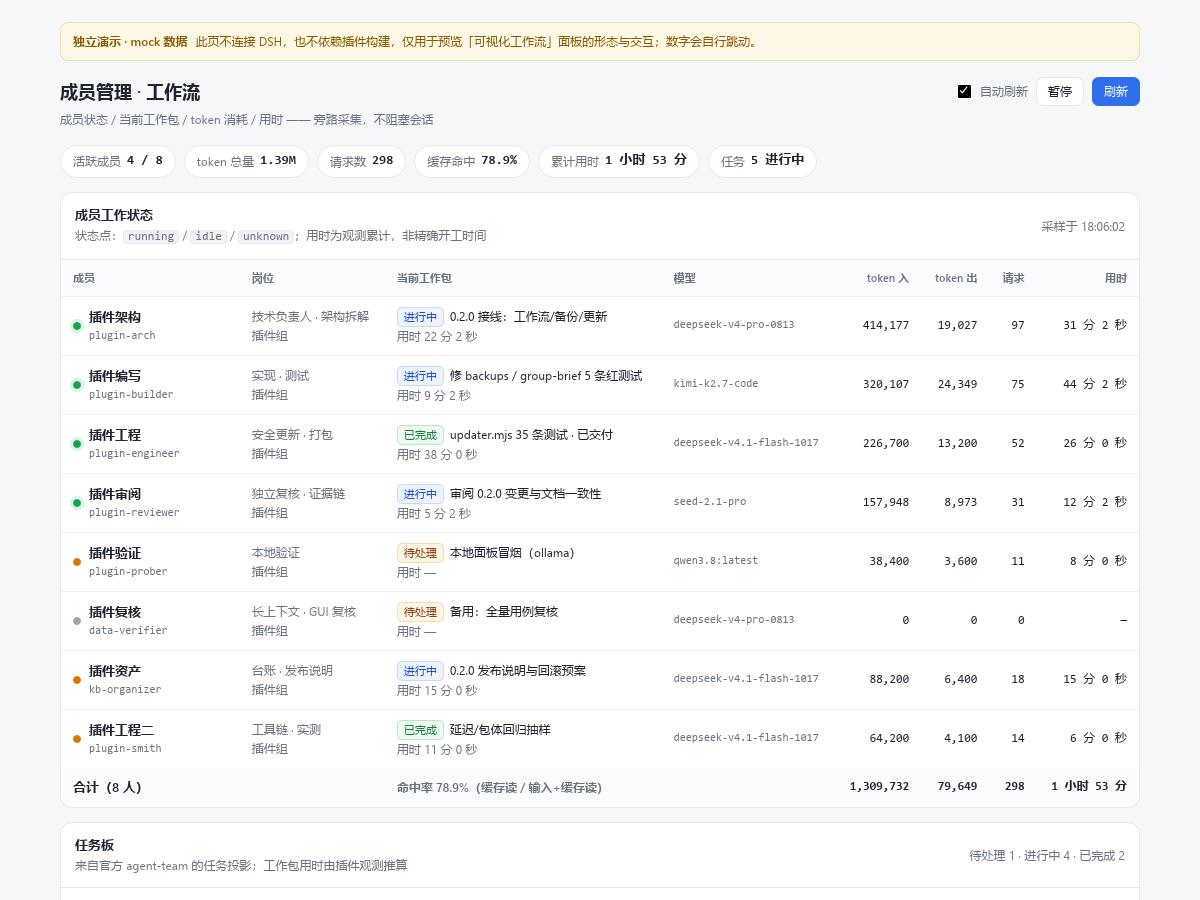
工作流面板:成员工作状态、任务板与统计(独立演示渲染)
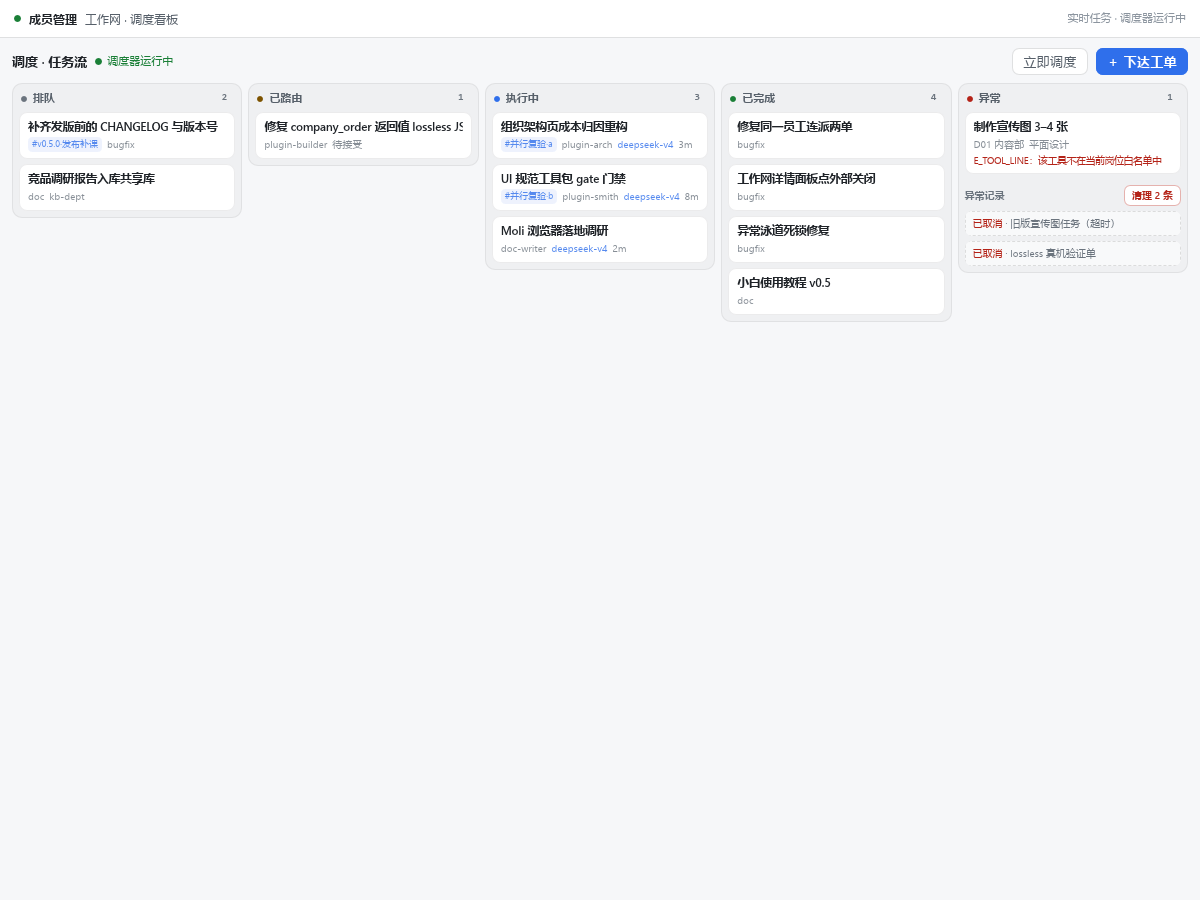
工作网调度看板:排队 / 已路由 / 执行中 / 已完成 / 异常 五条泳道,异常泳道含异常记录与清理(独立演示渲染)
截图来自
demo/的独立演示页(demo/*.html,不连 DSH,数据为 mock);真实面板请在 DSH 设置 →「成员管理」打开。
快速开始
- 安装(见「安装」;当前用本地 link 或 tgz)。
- 重启 DSH(插件不支持热重载)。
- 设置 →「成员管理」→「总架构」。
- 「新建部门」→ 输入一句话(如「新建市场部,编制 5 人」)→「创建预览」→「创建」。
- 对话里派活:
company_order(或company_plan提交任务图)→company_assign→ 员工company_accept/company_report→company_review。
核心能力
| 能力 | 说明 |
|---|---|
| 组织 | 部门编号 D01…(模板可自定义)、编制、接单范围、借调策略、职责描述;仅空部门可删除 |
| 员工 | 工号 E0001…、M/P 双通道等级(可并存)、岗位/职责/技能/模型覆盖、停用/调岗;v0.4 追加推理强度 / 派生方式 spawn·fork / 子代理深度 / 工具黑白名单 / 会话策略 |
| 总架构 | 管理层(虚拟聚合节点,M 通道)→ 部门图框 → 员工卡;管理层可重命名,编号规则与等级目录可「自定义」 |
| 员工中心 | 全量员工列表,按部门/等级排序,支持部门、停用与名册关联状态筛选;行内显示「名册·已登记 / 未登记 / 已停用」徽章,可单个或批量登记 |
| 名册关联 | 公司员工与 registry.json 双向关联:缺省「员工 id 即名册 target」(12 名历史员工零迁移),需要别名时写显式 rosterTarget;登记沿用「只补空字段、绝不覆盖」,refresh 才回填;member_list 附带公司关联、member_diagnose 报告 rosterLinks,CLI scripts/roster-link.mjs 可 --list / 按部门 / 单员工登记 |
| 人事管理 | 行内展开详情:公司化资料(3 列:显示名/岗位、技能/模型选择器、职责 ≤8 条)+ 通道 / 晋升 / 停用 / 调岗 |
| 部门弹层 | 两个页签(部门架构图 / 成员详情),内可招聘,页签行有「部门编辑」(名称/编号/编制/描述/接单范围/借调策略) |
| 工作网 | 右侧栏,只在点「工作网」按钮时打开,绝不自动弹出:上半部五泳道任务看板(待派/已路由/执行中/已完成/异常)+ KPI + 调度器状态 + 部门产能条,卡片点开详情、派工、验收、升级、取消,点详情外任意处收起;异常泳道只显示当前卡住的工单,历史异常归入「异常记录」区(可手动清理),无卡单时显示「重启进度」按钮;下半部管理层 → 部门 → 员工拓扑(工号/等级/任务/用量),空闲折叠,2s 刷新;公司化关闭时回退任务视图 |
| 派工闭环 | order → 五级路由回退(显式部门 / 规则表 / 部门接单范围 / 技能 / 兜底)→ attempt(派工凭证)→ accept → report → review;attemptId 防串单、重派先吊销旧 attempt、派工失败回滚重派、重启后冷恢复、终态订单孤儿 attempt 自动回收;忙碌门禁(E_EMPLOYEE_BUSY)防止同一员工被连派两单;调度器按优先级 + 依赖 + 部门产能派工,满编部门不再饿死其它部门 |
| 并行派发(DAG) | company_plan 一次提交任务图(≤50 任务),用 key 互相声明依赖;无依赖同层并行派发,下游等上游 done 自动放行;内置环检测等 6 类校验(E_PLAN_EMPTY / TOO_LARGE / TASK_INVALID / DUP_KEY / BAD_REF / CYCLE);company_status({group}) 按批次汇总 done/running/pending/failed |
| 成本 & 审计 | token/请求按员工 / 部门 / 工单归因(GET /company/costs);audit.jsonl append-only、加载时重放对账 |
| 隔离与降级 | 员工会话继承宿主标准工具;公司管理工具(company_*)走同步 guard + 执行体会话反查(v5.24 起不再收窄工具面);越权 E_TOOL_LINE,缺宿主服务 E_NO_AGENTS,开关关闭 E_DISABLED,均不影响名册功能 |
M/P 双通道与编号
| 通道 | 默认等级目录 | 默认等级 |
|---|---|---|
| M 管理 | M1 主管 / M2 经理 / M3 高级经理 / M4 总监 / M5 副总裁 | manager → M2 |
| P 技术 | P1 初级工程师 / P2 工程师 / P3 高级工程师 / P4 资深工程师 / P5 技术专家 / P6 首席专家 | staff → P3、window → P1 |
- 同一员工可同时拥有 M 与 P 等级:
channels:[{channel,level}],至少一个;manager必含 M、window仅 P。 - 晋升:同通道逐级 ±1;跨通道需显式目标等级且
role跟随(window不可转 M)。 - 编号模板:默认
E{seq:4}/D{seq:2},占位符{seq}{seq:N}{dept}{channel}{level};优先级company.json持久值 > 配置 > 内置默认。 - 历史数据 boot 时自动补号补通道(非法等级回退默认),不丢员工。
安装
方式 A:npm(dsh-member-manager)
dsh plugin --profile desktop add dsh-member-manager@0.5.1
方式 B:本地源码
dsh plugin --profile desktop add link:"<本仓库绝对路径>"
方式 C:从旧包升级(dsh-plugin-member-manager → dsh-member-manager)
node scripts/migrate-old-plugin.mjs          # 1) dry-run,不动任何文件
node scripts/migrate-old-plugin.mjs --apply  # 2) 备份 profile → 改写三处登记 → 写迁移标记
# 3) 重启 DSH:首次启动消费标记,把名册迁移成公司化组织(只迁 active 成员、只补空档案、幂等)
旧包名有转发包(
compat/dsh-plugin-member-manager,0.3.1)可继续安装并转发到本包;两个包不要同时启用(重复注册工具/路由,共用数据目录)。
卸载
删除 profile 三处登记(dependencies、dsh.profile.bundles、cordis.yml;或 dsh plugin --profile desktop remove dsh-member-manager)后重启 DSH。数据保留在 ~/.dsh/storages/member-manager/,可手动删除。
与旧插件 dsh-plugin-member-manager 的关系
本包是旧插件的重命名升级版。两者同源:从同一份代码 fork 而来,数据目录、名册文件格式和 16 个名册工具名保持一致;区别是包名 / 插件 id 改为 dsh-member-manager,并新增公司化运行时(部门 / 工号 / 双通道 / 工单 / DAG 并行 / 审计 / 成本)与 14 个 company_* 工具。
| 维度 | 旧包 dsh-plugin-member-manager |
新包 dsh-member-manager |
|---|---|---|
| 数据目录 | ~/.dsh/storages/member-manager/ |
相同(升级不迁移、不丢数据) |
| 名册文件 | registry.json(成员 / 小组 / 技能 / 模型覆盖 / 备份) |
相同格式,直接读写 |
| 名册工具 | 16 个 member_* / group_manage / skill_list / model_list |
同名保留,旧脚本可继续用 |
| 公司化数据 | 无 | 新增 company/(部门 / 员工 / 工单 / 审计 / 成本) |
| 面板 | 组织架构 · 已停用 · 未登记 · 工作流 · 维护 | 总架构 · 员工中心 · 工作流 · 备份与更新 |
| 维护状态 | 停止更新 | 唯一维护版本 |
名册里的「小组」在新版只作覆盖层与迁移来源(面板以部门组织为主);
company/数据旧包不存在,升级后为空,由「一键迁移」或面板自行建立。
不能同时启用
新旧包共用一个 DSH profile 时会重复注册 25 个名册工具与 16 条 HTTP 路由,并写入同一个数据目录,属未定义行为。切换前必须先移除旧包。
三种切换方式
| 方式 | 命令 | 适用场景 |
|---|---|---|
| 一键迁移(推荐) | node scripts/migrate-old-plugin.mjs → --apply → 重启 |
已装旧包,并希望把名册迁成公司化组织 |
| 只切插件 | node scripts/switch-to-dsh-member-manager.mjs → --apply → 重启 |
已装旧包,只换包,公司化组织稍后自建 |
| 手工 | 删除 profile 三处旧登记(dependencies / dsh.profile.bundles / cordis.yml)与旧 node_modules 链接,再按「安装」加新包,重启 |
喜欢自己动手 |
两个脚本都默认 dry-run,--apply 时先把 package.json / cordis.yml 备份到 ~/.dsh/backups/;回滚用 node scripts/rollback-to-dsh-plugin-member-manager.mjs --apply。
旧包名转发包
compat/dsh-plugin-member-manager(v0.3.1)保留旧包名可安装:它只依赖新包,并把 host / client 入口 export * 转发,cordis.patch.yml 仍插入旧 id。用于「CI / 脚本里写死旧包名」的过渡期;同样不能与新包同装,过渡完请移除。
npm 上的处理
npm 没有包名重定向。发布新包后建议对旧包执行 npm deprecate dsh-plugin-member-manager@* "已更名为 dsh-member-manager,请安装新包";旧用户先 dsh plugin --profile desktop remove dsh-plugin-member-manager(或跑上面的切换脚本),再安装新包。
使用
第一次用? 先读 docs/28-新手使用教程.md——从建部门到验收,五分钟跑通第一单,不需要懂代码。
- 对话:
member_list/member_add管理名册;company_hire/company_admin建公司组织;company_order起单,company_plan起任务图。 - 面板:总架构(新建部门、编号/等级自定义、部门编辑、开发模式预设徽章与部门弹层「开发模式」页签)· 员工中心 · 工作流 · 备份与更新。套用「游戏开发模式」后,部门卡显示模式徽章,弹层第三页签展示 7 个岗位槽位(自动匹配在职员工)与 7 阶段流水线(目标 / 负责人 / 参与 / 交付物 / 验收门禁),可切换或清除。
- 同步核心成员:面板「同步核心成员」按钮,或调用
member_sync(HTTP 路由拿不到 Agent 凭证,需工具触发一次)。 - HTTP:
GET /api/dsh-member-manager/{health,state,skills,overrides,models,orgmap,workflow,update,backups}、POST …/op;公司化只读GET …/company/{overview,org,board,costs,orders,presets}、写POST …/company/op。
配置项
| 字段 | 默认 | 说明 |
|---|---|---|
dataDir / registryFile |
~/.dsh/storages/member-manager / {dataDir}/registry.json |
数据目录与名册文件 |
scanLocalSkills / extraSkillRoots |
true / [] |
是否扫盘补技能目录、追加扫描根 |
backups |
{enabled:true,keep:20,dailyKeep:7} |
名册自动备份保留策略 |
workflow |
{enabled:true,persistMs:5000,retentionHours:6,tasksPollMs:3000} |
工作流采集 |
update |
{enabled:true,checkOnBoot:false,autoStage:false,allowOnlineApply:false} |
分阶段自更新(不在运行中替换自身) |
enabled / company.enabled |
true |
公司化总开关 |
company.autoBoot / company.provider |
true / "spawn" |
非阻塞自动 boot;派工 subagent provider(写错 → NO_PROVIDER) |
company.autoLinkRoster |
true |
新建部门 / 新增员工后自动登记名册(名册可用时 best-effort;失败不阻塞创建) |
company.defaultSessionPolicy / managerActsAsStaff |
"per_task" / false |
会话策略;经理是否可被派活 |
company.defaultOrderMode / requireManagerReview |
"async" / true |
下单模式;是否需要经理验收 |
company.limits |
见下 | {maxConcurrentPerProvider:4,maxTemps:4,budgetTokensPerDay:5000000,attemptTimeoutMs:1800000,lostReportGraceMs:120000,staleAttemptMs:3600000,schedulerIntervalMs:5000};当前仅校验与展示,并发/预算闸门尚未强制 |
company.departments / routingRules / toolPolicies |
[] / [] / {} |
种子部门 / 下单路由 / 分线工具策略 |
company.levels / numbering |
内置 M1–M5、P1–P6 / E{seq:4}、D{seq:2} |
等级目录 / 编号模板(非法回退默认 + warning) |
工具
名册工具(16 个,覆盖层,兼容保留)
member_list member_add member_rename member_remove member_set_role member_set_skills member_set_model group_manage member_sync member_diagnose member_backup member_group_from_text member_workflow member_update skill_list model_list
公司化工具(14 个)
| 工具 | 线 | 作用 |
|---|---|---|
company_order |
窗口 | 下单:{type,title,dept?,priority?,deps?,acceptance?,clientOrderId?,mode?} |
company_plan |
窗口 | 一次提交任务图(DAG):{group?,tasks:[{key?,type,title,deps?,priority?,dept?,detail?,project?,acceptance?}]}。同层无依赖的任务并行派发,下游等上游 done 自动放行;返回 {group,count,parallel,layers,orders} |
company_status |
窗口 | 查询工单/员工/部门视图:{orderId?,group?};带 group 时附该批次的 done/running/pending/failed 汇总 |
company_ask |
窗口 | 催办:{orderId,question} |
company_cancel |
窗口 | 取消工单:{orderId} |
company_assign |
经理 | 派工:{orderId,employeeId} → {attemptId,sessionId} |
company_review |
经理 | 验收:{orderId,pass}(通过 / 打回) |
company_borrow |
经理 | 借调共享员工:{orderId,sharedEmployeeId} |
company_escalate |
经理 | 升级转 owner:{orderId,reason?} |
company_report |
经理/员工 | 回报(必带 attemptId):{orderId?,attemptId,status,summary,artifacts?,acceptanceResults?} |
company_accept |
员工 | 接受派工:{attemptId} |
company_ask_help |
员工 | 求助并转发经理:{attemptId,question?} |
company_hire |
OWNER | 新增员工:{id,displayName?,department?,role?,kind?,code?,channel?,level?,channels?,title?,duties?,model?,provider?}(成功即自动登记名册,见 company.autoLinkRoster) |
company_admin |
OWNER | 控制面:{action,args},17 个 action——createDepartment createEmployee updateDepartment promoteEmployee setChannels setNumbering setManagementName setCompanyName setLevels updateEmployeeProfile importRosterProfiles linkEmployeeRoster syncEmployeesRoster unlinkEmployeeRoster setRoutingRules applyDepartmentPreset clearDepartmentPreset |
线隔离:OWNER 14 / 经理 12 / 员工 5 / 窗口 5(白名单见
src/host/company-compat.mjs)。越权 →E_TOOL_LINE;宿主缺agents/subagents→E_NO_AGENTS。
开发与测试
npm run check   # 语法校验(lib/ src/ scripts/ compat/)
npm test        # 655 tests / 655 pass
npm run verify  # 22 项交付自检(元数据/文件/语法/导出契约/面板字样/游戏开发模式预设/公司与名册关联/自动登记/测试不污染用户目录)
- 结构:
lib/插件入口与客户端 bundle ·src/shared/纯函数内核 ·src/host/运行时 ·test/测试 ·docs/契约与独立审阅 ·demo/独立演示页与截图 ·scripts/切换 / 回滚 / 迁移 / 验证。 - 零运行时依赖,仅使用 Node 内置模块与宿主注入服务。
数据与限制
- 数据:
registry.json(名册)·company/company.json+company/audit.jsonl+company/ledger/(公司化)·backups/(自动备份)·boot.log·workflow-stats.json·pending-migration.json(迁移标记);脚本备份写~/.dsh/backups/。 - 已知限制:并发/预算闸门当前仅校验未强制;成本为进程内计数(重启清零);工程验证以 Windows 11 + Node 24 为主;历史文档中的旧包名保留。
许可证
MIT(见 LICENSE);第三方许可见 THIRD-PARTY-NOTICES.md;历史版本见 CHANGELOG.md。
🌐 English
Overview
A runnable "company" layer for DeepSeek Harness (DSH): departments and employee codes, dual M/P career channels, order dispatch with accept/report/review, task-graph (DAG) parallel dispatch, an audit trail and cost attribution. A roster overlay keeps display names, titles, duties, skills and per-member model overrides.
- Version 0.5.1 · MIT · Node ≥ 22.19 · zero runtime dependencies
- Data:
~/.dsh/storages/member-manager/ - Entry points: Settings → "Member Manager" panel;
member_*(16) andcompany_*(14) host tools
Screenshots
Organization chart: management → departments/groups → members, switchable by session/task (standalone demo render).
Workflow panel: member work status, task board and stats (standalone demo render).
Work board (scheduling kanban): queued / routed / running / done / abnormal lanes; the abnormal lane carries exception history + one-click clear (standalone demo render).
Screenshots come from standalone demo pages under
demo/(demo/*.html, not connected to DSH, mock data); open the real panels via DSH Settings → "Member Manager".
Quick start
- Install (see Installation), then restart DSH (no hot reload).
- Settings → "Member Manager" → Overall architecture.
- "New department" → one sentence (e.g. "create Marketing with 5 headcount") → "Create preview" → "Create".
- Dispatch from chat:
company_order(orcompany_planfor a task graph) →company_assign→ employeecompany_accept/company_report→company_review.
Features
| Area | What you get |
|---|---|
| Organization | Department codes D01… (customizable templates), capacity, accepts, borrow policy, charter; only empty departments can be deleted |
| Employees | Employee codes E0001…, dual M/P channels (both at once), title/duties/skills/model override, disable/transfer; v0.4 adds reasoning effort / member provider spawn·fork / max depth / tool allow-deny / session policy |
| Overall architecture | Virtual Management node (M channel) → department boxes → employee cards; rename Management, customize numbering and level directories |
| Employee center | Full employee list sorted by department/level with department and disabled filters |
| Roster link | Bidirectional link between company employees and registry.json: default "employee id is the roster target" (12 legacy employees migrate with zero work), explicit rosterTarget only when aliasing is needed; registration only fills blank fields (never overwrites), refresh backfills; member_list carries the company link, member_diagnose reports rosterLinks |
| Personnel | Inline detail: company profile in 3 columns (display name/title, skill/model pickers, duties ≤8) plus channels / promote / disable / transfer |
| Work network | Right sidebar, opens only when you click the 工作网 button — never auto-opens: top half is a five-lane task board (queued / routed / running / done / abnormal) with KPIs, scheduler state and capacity bars; cards open an order drawer with assign / review / escalate / cancel, and close when you click anywhere outside the detail; the abnormal lane shows only currently-stuck orders — historical exceptions live in an "Exception history" area (with a manual clear button), and when nothing is stuck a "Restart progress" button is shown; bottom half is the Management → department → employee topology (code/level/task/usage), idle folded, 2s refresh; falls back to the task view when the company runtime is off |
| Dispatch loop | order → five-step routing fallback (explicit dept / routing rules / department accepts / skills / capacity fallback) → attempt → accept → report → review; attemptId blocks stale reports, reassignment revokes the old attempt, failed dispatch rolls back and retries, restarts cold-recover orphan attempts (including orphans under terminal orders); a busy guard (E_EMPLOYEE_BUSY) stops one employee being assigned two orders at once; the scheduler honours priority + dependencies + department capacity, and a saturated department no longer starves the rest of the queue |
| Parallel dispatch (DAG) | company_plan submits a task graph (≤50 tasks) with key-based dependencies; same-layer tasks run in parallel, downstream releases automatically when its upstream reaches done; built-in cycle detection plus 5 other validations (E_PLAN_EMPTY / TOO_LARGE / TASK_INVALID / DUP_KEY / BAD_REF / CYCLE); company_status({group}) aggregates done/running/pending/failed per batch |
| Cost & audit | Tokens/requests attributed per employee / department / order (GET /company/costs); append-only audit.jsonl replayed on load |
| Isolation | Employee sessions inherit host tools; company_* management tools use a synchronous guard + session lookup (no tool-surface narrowing since v5.24); E_TOOL_LINE, E_NO_AGENTS, E_DISABLED never break roster features |
M/P channels & numbering
| Channel | Default levels | Default level |
|---|---|---|
| M (management) | M1 Supervisor / M2 Manager / M3 Senior Manager / M4 Director / M5 VP | manager → M2 |
| P (professional) | P1 Junior Engineer / P2 Engineer / P3 Senior Engineer / P4 Staff Engineer / P5 Expert / P6 Principal Expert | staff → P3, window → P1 |
channels:[{channel,level}]— at least one;managermust include M,windowis P-only.- Promotion: ±1 level within a channel; switching channels requires an explicit target level and the matching role.
- Numbering:
E{seq:4}/D{seq:2}with{seq}{seq:N}{dept}{channel}{level}; persistedcompany.json> config > built-in defaults. - Loading legacy data backfills codes and channels without dropping employees.
Installation
Option A — npm (dsh-member-manager)
dsh plugin --profile desktop add dsh-member-manager@0.5.1
Option B — local source
dsh plugin --profile desktop add link:"<repo path>"
Option C — upgrade from the old package
node scripts/migrate-old-plugin.mjs          # 1) dry-run, writes nothing
node scripts/migrate-old-plugin.mjs --apply  # 2) back up profile, rewrite 3 registrations, write the migration marker
# 3) restart DSH: the marker is consumed on first boot and the roster is migrated into the company org (idempotent)
A shim package under the old name (
compat/dsh-plugin-member-manager, 0.3.1) re-exports this package. Never enable both at once.
Uninstall: remove the three profile registrations (or dsh plugin --profile desktop remove dsh-member-manager) and restart. Data stays under ~/.dsh/storages/member-manager/.
Relationship to the old dsh-plugin-member-manager
This package is the renamed successor of the old plugin. It is forked from the same code base: the data directory, registry.json format and the 16 roster tool names are unchanged. What differs is the package name / plugin id (dsh-member-manager), the new company runtime (departments, employee codes, dual M/P channels, orders, DAG dispatch, audit, cost) and 14 company_* tools.
| Aspect | Old package | New package |
|---|---|---|
| Data directory | ~/.dsh/storages/member-manager/ |
same — upgrade in place, nothing migrated away |
| Roster file | registry.json (members / groups / skills / model overrides / backups) |
same format, read and written directly |
| Roster tools | 16 member_* / group_manage / skill_list / model_list |
kept under the same names |
| Company data | none | new company/ (departments / employees / orders / audit / cost) |
| Panel | Organization · Retired · Unregistered · Workflow · Maintenance | Overall architecture · Employee center · Workflow · Backups & updates |
| Maintenance | no longer updated | the only maintained version |
"Groups" in the roster now serve as a compatibility overlay and migration source only; the panel is department-centric.
company/is new and starts empty — populate it with the one-step migration or from the panel.
Never enable both
Both packages in one DSH profile would register 25 roster tools and 16 HTTP routes twice and write the same data directory — undefined behaviour. Remove the old package first.
Three ways to switch
| Way | Command | When |
|---|---|---|
| One-step migration (recommended) | node scripts/migrate-old-plugin.mjs → --apply → restart |
old package installed and you want the roster migrated into the company org |
| Swap the package only | node scripts/switch-to-dsh-member-manager.mjs → --apply → restart |
old package installed, only switching the package |
| Manual | drop the three old profile registrations (dependencies, dsh.profile.bundles, cordis.yml) and the old node_modules link, then install as in Installation, restart |
you prefer doing it by hand |
Both scripts default to dry-run and back up package.json / cordis.yml into ~/.dsh/backups/ before --apply. Roll back with node scripts/rollback-to-dsh-plugin-member-manager.mjs --apply.
Shim package under the old name
compat/dsh-plugin-member-manager (v0.3.1) keeps the old name installable: it depends on the new package and re-exports host / client entry points, while its cordis.patch.yml still inserts the old id. Intended for a transition period when CI or scripts hard-code the old name; it must not be enabled together with the new package.
On npm
npm has no package-name redirection. After publishing, deprecate the old one: npm deprecate dsh-plugin-member-manager@* "renamed to dsh-member-manager, please install the new package". Old users should dsh plugin --profile desktop remove dsh-plugin-member-manager (or run the switch script) before installing the new package.
Usage
- Chat:
member_list/member_addfor the roster;company_hire/company_adminfor the org;company_orderto dispatch,company_planto dispatch a task graph. - Panel: Overall architecture · Employee center · Workflow · Backups & updates; the "Sync core members" button or
member_syncimports core team members into the roster; the employee center shows roster-link badges (linked / unlinked / retired), filters by link status and registers one employee or a whole department into the roster (only blank fields are filled;refreshoverwrites). A department can apply the built-in "Game dev mode" preset: its card shows a mode badge and the department modal's third tab lists the 7 role slots (auto-matched to current employees) plus the 7-stage pipeline (goal / owner / participants / deliverables / acceptance gates), with switch and clear actions. - HTTP:
GET /api/dsh-member-manager/{health,state,skills,models,orgmap,workflow,backups},POST …/op; company read-onlyGET …/company/{overview,org,board,costs,orders,presets}, writePOST …/company/op.
Configuration (highlights)
dataDir · registryFile · scanLocalSkills · extraSkillRoots · backups · workflow · update · enabled · company.autoBoot · company.autoLinkRoster · company.provider ("spawn") · company.defaultSessionPolicy / managerActsAsStaff · company.defaultOrderMode / requireManagerReview · company.limits (validated and shown only; concurrency/budget gates are not enforced yet; includes schedulerIntervalMs: 5000) · company.departments / routingRules / toolPolicies · company.levels / numbering.
Tools
Roster (16): member_list member_add member_rename member_remove member_set_role member_set_skills member_set_model group_manage member_sync member_diagnose member_backup member_group_from_text member_workflow member_update skill_list model_list.
Company (14): company_order company_plan company_status company_ask company_cancel company_assign company_review company_borrow company_escalate company_report company_accept company_ask_help company_hire company_admin (17 actions: createDepartment createEmployee updateDepartment promoteEmployee setChannels setNumbering setManagementName setCompanyName setLevels updateEmployeeProfile importRosterProfiles linkEmployeeRoster syncEmployeesRoster unlinkEmployeeRoster setRoutingRules applyDepartmentPreset clearDepartmentPreset).
Tool lines: OWNER 14 / manager 12 / staff 5 / window 5.
Development & tests
npm run check   # syntax check
npm test        # 655 tests / 655 pass
npm run verify  # 22 delivery self-checks
Data & limits
registry.json, company/{company.json,audit.jsonl,ledger/}, backups/, boot.log, workflow-stats.json, pending-migration.json; script backups live in ~/.dsh/backups/. Known limits: concurrency/budget gates are validated only, cost counters are in-process (reset on restart), engineering verification is Windows 11 + Node 24 first.
License
MIT — see LICENSE and THIRD-PARTY-NOTICES.md; release history in CHANGELOG.md.
No comments yet. Be the first to write one.