dsh-easy2restart

DSH 重启 + 安全归档插件。0.2.0 起由 dsh-plugin-easy2restart 与 dsh-plugin-safe-archive 合并而来,0.2.1 完成界面重做与「自动备份」可配置化。
📦 包名 / 仓库已改名 旧:
dsh-plugin-easy2restart(GitHub 同名仓库)+dsh-plugin-safe-archive→ 新:dsh-easy2restart旧包仍可安装但不再更新,请迁移到新包,详见 RENAME.md。
- 重启:侧边栏底部「重启」按钮,双击即整进程重启 DeepSeek Harness;会话运行中自动置灰。
- 安全归档:任何归档入口先弹确认框;会话仍在活动时给出活动清单 + 10 秒倒计时,倒计时结束才能「停止并归档」。
- 归档即备份:归档成功后宿主在 3 秒后自动备份会话文件、附件、标题缓存与元数据;备份目录可在界面里改,也能整个关掉。
- 右侧栏「已归档会话」:以归档会话文件夹为根的文件树,可在资源管理器中直接定位。
⚠️ 已知 DSH 启动问题(与本插件无关)
现象|Symptom
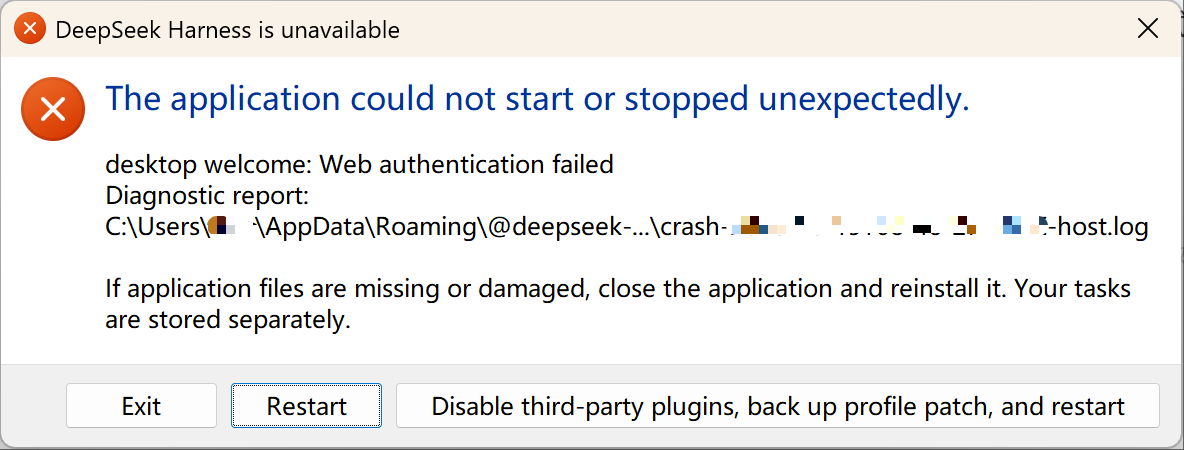
启动 DSH 时弹出上面这个窗口:「The application could not start or stopped unexpectedly.」,正文是 desktop welcome: Web authentication failed,并附诊断日志路径(%APPDATA%\@deepseek-ai\dsh-desktop\logs\ 下的 crash/host 日志);按钮为 Exit / Restart / Disable third-party plugins, back up profile patch, and restart。主界面进不去,日志目录里每次多一条 phase: startup 的崩溃记录。
原因|Cause
每次启动 DSH 都会向桌面 cookie 库新增一条 dsh-auth-* cookie(127.0.0.1、每次启动端口随机,所以 cookie 名不同、不会覆盖旧条目)。它的有效期是 30 天,30 天内不会自己消失;累积到 71 条时 Cookie 请求头超过 16 KB 上限,host 返回 431,桌面握手失败 —— 就是上面这个弹窗。所以重启越频繁,越快撞线:一天重启几次的话,大约一个月内必然出现。
为什么点「Disable…」没用|Why the "Disable" button doesn't help
这个按钮只是禁用所有第三方插件(注意是禁用,不是删除、不是清空 —— 插件本体和配置都还在),然后重启一次。问题出在 cookie 累积,跟插件没有关系,所以点完照样起不来,反而暂时失去全部第三方插件能力,还得手动重新启用。Restart 按钮同理,只会再撞一次。
处理办法|Fix
- 完全退出 DSH(含托盘与后台进程)。
- 清掉
%APPDATA%\@deepseek-ai\dsh-desktop\Network\Cookies里的dsh-auth-*:用 SQLite 执行DELETE FROM cookies WHERE host_key='127.0.0.1' AND name LIKE 'dsh-auth-%';,或直接删除Cookies文件(只影响免登录状态,不影响账号与会话)。 - 或安装
dsh-cookie-guard:DSH 关闭时每分钟自动清理,推荐用于长期防复发。 - 重新打开 DSH;cookie 会按需重新签发,不用重新登录,会话与工作区不受影响。
🀄 中文(默认展开)
已发布到官方 NPM
DSH 重启 + 安全归档插件:双击侧边栏按钮整体重启 DeepSeek Harness;归档会话前先确认,会话仍在活动时倒计时后才能停止归档;归档成功自动备份,备份到哪、备不备份都由你定。
功能
一、重启 DSH
- 侧边栏
sidebar.footer.action位置注入「重启 DSH」按钮(账号头像、设置上方),图标为手绘缺口环 + 箭头。 - 双击按钮 → 宿主用 Windows 计划任务拉起一个脱离 DSH 进程树的 PowerShell 脚本,
taskkill /T强杀整个 DSH 进程树,随后重新启动DeepSeek Harness.exe。 - 有 Agent 会话运行中时按钮置灰禁用(依据 DSH 会话状态
running),鼠标悬停给出原因。 - 宿主保存一个「重启待办」,便于后续扩展「重启后回到原会话」等流程。
二、安全归档(确认 + 活动保护)
- 点击归档(菜单 / 行尾按钮 / 快捷键)先弹确认框
- 开启自动备份时:「确认归档该会话吗?归档后会话窗口会关闭。归档完成后会自动备份到:
<备份目录>。」 - 关闭自动备份时:第二行变红字「自动备份已关闭,本次归档不生成备份副本。」
- 开启自动备份时:「确认归档该会话吗?归档后会话窗口会关闭。归档完成后会自动备份到:
- 会话仍在活动时的二次确认
- 点「确认归档」后若 Host 拒绝(
workspace/session-active),对话框切换为「会话正在活动」+ 活动清单(进行中回合 / 子代理 / 后台任务 / 定时任务); - 「停止并归档」按钮 10 秒倒计时后才解禁,防止误操作。
- 点「确认归档」后若 Host 拒绝(
三、归档即备份(事件驱动,不轮询)
- 宿主半侧包装
workspaceRegistry.archiveSession:归档成功后等 3 秒收尾,把会话文件 + 附件 + 标题缓存 + 元数据复制到<备份根目录>\<会话名>-<归档日期-时间>\; - 去重/状态按 会话 ID + SHA256 记录在
<备份根目录>\_auto-backup-state.json;manifest.json自动落种子; - 插件启动 5 秒后补扫「已归档但未备份」的会话,也可
POST /scan手动补扫; - 每次备份追加一行到
归档清单.md与_auto-backup-manifest.json; - 备份根目录可改、自动备份可关闭(见下一节)。
四、自动备份设置(右侧栏内直接改)
右侧栏「已归档会话」页顶部有「自动备份」卡片,默认收起成一行摘要(开关状态 + 当前目录 + 状态徽章),点开后:
- 开启 / 关闭:关闭后归档照常进行,只是不生成备份副本;
- 备份根目录:输入框直接改,或点「选择…」弹系统文件夹对话框;
- 保存前先探测:目录不存在会自动创建,再写一个探针文件验证真的可写;不可写则红字提示原因且不落盘;
- 字段下方常驻一行状态:「✓ 可写,已备份 N 个会话」/「目录不存在,保存后自动创建」/「目录不可写,请换一个位置」/「自动备份已关闭:归档只留在 DSH 会话目录」,并标出来源(默认路径 / 用户设置 / 环境变量);
- 配置写在
~/.dsh/storages/dsh-easy2restart/config.json,环境变量优先(见「配置」); - 改路径只影响之后的归档,已有备份不会被搬动。
五、右侧栏「已归档会话」
- DSH 右侧栏引导页新增「已归档会话」条目(文件资源管理器式页面);
- 根目录 = 归档会话文件夹
<DSH_HOME>/sessions(归档会话文件真实位置); - 不连接备份副本(只做提示,路径守卫会 403 拒绝访问它);
- 含「归档清单」(按
workspace.json的archivedSessionIds,标题缓存 + 会话文件回读兜底)与「会话存储目录」两棵树,文件点击可在资源管理器中定位;头部「刷新」「打开文件夹」,并实时显示「自动备份 / 备份关闭 / 备份不可写」状态。
六、界面(0.2.1 重做)
- 统一淡暖纸本配色(纸
#FBF6EC/ 卡#FFFDF8/ 墨#2A2119/ 线#E5D8C4),红黄绿蓝紫青六色只表达语义,一屏最多两色; - 圆角只有 16 / 10 两档,正文 15px 起,一屏字号不超过三档;
- 所有图标改为内联 SVG(重启缺口环、归档托盘、文件夹、警示),不再依赖位图;
- 禁用态用灰底 + 去阴影(不用半透明,避免读成"坏了");报错紧贴字段,不弹 toast;
- 动效 120–300ms,且完整响应系统的「减少动态效果」;按钮热区 36px,键盘可聚焦并有可见焦点环。
接口
| 方法 | 路径 | 说明 |
|---|---|---|
| GET | /api/dsh-easy2restart/health |
探针(宿主是否已加载本插件) |
| GET | /api/dsh-easy2restart/state |
重启待办(pending.json) |
| GET | /api/dsh-easy2restart/active |
是否有 Agent 会话在运行(按钮禁用依据) |
| POST | /api/dsh-easy2restart/restart |
{ sessionId, text } 记录待办并触发重启 |
| POST | /api/dsh-easy2restart/clear |
清除重启待办 |
| GET | /api/dsh-easy2restart/status |
已备份会话数 |
| POST | /api/dsh-easy2restart/scan |
手动补扫「已归档未备份」 |
| POST | /api/dsh-easy2restart/diag |
客户端诊断回写 |
| GET | /api/dsh-easy2restart/backup |
备份设置快照(开关 / 目录 / 来源 / 可写 / 已备份数) |
| POST | /api/dsh-easy2restart/backup |
{ enabled?, dir? } 保存设置;目录不可写返回 400 BACKUP_DIR_UNWRITABLE |
| POST | /api/dsh-easy2restart/backup/pick |
打开系统文件夹选择框,返回选中路径与探测结果 |
| GET | /api/dsh-easy2restart/archive/roots |
归档会话清单 + 数据源路径 + 备份状态 |
| GET | /api/dsh-easy2restart/archive/ls?path=<绝对路径> |
列举 sessions 下某一层目录(路径守卫) |
| POST | /api/dsh-easy2restart/archive/open |
{ path } 在资源管理器中打开/定位(路径守卫) |
离线自检(不启动 DSH、不触发重启、不动真实备份):
node test/plugin.selftest.mjs
配置
优先级:环境变量 > 配置文件 > 内置默认。
| 名称 | 取值 | 作用 |
|---|---|---|
DSH_EASY2RESTART_BACKUP |
off / 0 / false / no / disable / none |
关闭自动备份(归档照常) |
DSH_EASY2RESTART_BACKUP_DIR |
绝对路径 | 指定备份根目录,覆盖界面设置 |
~/.dsh/storages/dsh-easy2restart/config.json |
{"backup":{"enabled":true,"dir":"D:\\DSH备份"}} |
界面保存的位置 |
| 内置默认 | F:\AI\会话归档备份\DSH |
未配置时的目录(保留老用户习惯) |
环境变量存在时,界面上的开关与路径框变为只读并给出提示,避免"改了没生效"的困惑。
依赖
- DeepSeek Harness 桌面版(0.2.0-rc 以上)
- Node.js ≥ 22
- Windows(重启依赖计划任务 + PowerShell;文件夹选择与路径守卫按 Windows 盘符实现)
安装
前提:
dsh命令在 PATH 中(DeepSeek Harness 自带)。
在「插件 / 查检中心」里搜 dsh-easy2restart,或直接:
dsh plugin --profile desktop add dsh-easy2restart@0.2.1
装完重启 DeepSeek Harness(插件不支持热加载),侧边栏底部账号头像上方即出现重启按钮,右侧栏引导页出现「已归档会话」。
从旧包迁移:先
dsh plugin --profile desktop remove dsh-plugin-easy2restart(如果你曾在本地装过dsh-plugin-safe-archive也一并 remove;它从未发布到 npm),再装本包。 两个旧插件的能力已全部并入,状态文件、备份目录与配置完全兼容,无需迁移数据。
使用
- 双击侧边栏按钮重启 DSH;会话运行中按钮为灰色,会话空闲时可正常重启。
- 重启由计划任务拉起,与 DSH 自身退出无关,即使 DSH 被强杀也会自动重新启动。
- 归档会话:照常用原来的归档入口,确认框会先出现;会话还在跑就等倒计时结束再「停止并归档」。
- 归档完成后约 3 秒自动备份;进度看
~/.dsh/archive-backup/auto-backup.log。 - 换机器 / 换备份盘:右侧栏「已归档会话」→「自动备份」→ 改目录 → 保存,下次归档即生效。
卸载
dsh plugin --profile desktop remove dsh-easy2restart
然后重启 DSH 使改动生效。备份目录、日志与 config.json 保留在磁盘上,可自行删除。
工作原理(简述)
lib/index.js(宿主 / Cordis 插件):- 重启:注册
/api/dsh-easy2restart/*;/restart记录待办并调用scheduleRestart,用schtasks创建立即运行的重启任务(由计划任务服务启动,脱离 DSH 进程树),执行restart/restart.ps1。 - 归档:包装
workspaceRegistry.archiveSession,归档成功后 3 秒调度备份;启动 5 秒补扫。 - 备份设置:
backupSetting()(env → config → 默认)、probeBackupDir()(建目录 + 探针写)、pickBackupDirectory()(PowerShell 文件夹对话框)。 - 浏览:只读
<DSH_HOME>/sessions,带路径守卫。
- 重启:注册
restart/restart.ps1:taskkill /PID <主进程> /T /F结束整个 DSH 进程树,等待退出后重新Start-Process DeepSeek Harness.exe。lib/client.js(Web 客户端):注入sidebar.footer.action(重启按钮)、shell.overlay(归档确认框)、sidebar.right.pane.tab(已归档会话页),并接管uiWorkspace.archiveSession。
目录结构
dsh-easy2restart/
├─ package.json         # 插件清单(dsh.client / dsh.bundle 声明)
├─ cordis.patch.yml     # bundle 挂载声明
├─ lib/
│  ├─ index.js          # 宿主端:重启调度 + 归档备份 + 备份设置 + 归档浏览路由
│  └─ client.js         # 客户端端:重启按钮 + 归档确认框 + 已归档会话页 + 备份设置卡
├─ restart/
│  └─ restart.ps1       # 重启脚本(杀进程树 + 重启 exe)
├─ test/
│  └─ plugin.selftest.mjs   # 离线自检(宿主 13 条路由 + 备份设置 + 客户端注册 + 视觉层)
└─ scripts/
   ├─ check-readme-assets.mjs  # README 图片发布门禁
   └─ make-icon.py             # 插件图标生成脚本(Pillow)
已知限制
- 重启依赖 Windows 计划任务与 PowerShell,非 Windows 平台无法使用。
- 归档拦截只覆盖经过
uiWorkspace.archiveSession的入口;若 DSH 未来改走其他路径,归档不再弹确认框,备份也需另找触发点。 - 取消归档/重新归档会重新触发确认与备份(备份按 SHA256 去重,不会重复占空间)。
- 右侧栏「已归档会话」只读 DSH 会话目录,看不到备份副本(备份目录仅作提示)。
- 改备份目录不会迁移历史备份;旧目录里的内容需要自己处理。
数据与隐私
- 备份只写到本地磁盘的备份根目录(默认
F:\AI\会话归档备份\DSH\),不上传任何远端。 - 诊断日志:
~/.dsh/storages/dsh-easy2restart/host-boot.log、~/.dsh/storages/dsh-easy2restart/diag.log、~/.dsh/archive-backup/auto-backup.log(以及备份目录内同名日志)。 - 不含遥测、不联网。
License
MIT
🌐 EnglishPublished on official NPM
DSH restart + safe-archive plugin: double-click the sidebar button to fully relaunch DeepSeek Harness; every archive goes through a confirm dialog (with a 10s countdown while the session is still busy) and is backed up automatically — where, and whether, is up to you.
📦 Renamed. Old packages
dsh-plugin-easy2restart+dsh-plugin-safe-archiveare nowdsh-easy2restart; see RENAME.md.
Features
1. Restart DSH
- Injects a restart button into the
sidebar.footer.actionslot (above the account avatar / settings), drawn as an inline SVG open ring with an arrow. - Double-click → the host launches a PowerShell script detached from the DSH process tree via Windows Task Scheduler; the script uses
taskkill /Tto force-kill the whole DSH process tree, then relaunchesDeepSeek Harness.exe. - The button is greyed out while an agent session is running, with a tooltip explaining why.
- The host keeps a "restart pending" record so flows such as "return to the original session after restart" can be added later.
2. Safe archiving (confirm + activity guard)
- Every archive entry (menu / row button / shortcut) opens a confirm dialog first. When auto-backup is on, it also names the target folder; when off, it warns in red that no backup copy will be made.
- Second confirmation while the session is still busy: if the host rejects with
workspace/session-active, the dialog switches to "session is active" plus an activity list (running turn / subagents / background jobs / schedules); "stop and archive" unlocks only after a 10-second countdown.
3. Archive means backup (event-driven, no polling)
- The host wraps
workspaceRegistry.archiveSession: 3 seconds after a successful archive it copies the session file, attachments, title cache and metadata to<backup root>\<title>-<archive-time>\. - Deduplication is recorded per session id + SHA256 in
<backup root>\_auto-backup-state.json; a catch-up scan runs 5 seconds after the plugin starts, andPOST /scantriggers it manually. - The backup root is editable and the whole feature can be switched off from the right sidebar.
4. Auto-backup settings (editable in the right sidebar)
The "Archived sessions" page carries an "Auto-backup" card, collapsed to one summary line by default. Expanded it gives:
- an on/off switch — when off, archiving still works and simply makes no copy;
- a backup root field with a "Browse…" button (native folder dialog);
- validation before saving: a missing folder is created, then a probe file proves it is writable; if not, the reason is shown next to the field and nothing is persisted;
- a permanent status line ("✓ Writable, N session(s) backed up" / "Folder does not exist yet; created on save" / "Folder not writable; pick another location" / "Auto-backup is off: archives stay in the DSH session folder") plus the setting source (default / user / environment);
- stored in
~/.dsh/storages/dsh-easy2restart/config.json, with environment variables taking precedence; - changing the folder only affects future archives; existing backups are not moved.
5. Right-sidebar "Archived sessions" page
- Adds an "Archived sessions" entry to the right-sidebar guide page (explorer-like).
- Root = the archive session folder
<DSH_HOME>/sessions(where archived session files really live); the backup copy is not connected and is rejected by the path guard (403). - Two trees (archive list from
workspace.json→archivedSessionIds, plus the raw session storage directory); clicking a file reveals it in Explorer. The header shows "refresh", "open folder" and a live auto-backup status chip.
6. Interface (rebuilt in 0.2.1)
- One warm-paper palette (paper
#FBF6EC/ card#FFFDF8/ ink#2A2119/ line#E5D8C4); six semantic colours, at most two per screen. - Only two corner radii (16 / 10); body text from 15px, at most three sizes per screen.
- All icons are inline SVG (restart ring, archive tray, folder, warning) — no bitmaps.
- Disabled states use a grey fill and no shadow instead of opacity (opacity reads as "broken"); errors sit next to their field, never in a toast.
- Motion is 120–300ms and honours
prefers-reduced-motion; buttons keep a 36px hit area, are keyboard reachable and show a visible focus ring.
HTTP routes
| Method | Path | Purpose |
|---|---|---|
| GET | /api/dsh-easy2restart/health |
Probe (is the host half loaded) |
| GET | /api/dsh-easy2restart/state |
Pending restart record |
| GET | /api/dsh-easy2restart/active |
Whether an agent session is running |
| POST | /api/dsh-easy2restart/restart |
{ sessionId, text } record and trigger a restart |
| POST | /api/dsh-easy2restart/clear |
Clear the pending record |
| GET | /api/dsh-easy2restart/status |
Number of backed-up sessions |
| POST | /api/dsh-easy2restart/scan |
Manual catch-up scan |
| POST | /api/dsh-easy2restart/diag |
Client diagnostics |
| GET | /api/dsh-easy2restart/backup |
Backup settings snapshot |
| POST | /api/dsh-easy2restart/backup |
{ enabled?, dir? }; 400 BACKUP_DIR_UNWRITABLE when the folder is not writable |
| POST | /api/dsh-easy2restart/backup/pick |
Native folder picker; returns the chosen path plus probe result |
| GET | /api/dsh-easy2restart/archive/roots |
Archived sessions + data source + backup state |
| GET | /api/dsh-easy2restart/archive/ls?path=<abs> |
List one level under sessions (path guard) |
| POST | /api/dsh-easy2restart/archive/open |
{ path } reveal in Explorer (path guard) |
Offline self-test (starts no DSH, never triggers a restart, touches no real backup):
node test/plugin.selftest.mjs
Configuration
Precedence: environment > config file > built-in default.
| Name | Value | Effect |
|---|---|---|
DSH_EASY2RESTART_BACKUP |
off / 0 / false / no / disable / none |
Turns auto-backup off (archiving still works) |
DSH_EASY2RESTART_BACKUP_DIR |
absolute path | Overrides the backup root set in the UI |
~/.dsh/storages/dsh-easy2restart/config.json |
{"backup":{"enabled":true,"dir":"D:\\DSH-bak"}} |
What the UI saves |
| built-in default | F:\AI\会话归档备份\DSH |
Used when nothing is configured |
When an environment variable is set, the toggle and the path field become read-only and explain why, so "I changed it but nothing happened" cannot occur.
Requirements
- DeepSeek Harness desktop (0.2.0-rc or later)
- Node.js ≥ 22
- Windows (restart relies on Task Scheduler + PowerShell; the folder picker and path guard assume Windows drive paths)
Installation
Prerequisite: the
dshcommand must be on PATH (bundled with DeepSeek Harness).
dsh plugin --profile desktop add dsh-easy2restart@0.2.1
After installing, restart DeepSeek Harness (plugins are not hot-reloaded); the restart button appears at the bottom of the sidebar and the "Archived sessions" page shows up in the right sidebar.
Migrating from the old package: remove
dsh-plugin-easy2restartfirst (also removedsh-plugin-safe-archiveif you had it installed locally — it was never published to npm), then install this one. State files, backup folder and configuration are fully compatible — no data migration is needed.
Usage
- Double-click the sidebar button to restart DSH; it is greyed out while a session is running.
- The restart is launched by a scheduled task and is independent of DSH exiting itself.
- Archive a session as usual — the confirm dialog comes first; if the session is still busy, wait for the countdown, then "stop and archive".
- About 3 seconds after archiving, the backup runs; watch
~/.dsh/archive-backup/auto-backup.log. - Moving to another disk: right sidebar → "Archived sessions" → "Auto-backup" → change the folder → save; the next archive uses it.
Uninstall
dsh plugin --profile desktop remove dsh-easy2restart
Then restart DSH. The backup folder, logs and config.json stay on disk; delete them yourself if you want.
How it works (brief)
lib/index.js(host / Cordis plugin): restart routing viaschtasks+restart/restart.ps1; wrapsworkspaceRegistry.archiveSessionand schedules a backup 3 seconds after a successful archive (plus a catch-up scan 5 seconds after startup);backupSetting()/probeBackupDir()/pickBackupDirectory()back the settings UI; serves read-only archive browsing under<DSH_HOME>/sessionswith a path guard.restart/restart.ps1:taskkill /PID <main process> /T /F, wait for exit, thenStart-Process DeepSeek Harness.exe.lib/client.js(Web client): registerssidebar.footer.action(restart button),shell.overlay(archive confirm dialog) andsidebar.right.pane.tab(archived sessions page), and wrapsuiWorkspace.archiveSession.
Known limitations
- The restart needs Windows Task Scheduler and PowerShell; other platforms cannot use it.
- Only archive entries that go through
uiWorkspace.archiveSessionare intercepted. If DSH routes archiving elsewhere in the future, there is no confirm dialog and no automatic backup for that path. - Re-archiving triggers the dialog and a backup again (deduplicated by SHA256, so no wasted space).
- The right-sidebar page reads only the DSH session directory; the backup copy is not browsable there.
- Changing the backup folder does not migrate existing backups.
Data & privacy
- Backups stay on the local disk (default
F:\AI\会话归档备份\DSH\); nothing is uploaded. - Diagnostics:
~/.dsh/storages/dsh-easy2restart/host-boot.log,~/.dsh/storages/dsh-easy2restart/diag.log,~/.dsh/archive-backup/auto-backup.log. - No telemetry, no network calls.
License
MIT
No comments yet. Be the first to write one.