dsh-video-storyboard

A scene-aware storyboard for text-only agents. Feed a video in, get one addressable grid out: numbered cells, a timestamp per cell, and the transcript line that falls inside it — so the model can look, cite a cell, and ask for a close-up instead of being told a summary.
The effect, in numbers. A 5-minute clip becomes one image — 9–16 frames for 384 tokens, where a frame-per-image tool spends 3,072–6,144 for the same coverage. A 90-second PV scans in 9 s and returns 12 cells whose shot boundaries match 41 detected cuts. Second call on the same file: 3.6 s (cached). No model weights, no image library, no font config.
Community project. Not affiliated with DeepSeek.
中文说明:README.zh.md — 创新点、实现原理、实测基线、路线图。
Requires: Node ≥ 20,
ffmpeg/ffprobeonPATH. No other runtime dependencies.
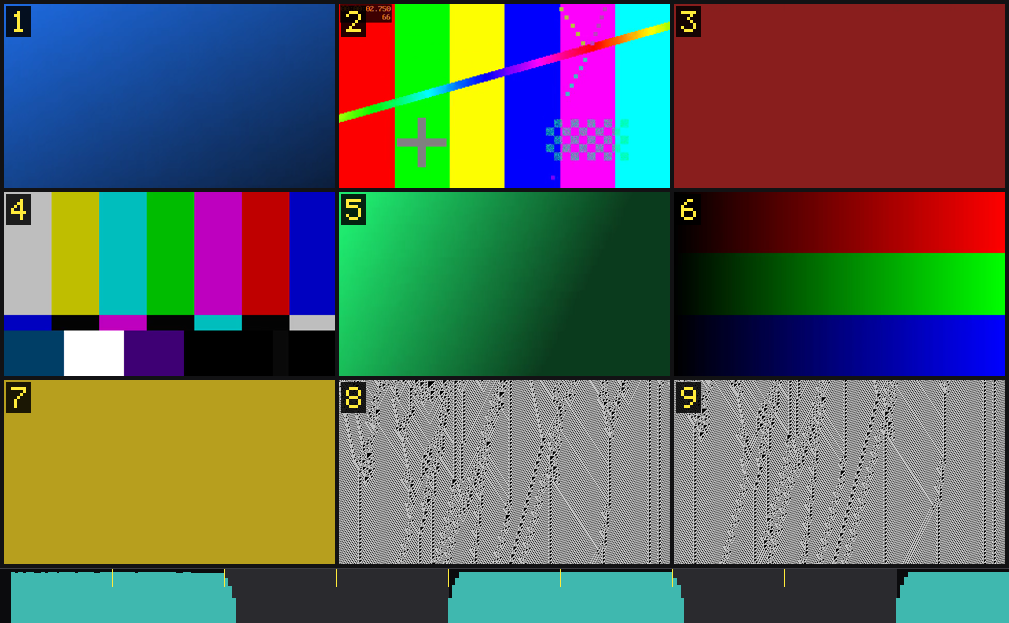
A 27-second synthetic clip (9 shots, loud/quiet/loud audio) turned into one image: 9 numbered cells,
one timestamp range each, and a footer strip showing loudness, silence and cut points on the same time
axis. The clip is generated by ffmpeg — no third-party footage is used anywhere in this repo.
What the algorithm actually does
Eight decisions, each made because the obvious alternative failed on real footage:
| # | Decision | Why not the obvious thing | Code |
|---|---|---|---|
| 1 | Scene-change detection on HSV at 64×36, three-channel mean of |ΔH|+|ΔS|+|ΔV| | Luma-only difference misses cuts that swap hue at equal brightness (2 of 9 cuts in our fixture; ffmpeg scdet finds 4/9, we find 9/9) |
src/scan.js |
| 2 | Threshold chosen by rate, not by a score multiple — target ≈1 cut per 1.5 s, floor at score 12 | 3×p95 scored 38 on B-roll (fine) but 130 on fast-cut anime → zero cuts, on exactly the content that needs the most cells |
src/scan.js |
| 3 | Cell placement = equal increments of the local cut-rate integral, snapped to real cuts (≤30 % of an ideal cell) | Uniform splitting gives a 6 s burst of 20 shots the same space as a 20 s static shot; snapping without a limit silently distorts the weights | src/density.js |
| 4 | Grid size from motion p90, not from duration | 16 cells over a static single take = 16 identical frames; 4 cells over a PV = nothing | src/plan.js |
| 5 | Minimum gap capped by the material's own granularity (min(minGap, medianShot×0.9)) |
A fixed 1.2 s merged six 1 s shots into three, and then could not reach the requested cell count at all | src/segments.js |
| 6 | Sharpest frame wins — 3 candidates per segment, highest Laplacian variance | thumbnail=n= picks by histogram; blur does not change a histogram, so it happily returns a Gaussian-smeared credit card |
src/sheet.js |
| 7 | Audio envelope on the same axis, inside the same image | A separate audio image costs another 384 tokens and loses the alignment, which is the entire point | src/audio.js, src/sheet.js |
| 8 | ASR chunked to ≤45 s at silence midpoints, non-speech segments filtered and reported | One 299 s request shifted every timestamp 13 s early; a music-only PV produced a fake 29 s line that landed in 5 cells | src/asr.js, src/pipeline.js |
Prior art, accuracy ceilings we do not try to beat, and the things we deliberately left out: docs/REFERENCES.md.
Long films: the text index has a budget
One image is 384 tokens, but the text index is unbounded — a 2 h 35 min film produced 64 cells and a 75 KB index, which exceeded the host's tool-result limit. The excess was folded into a file on disk and never read, so 44 minutes of dialogue were silently missing. Three things prevent that now:
- Per-cell cap (180 chars by default). An overview needs "what is this stretch about", not the full line.
- Cell-aligned truncation with an explicit continuation hint:
[text stopped at cell 13 of 64 — call again with cellRange: [14, 64] and textOnly: true to read the rest] cellRange+textOnly— page through the index without re-rendering images or re-decoding frames.
video_storyboard({ input, cells: 16, sheets: 4 })                     // 4 images + first page of text
video_storyboard({ input, cells: 16, sheets: 4, cellRange: [14, 42], textOnly: true })
video_storyboard({ input, cells: 16, sheets: 4, cellRange: [43, 64], textOnly: true })
textOnly returns no image, so paging costs nothing in tokens; with the scan and ASR results cached it
takes ~0.8 s per page after the first call.
Quick start
git clone https://github.com/SAOS-3624/dsh-video-storyboard.git
cd dsh-video-storyboard

node --test                                          # 154 tests (needs ffmpeg)
node bin/storyboard.mjs your-video.mp4 --cells 9 --text   # see exactly what the model would get
node scripts/install-dev.mjs                         # mount into DSH, then restart DSH
Installing into DSH. For a normal profile:
dsh plugin --profile web add dsh-video-storyboard
The desktop profile is managed exclusively by the Electron app, so dsh plugin refuses it —
use node scripts/install-dev.mjs instead (it copies the package into the profile and registers the
bundle). Either way, restart DSH afterwards: the plugin tree is composed at process start.
How sampling actually works (and what it is not)
Worth stating plainly, because it is easy to misread:
- Tokens are billed per image, not per frame. Everything here exists to put many frames into one image. 9–16 frames = 384 tokens.
- All cells are the same size. This tool does not shrink resolution in fast-cut sections.
What it varies is how many seconds each cell covers — dense regions get short cells, calm
regions get long ones (
density(t) = clamp(localCutRate / meanCutRate, 1, 2.5)). Why not variable resolution: at 350×194 a halved cell is mush, and the token cost is flat anyway. - The timeline is fully covered; individual shots are not guaranteed. 300 shots in 5 minutes across
16 cells cannot all be seen. That is what
video_zoomis for. - Continuous motion is not a cut. Any frame-difference scorer (this one,
scdet, TransNetV2) gives high scores to a fast pan or a zoom. That is why peaks are suppressed within 0.35 s and why short segments get merged instead of each taking a cell.
Status (v0.1)
| Piece | State |
|---|---|
src/plan.js — layout / coverage / grouping / guardrails (pure functions) |
✅ implemented |
src/scan.js — HSV-weighted shot boundary detection |
✅ implemented — 9/9 cuts, 0 false positives on the fixture, 47× realtime |
src/segments.js — cuts → segments → fit to N cells |
✅ implemented |
src/probe.js — ffprobe + rotation / end-edge handling |
✅ implemented |
src/sheet.js — extract + cover-crop + burn index + tile, zero image library |
✅ implemented |
| adaptive threshold + min-gap + density-driven grid sizing | ✅ validated on 6 real clips |
src/pipeline.js — orchestration shared by CLI and tool |
✅ implemented |
src/index.js — registers video_storyboard + video_zoom |
✅ implemented, host contract verified |
src/audio.js — loudness (EBU R128) + silence, no model |
✅ implemented |
src/asr.js — subtitle track + OpenAI-compatible ASR + cell alignment |
✅ implemented (client verified against a local fake server) |
src/cache.js — scan-result cache keyed by file+window+threshold |
✅ implemented (2nd call on a 5-min clip: 13.4 s → 3.6 s) |
npm test                                                  # 154 passing (unit + ffmpeg e2e + host contract)
node bin/scan-video.mjs video.mp4 9                       # 调阈值:切点 / 分数 / 段长 / top peaks
node bin/storyboard.mjs video.mp4 --cells 9               # 端到端出一张图 + manifest
node bin/storyboard.mjs film.mp4 --from 600 --to 780      # 只看某一段(不扫全片)
node bin/storyboard.mjs film.mp4 --plan 300               # 先出分段计划(不渲染)
Against ffmpeg -vf scdet on the same clip: scdet's default threshold finds 4 of 9 hard cuts; this scanner finds 9 of 9 with a 2× score margin to the strongest non-cut frame. Reason: scdet scores mean absolute frame difference (luma-ish), so a cut that swaps hue at equal brightness is invisible to it. Measured on the two such cuts in the fixture: brightness delta 0.6–0.8 %, hue delta 24/255 and 151/255.
Real-world check (6 clips of 1080p footage: B-roll, anime, PVs, a single take)
| clip | len | p90 | auto th | cuts | gap | grid |
|---|---|---|---|---|---|---|
| B-roll (50 mm lens) | 299 s | 7.9 | 16 | 141 | 2.1 s | 16 ×1 |
| anime feature | 1090 s | 15.0 | 43 | 408 | 2.7 s | 16 ×2 |
| special ED | 80 s | 11.6 | 21 | 42 | 1.9 s | 4 ×1 |
| PV (official) | 92 s | 17.0 | 54 | 44 | 2.1 s | 9 ×1 |
| PV (concept) | 90 s | 26.1 | 58 | 41 | 2.2 s | 9 ×1 |
| party singing (single take) | 251 s | 2.2 | 12 | 1 | — | 4 ×1 |
The threshold is chosen by rate, not by a score multiple. My first attempt was 3 × p95, which looked fine on the B-roll clip (38 → 88 cuts) and then died on fast-cut anime: the concept PV's p95 is 43, so ×3 = 130 → zero cuts, on the exact content that needs the most cells. Targeting ≈1 cut per 1.5 s (auto-tightened to 0.5 s on short clips, floored at score 12 so static footage stays a single shot) works across all six.
Grid size follows content density (p90), not duration alone: ≥15 → 12 s/cell, 5–15 → 20 s/cell, <5 → 40 s/cell. A fast-cut PV gets 9 cells over 90 s; a static single take gets 4 cells and a warning.
Minimum gap between sampled frames is enforced by merging segments shorter than minGap (default 1.2 s) before fitting to the cell count — a 0.3 s shot in a burst should not eat a whole cell.
Pick the sharpest frame, not the blurriest
--pick sharp (default) samples 3 candidates inside each segment and keeps the one with the highest Laplacian variance. On the credit card of a PV, --pick thumb returned a Gaussian-blurred frame (text unreadable) while --pick sharp returned the crisp one — same segment, same second.
Cost on a 90 s clip / 9 cells: mid 8.0 s · sharp 9.2 s · thumb 11.3 s. Sharp is cheaper than thumbnail=n= because three seeks decode three frames, while the thumbnail filter decodes the whole segment.
Read a slice, not the whole file
--from 600 --to 780 passes -ss/-t to ffmpeg, so scanning and sampling only touch that window: an 18-minute film sliced into 3 minutes takes 15.8 s end to end (vs 22.7 s just to scan the whole thing). This is how the model is meant to read a feature film — five minutes at a time, on demand.
Audio: a strip inside the same image
The sheet has a footer strip on the same time axis as the cells: teal bars are momentary loudness (EBU R128, measured locally with ffmpeg), dark blocks are silence, yellow ticks are cut points. So the model can say "cell 5 sits in the quiet stretch before the swell" — an alignment neither a music-analysis plugin nor a transcript alone can give it.
It costs no extra tokens (same image), only ~9 % of the pixel budget: cells are laid out at
budget × 0.9 and the strip takes the rest. audioStrip: false turns it off.
What it does not do: say why the music sounds like that. Loudness is measurement, not understanding — see the design doc for why (a mastered track sits inside a 3 dB band, so the envelope alone can't find the chorus).
Caching
Scan results are cached by (path, size, mtime, window, threshold) — video_storyboard followed by
video_zoom on the same clip scans once. Loudness is not cached (2 h at 10 Hz is ~70 k floats, and
audio decode is cheap compared to video). Cap 50 MB with LRU eviction; DSH_VIDEO_CACHE_DIR points it
at another drive; cache: false disables it.
Note on long videos: decoding dominates (~25 s for a 1090 s 1080p film), and decimating the scan does
not help — measured 24.9 s at full rate vs 22.5 s at 2 fps, because the cost is H.264 decode, not the
HSV scoring. -skip_frame nokey is 5× faster but produces frames that differ from a normal decode, so
it is unusable. For long films, use --from/--to or --plan.
Transcript: subtitles first, then ASR, never fatal
- Embedded subtitle track → extracted with ffmpeg (free, exact).
- No subtitle +
DSH_ASR_KEYconfigured → OpenAI-compatible/audio/transcriptions(defaultFunAudioLLM/SenseVoiceSmall),response_format=verbose_jsonfor timestamps. - Neither → the sheet still renders; the text block says
transcript="no-audio"/asr-failed.
Each cell then carries the lines that overlap it:
cell 5 (r2c2, image 1) = 00:01:12.40-00:01:22.80  frame@00:01:17.20
    "我觉得这个好像和我想要的东西有点接近"
Music is not speech, and ASR will invent words for it. On a music-driven PV (90 s, one real line)
one request produced a fake 29 s segment (45.35–74.33, 9 characters). Because cells are filled by time
overlap, that single fake line landed in 5 cells — the same garbage quoted five times, which is worse
than silence. filterSuspectSegments drops segments that are either punctuation-only or longer than 8 s
with under 0.8 chars/s (real speech is 2–6), and the text block reports how many were ignored so the
filter never hides data.
Long windows are chunked client-side (transcribeLong, ≤45 s, cut points snapped to silence
midpoints). Reason: a single 299 s request to a local Paraformer shifted every timestamp 13 s early
(≈4.5 % compression — the pauses get eaten), which silently misplaces every cell's transcript. Chunking
brought it to 0.02 s mean / 0.07 s max, and costs ~6 % extra wall time on top of a server that already
chunks. The regression test fakes a server that compresses timestamps on long audio, so the bug cannot
come back silently.
Speech density (chars/sec) is also fed into the density curve as a third signal, so talk-heavy stretches get shorter cells — same mechanism as cut density.
Content-type routing. Both halves of the picture are used: loudness and speech rate move in opposite
directions (tutorial 5.6 chars/s @ −23 LUFS, music PV 0.16 @ −14.2). meanLufs > −18 && charsPerSec < 1
marks a music-driven clip, which keeps the cell floor at 9 instead of letting the "dialogue carries the
info" rule shrink it. See docs/BASELINE.md.
Term dictionary. ASR will always mangle specialist vocabulary (彗差→绘插, 八羽怪→巴与怪). Put the
corrections in ~/.dsh/asr.json and they are applied deterministically, single-pass, with the count
reported in the text block:
{ "baseUrl": "http://127.0.0.1:8000/v1", "key": "local", "terms": { "绘插": "彗差", "巴与怪": "八羽怪" } }
Two tools, one pipeline
| tool | for | cells | images | tokens |
|---|---|---|---|---|
video_probe |
container metadata + a reading plan, before spending anything | — | 0 | 0 |
video_storyboard |
the whole clip (or a slice) at a glance | 4–16 | 1–4 | 384 × images |
video_zoom |
one short window, read closely | 1–9 (default 6) | 1 | 384 |
video_probe reads the container only — no decode, no image. Use it first when the length is unknown: it
replies with duration/resolution/rotation/audio/subtitle tracks and, for anything over 20 minutes, tells
you to read the file in 5-minute windows instead of scanning it whole.
Both run the same pipeline; zoom just narrows the window and drops adaptive, so each cell gets
~4× the pixels of a 16-cell overview. On the same 96–128 s window of a talking-head video:
video_zoom at 429×239 per cell renders the burned-in subtitles readably; the 16-cell overview
at 261×145 does not.
Zoom is opt-in — it only costs the extra image when the model actually asks for one.
Cell placement follows cut density
A fixed grid spends the same amount of time on a static talking head as on a six-second burst of
half-second shots — so the burst gets one frame and loses five. Instead, cell boundaries are placed
where the integral of local cut rate is equal: density(t) = clamp(localRate / meanRate, 1, 2.5).
Dense stretches get short cells (more frames per second), calm stretches get long ones. The timeline
is still covered end to end, cell count and token cost are unchanged.
On a 90 s PV: uniform gives 4.5–9.6 s cells; adaptive gives 3.9 s in the fast section and 10.6 s in
the still ones — and the closing title card, which uniform sampled as a blurry credit list, is now a
clean cell. adaptive: false keeps the old behaviour.
Index size: 15 % of cell height
The burned index defaults to 15 % of the cell height (was 22 %). Downsampling the sheet to 66×37 per cell and re-reading it, the digit stays legible all the way down to 11 %, so 15 % keeps a margin while covering half the pixels of the old badge. --badge 0.22 if you prefer the louder version; --badge 0 is the same as burn: none.
Planning a long film
--plan 300 prints the window list before rendering anything — for an 18-minute film: 4 windows of ≤300 s, 4 images, ≈1536 tokens. If the requested step would exceed 12 windows, the step is stretched instead of truncated, so a 90-minute film becomes 12 × 450 s covering the whole runtime rather than 12 × 300 s that stops at minute 60.
No image library, on purpose
Frames are decoded straight to rgb24 at cell resolution, the grid is assembled in a plain Buffer, the index is drawn from a built-in 5×7 bitmap font, and the result is piped back into ffmpeg as rawvideo. That removes Pillow / sharp / canvas / fontconfig from the dependency graph — and with them the platform-specific font-path escaping that breaks drawtext on a stranger's machine.
Install (dev)
Not on npm yet. The desktop profile is managed exclusively by the Electron app, so
dsh plugin --profile desktop ... is refused — use the bundled script instead:
node scripts/install-dev.mjs           # 同步 + 注册为 bundle(会备份 package.json)
node scripts/install-dev.mjs --check   # 只看状态
node scripts/install-dev.mjs --remove  # 卸载
Then restart DSH Desktop (the plugin tree is composed at process start).
It copies the package into <dsh-home>/profiles/<profile>/node_modules/ rather than symlinking,
because Node resolves bare specifiers (@deepseek-ai/dsh-tools) through the real path — a symlink
would walk up from this repo and never find the host package.
After changing this package, re-run the script and restart again (the copy is a snapshot).
The tool shows up as video_storyboard. Prerequisites: ffmpeg/ffprobe on PATH
(or DSH_FFMPEG_PATH / DSH_FFPROBE_PATH).
The schema is verified against the host, not against a copy of it. test/contract.test.mjs
imports the real defineTool / validateArgs from the installed @deepseek-ai/dsh-tools and
compiles this tool's schema through them. That matters because an unsupported keyword does not
degrade the tool — it throws inside apply(), which takes down the whole plugin tree and the app
with it. The supported subset is string/number/integer/boolean/null/array/object/json/oneOf plus
required: true — no minimum, maximum, pattern or maxItems, so range checks live in
execute (validateToolArgs).
Why another video plugin
Two things the existing ones don't do:
- Addressable cells. A big, high-contrast index is burned into each cell's corner, so a small vision model reads the number instead of counting cells (counting is a known weak spot). The text manifest carries
cell k (r2c3) = 00:12.76–00:31.40on top of that — belt and braces. - Transcript aligned to cells. ASR runs first; its sentence boundaries are one of three signals used to cut segments (visual cut / silence > 0.6 s / sentence end). A 10-minute talking-head does not degrade into nine identical faces.
Decisions worth knowing
- The pixel budget is fixed (~640k per image, ~384 tokens per image), so
m×nonly decides how many frames share one image. More detail is bought by sending another image, never by cutting cells smaller. - Square grids keep the source aspect (
canvas = (m/n) × source). For a 16:9 video use2×2/3×3/3×4— not4×3, whose canvas is 2.37:1 and gets cropped by square-ish encoders. - Coarse first, then zoom. Default plan is always
balanced(3×3, one image). The model then asks for a close-up of the cells it cares about. - Only the index is burned in. Timestamps are 8 characters at 7.5% cell height — they die first under compression, and the text manifest already carries them exactly.
- Empty cells are neutral grey with a dash and no number, so padding is never mistaken for content.
Troubleshooting
Unsupported or malformed image data — the attachment service decodes the bytes you hand it,
so saveImage needs real encoded image bytes, not a raw pixel buffer with an image/png label.
runStoryboard therefore returns sheet.png (encoded via -f image2pipe -vcodec png) in addition
to the raw RGB canvas; the CLI uses the raw buffer to write files, the tool uses sheet.png.
Two regression tests cover it — one asserts the PNG magic and IHDR dimensions, one runs the tool's
execute() and checks what actually reaches saveImage.
How it compares
DSH bills 384 tokens per image, so the number of images is the cost. Packing N frames into one image is the whole trick:
| approach | frames shown | images | host tokens |
|---|---|---|---|
| this plugin, 9-cell sheet | 9 | 1 | 384 |
| this plugin, 16-cell sheet | 16 | 1 | 384 |
frame-per-image plugin (count=8) |
8 | 8 | 3,072 |
frame-per-image plugin (count=64) |
64 | 64 | 24,576 |
| bridge plugin (frames → external VLM, text back) | 12 | 0 | ≈0 + API cost |
8–16× cheaper at the same coverage. The trade is per-frame resolution: a cell here is ~68k px
versus up to 640k px for a full-size frame. That is exactly what video_zoom is for — the second
image is bought only when the model asks for a close-up.
Speed is scenario-dependent: for "just show me 6 frames" a frame-per-image plugin wins (no full-file scan). For "what is the structure of this whole clip, what happens at 1:12, and who is talking", this scans once and returns all of it, and the second call on the same file is near-instant (cache).
What the others don't do: addressable cells, timeline-coverage that follows cut density, transcript attached to cells, and an audio envelope on the same axis as the pictures.
ASR endpoint contract
The transcript layer talks to any OpenAI-compatible /audio/transcriptions (local FunASR, SiliconFlow,
whisper-server…). The exact request/response shape, the two failure modes that will bite you
(long-request timestamp drift, ASR inventing words over music), and how to check each one are in
docs/asr-contract.md.
Compliance
No third-party source code is copied into this repository. FFmpeg, model weights and any downloader stay on the user's machine. See CREDITS.md.
Speech recognition is designed to run against a user-configured OpenAI-compatible endpoint (e.g. SenseVoiceSmall, developed by the FunAudioLLM team at Alibaba, used under the FunASR Model License v1.1 — attribution and model name retained). This project does not redistribute model weights.
License
MIT — see LICENSE.
No comments yet. Be the first to write one.