dsh-full-throttle
English | 中文
Full Throttle mode for DeepSeek Harness: a switch in the composer toolbar that injects a high-budget, no-holds-barred instruction into the system prompt of every session and subagent in the profile.
我们是一家实力雄厚的大模型公司,你的 token 用量预算无限,不要吝惜或有所保留。一切以高标准完成任务为优先。
We are a well-funded model company. Your token budget is unlimited — do not skimp or hold back. Always prioritize a high-standard result.
The injected section disappears completely while the switch is off.
Appearance
| Off | On |
|---|---|
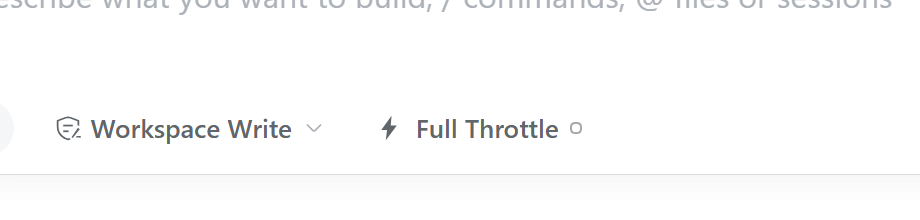 |
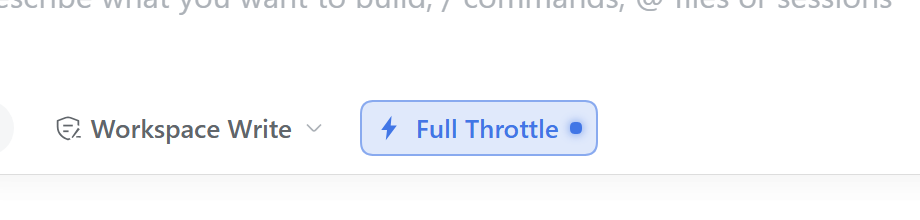 |
The label follows the UI language: Full Throttle in English, 火力全开 in Chinese. The small dot shows the state (hollow = off, solid + accent = on), so the state stays readable even in themes that restyle every composer button.
Install
Open DeepSeek Harness and go to Plugins in the sidebar.
Click Add plugin and paste this repository address:
https://github.com/RorschachXR/dsh-full-throttleClick Install. When it finishes, choose Enable now (or enable the bundle later on the plugin page).
A branch or tag works too: append #main or #v0.1.0 to the address. Plugin updates are not
automatic — uninstall and install again to upgrade.
Uninstall
Go to Plugins → Installed, open Full Throttle, and click Uninstall.
The switch state is stored separately in $DSH_HOME/full-throttle.json; delete that file if you
want to reset it to off.
Usage
Click the switch in the composer toolbar (left of the model selector, beside the permission chip).
The state is profile-wide: it applies to all sessions and subagents, and takes effect on their next model request. It persists across restarts.
The default injected text is the Chinese paragraph above. It can be replaced with the
instructionsoption: add this override to your profile'scordis.patch.yml(advanced, optional)- id: full-throttle config: instructions: 'Spend the full budget. Never stop early.'
Compatibility
- Colours, radii and fonts use host theme tokens only, so stock light/dark and third-party themes are supported.
- PRTS: that theme restyles every composer button with
!important. The switch beats it with an id-scoped!importantrule and a state dot, and maps its own PRTS control variables so the ON state uses PRTS yellow. - English and Chinese dictionaries are built in; the plugin's title and description in the Plugin Manager are localized too.
No comments yet. Be the first to write one.