DSH Pretty Extension
A polished theme editor for the DeepSeek Harness Web UI.
Customize colors, typography, and interface depth from a native-looking Settings → Pretty page.



Features · Installation · Usage · Development · Contributing
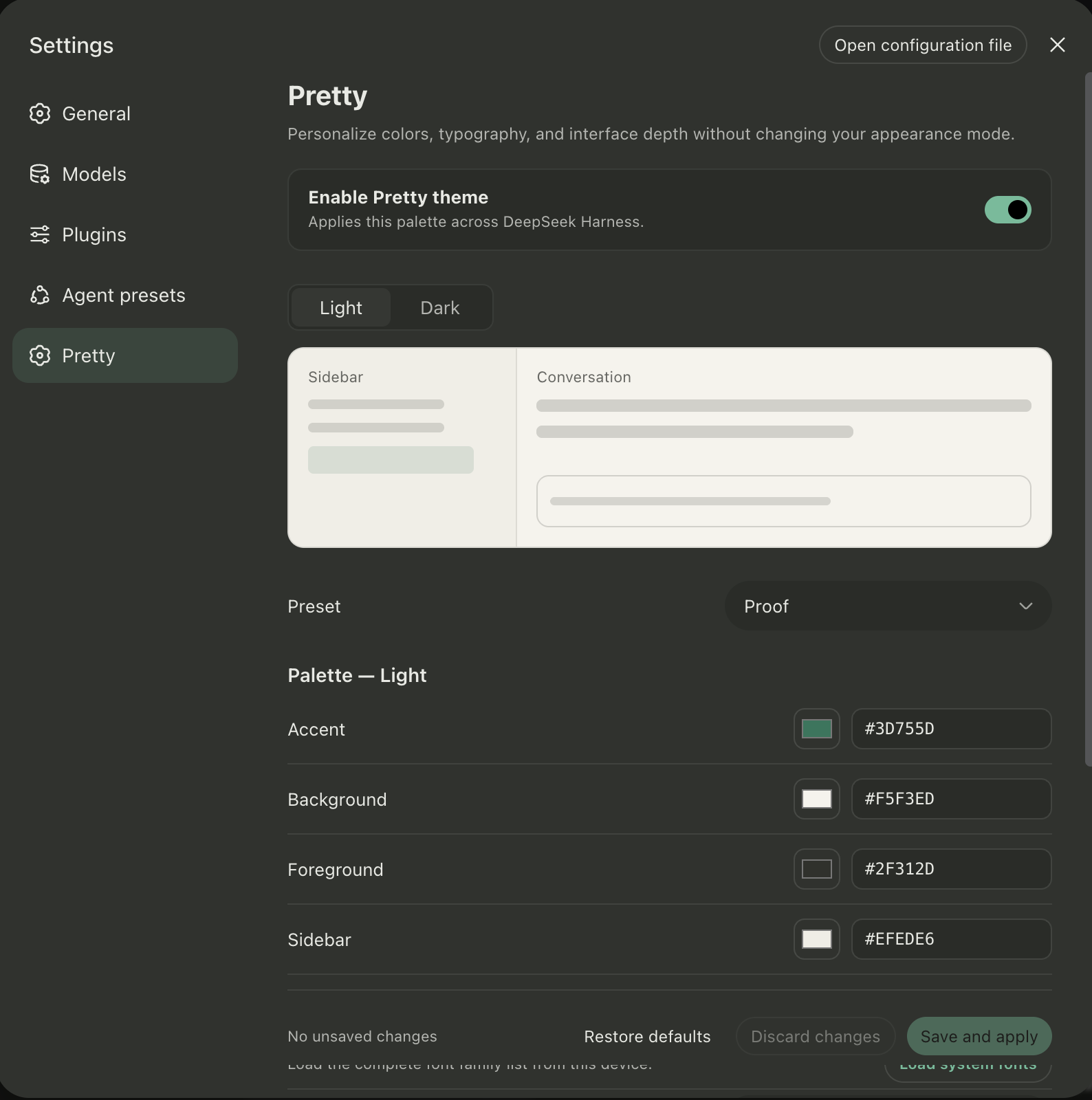
DSH Pretty Extension adds a complete theme editor to DeepSeek Harness. Start from one of 28 presets or build your own light and dark palettes, preview every change in context, and save the result through DSH's settings system.
The extension uses the public DSH plugin, settings, slot, and theme APIs. It does not fork or patch the DeepSeek Harness source tree, and it stays disabled until you explicitly enable it.
Features
| Capability | What it adds |
|---|---|
| 28 theme presets | Ayu, Catppuccin, Codex, Dracula, GitHub, Nord, Proof, Tokyo Night, Vercel, Xcode, and more. |
| Independent light and dark palettes | Customize accent, background, foreground, and sidebar colors for each appearance mode. |
| Live preview | See the sidebar, conversation surface, and selected-session state before saving. |
| Typography controls | Choose separate UI and code fonts, including local macOS Font Book families when permitted by the browser. |
| Interface depth | Tune surfaces, borders, secondary text, hover states, and an optional translucent sidebar rendered at 82% opacity. |
| Accessible color correction | Low-contrast foreground colors are minimally adjusted to preserve a WCAG 4.5:1 text contrast ratio. |
| Native DSH integration | Uses DSH menus, semantic theme tokens, settings persistence, revision protection, and English/Chinese UI copy. |
Installation
Requirements
- A working DeepSeek Harness installation with the
webprofile. pnpmavailable onPATH;dsh pluginuses pnpm to manage profile dependencies.
Install from GitHub
Stop any running dsh web process, then install the plugin into the Web profile:
dsh plugin --profile web add github:Rheasilvia/dsh-pretty-extension
Start DSH Web again:
dsh web
[!IMPORTANT]
dsh plugin addupdates the profile on disk. It does not hot-reload the bundle set of an already running DSH process, so a restart is required after installing, updating, or removing the plugin.
[!NOTE] The repository ships reviewed, prebuilt Host and client bundles, source maps, and declarations under
lib/. Git installation does not run plugin lifecycle scripts and does not require a Pretty-specificallowBuildsentry.
For a reproducible installation, pin the GitHub dependency to a reviewed commit:
dsh plugin --profile web add github:Rheasilvia/dsh-pretty-extension#YOUR_COMMIT_SHA
Link a local checkout
Use a linked checkout for development or testing:
git clone https://github.com/Rheasilvia/dsh-pretty-extension.git
cd dsh-pretty-extension
corepack enable
pnpm install
pnpm build
dsh plugin --profile web add link:.
dsh web
After editing the source, run pnpm build and restart dsh web. You do not need to add the linked plugin again.
Usage
- Start DSH with
dsh weband open its loopback URL, normallyhttp://127.0.0.1:3080. - Open Settings → Pretty.
- Turn on Enable Pretty theme.
- Select the light or dark palette, then choose a preset or customize its colors, fonts, and interface effects.
- Review the live preview and click Save and apply.
[!NOTE] The Light and Dark buttons in Pretty select the palette you are editing. The active application appearance is still controlled by Settings → General → Appearance.
The plugin is disabled by default. Installing it alone does not change the DSH interface or write theme settings.
Updating
For an unpinned GitHub installation, stop DSH Web and run:
dsh plugin --profile web update dsh-pretty-extension
dsh web
If you pinned a commit, install the new reviewed commit SHA explicitly instead.
Uninstalling
Stop DSH Web, remove the plugin, and restart the profile:
dsh plugin --profile web remove dsh-pretty-extension
dsh web
Troubleshooting
| Problem | What to do |
|---|---|
| Pretty does not appear in Settings | Confirm the plugin was added with --profile web, then fully stop and restart dsh web. |
| “Pretty is read-only in this browser” | Open DSH through 127.0.0.1, localhost, or another loopback address. Remote browser sessions intentionally use memory settings and cannot persist Pretty changes. |
| The Host settings provider is unavailable | Use the standard Web profile and restart it after installing or rebuilding the plugin. |
| Local fonts are unavailable | Local Font Access requires browser support, a loopback or secure context, and explicit permission. Built-in font stacks remain available. |
Configuration and privacy
Pretty settings are stored by the DSH file settings provider under the ui-pretty.theme namespace in $DSH_HOME/settings.yaml (normally ~/.dsh/settings.yaml). Restore defaults removes that namespace override and lets the original DSH theme tokens take effect again.
Local Font Access is requested only after you click Load system fonts. The plugin stores the selected font family name; it does not copy or upload font files.
Development
Local development requires Node.js ^22.19.0 || >=24.0.0 and pnpm 11.
| Command | Description |
|---|---|
pnpm typecheck |
Run the TypeScript type checker. |
pnpm test |
Run domain, controller, component, accessibility, and settings integration tests. |
pnpm build |
Build the Host entry, browser client bundle, declarations, and inline CSS Modules. |
pnpm check |
Run type checking, tests, and a production build. |
pnpm check:dist |
Rebuild and verify that the committed lib/ tree remains unchanged. |
pnpm watch |
Rebuild when source files change. |
pnpm pack --dry-run |
Inspect the publishable package contents. |
lib/ is generated by pnpm build and committed so Git installations remain scriptless. Never edit it by hand. After changing source or build tooling, run pnpm check and commit the regenerated lib/ with the source change. pnpm check:dist must then pass from the clean commit and in CI.
Project structure
src/
├── index.ts                         # Host composition root and settings schema
├── settings/pretty-settings.ts      # Persistent configuration contract
└── client/
    ├── index.ts                     # Browser composition root
    ├── locales.ts                   # English and Chinese UI copy
    └── pretty/
        ├── PrettySection/           # Settings page and state branches
        ├── components/              # UI components and CSS Modules
        ├── state/                   # Settings adapters, store, and controller
        └── theme/                   # Presets, font catalog, and token derivation
The Host registers the settings schema. The browser client injects the Pretty page into DSH Settings and applies colors and fonts through an owned theme-token override. Adapters keep DSH services outside the UI and theme domain logic.
Contributing
Issues and pull requests are welcome. Please read CONTRIBUTING.md and run the verification gates before opening a PR:
pnpm check
pnpm check:dist
pnpm pack --dry-run
License
Released under the MIT License.
A community-maintained plugin for DeepSeek Harness. This project is not affiliated with or endorsed by DeepSeek AI.
No comments yet. Be the first to write one.