AgentAstra
A spatial conversation view for DeepSeek Harness. Watch an agent move through time, touch tools and files, and leave a readable trail behind.
AgentAstra is the product name. spatial-trajectory remains the package and Harness identifier.
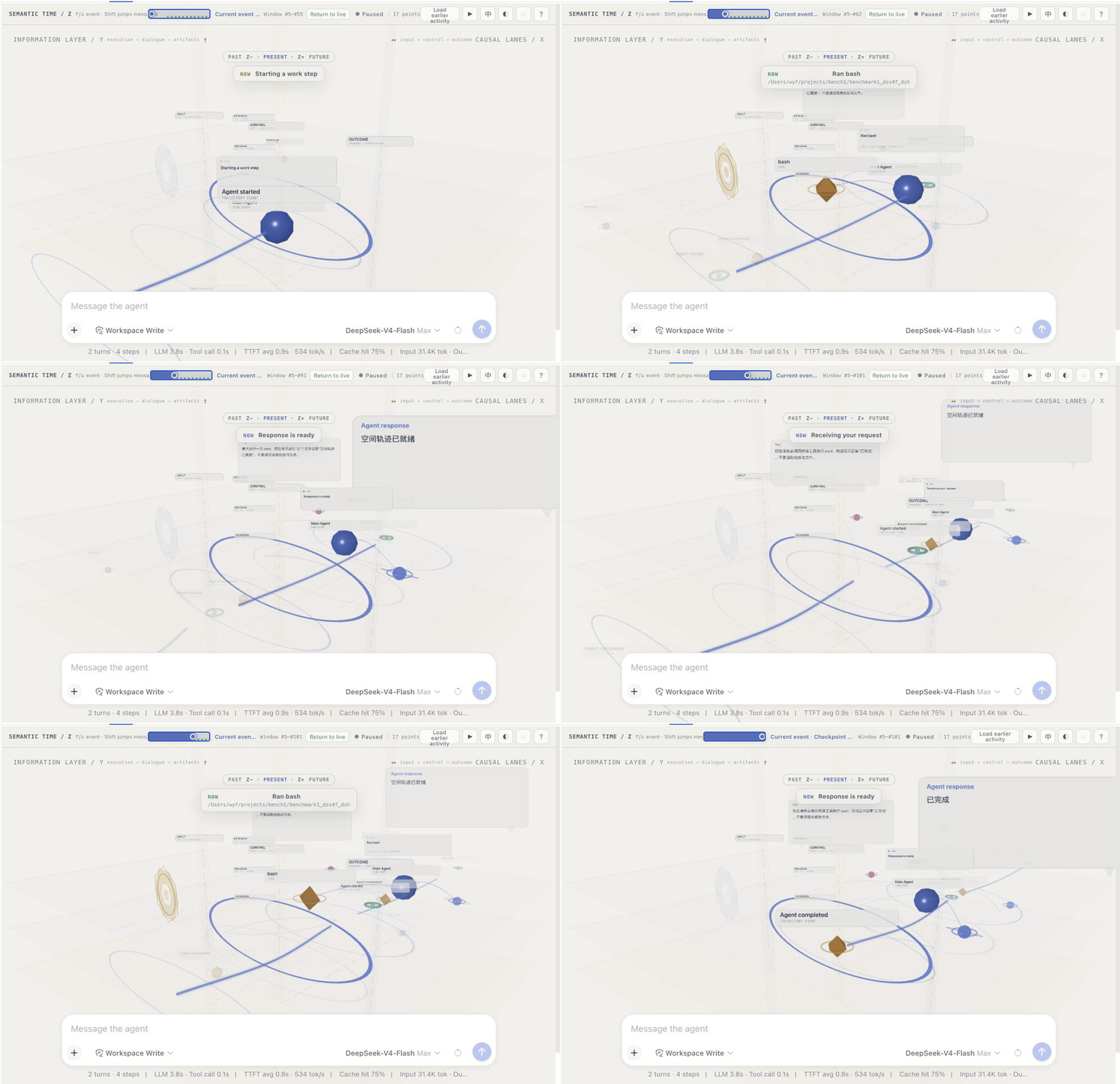
Most agent UIs turn a busy run into a long list of messages and collapsed tool rows. This plugin takes a different route: it keeps the conversation itself, but lays the work out as a small space you can move through. A reply, a command, a file edit, and a delegated task are no longer just rows in a transcript—they have a place, a relationship, and a moment in time.
What you can see at a glance
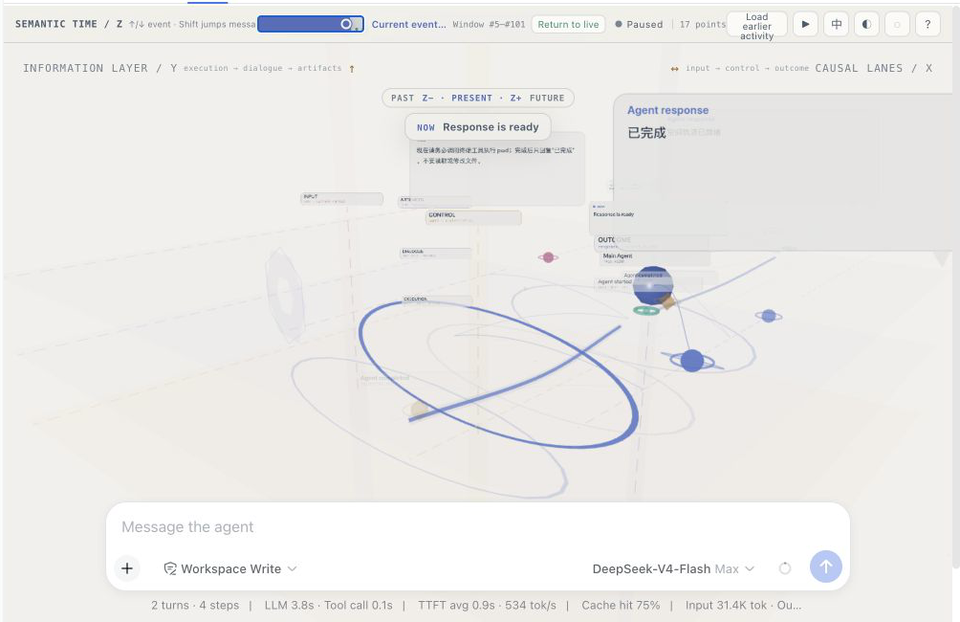
- Semantic time (Z) — move through meaningful events rather than every streaming token. The past fades, the present is marked, and future structure stays deliberately opaque.
- Causal lanes (X) — input, control, and outcome are separated so it is easier to spot what caused a tool call and what it produced.
- Information layers (Y) — execution, dialogue, and artifacts occupy different heights instead of competing in one flat feed.
- An active workbench — when the agent is reading, writing, or invoking a tool, the agent and its real targets move into a shared work area and are connected by a small animated tether.
- The conversation is still there — user messages and final agent replies are projected as readable cards. Select one to open its full Markdown content; nothing important is replaced with a decorative visualization.
The GIF above was recorded from a fresh, read-only Flash-model session. It follows two short prompts through their semantic checkpoints, including a single pwd tool call. No repository files were read or changed for the recording.
Install as a DeepSeek Harness plugin
This is a DeepSeek Harness plugin. It targets @deepseek-ai/dsh 0.1.0-rc.6 and uses the Harness client module loader.
Install it into the web profile from GitHub with either form:
dsh plugin --profile web add github:Rgndmln/dsh-agent-astra
# or
dsh plugin --profile web add https://github.com/Rgndmln/dsh-agent-astra.git
Then open a conversation in DeepSeek Harness and choose Spatial. The view is session-scoped: it renders the currently selected conversation only, and disposes its WebGL scene when the view unmounts.
If macOS reaches its file-watcher limit during local Harness development, CHOKIDAR_USEPOLLING=1 dsh web is a practical temporary workaround.
Moving through a run
| Action | Result |
|---|---|
↑ / ↓ |
Previous / next semantic event |
Shift + ↑ / Shift + ↓ |
Previous / next visible user or agent message |
Pause, drag the rail, or use Home / End |
Inspect history without resetting your orbit or zoom |
| Click a node | Select it and open its floating detail card |
| Double-click a node | Deliberately focus the camera on it |
| Drag an exact file snapshot | Put its real content into the native composer draft |
The detail card can be dragged when it overlaps the composer. File paths are compacted in the scene; the complete path and Markdown preview remain available in the card.
What becomes a node
The projection is intentionally selective. It keeps things a person would recognize as part of the work:
- the start and end of an agent run;
- human prompts and the assistant's visible reply text;
- tools, delegated agents, files, and external resources;
- explicit read, write, call, delegate, and flow relationships;
- an aggregated activity record for streaming replies, so a long answer does not become thousands of tiny nodes.
Internal reasoning, tool arguments, usage records, injected context, and raw streaming fragments do not become conversation bubbles. The visual view should add orientation, not expose implementation debris.
How it is put together
Harness session events
        ↓
normalization + semantic projection
        ↓
scene state (entities, relations, activity, checkpoints)
        ↓
React controls + Three.js renderer
src/projection.ts is the source of truth for semantic meaning. src/App.tsx turns the selected time into a bounded, readable window. src/spatial-renderer.ts is concerned only with rendering and interaction. That separation keeps the replay logic testable without WebGL and prevents UI details from changing event facts.
Deliberate boundaries
- The browser view never writes workspace files on its own.
- A historical file can be pushed to the composer only when the Harness event has an exact source snapshot. Metadata-only history stays unavailable rather than inventing an attachment.
- The view follows the active session. Background conversations are not left rendering after you switch away.
- Canvas textures and animated links are bounded; dense tool bursts collapse into a quiet execution trace instead of a cloud of repeated geometry.
- If WebGL is unavailable, the surrounding controls and textual fallback remain usable.
Repository map
src/
  projection.ts          semantic event → spatial state
  temporal-window.ts     bounded time-window and message lingering rules
  station-layout.ts      stable semantic coordinates
  spatial-renderer.ts    Three.js scene, interaction, disposal
  harness/               DeepSeek Harness host/client integration
assets/                  the lightweight README demo media
License
MIT.
Status
This is an experimental interaction plugin, not an attempt to turn every agent run into a videogame. The goal is simpler: when an agent is busy, you should be able to glance at the space and understand what it is doing, what it is touching, and where the answer came from.
AgentAstra
面向 DeepSeek Harness 的空间化对话视图。让智能体在时间中移动、触碰工具和文件,并留下可以阅读的工作轨迹。
AgentAstra 是产品名称;spatial-trajectory 仍是技术包和 Harness 标识符。
多数 Agent 界面会把一次忙碌的运行压成很长的消息列表和折叠的工具行。AgentAstra 想走另一条路:保留完整对话,同时把工作铺展成一个可以穿行的小空间。回复、命令、文件修改和子任务不再只是文本流中的一行——它们都有位置、关系和发生的时刻。
一眼能看到什么
- 语义时间(Z) — 按有意义的事件而非每个流式 token 穿行。过去渐隐、现在被标出,未来只保留结构,不提前泄露内容。
- 因果通道(X) — 输入、主控和结果被分开,更容易看出某次工具调用由什么触发,又带来了什么。
- 信息层级(Y) — 执行、对话和工件位于不同高度,不再挤在单一平面。
- 活动工作区 — Agent 正在读取、写入或调用工具时,它和实际目标会进入共享工作区,并用一条轻量动画连接。
- 对话仍然可读 — 用户消息和最终回复会投影为可阅读卡片;点击即可打开完整 Markdown 内容,重要信息不会被可视化替代。
上方 GIF 来自一个全新的只读 Flash 模型会话。它按语义检查点回放两条短提示,其中包含一次 pwd 工具调用;录制过程没有读取或修改任何仓库文件。
作为 DeepSeek Harness 插件安装
这是一个 DeepSeek Harness 插件,目标版本为 @deepseek-ai/dsh 0.1.0-rc.6,使用 Harness 客户端模块加载器。
可以通过以下任一方式从 GitHub 安装到 web profile:
dsh plugin --profile web add github:Rgndmln/dsh-agent-astra
# 或
dsh plugin --profile web add https://github.com/Rgndmln/dsh-agent-astra.git
然后打开 DeepSeek Harness 中的任意对话,选择 Spatial。视图与会话绑定:它只渲染当前选中的对话,并会在视图卸载时释放 WebGL 场景。
如果 macOS 在本地 Harness 开发时达到文件监听数量上限,可临时使用 CHOKIDAR_USEPOLLING=1 dsh web。
在轨迹中穿行
| 操作 | 效果 |
|---|---|
↑ / ↓ |
前一个 / 后一个语义事件 |
Shift + ↑ / Shift + ↓ |
前一条 / 后一条可见的用户或 Agent 消息 |
暂停、拖动时间条,或使用 Home / End |
浏览历史,同时保留你已调整的旋转和缩放视角 |
| 单击节点 | 选中节点并打开浮动详情卡 |
| 双击节点 | 有意地将镜头聚焦到该节点 |
| 拖动精确文件快照 | 将真实内容放入原生聊天框草稿 |
详情卡可拖动,以免遮住聊天框。场景中会压缩长文件路径;完整路径与 Markdown 预览仍可在详情卡内查看。
哪些内容会成为节点
投影层会刻意筛选,只保留人能理解为工作过程一部分的内容:
- 一次 Agent 运行的开始和结束;
- 用户输入,以及 Agent 实际显示给用户的回复文本;
- 工具、子 Agent、文件和外部资源;
- 明确的读取、写入、调用、委派和流转关系;
- 为流式回复聚合出的活动记录,避免一段长回复膨胀成几千个小节点。
内部推理、工具参数、usage、注入上下文和原始流式片段不会成为对话气泡。可视化应该帮助定位,而不是展示实现噪声。
实现结构
Harness 会话事件
        ↓
规范化 + 语义投影
        ↓
场景状态(实体、关系、活动、检查点)
        ↓
React 控制层 + Three.js 渲染器
src/projection.ts 负责语义事实;src/App.tsx 将选中的时间点转成一个有限、可读的窗口;src/spatial-renderer.ts 只处理渲染与交互。这样的分层使回放逻辑无需 WebGL 即可测试,也避免 UI 细节反过来改变事件事实。
有意保留的边界
- 浏览器视图不会自行写入工作区文件。
- 历史文件只有在 Harness 事件提供精确源快照时,才可推入聊天框;只有元数据的历史会明确保持不可用,而不是伪造附件。
- 视图跟随当前会话;切换走后,后台对话不会继续渲染。
- Canvas 纹理和动画连接都有上限;密集工具调用会压成安静的执行痕迹,而不是重复几何体组成的云团。
- WebGL 不可用时,周围控制和文本回退仍然可用。
仓库结构
src/
  projection.ts          语义事件 → 空间状态
  temporal-window.ts     有界时间窗口与消息停留规则
  station-layout.ts      稳定的语义坐标
  spatial-renderer.ts    Three.js 场景、交互和资源释放
  harness/               DeepSeek Harness 的主机/客户端接入
assets/                  README 使用的轻量演示媒体
许可证
MIT。
状态
这是一个实验性的交互插件,并不打算把每次 Agent 运行做成游戏。目标很简单:当 Agent 正在工作时,用户应该能一眼看懂它在做什么、触碰了什么,以及最终回答从哪里来。
No comments yet. Be the first to write one.