
Where Did My Tokens Go?
Realtime token badges beside the deep-thinking indicator — merged or split in/out, auto K/M/G/T units, per-step operation counts




Where Did My Tokens Go? is a community-maintained DeepSeek Harness (DSH) plugin, not an official DeepSeek AI product.
This README describes 1.9.3.
Features
Put "where did this turn's tokens go" directly in the transcript: a live counter rides the deep-thinking indicator, and every finished operation row is tagged with the cost of its own step. The plugin is global — once installed, every conversation gets it.
- Live in / out badge: after the blue 「深度思考 / 深度求索」 ("deep-thinking") indicator, a shimmer-swept badge counts tokens while the model is thinking and streaming. The sweep reuses the platform's own TextShimmer geometry, so the badge reads as part of the same sentence.
in N= input tokens,out N= output tokens, reasoning text included.- Both figures price the whole exchange, prompt cache included. The provider's own
inputTokenscovers only the uncached part of the prompt (the API subtracts cache reads and writes before reporting it), while a warm cache makes that part tiny — measured on a real transcript, cache hits were 99% of the prompt, so a 25K-token prompt reported 628 fresh tokens. The plugin therefore addscacheReadTokens+cacheWriteTokensback onto the settled figure, keeping it on the same full-prompt scale as the harness's live projection (contextPressure). That projection prices the next request and is live during the input phase; the usage of the request just finished outranks it, and before either exists the last known full prompt is reused. Output counts are estimated client-side while streaming (CJK glyph ≈ 1 token, latin ≈ 4 chars/token) and snap to the authoritative value when the stream settles — reasoning text counts toward the sameouttotal, so nothing is double-counted and no separate thinking figure is printed. - It borrows the type of the words it extends. The badge walks back to the nearest preceding sibling that carries text and is actually readable, then descends into it to the visible child holding the most text — that is the sentence on screen. Descending is what makes it work under a theme: the host wraps its label in a shimmer span whose own colour is only the row's inherited ink, and a theme hides that label with
display:noneand paints its own summary beside it, inside the same wrapper. Reading the wrapper would copy the row ink and leave the badge blue next to grey text. Hidden,visibility:hidden,content-visibility:hidden, zero-opacity and zero-box nodes are skipped at every level.aria-hiddenis read as the tri-state it is — absent,"true"(case-insensitively) or explicitly exposed — so the host's mirror copy of the words never lends its sweep tint, while anaria-hidden="false"sentence is still read instead of being thrown away. A hidden node is stepped over rather than ending the walk, so a decoration between the figure and the sentence does not leave it bare. Ties in text length keep the first child, so a trailing decoration cannot take over. The badge stands at full strength, never behind an opacity veil, so the borrowed ink arrives undiluted. A colour or font size you set yourself rides on the segment itself, inside the badge root, so an explicit choice always outranks the borrow — and when no readable neighbour is left, the borrow is cleared rather than frozen.
- Auto units (default): numbers scale into K (1e3) / M (1e6) / G (1e9) / T (1e12) —
1866 → 1.9K,2 500 000 → 2.5M; below 1000 the raw number shows; a rounding that would print1000Kpromotes to1Minstead. A gear menu can also lock one unit for a site, which then always scales by it. - Merged / split display (configurable): merged swaps a single label — only
in …during the input phase, thenout …while the model is reasoning and generating; split showsin … · out …together for the whole turn. - Three independent switches (configurable): show/hide the in, out and per-operation labels separately (all on by default). Two nested switches underneath (both off by default) append the prompt-cache halves to every
usefigure, each on its own — see below. Each of the three top-level switches carries a gear button that drops open a per-site editor (the nested pair reuses theusesite's styling, so they have none): font size (0/empty = follow the interface text), color (native picker plus a "follow theme" reset) and unit (auto / K / M / G / T). - Per-operation
use N token: every completed operation row (「已完成思考」, 「已完成命令」, …) gets ause N tokenlabel styled like that row, showing its own step's tokens — the provider'stotalTokenswhen it reports one, otherwise the full prompt cost (uncached input + cache reads + cache writes) plus output. Never the whole reply's total. The cache fields matter: this provider family reports nototalTokensat all, so aninput + outputsummation silently drops the prompt cache and understated a real transcript by 25×. - Optional cache split on
use(both halves off by default): two nested switches sit under theuseswitch, one per half, and each adds just its own figure —use 24.8K token · miss 628 token,use 24.8K token · hit 24.1K token, or both together:use 24.8K token · miss 628 token · hit 24.1K token.missis the input the provider charged at full price,hitis what the prompt cache served (reads + writes). The two add up to the prompt, somiss + hitequals the turn'sinfigure — and sinceusealso counts the output, the total beside them ismiss + hit + out. All figures share the site's own unit, so a row never mixes scales. Both switches grey out whileuseitself is off, since there would be no figure to split. - Visual settings UI: an adaptive two-pane layout. Merged and split each get a preview card that recreates the real transcript scene (a finished-operation row and the shimmering deep-thinking badge, all with fake data): hovering animates the numbers, clicking switches the display mode, and toggling any switch updates both cards live — unsaved gear choices included, so you see the effect before saving.
- Coexists with themes that take over the transcript: a theme is free to redesign the process row wholesale —
dsh-claude-stylehides every direct child of the activity button that lacksaria-hidden="true"and paints its own rolling summary there. Theusefigure is such a child, so it would vanish under that theme; it now carries its owndisplayoverride, which is the only thing that outranks the theme's selector. It also borrows the row's font size instead of pinning one, and takes the shimmer's cadence from the theme's own--dsh-claude-*variables when present, falling back to the literal 1.5s / .3s / steps(48, end) the host's own row shimmer uses.- It stays the row's tail. The figure belongs after the row's sentence, but two parties keep appending into the same button: host React re-mounts its own label, and a theme appends its rolling summary. Either one would leave the figure wedged between the activity icon and the text (
⊙ use 171K token 执行 1 次思考). Every sync re-files it as the last child, which in the DOM moves the node rather than copying it, so it can never be painted twice. - It inherits the row's type, and your own choice still wins. The
usefigure takes the row's font size and colour instead of pinning its own, and a per-site font size or colour you set in the gear menu is written on the figure itself, so it outranks that inheritance. Unlike the live badge it does not read a neighbouring sentence's computed style.
- It stays the row's tail. The figure belongs after the row's sentence, but two parties keep appending into the same button: host React re-mounts its own label, and a theme appends its rolling summary. Either one would leave the figure wedged between the activity icon and the text (
- Follows the interface theme: the whole panel — cards, preview bubbles, switches and gear popovers — tracks the host's light/dark theme. The host flips themes by setting
data-ds-dark-themeon<body>; under that attribute every colour is re-pointed at the host's own--dsw-alias-*design tokens, so a dark window repaints the panel instead of leaving a white island on a dark page. The preview badge keeps the host's deep-thinking blue and shimmer band in both themes. The light palette defers to the same alias tokens — translucent shadows and the selection ring included, ascolor-mix()over those tokens — with its own values remaining only as fallbacks, so a theme that repaints those tokens repaints this panel too instead of leaving stray light-mode colours behind.
Screenshots
The live badge beside the deep-thinking indicator (split mode):

Each finished operation row tagged with its own step cost:

The settings page with preview cards and switches:
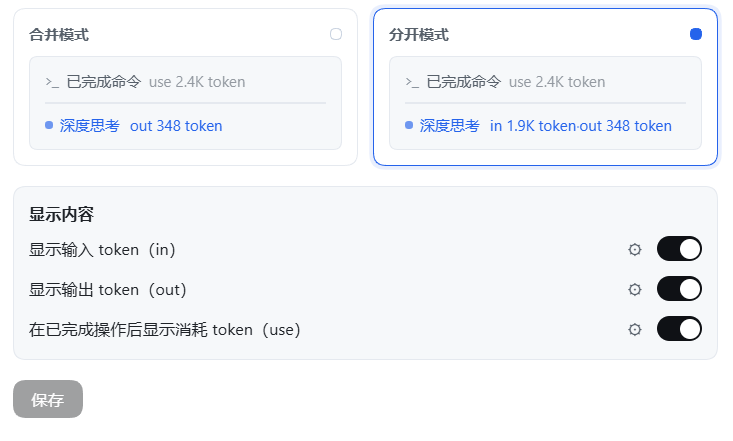
Screenshots are taken from the 1.6.0 release running on DeepSeek Harness 0.2.0-rc.2; UI crops keep only the relevant panels, saved as lossless WebP.
Installation
Requires a working DeepSeek Harness installation. The commands below use the desktop profile; replace it with yours if needed.
Ask an agent to install it
Send this to an agent that can operate your terminal:
Install the dsh-where-did-my-tokens-go plugin from npm into my DSH profile, verify it is served after the install, and tell me how to reload.
From npm (recommended)
dsh plugin --profile desktop add dsh-where-did-my-tokens-go
From GitHub
dsh plugin --profile desktop add github:RevxZxCx/dsh-where-did-my-tokens-go
From source
# 1. pack the plugin
cd packages/dsh-where-did-my-tokens-go
pnpm pack

# 2. install into the desktop profile
dsh plugin --profile desktop add ./dsh-where-did-my-tokens-go-<version>.tgz
# (or manually: add the tarball to the profile's package.json dependencies and
#  append "dsh-where-did-my-tokens-go" to dsh.profile.bundles, then `pnpm install`)

# 3. restart DSH
After installing, restart DSH and open any conversation — the badge appears once you send a message. Re-run the install command to update.
- Verified running on DeepSeek Harness
0.2.1-rc.2(desktop profile, Windows); the host interfaces the plugin depends on were re-checked against that release.
Usage
| What you want | How |
|---|---|
| Watch this turn's in / out tokens | Send a message and read the badge after the 「深度思考」 indicator; it counts in real time. |
| Switch merged / split | Open Settings → Token 计数器 and click the matching preview card. |
| Keep only in or only out | Toggle the other switch off — both preview cards drop the segment immediately. |
| See what each finished operation cost | Keep the use switch on; every 「已完成…」 row gets its own number. |
| Make big numbers readable | Leave units on auto, or lock K / M / G / T for a site in its gear menu. |
| Restyle one site | Gear → font size / color / unit. 0 and "follow theme" mean no override. |
| Check before saving | Gear edits reflect in the preview cards right away; the chat badge only changes when you press save. |
- Three configuration entries: 设置 → Token 计数器 (an own entry in the Settings navigation), the configuration section on this bundle's page in the 插件 / Plugins panel, and the "Token 计数器" card in that panel's 官方 / Official group. All three open the same form.
- Unsaved drafts never leak: preview and gear edits are staged inside the form; the live badge renders only saved configuration; "save" writes the host config, "discard" reverts everything at once.
- Fixed units still promote stepwise: locking
Kon an extreme number never prints1000K; it keeps promoting upward (capped at1000T). - Reasoning text is not a separate figure: it is part of the provider's
outputTokens(the platform validatesreasoningTokens <= outputTokens), so it simply counts towardoutwhile streaming. Adding a separatethinkterm on top ofoutwould double-count, which is why the badge prints no thinking breakdown any more. - Reduced motion: with the system "reduce motion" preference, the sweep decoration is dropped and the numbers stay visible.
- Color inside the sweep: while the highlight band passes over the badge it shows the row's shimmer tint (same behavior as the official indicator); font size and unit always apply.
How it works
- The browser half subscribes to the DSH client
sessionsservice and the active (main-view) session'sbinding.eventSource. - It counts
text-delta/reasoning-deltastream chunks as they arrive (both feed the one output total), takes the input count from the authoritative usage first (inputTokens+cacheReadTokens+cacheWriteTokens, i.e. the complete prompt) and from the harness'scontextPressureprojection otherwise, and records authoritativeusageper step from theusagechunk /assistant/messageevent (keyed by turn + step), ignoring itsreasoningTokensfield. - It injects a DOM badge into the running indicator (there is no slot around it), rebuilt as two counter-moving layers mirroring the platform TextShimmer so the glyphs stay still while the highlight travels. Each completed operation row is one step, so rows walked in document order claim the next settled step of their turn.
- The host half declares the options schema with schemastery (15 fields); the settings form reads and writes the same namespace through
configForms.
Package layout
lib/index.js— host half: schemasteryConfig+apply.lib/client.js— browser half viawindow.__ModuleLoader__.load.cordis.patch.yml— registers the plugin profile entry.package.json—dsh.bundle+dsh.client = { platform: "web", inject: [...] }.
Development
node test/run-tests.mjs    # mocked-browser unit tests (~372 assertions, covers every feature)
node test/probe-served.mjs # checks the running DSH serves the current on-disk client build
Feedback & contribution
Issues and suggestions are welcome on GitHub Issues — please include your DSH and plugin versions and steps to reproduce; full screenshots help for UI problems. If the settings form reports "This plugin is not loaded, so it cannot be configured right now", the host half is not mounted — run dsh --profile desktop --dump-config (or check the profile's cordis.patch.yml) before filing an issue.
No comments yet. Be the first to write one.